GUI
All ins and outs on how to use the GUI (gui.py)
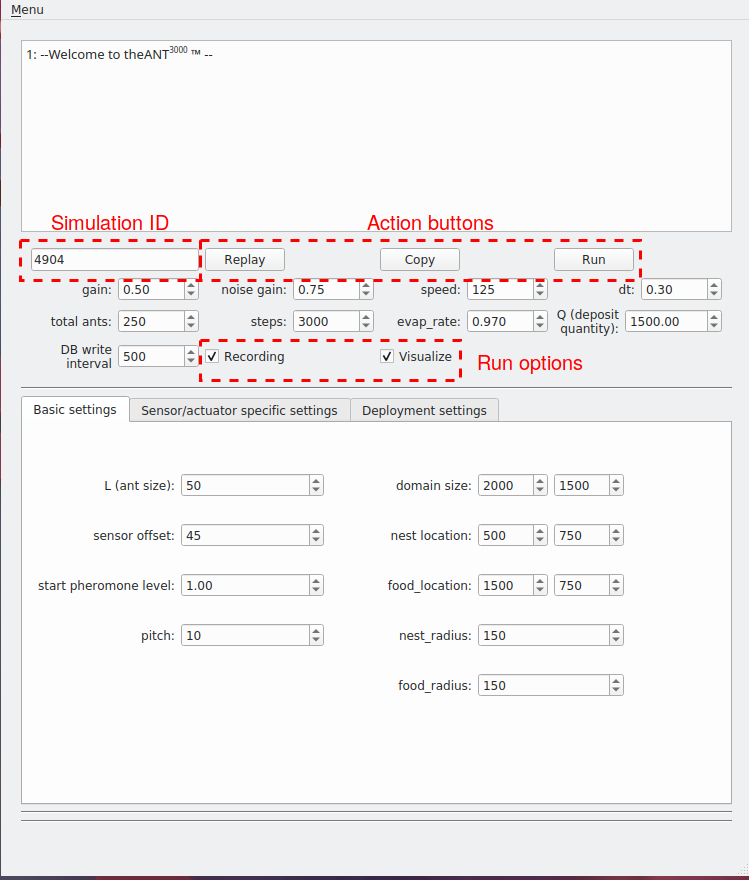
The gui contains:
- 3 different action buttons.
- Replay: Show a visualization of a previous simulation specified by the sim_id. If the full simulation has been recorded, an animation starts. If only the results are stored, a graph of the entropy development over time and the number of returning ants is shown.
- Copy: clone all settings of a previous simulation specified by the sim_id into the input fields.
- Run: This runs a new simulation.
- 2 simulation recording checkboxes.
- If recording is checked, all simulation steps are recorded to the database and the simulation is replay-able.
- If visualize is checked, right after the simulation is finished, the visualization is shown.
- (Currently not implemented) If neither recording nor visualize is checked, only a live visualization is shown, no steps are logged to the database.
- The simulation ID (sim_id) input textfield.