
Visual storytelling for deep learning training runs.



See what your model is actually doing — training logs become a plain-English story with a letter grade, live in VS Code.
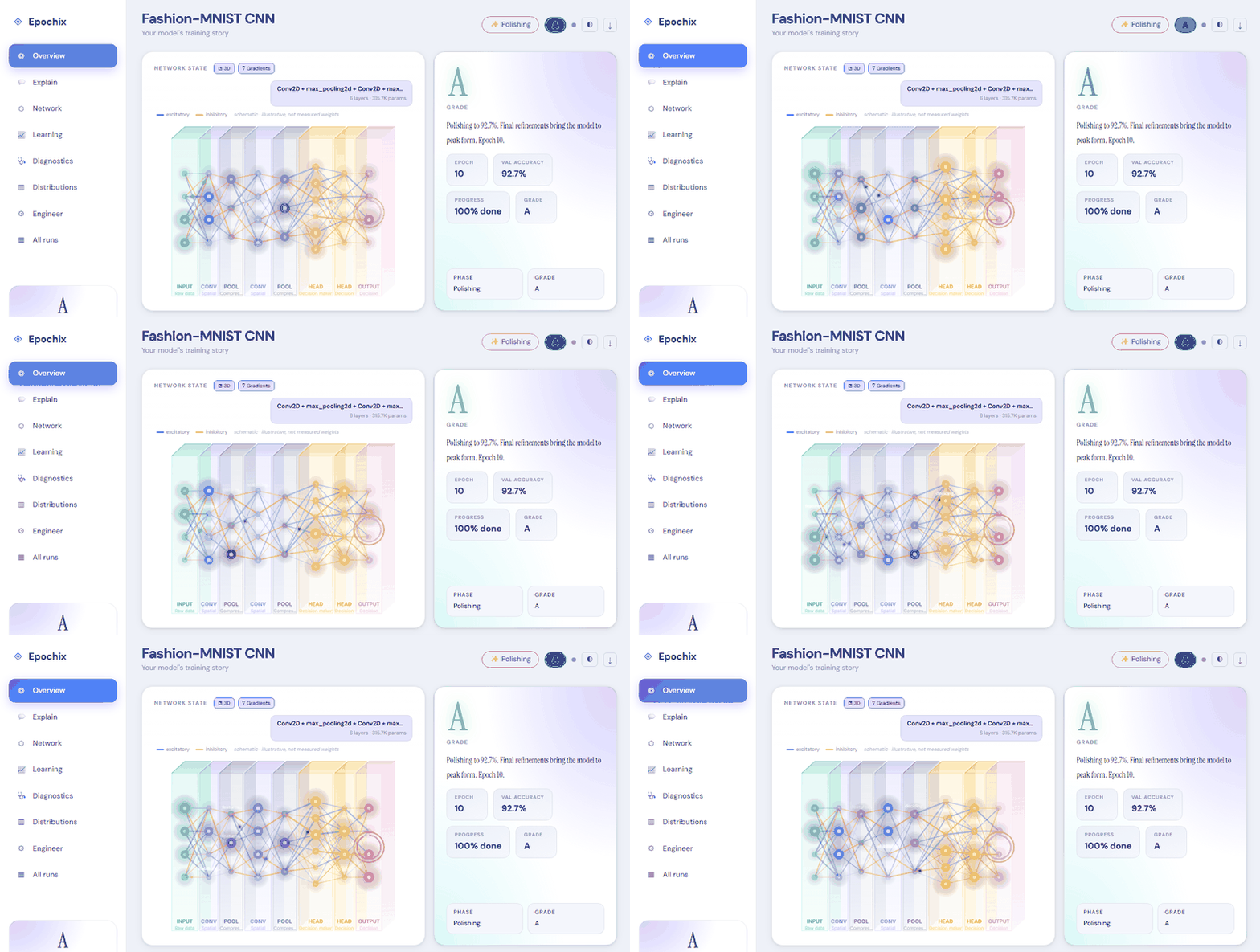
No code changes — it reads your training output as-is:
Epoch 7/20 ████████████░░░░ train_loss: 0.312 val_accuracy: 0.847
↓
⚡ Mastering phase — Grade B+

The model reaches a significant milestone at epoch 7. Val accuracy 84.7%
(Δ +3.1%) — the network has stopped memorising and started generalising.
Not comfortable with terminals? Install the Epochix extension, click the E icon in the sidebar, and hit ▶ Try a Demo Run — an animated dashboard opens on a bundled training run. No Python, no data, nothing to configure.
From there it's automatic: run your training script in the integrated terminal
and the dashboard opens by itself when Epochix recognises training output
(Keras, PyTorch Lightning, YOLO, HuggingFace, fastai, or plain key=value
logs). A Get Started walkthrough inside the extension covers the rest.
Installing the Python package below is optional — it adds run history, run comparison and exports, and the extension picks it up automatically.
pip install epochixOptional extras:
pip install "epochix[pdf]"       # PDF export via WeasyPrint
pip install "epochix[lightning]" # PyTorch Lightning callback
pip install "epochix[hf]"        # HuggingFace Trainer callback
pip install "epochix[all]" # everything aboveepochix demo # seq2seq + attention narrative
epochix demo yolov8 # YOLO object detection
epochix demo keras # Keras image classifierpython train.py 2>&1 | epochix --liveepochix training.log # any subcommand can be omitted — it's the defaultTraining on a GPU box / cluster node, dashboard on your laptop:
# Direct: tail any remote log into the local dashboard
epochix --ssh kv@trainbox:/workspace/runs/train.log

# With extras (jump host, custom port, key)
epochix --ssh kv@trainbox:/workspace/train.log \
            --ssh-port 2222 \
            --ssh-identity ~/.ssh/id_ed25519 \
            --ssh-opt ProxyJump=bastion.example.com
We spawn ssh -o BatchMode=yes -o ServerAliveInterval=30 <host> 'tail -F …'
under the hood — your credentials, ~/.ssh/config, agent and keys are
inherited automatically. The remote path is shell-quoted before being sent so
exotic filenames are safe. Connection drops surface as a clear error rather
than hanging.
The classic Unix pipe still works too if you prefer:
ssh trainbox 'tail -F /workspace/runs/train.log' | epochix --liveepochix serve
# → opens http://127.0.0.1:7860 in your browserfrom epochix import parse, LiveReporter
# Parse a finished log
result = parse("training.log")
print(result.final_grade, result.summary)
# Stream live during training (PyTorch Lightning)
from epochix.integrations.lightning import StoryCallback
trainer = pl.Trainer(callbacks=[StoryCallback()])| 7 log parsers | PyTorch Lightning · Keras/TF · HuggingFace · YOLO · FastAI · Accelerate · Universal — plus an opt-in LLM fallback (Ollama/OpenAI) for formats none of them recognise |
| 7 task types | Classification · Detection · Regression · Biometric · Gaze · NLP · Generative |
| 5 training phases | Awakening → Learning → Understanding → Mastering → Polishing |
| 11 letter grades | A+ through F, task-specific thresholds, configurable via .epochix.yaml |
| Live streaming | WebSocket + SSE with ring-buffer replay on reconnect |
| Exports | JSON · Markdown · HTML (self-contained < 2 MB) · PDF |
| i18n | English · Farsi (RTL) · French — UI and story narratives |
| VS Code | Activity-bar panel · one-click demo · terminal auto-detect · run compare · Ctrl+Alt+M |
| Integrations | PyTorch Lightning · HuggingFace · Keras · Jupyter magics · TensorBoard · W&B |
| Plugin system | Custom parsers, metaphor packs, task types, exporters via entry_points |
epochix is secure-by-default:
- the server binds to
127.0.0.1(loopback only), - read endpoints are open to any same-origin page on your machine,
- write/delete endpoints require either a Bearer token or a same-machine (loopback) caller — so a malicious tab on another site cannot delete runs or inject metric events,
- CORS is same-origin only (no
Access-Control-Allow-Originis emitted unless you configureEPOCHIX_CORS_ORIGINS), - the OpenAPI / Swagger UI is hidden unless
EPOCHIX_EXPOSE_DOCS=1is set or an auth token is configured.
To expose the server beyond your own machine (a shared box, a container, the internet), turn on authentication and configure the allowed origins:
# Require a token on every request, and only allow your own origin
export EPOCHIX_AUTH_TOKEN="$(openssl rand -hex 24)"
export EPOCHIX_CORS_ORIGINS="https://story.example.com"
epochix serve --host 0.0.0.0 --port 7860| Setting | Env var | Default | Effect |
|---|---|---|---|
| Auth token | EPOCHIX_AUTH_TOKEN |
(empty) | Require a token on all routes; write/delete also accept loopback callers when this is empty |
| CORS origins | EPOCHIX_CORS_ORIGINS |
(empty — same-origin only) | Comma-separated allowlist (use the explicit * to opt into open CORS) |
| Expose API docs | EPOCHIX_EXPOSE_DOCS |
false |
Show /api/docs, /api/redoc, /api/openapi.json (auto-on when an auth token is set) |
How the token is checked:
- REST (
/api/*): sendAuthorization: Bearer <token>. - WebSocket / SSE (
/ws/live/...,/sse/live/...): pass?token=<token>in the URL (browsers can't set headers on those transports). Without it, live streams are refused.
Note: wildcard CORS (
*) and credentialed requests are never combined — credentials are enabled only when you set explicit origins. And when a token is configured, the bundled dashboard has no way to supply it, so live updates won't load from the served page. For authenticated hosting, put epochix behind a reverse proxy (nginx, Caddy, Cloudflare Access, …) that handles auth and serves the UI.
Settings can also be written to a local .env:
epochix config set auth_token "$(openssl rand -hex 24)"
epochix config showPlace a .epochix.yaml in your project root:
version: 1

grade_thresholds:
  classification:
    "A+": 0.97   # tighter standard for your domain
    A:    0.93
    # ... (see .epochix.yaml template for all grades)

lower_better:
nlp: true # perplexityInstall from the VS Code Marketplace or search "Epochix" in the Extensions panel.
- Open the Epochix Runs tree view in the Explorer sidebar
- Press
Ctrl+Alt+M(Cmd+Alt+Mon macOS) to open the dashboard panel - Works in standalone mode (no Python required) or sidecar mode with the Python package
Copy the content of src/epochix/_artifacts/epochix.artifact.jsx into a Claude
conversation artifact to get a fully interactive training story viewer — no server, no install.
Full docs at docs.epochix.dev
git clone https://github.com/epochix-dev/epochix
cd epochix
pip install -e ".[dev]"
pytest tests/unit tests/integration
Please read CONTRIBUTING.md before opening a pull request.
Apache 2.0 — © 2026 Epochix Team