Releases: EricMcWinNer/DVotingFrontend
Release list
Completed Voting System Without Biometrics

 DVotingApp Frontend


DvotingApp is a prototype web application proposal to handle the Nigerian Presidential elections online built by Eric Aprioku as a final year project. The web application consists of a RESTful, stateless API built on Laravel on the server-side and a React application on the front-end. This repository contains the React application that holds the client-side of the application. This release is the first version that works using an email address and a password to identify users. A second release would be created that would make use of fingerprint verification as an added layer of identity verification via biometrics.
This application allows users to create elections, with a start date-time and an end date-time, as well as create political parties and add candidates to these parties. The application automatically starts and ends the application at the set date and time. It would work in a browser and all activity to be performed by users would done via the browser.
The application has four roles a user could adopt. These roles are: Voter, Candidate, Electoral Official and Polling Officer. Every user is a voter by default, users are allowed to adopt only one more role to keep things free and fair. An overview of these roles is given below:
-
Voter: All users are voters. Voters are allowed to participate and vote in elections. They are the most basic kind of users.
-
Candidate: Candidates are users who can be voted for in an election. All candidates would be selected by the electoral officials and a new candidate would be notified when he is made a new candidate. All candidates must belong to only one party per election. A candidate could further have two "roles" depending on the position he/she is campaigning for which are: President and Vice-President. All candidates must have only one role.
-
Electoral Official: Electoral Officials are in charge of managing the entirety of the election. As such, they have access to editing the information of the election, postponing the election, creating new officials, and polling officers, generating registration pins and viewing all the voters registered in the application.
-
Polling Officer: Polling officers are responsible for managing polling stations. Their duties are to register new voters as well as supervise voters during an election. Only polling officers are allowed to register new voters. The electoral officers can see all the voters a polling officer has registered.
Features of DVotingApp
Automatic Elections

Elections as mentioned earlier are created by electoral officials. In this application only one election can exist at a given time. Elections have three defining properties; a name, a start date-time and an end date-time which must be defined by an electoral official when creating an election. An election has four states in it's life-cycle: pending, ongoing, completed and finalized.
A pending election is one that has been created but whose start date-time is still in the future. During this time, candidates, polling officers, electoral officials, voters and parties can be added. This is the time to setup the election. To ensure this is obeyed, an election cannot be created if it's start date-time is less than one hour into the future. The minimum duration an election can run is one hour; meaning the end date-time of an election must be at least one hour greater than the start date-time.
Once an election start date-time has been reached but it's end date-time is in the future, it is ongoing. During this time, new users cannot be registered, and candidates cannot be added until the election completes. A completed election is one whose end date-time has been reached. While the election is ongoing and while it is completed, its results are publicly available to all voters.
A finalized election is one that has been finished and one can consider as dead. Elections are not finalized automatically, they have to be finalized by an electoral official. They cannot however be finalized until 24 hours after the election has ended. This is to ensure all voters have seen the results of the election. The moment an election is finalized, the results are trashed and become unavailable to all voters, the results remain in the database though.
Confirmation/Registration Pins

Manually creating electoral officials and polling officers can quickly become a mundane, monotonous and painful task to do on the part of the electoral officials. In the 2019 elections, there were over 119,000 polling units all across the country. If each of these polling units had just three polling officers (which would probably not be the case) we could easily have over 357,000 polling officers to add to the system, minus the electoral officials. To fix this problem, I added the ability for electoral officials to create registration/confirmation pins which can be given to polling officers who can then register remotely. An electoral official can create up to 100,000 pins at a given time. There are two kinds of registration pins to be used by electoral officials and polling officers.

Easy Online Registration
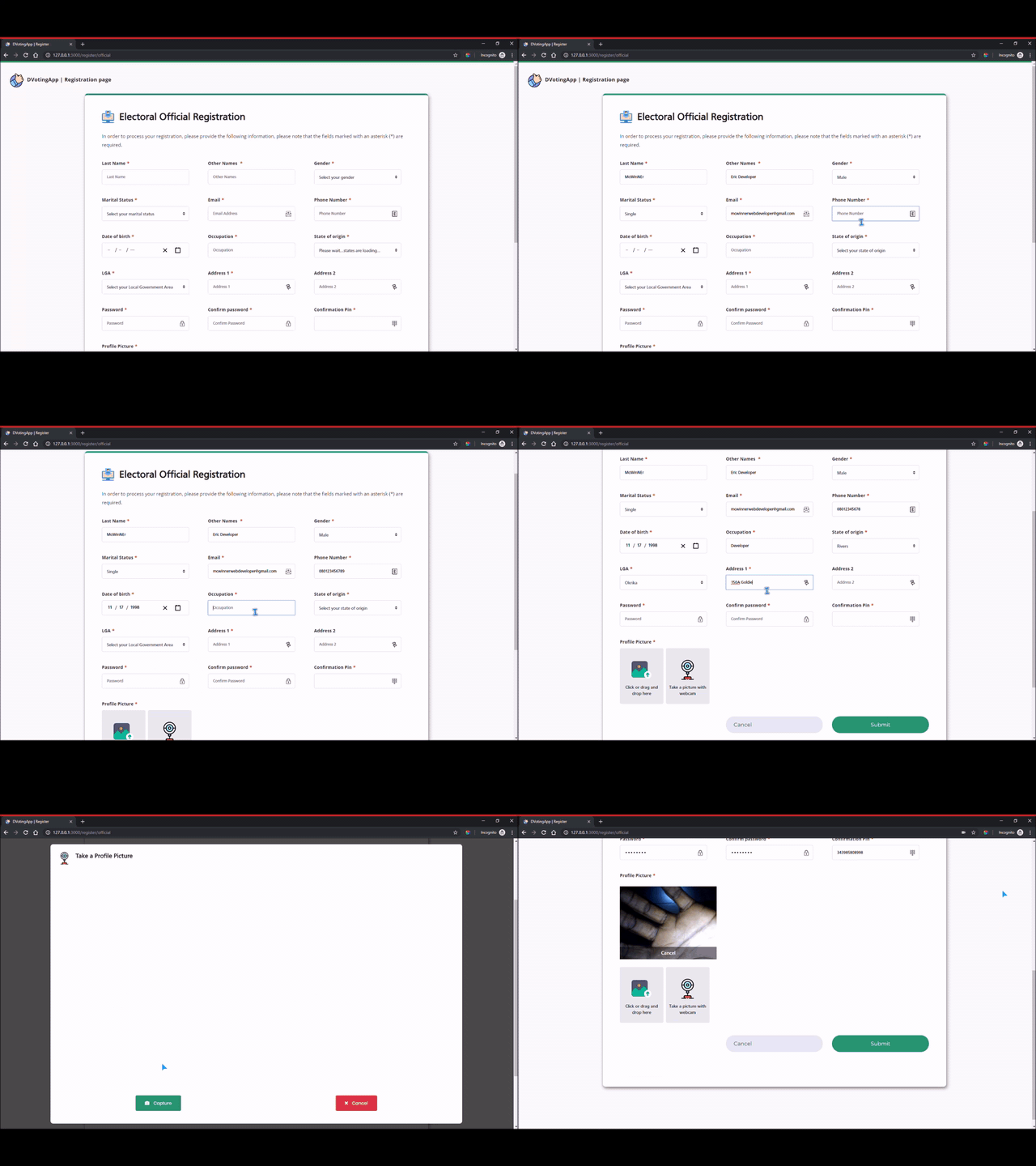
As mentioned earlier, polling officers and electoral officials can easily create an account online once they have a registration/confirmation pin as seen in the snapshot above. To prevent the system from being spammed however, voters have to be registered by polling officers. All polling officers have access to a similar page where they can register voters. Users' pictures could either be uploaded to the site or captured there at the time of registration via webcam.
Remote Voting

While registration must be done by polling officers, voting must not. Anybody with an internet connection and a fingerprint reader can stay wherever they are and participate in the elections and if they do not have access to a computer, the internet and a fingerprint reader, then they can go to polling stations and register via Polling Officers. In order to vote, one would need the password to his account to verify his identity (as well as the fingerprint in the future release).
Automatic Counting and Real-time Results

This application also has a feature to allow all users to see the results of the election in real-time. The results are calculated automatically and displayed even as the election is ongoing. It shows the number of votes and distribution of votes and this can be filtered to show votes from different states and local governments as seen above.
Resources
- All colored icons (including the logo) used in this project were gotten from FlatIcon
- All dark icons were gotten from FontAwesome
- The sidebar background image and the login page's background image were both gotten from Unsplash
- The 404 error page background image was gotten from Freepik
- Thanks to all the Open-Source authors and packages on top of which this application was built
Disclaimer
- This is a prototype and there is still room for improvement
- I use my gravatar and online name instead of my actual details because once again, this is a prototype; if this becomes adopted users would have to use their real information
- A link to an online demo would probably be available after the second release upon request
- If you want to set it up in your PC and need help you can contact me
- With the exception of the open source packages used, the rest of the dashboard and application were built ground-up from scratch.
You can find a link to the API here