
The first release of Exotic GUI, an immediate-mode GUI library for modern C++.
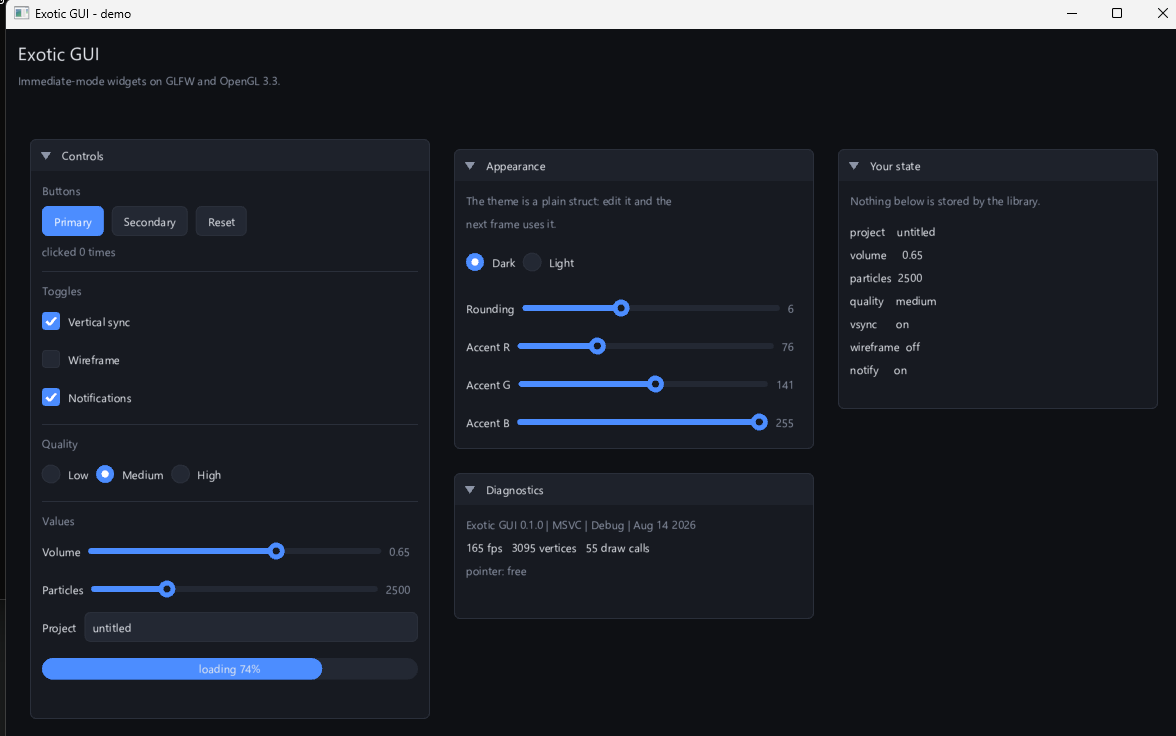
What is in it
- Windowing and input on GLFW - no raw Win32 anywhere in the codebase. Mouse, wheel, keyboard, typed Unicode, cursors, high-DPI.
- Batched 2D renderer on OpenGL 3.3: rounded rectangles, outlines, circles, lines, triangles, polylines, a path API, and a nested clip stack. The whole demo is ~3000 vertices in 55 draw calls at 165 fps.
- Text from a stb_truetype atlas, 2x2 oversampled, ASCII + Latin-1.
- Widgets: buttons, checkboxes, radios, sliders, a text field with a UTF-8 aware caret, progress bars, labels and headings, in draggable and collapsible panels.
- Theming as a plain struct - assign a field and the next frame uses it.
Getting started
git clone https://github.com/ExoticGamerrrYT/exotic-gui-cpp.git
cd exotic-gui-cpp
.\scripts\build.ps1
.\scripts\run.ps1
Or add it to your own CMake project:
include(FetchContent)
FetchContent_Declare(exotic_gui
    GIT_REPOSITORY https://github.com/ExoticGamerrrYT/exotic-gui-cpp.git
    GIT_TAG        v0.1.0)
FetchContent_MakeAvailable(exotic_gui)
target_link_libraries(my_app PRIVATE exotic::gui)
The attached zip is a prebuilt Release package: static library, public headers, CMake package config for find_package(ExoticGui 0.1 REQUIRED), and the three example binaries.
Requirements
Windows 10/11, Visual Studio 2022+ with the C++ workload, and an OpenGL 3.3 driver. CMake 3.25+ and Ninja both ship with Visual Studio.
Known limitations
Panels do not scroll or reorder, the atlas is ASCII + Latin-1 only, text editing has no selection or clipboard, and only Windows has been built and tested. Full list in the README.
Full changelog: CHANGELOG.md