Conversation


Added the images from this PR - https://github.com/Expensify/App/pull/29427/files

 melvin-bot
bot
requested review from
aldo-expensify
and removed request for
a team
melvin-bot
bot
requested review from
aldo-expensify
and removed request for
a team

|
@aldo-expensify Please copy/paste the Reviewer Checklist from here into a new comment on this PR and complete it. If you have the K2 extension, you can simply click: [this button] |

|
A preview of your ExpensifyHelp changes have been deployed to https://9bae9438.helpdot.pages.dev ⚡️ |


 aldo-expensify
left a comment
aldo-expensify
left a comment
aldo-expensify
left a comment
There was a problem hiding this comment.
@zanyrenney Can you update the links to start with /? if not, I can do it for you
| {:width="100%"} | ||
| {:width="100%"} |
There was a problem hiding this comment.
I think the images links may be missing a / at the beginning, otherwise they look broken:


|
Pushed fixes for the images. You can check here: https://github.com/Expensify/App/blob/bb0c1f07499340cd7afd87827d44821cbb209831/docs/articles/expensify-classic/manage-employees-and-report-approvals/Approval-Workflows.md Adding a new reviewer since I committed. |


Reviewer Checklist
Screenshots/VideosAndroid: NativeAndroid: mWeb ChromeiOS: NativeiOS: mWeb SafariMacOS: Chrome / SafariMacOS: Desktop |

 rushatgabhane
left a comment
rushatgabhane
left a comment
rushatgabhane
left a comment
There was a problem hiding this comment.
@aldo-expensify that doesn't work. Could we please change the format to
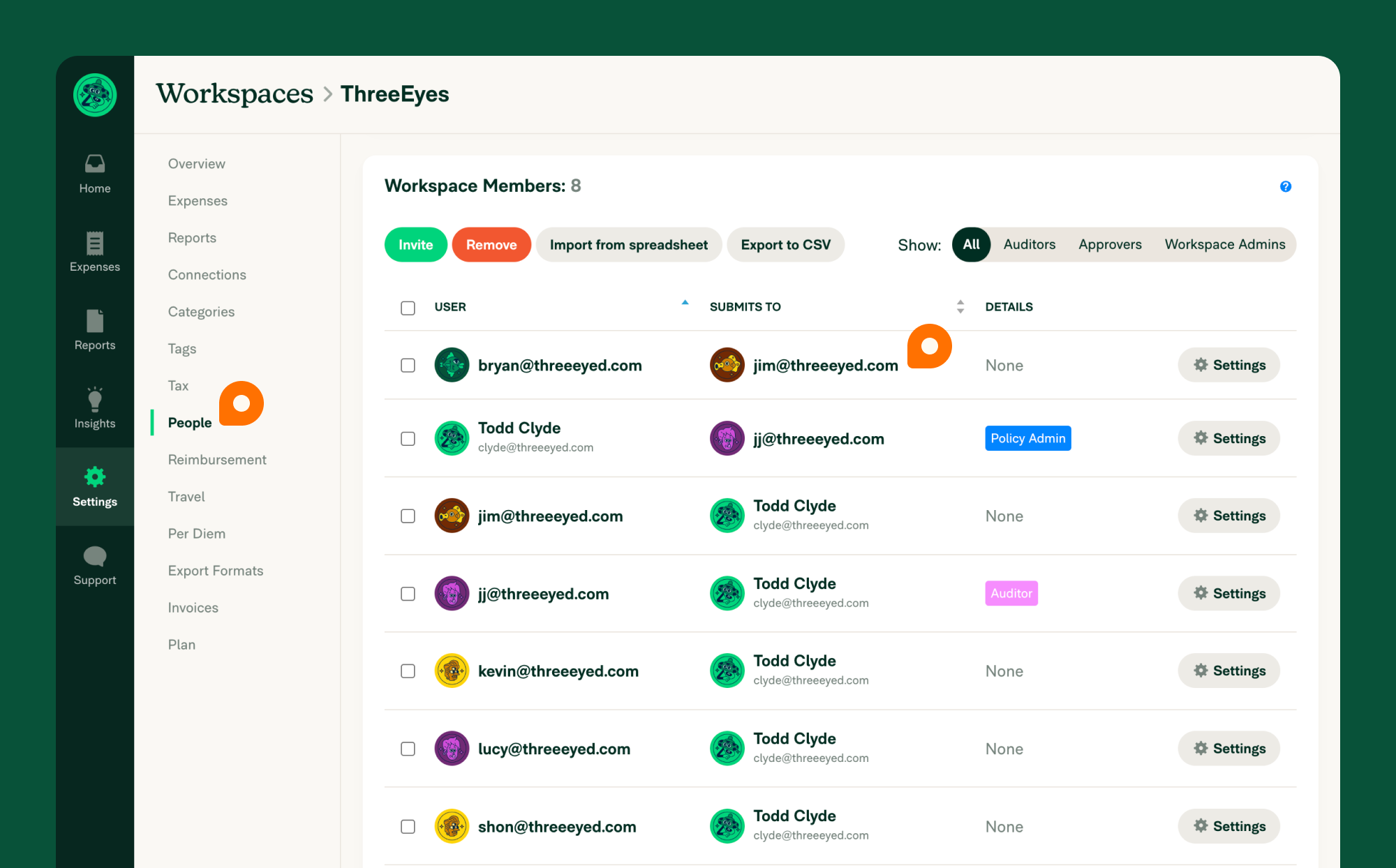{:width="100%"}

| - This is what this setup looks like in the Workspace Members table. | ||
| - Bryan submits his reports to Jim for 1st level approval. | ||
| {:width="100%"} | ||
|  |
There was a problem hiding this comment.
|  | |
| {:width="100%"} |
|
|
||
| - All of the reports Jim approves are submitted to Kevin. Kevin is the 'approves to' in Jim's Settings. | ||
| {:width="100%"} | ||
|  |
There was a problem hiding this comment.
|  | |
| 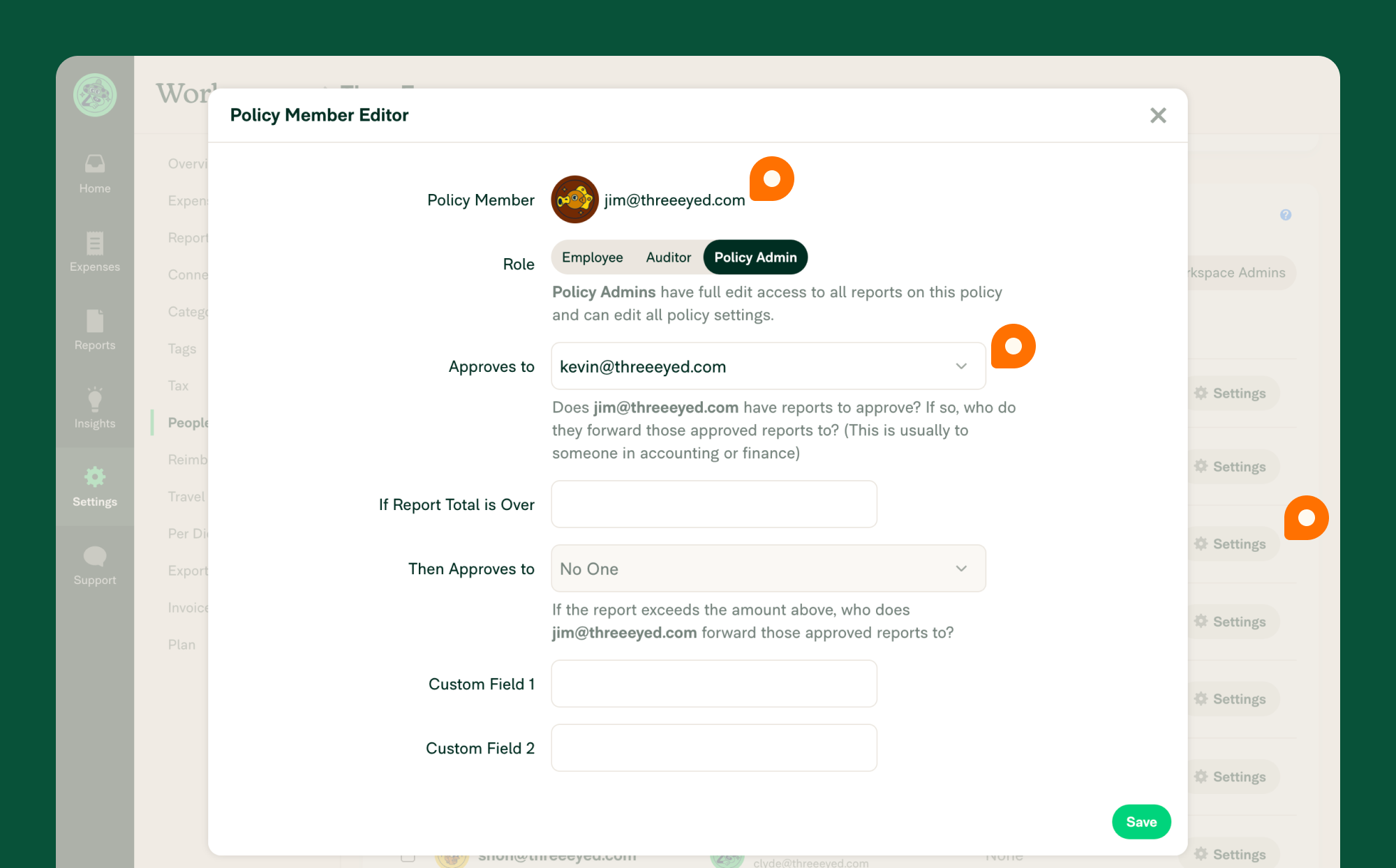{:width="100%"} |
|
|
||
| - All of the reports Kevin approves are submitted to Lucy. Lucy is the 'approves to' in Kevin's Settings. | ||
| {:width="100%"} | ||
|  |
There was a problem hiding this comment.
|  | |
| 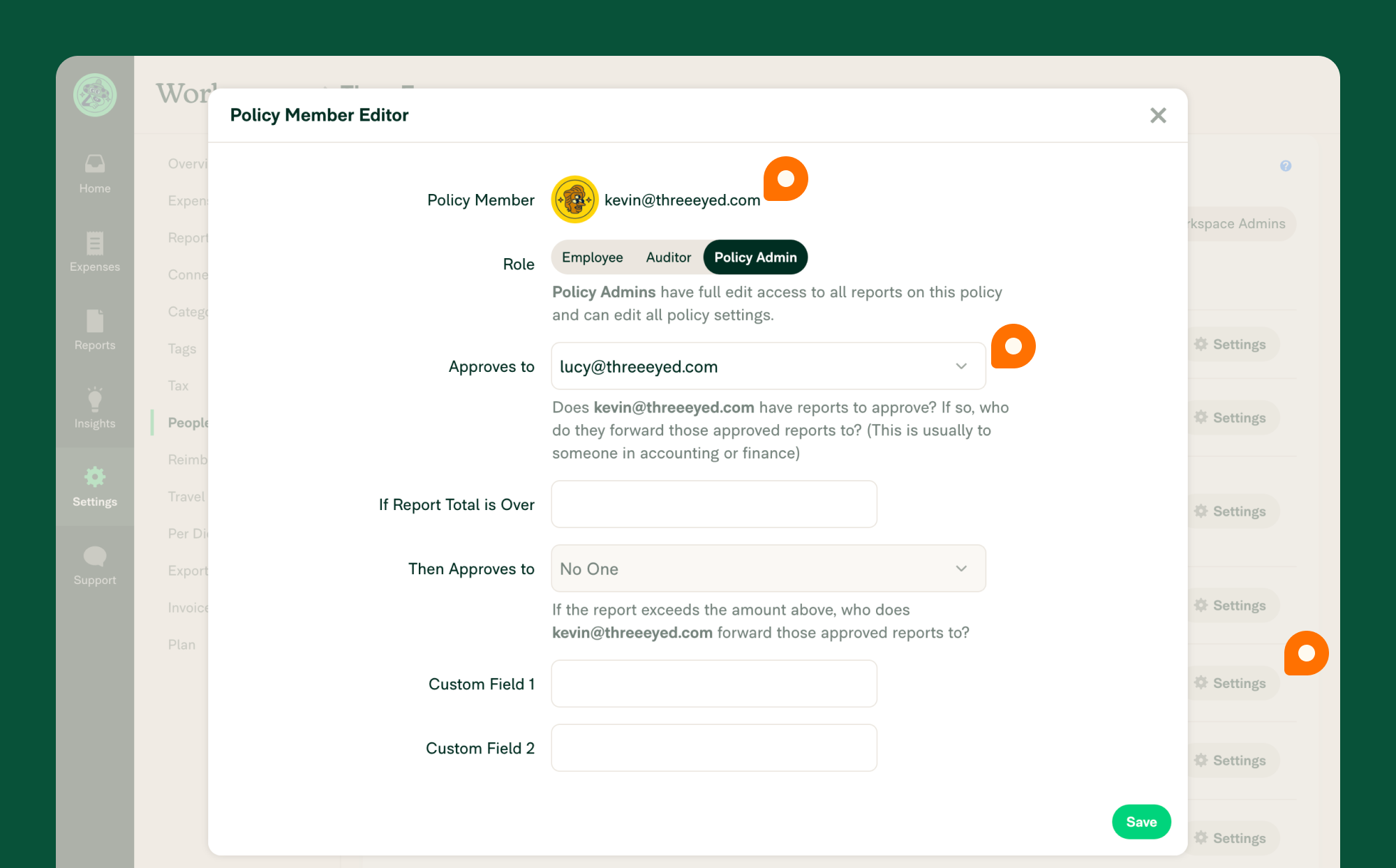{:width="100%"} |

 amyevans
left a comment
amyevans
left a comment
amyevans
left a comment
There was a problem hiding this comment.
One comment in addition to the image URLs feedback from Rushat
|
|
||
| ### Workflow enforcement | ||
| - If you want to ensure your employees cannot override the workflow you set - enable workflow enforcement by following the steps below. As a Workspace Admin, you can choose to enforce your approval workflow by going. No newline at end of file | ||
| - If you want to ensure your employees cannot override the workflow you set - enable workflow enforcement by following the steps below. As a Workspace Admin, you can choose to enforce your approval workflow by going. |
There was a problem hiding this comment.
This seems like an incomplete thought 😅
There was a problem hiding this comment.
hehe true, I'm not even sure why this is showing as diff if the lines are the same
oh!, how are you testing that? I thought it worked for me |

|
|
Please close this PR in favor of #30785 |

5 participants


Added the images from this PR - https://github.com/Expensify/App/pull/29427/files
Details
Fixed Issues
$
PROPOSAL:
Tests
Go to https://github.com/Expensify/App/blob/bb0c1f07499340cd7afd87827d44821cbb209831/docs/articles/expensify-classic/manage-employees-and-report-approvals/Approval-Workflows.md and verify that the doc and images looks fine
Offline tests
QA Steps
N/A
PR Author Checklist
### Fixed Issuessection aboveTestssectionOffline stepssectionQA stepssectiontoggleReportand notonIconClick)myBool && <MyComponent />.src/languages/*files and using the translation methodWaiting for Copylabel for a copy review on the original GH to get the correct copy.STYLE.md) were followedAvatar, I verified the components usingAvatarare working as expected)/** comment above it */thisproperly so there are no scoping issues (i.e. foronClick={this.submit}the methodthis.submitshould be bound tothisin the constructor)thisare necessary to be bound (i.e. avoidthis.submit = this.submit.bind(this);ifthis.submitis never passed to a component event handler likeonClick)StyleUtils.getBackgroundAndBorderStyle(themeColors.componentBG))Avataris modified, I verified thatAvataris working as expected in all cases)ScrollViewcomponent to make it scrollable when more elements are added to the page.mainbranch was merged into this PR after a review, I tested again and verified the outcome was still expected according to theTeststeps.Screenshots/Videos
Android: Native
Android: mWeb Chrome
iOS: Native
iOS: mWeb Safari
MacOS: Chrome / Safari
MacOS: Desktop