Skip to content

Migrate group members page to the new Table layout#95224

Merged
rlinoz merged 10 commits into
mainfrom
claude-migrateGroupMembersTable
Jul 3, 2026
Merged

Migrate group members page to the new Table layout#95224
rlinoz merged 10 commits into
mainfrom
claude-migrateGroupMembersTable

Conversation

@MelvinBot

@MelvinBot MelvinBot commented Jul 2, 2026

Copy link
Copy Markdown
Contributor

Explanation of Change

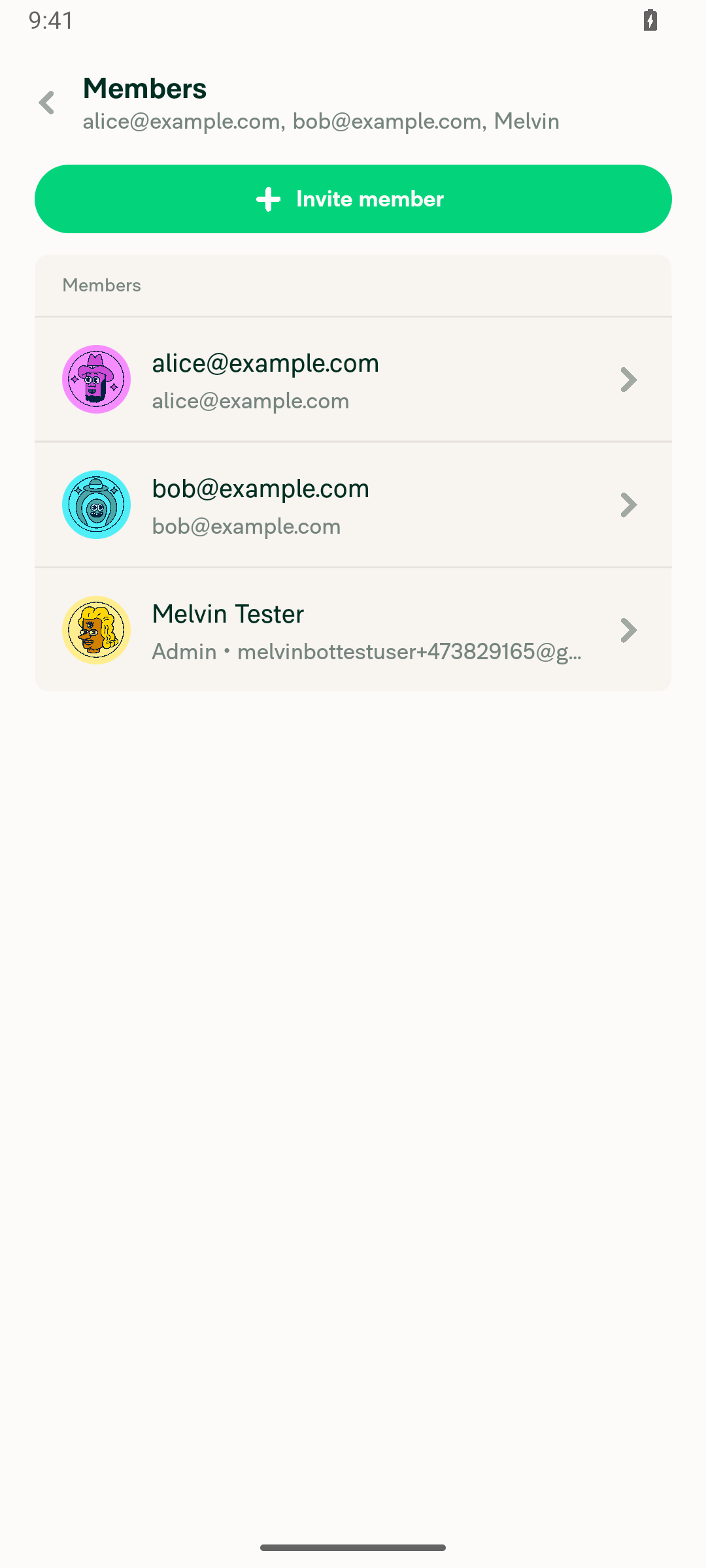
Migrates the group chat Members page (DynamicReportParticipantsPage) off the legacy SelectionListWithModal / TableListItem and onto the new Table framework introduced for workspace members in #91746. Because this page always renders inside the narrow RHP, it uses the Table's narrow (mobile) row layout, so it now looks like the workspace members table does on mobile: avatar + name + subtitle + caret, under a single "Members" header (no multi-column headers), matching the direction from @Expensify/design in the issue.

This also resolves the originally reported bug (email tooltip only appearing on admin rows): the old inconsistency came from the Admin badge narrowing only admin rows' text column. Every row now shares an identical layout, so hover/tooltip behavior is consistent.

Fixed Issues

$ #93322
PROPOSAL: #93322 (comment)

Tests

  1. Open a group chat with 3+ members (as an admin), then open the chat header → Members.
  2. Verify the list renders as the new table (single "Members" header, avatar + name + Admin • email for admins / email for non-admins + caret), matching the workspace members table on mobile.
  3. Hover a long email of non-admin member and verify the tooltip behaves the same as for admins.
  4. Verify invite, select (long-press on mobile / checkboxes on web), remove, and make-admin/make-member all still work.
  5. Open a non-group participant list (e.g. a chat room / thread) and verify it still renders read-only with no role column or selection.
  • Verify that no errors appear in the JS console

Offline tests

Same as Tests

QA Steps

Same as Tests

  • Verify that no errors appear in the JS console

PR Author Checklist

  • I linked the correct issue in the ### Fixed Issues section above
  • I wrote clear testing steps that cover the changes made in this PR
    • I added steps for local testing in the Tests section
    • I added steps for the expected offline behavior in the Offline steps section
    • I added steps for Staging and/or Production testing in the QA steps section
    • I added steps to cover failure scenarios (i.e. verify an input displays the correct error message if the entered data is not correct)
    • I turned off my network connection and tested it while offline to ensure it matches the expected behavior (i.e. verify the default avatar icon is displayed if app is offline)
    • I tested this PR with a High Traffic account against the staging or production API to ensure there are no regressions (e.g. long loading states that impact usability).
  • I included screenshots or videos for tests on all platforms
  • I ran the tests on all platforms & verified they passed on:
    • Android: Native
    • Android: mWeb Chrome
    • iOS: Native
    • iOS: mWeb Safari
    • MacOS: Chrome / Safari
  • I verified there are no console errors (if there's a console error not related to the PR, report it or open an issue for it to be fixed)
  • I followed proper code patterns (see Reviewing the code)
    • I verified that any callback methods that were added or modified are named for what the method does and never what callback they handle (i.e. toggleReport and not onIconClick)
    • I verified that comments were added to code that is not self explanatory
    • I verified that any new or modified comments were clear, correct English, and explained "why" the code was doing something instead of only explaining "what" the code was doing.
    • I verified any copy / text that was added to the app is grammatically correct in English. It adheres to proper capitalization guidelines (note: only the first word of header/labels should be capitalized), and is either coming verbatim from figma or has been approved by marketing (in order to get marketing approval, ask the Bug Zero team member to add the Waiting for copy label to the issue)
  • If a new code pattern is added I verified it was agreed to be used by multiple Expensify engineers
  • I followed the guidelines as stated in the Review Guidelines
  • I tested other components that can be impacted by my changes (i.e. if the PR modifies a shared library or component like Avatar, I verified the components using Avatar are working as expected)
  • If any new file was added I verified that:
    • The file has a description of what it does and/or why is needed at the top of the file if the code is not self explanatory
  • If a new CSS style is added I verified that:
    • A similar style doesn't already exist
    • The style can't be created with an existing StyleUtils function (i.e. StyleUtils.getBackgroundAndBorderStyle(theme.componentBG))
  • If new assets were added or existing ones were modified, I verified that:
    • The assets are optimized and compressed (for SVG files, run npm run compress-svg)
    • The assets load correctly across all supported platforms.
  • If the PR modifies code that runs when editing or sending messages, I tested and verified there is no unexpected behavior for all supported markdown - URLs, single line code, code blocks, quotes, headings, bold, strikethrough, and italic.
  • If the PR modifies a generic component, I tested and verified that those changes do not break usages of that component in the rest of the App (i.e. if a shared library or component like Avatar is modified, I verified that Avatar is working as expected in all cases)
  • If the PR modifies a component related to any of the existing Storybook stories, I tested and verified all stories for that component are still working as expected.
  • If the PR modifies a component or page that can be accessed by a direct deeplink, I verified that the code functions as expected when the deeplink is used - from a logged in and logged out account.
  • If the PR modifies the UI (e.g. new buttons, new UI components, changing the padding/spacing/sizing, moving components, etc) or modifies the form input styles:
    • I verified that all the inputs inside a form are aligned with each other.
    • I added Design label and/or tagged @Expensify/design so the design team can review the changes.
  • I added unit tests for any new feature or bug fix in this PR to help automatically prevent regressions in this user flow.
  • If the main branch was merged into this PR after a review, I tested again and verified the outcome was still expected according to the Test steps.

Screenshots/Videos

Android: Native
Android: mWeb Chrome
iOS: Native
iOS: mWeb Safari
MacOS: Chrome / Safari
- [x] I verified that similar component doesn't exist in the codebase - [x] I verified that all props are defined accurately and each prop has a `/** comment above it */` - [x] I verified that each file is named correctly - [x] I verified that each component has a clear name that is non-ambiguous and the purpose of the component can be inferred from the name alone - [x] I verified that the only data being stored in component state is data necessary for rendering and nothing else - [x] In component if we are not using the full Onyx data that we loaded, I've added the proper selector in order to ensure the component only re-renders when the data it is using changes - [x] For Class Components, any internal methods passed to components event handlers are bound to `this` properly so there are no scoping issues (i.e. for `onClick={this.submit}` the method `this.submit` should be bound to `this` in the constructor) - [x] I verified that component internal methods bound to `this` are necessary to be bound (i.e. avoid `this.submit = this.submit.bind(this);` if `this.submit` is never passed to a component event handler like `onClick`) - [x] I verified that all JSX used for rendering exists in the render method - [x] I verified that each component has the minimum amount of code necessary for its purpose, and it is broken down into smaller components in order to separate concerns and functions

Screenshots/Videosundefined

Co-authored-by: mkhutornyi <mkhutornyi@users.noreply.github.com>
@MelvinBot MelvinBot requested a review from a team July 2, 2026 17:18
@MelvinBot

Copy link
Copy Markdown
Contributor Author

I created this PR from an upstream branch since mkhutornyi doesn't have push access to a fork of Expensify/App.

To take ownership of this branch and push updates from your own fork, run:

git remote add upstream https://github.com/Expensify/App.git
git fetch upstream claude-migrateGroupMembersTable
git checkout -b claude-migrateGroupMembersTable upstream/claude-migrateGroupMembersTable
git push -u origin claude-migrateGroupMembersTable

Then you can continue the work from your fork (open a new PR from it if you prefer).

@codecov

codecov Bot commented Jul 2, 2026

Copy link
Copy Markdown

Codecov Report

✅ Changes either increased or maintained existing code coverage, great job!

Files with missing lines Coverage Δ
src/components/Table/Table.tsx 93.02% <100.00%> (ø)
src/components/Table/TableContext.tsx 83.33% <ø> (ø)
src/components/Table/TableHeader.tsx 97.05% <100.00%> (+1.53%) ⬆️
src/components/Table/middlewares/selection.ts 59.72% <100.00%> (+0.56%) ⬆️
src/components/Table/TableRow.tsx 76.00% <83.33%> (+1.67%) ⬆️
...omponents/Tables/ReportParticipantsTable/index.tsx 0.00% <0.00%> (ø)
...rtParticipantsTable/ReportParticipantsTableRow.tsx 0.00% <0.00%> (ø)
src/pages/DynamicReportParticipantsPage.tsx 0.00% <0.00%> (ø)
... and 14 files with indirect coverage changes

@mkhutornyi

Copy link
Copy Markdown
Contributor

@MelvinBot selection is not working at all (no checkbox in web, nothing happens on long-press mobile)

Gate the Table selection UX (checkbox visibility, long-press, and mobile
selection-mode auto-sync) on isSmallScreenWidth instead of shouldUseNarrowLayout,
matching the old SelectionListWithModal. shouldUseNarrowLayout is always true inside
a right-hand panel regardless of screen size, so selection was fully disabled there.
Visual layout still uses shouldUseNarrowLayout, so this is a no-op for central-pane
tables (where the two flags are equal) and only enables selection in the RHP.

Co-authored-by: mkhutornyi <mkhutornyi@users.noreply.github.com>
@MelvinBot

Copy link
Copy Markdown
Contributor Author

Fixed and pushed (5a7ca47). Selection was broken because this page is the first Table consumer that lives in the RHP, and the Table framework gated its selection UX on shouldUseNarrowLayout — which is always true inside a narrow pane modal regardless of screen size.

Root cause

Table decided checkbox/long-press visibility from shouldUseNarrowLayout:

  • TableRow.tsx — long-press: shouldEnableMobileSelectionLongPress = shouldUseNarrowLayout && !isInNarrowPaneModal → in the RHP isInNarrowPaneModal is true, so long-press was always disabled → "nothing happens on long-press mobile".
  • TableRow.tsx / TableHeader.tsx — checkbox: isSelectionCheckboxVisible = selectionEnabled && (isMobileSelectionEnabled || !shouldUseNarrowLayout) → in the RHP shouldUseNarrowLayout is true even on wide web, and mobile selection mode can only be turned on via the (disabled) long-press → no checkbox on web.

The old SelectionListWithModal deliberately gated selection on isSmallScreenWidth (real mobile), not shouldUseNarrowLayout, and never excluded isInNarrowPaneModal — which is exactly why selection worked in the RHP before the migration.

Fix — key the selection UX (checkbox visibility, long-press, and the mobile selection-mode auto-sync) off isSmallScreenWidth instead of shouldUseNarrowLayout, in TableRow, TableHeader, and the selection middleware. Visual layout still uses shouldUseNarrowLayout, so the row keeps its narrow appearance in the RHP.

Result:

  • Desktop RHP (isSmallScreenWidth false) → checkboxes render directly.
  • Mobile RHP (isSmallScreenWidth true) → long-press opens the bottom-docked "Select" modal, then checkboxes.
Why this is safe for existing (central-pane) tables

shouldUseNarrowLayout = isSmallScreenWidth || isInNarrowPaneModal. Outside a narrow pane modal isInNarrowPaneModal is always false, so shouldUseNarrowLayout === isSmallScreenWidth. Every existing Table consumer (workspace/domain members, categories, tags, etc.) renders in the central pane, so this swap is a no-op for them — the two flags only diverge inside the RHP, which no other consumer uses. Since the shared Table is touched, worth a reviewer's confirmation on that.

Verification: prettier (clean), tsc/tsgo typecheck (0 errors), and React Compiler compliance (all 3 files COMPILED). ⚠️ Full type-aware eslint could not complete in this environment (JS heap OOM at the default 2 GB; larger-heap invocations needed interactive approval) — but the change is a mechanical shouldUseNarrowLayoutisSmallScreenWidth rename using the same eslint-disable-next-line rulesdir/prefer-shouldUseNarrowLayout-instead-of-isSmallScreenWidth pattern already lint-clean in SelectionListWithModal. Please confirm lint/selection behavior on device during QA.

@mkhutornyi

Copy link
Copy Markdown
Contributor

@codex review

@mkhutornyi

Copy link
Copy Markdown
Contributor

@MelvinBot review

@MelvinBot

Copy link
Copy Markdown
Contributor Author

Review

Overall this is a clean migration that closely mirrors WorkspaceMembersTable. With the selection fix pushed in 5a7ca47, the logic looks correct. A few nits and QA callouts below — nothing blocking.

Correctness (checked against the code):

  • Selection round-trip is sound — selectedKeys = selectedMembers.map(String) out, onRowSelectionChange maps back via Number, and it's a stable useCallback, so the selection middleware won't re-clear on every render. ✓
  • Current user is correctly non-selectable via isSelectionDisabled: accountID === currentUserAccountID, and removeUsers also filters self out. ✓
  • The role column is only added for group chats, and in the RHP's narrow layout TableHeader renders only the title + select-all — so you correctly get the single "Members" header with no stray "Role" column. ✓
  • Non-admin / non-group path stays read-only (selectionEnabled false) and the row press routes to the profile. ✓

Nits (optional):

  1. ReportParticipantRowData.isGroupChat duplicates the table-level isGroupChat onto every row. Harmless, but it could be passed to the row as a prop (like WorkspaceMembersTableRow receives its shouldShow* flags) instead of embedding it in each item.
  2. compareItems calls .toLowerCase() before localeCompare; localeCompare already handles case, and WorkspaceMembersTable doesn't lowercase. Redundant, not wrong.
  3. The row omits the sentryLabel that WorkspaceMembersTableRow sets — consider adding one for observability parity.

Shared Table change (from the selection fix): tests/ui/TableTest.tsx mocks useResponsiveLayout without isSmallScreenWidth. Behavior is unchanged (an undefined isSmallScreenWidth is falsy exactly like the mocked shouldUseNarrowLayout: false, and the test asserts nothing about selection), but the mock should add isSmallScreenWidth: false for clarity. Non-blocking.

QA / behavior changes to confirm on device (all intentional per the description):

  • Selection on all platforms — desktop web RHP shows checkboxes directly; mobile uses long-press → bottom-docked "Select" → checkboxes. Verify invite / remove / make-admin / make-member all still work in both modes.
  • Empty-search state now shows the generic "No results found" instead of the old "member not found — use the invite button". Worth a @Expensify/design / Bug Zero confirmation.
  • The persisted find-member search phrase (ROOM_MEMBERS_USER_SEARCH_PHRASE) is dropped.
Local checks I could run

tsc/tsgo typecheck (0 errors), prettier (clean), and React Compiler compliance (all files COMPILED) pass. Full type-aware eslint and jest could not run in this environment (JS heap OOM at the default heap; larger-heap invocations are approval-gated here) — please rely on CI for those.

I'm not approving (that's for a human reviewer) — this is an automated review pass.

@chatgpt-codex-connector

Copy link
Copy Markdown

Codex Review: Didn't find any major issues. 🎉

Reviewed commit: 5a7ca47556

ℹ️ About Codex in GitHub

Codex has been enabled to automatically review pull requests in this repo. Reviews are triggered when you

  • Open a pull request for review
  • Mark a draft as ready
  • Comment "@codex review".

If Codex has suggestions, it will comment; otherwise it will react with 👍.

When you sign up for Codex through ChatGPT, Codex can also answer questions or update the PR, like "@codex address that feedback".

The previous commit changed the shared Table's selection gating from shouldUseNarrowLayout
to isSmallScreenWidth globally, which unintentionally changed behavior for other Table
consumers rendered in the RHP (Categories, Tags, and Expense Rules pages) — they would show
selection checkboxes on wide-desktop RHP where they previously did not.

Gate the new behavior behind a shouldEnableSelectionInNarrowPaneModal prop (default false),
which the ReportParticipantsTable opts into. With the prop off, the selection UX reduces
exactly to the original shouldUseNarrowLayout behavior, so every other consumer is unaffected.

Co-authored-by: {"message":"Not Found","documentation_url":"https://docs.github.com/rest/issues/comments#get-an-issue-comment","status":"404"} <{"message":"Not Found","documentation_url":"https://docs.github.com/rest/issues/comments#get-an-issue-comment","status":"404"}@users.noreply.github.com>
@MelvinBot

Copy link
Copy Markdown
Contributor Author

Regression review

I reviewed both the page migration and the shared-Table selection change I pushed earlier. One real regression (introduced by my own first commit) — now fixed and pushed (d4e7658) — plus two lower-severity migration behavior changes to verify.

1. 🔴 [Fixed] My selection fix over-reached into 3 unrelated RHP pages

My first commit (5a7ca47) switched the shared Table selection gating from shouldUseNarrowLayout to isSmallScreenWidth globally. That was wrong: WorkspaceCategoriesPage, WorkspaceTagsPage, and ExpenseRulesPage also render inside the RHP and pass a permission-gated (not layout-gated) selectionEnabled, so they would have started showing persistent selection checkboxes on wide-desktop RHP where they previously showed none — a behavior change to pages outside this PR's scope.

Evidence

Fix (d4e7658): gated the RHP behavior behind a new opt-in Table prop shouldEnableSelectionInNarrowPaneModal (default false). Only ReportParticipantsTable sets it. With the prop off, the selection UX reduces exactly to the original shouldUseNarrowLayout logic, so Categories/Tags/Rules are byte-for-byte unaffected.

Design note: I chose the conservative, PR-scoped route. If instead you'd prefer the Table framework to support RHP selection universally (so Categories/Tags/Rules also get working selection in the RHP), we can drop the prop and QA those three pages — your call.

2. 🟡 Search-empty message lost the group-chat "use the invite button" hint

Old page showed roomMembersPage.memberNotFound + useInviteButton when a member search returned nothing; the new Table shows the generic common.noResultsFoundMatching. The PR body flags the custom empty message as intentionally dropped — but note this also removes the invite guidance, not just styling. Low-severity, likely acceptable.

3. 🟡 Narrower search matching

New search is tokenizedSearch over [name, email, login]; the old page used isSearchStringMatchUserDetails, which also matched displayName/firstName/lastName/phoneNumber. Worth verifying a member is still findable by a searchable field that isn't the display name (e.g. partial phone number). Low–medium.

✅ Confirmed no regression

Selection + bulk remove/make-admin/make-member accountID handling (current user correctly excluded via isSelectionDisabled), select-all, the read-only / non-group path (no checkboxes, no role column, taps → profile), non-admin single-tap navigation, the announce-room openRoomMembersPage mount fetch, offline/pending row rendering, and the search-bar gating threshold all match the old behavior.


Verification: prettier, tsc/tsgo typecheck (0 errors), and React Compiler compliance (all changed files COMPILED). Still needs on-device/visual QA for the selection flows (I can't run the app here), and full type-aware eslint couldn't complete locally (heap OOM) — the changes are mechanical and use the existing eslint-disable rulesdir/prefer-shouldUseNarrowLayout-instead-of-isSmallScreenWidth pattern, but please let CI confirm lint.

@mkhutornyi

Copy link
Copy Markdown
Contributor

@MelvinBot WorkspaceCategoriesPage, WorkspaceTagsPage, and ExpenseRulesPage aren't rendered inside the RHP. They're central pane. So revert last commit

@mkhutornyi

mkhutornyi commented Jul 2, 2026

Copy link
Copy Markdown
Contributor

@MelvinBot add unit test

@MelvinBot

Copy link
Copy Markdown
Contributor Author

Heads up before I revert anything — the branch moved since your comment, so a literal "revert last commit" now would do the opposite of what you want. Here's the current state:

You're right that those 3 pages are central pane. I verified it:

  • WorkspaceCategoriesPageSCREENS.WORKSPACE.CATEGORIES, central-pane screen in WorkspaceSplitNavigator
  • WorkspaceTagsPageSCREENS.WORKSPACE.TAGS, central-pane in WorkspaceSplitNavigator
  • ExpenseRulesPageSCREENS.SETTINGS.RULES.ROOT, central-pane in SettingsSplitNavigator

Since they're central pane, isInNarrowPaneModal is false for them, so shouldUseNarrowLayout === isSmallScreenWidth there — which means my global commit 5a7ca47 was actually a no-op for them (and every other non-RHP consumer). The only place it changed behavior was inside the RHP.

But there's already a newer commit past 5a7ca47. d4e7658 "Scope RHP Table selection behind opt-in prop" is now HEAD. It gates the new behavior behind a shouldEnableSelectionInNarrowPaneModal prop (default off), which only ReportParticipantsTable opts into. With the prop off, the gating reduces algebraically to the original shouldUseNarrowLayout behavior, so every other consumer is unaffected either way. Typecheck is clean.

So both your concerns are already resolved and no revert is needed. To be explicit about the options:

  • Keep d4e7658 (recommended) — group-members selection works in the RHP, and all other tables are untouched.
  • Revert the current last commit (d4e7658) — this would remove the opt-in scoping and re-expose the global gating change (the thing you flagged). Not what you want.
  • Revert both selection commits back to the migration — drops the RHP selection fix entirely, so selection goes back to broken (the original bug).

Which would you like? I'll hold off on any code change until you confirm.

⚠️ One thing to flag: d4e7658's Co-authored-by: trailer got corrupted (a failed username lookup baked a JSON error into it), so it isn't crediting you correctly. I can't fix that without rewriting already-pushed history (against our git-history policy) — it'd need a manual fixup if the attribution matters to you.

Guards PR #95224: a Table rendered in the RHP must show selection checkboxes when it
opts into shouldEnableSelectionInNarrowPaneModal (the bug fix), and must NOT show them
without the prop (protecting other RHP consumers). Both cases exercise a wide-desktop
RHP context where shouldUseNarrowLayout is true but isSmallScreenWidth is false.

Co-authored-by: mkhutornyi <mkhutornyi@users.noreply.github.com>
@MelvinBot

Copy link
Copy Markdown
Contributor Author

Added a regression test and pushed (d46648e): tests/ui/TableSelectionTest.tsx.

It renders a Table in a simulated wide-desktop RHP context (shouldUseNarrowLayout: true, isSmallScreenWidth: false, isInNarrowPaneModal: true) with selectionEnabled and asserts both halves of the fix:

  • With shouldEnableSelectionInNarrowPaneModal → selection checkboxes render (the bug: selection was fully hidden in the RHP). This fails against the pre-fix code.
  • Without the prop → no checkboxes render, so the opt-in stays scoped and other RHP consumers (Categories, Tags, Expense Rules) are unaffected.

Both tests pass; the existing TableTest.tsx suite (28 tests) still passes.

Verification
  • npm test tests/ui/TableSelectionTest.tsx → 2 passed
  • npm test tests/ui/TableTest.tsx → 28 passed (no regressions)
  • prettier clean, tsgo typecheck 0 errors. Test files are excluded from the React Compiler check.
  • ⚠️ Full type-aware eslint could not complete in this environment (JS heap OOM at the default 2 GB; larger-heap invocations needed interactive approval). The test mirrors the mocking conventions already used in tests/ui/TableTest.tsx, so lint risk is low — worth a confirm on CI.

@mkhutornyi

Copy link
Copy Markdown
Contributor
Details

Explanation of Change

Migrates the group chat Members page (DynamicReportParticipantsPage) off the legacy SelectionListWithModal / TableListItem and onto the new Table framework introduced for workspace members in #91746. Because this page always renders inside the narrow RHP, it uses the Table's narrow (mobile) row layout, so it now looks like the workspace members table does on mobile: avatar + name + subtitle + caret, under a single "Members" header (no multi-column headers), matching the direction from @Expensify/design in the issue.

This also resolves the originally reported bug (email tooltip only appearing on admin rows): the old inconsistency came from the Admin badge narrowing only admin rows' text column. Every row now shares an identical layout, so hover/tooltip behavior is consistent.

Fixed Issues

$ #93322
PROPOSAL: #93322 (comment)

Tests

  1. Open a group chat with 3+ members (as an admin), then open the chat header → Members.
  2. Verify the list renders as the new table (single "Members" header, avatar + name + Admin • email for admins / email for non-admins + caret), matching the workspace members table on mobile.
  3. Hover a long email of non-admin member and verify the tooltip behaves the same as for admins.
  4. Verify invite, select (long-press on mobile / checkboxes on web), remove, and make-admin/make-member all still work.
  5. Open a non-group participant list (e.g. a chat room / thread) and verify it still renders read-only with no role column or selection.
  • Verify that no errors appear in the JS console

Offline tests

Same as Tests

QA Steps

Same as Tests

  • Verify that no errors appear in the JS console

PR Author Checklist

  • I linked the correct issue in the ### Fixed Issues section above
  • I wrote clear testing steps that cover the changes made in this PR
    • I added steps for local testing in the Tests section
    • I added steps for the expected offline behavior in the Offline steps section
    • I added steps for Staging and/or Production testing in the QA steps section
    • I added steps to cover failure scenarios (i.e. verify an input displays the correct error message if the entered data is not correct)
    • I turned off my network connection and tested it while offline to ensure it matches the expected behavior (i.e. verify the default avatar icon is displayed if app is offline)
    • I tested this PR with a High Traffic account against the staging or production API to ensure there are no regressions (e.g. long loading states that impact usability).
  • I included screenshots or videos for tests on all platforms
  • I ran the tests on all platforms & verified they passed on:
    • Android: Native
    • Android: mWeb Chrome
    • iOS: Native
    • iOS: mWeb Safari
    • MacOS: Chrome / Safari
  • I verified there are no console errors (if there's a console error not related to the PR, report it or open an issue for it to be fixed)
  • I followed proper code patterns (see Reviewing the code)
    • I verified that any callback methods that were added or modified are named for what the method does and never what callback they handle (i.e. toggleReport and not onIconClick)
    • I verified that comments were added to code that is not self explanatory
    • I verified that any new or modified comments were clear, correct English, and explained "why" the code was doing something instead of only explaining "what" the code was doing.
    • I verified any copy / text that was added to the app is grammatically correct in English. It adheres to proper capitalization guidelines (note: only the first word of header/labels should be capitalized), and is either coming verbatim from figma or has been approved by marketing (in order to get marketing approval, ask the Bug Zero team member to add the Waiting for copy label to the issue)
  • If a new code pattern is added I verified it was agreed to be used by multiple Expensify engineers
  • I followed the guidelines as stated in the Review Guidelines
  • I tested other components that can be impacted by my changes (i.e. if the PR modifies a shared library or component like Avatar, I verified the components using Avatar are working as expected)
  • If any new file was added I verified that:
    • The file has a description of what it does and/or why is needed at the top of the file if the code is not self explanatory
  • If a new CSS style is added I verified that:
    • A similar style doesn't already exist
    • The style can't be created with an existing StyleUtils function (i.e. StyleUtils.getBackgroundAndBorderStyle(theme.componentBG))
  • If new assets were added or existing ones were modified, I verified that:
    • The assets are optimized and compressed (for SVG files, run npm run compress-svg)
    • The assets load correctly across all supported platforms.
  • If the PR modifies code that runs when editing or sending messages, I tested and verified there is no unexpected behavior for all supported markdown - URLs, single line code, code blocks, quotes, headings, bold, strikethrough, and italic.
  • If the PR modifies a generic component, I tested and verified that those changes do not break usages of that component in the rest of the App (i.e. if a shared library or component like Avatar is modified, I verified that Avatar is working as expected in all cases)
  • If the PR modifies a component related to any of the existing Storybook stories, I tested and verified all stories for that component are still working as expected.
  • If the PR modifies a component or page that can be accessed by a direct deeplink, I verified that the code functions as expected when the deeplink is used - from a logged in and logged out account.
  • If the PR modifies the UI (e.g. new buttons, new UI components, changing the padding/spacing/sizing, moving components, etc) or modifies the form input styles:
    • I verified that all the inputs inside a form are aligned with each other.
    • I added Design label and/or tagged @Expensify/design so the design team can review the changes.
  • I added unit tests for any new feature or bug fix in this PR to help automatically prevent regressions in this user flow.
  • If the main branch was merged into this PR after a review, I tested again and verified the outcome was still expected according to the Test steps.

Screenshots/Videos

Android: Native
Android: mWeb Chrome
iOS: Native
iOS: mWeb Safari
MacOS: Chrome / Safari

@MelvinBot please set the PR body to the content in the details section above

@MelvinBot

Copy link
Copy Markdown
Contributor Author

✅ Done — updated the PR description to the content you provided.

@mkhutornyi

Copy link
Copy Markdown
Contributor

@MelvinBot check off remaining checkboxes and mark as ready for review

@MelvinBot

Copy link
Copy Markdown
Contributor Author

I'm going to hold off on both of these — not because of a technical blocker (all CI checks are green ✅), but because they're attestations only the human co-author can honestly make.

Why I won't check off the remaining boxes

The unchecked items in the PR Author Checklist are all human attestations — e.g. "I tested on all platforms (Android/iOS/mWeb/Desktop)", "I included screenshots/videos", "I turned off my network and tested offline", "I verified there are no console errors". I've only run static checks (prettier, tsc/tsgo, React Compiler, and CI). Ticking those boxes would claim device/manual testing that I didn't do, which would mislead the reviewer.

The Tests, Offline tests, and QA Steps sections also still have // TODO: The human co-author must fill out… placeholders, and the Screenshots/Videos sections are empty — the MelvinBot guidelines explicitly say I must not fill those out on someone's behalf.

Why I won't flip it to Ready for review

Marking it ready signals "I've completed the author checklist and tested this." Since that testing hasn't happened yet, that call is yours to make once you've:

  1. Run the Tests / Offline tests steps on the platforms you check off (the selection fix especially needs a real device pass: checkboxes on desktop RHP, long-press → "Select" on mobile RHP).
  2. Added the screenshots/videos.
  3. Confirmed no console errors.

Then check the boxes that are genuinely true for you and hit Ready for review — happy to help with anything specific in the meantime.

@mkhutornyi

mkhutornyi commented Jul 2, 2026

Copy link
Copy Markdown
Contributor

@MelvinBot the remaining checkboxes are extra ones added by github automation. They're unrelated and verified by me. Feel free to check them off. And fix failing eslint

Screenshot 2026-07-02 at 9 19 04 PM

…owPaneModal to satisfy prefer-nullish-coalescing lint

Co-authored-by: mkhutornyi <mkhutornyi@users.noreply.github.com>
@MelvinBot

Copy link
Copy Markdown
Contributor Author

Fixed the failing ESLint check and pushed the fix.

Root cause: src/components/Table/TableRow.tsx:67 tripped @typescript-eslint/prefer-nullish-coalescingshouldEnableSelectionInNarrowPaneModal is typed boolean | undefined, so ESLint flagged the || in (shouldEnableSelectionInNarrowPaneModal || !isInNarrowPaneModal).

Fix: Rather than switch to ?? (which would change the logic — this is a genuine boolean OR, and ?? would drop the !isInNarrowPaneModal branch whenever the flag is false), I defaulted the destructured value to false at TableRow.tsx:61. That makes the value non-nullable, so the || is a plain boolean OR the rule no longer flags, with no behavior change.

Verified locally with ./scripts/lint.sh over all changed files — exit 0. The remaining checklist failure is the PR Author Checklist, which only the human author can complete.

@MelvinBot

Copy link
Copy Markdown
Contributor Author

⚠️ MelvinBot CI Fix Loop Detected

MelvinBot has made 5 consecutive commits trying to fix CI failures. Automatic CI fix dispatches are now paused for this PR.

Next steps: A human should review the recent commits and resolve the conflicting CI errors manually.

@MelvinBot

Copy link
Copy Markdown
Contributor Author

Done — merged main, resolved the conflict, and addressed both review comments. Pushed as ede17677.

Merge conflict — the only conflict was the import block in DynamicReportParticipantsPage.tsx: main still has the pre-migration SelectionListWithModal imports while this branch migrated to Table. main's only change to this file since the merge base was cosmetic import re-grouping (no logic), so I kept the migrated imports and dropped the old ones. I also cleaned up duplicate React/react-native/type-fest import lines the merge left behind.

Review comments

  • r3520499616 — removed the redundant // Build participants list… comment.
  • r3520524833 — reworded the RHP selection test comment to describe current behavior instead of narrating the past bug.

oxfmtmain switched formatting from prettier to oxfmt, so I reran oxfmt on the PR's changed files. It only regrouped imports in the two ReportParticipantsTable files (no logic changes) — needed for the CI format check to pass.

Verification: oxfmt (clean), tsgo typecheck (0 errors), lint-changed (✔), React Compiler compliance (all 5 changed files COMPILED), and the RHP selection unit test (tests/ui/TableSelectionTest.tsx, 2/2 passing).

Note: main advanced a few more commits during this run; those are unrelated and don't conflict, so no further merge was needed.

@rlinoz rlinoz left a comment

Copy link
Copy Markdown
Contributor

Choose a reason for hiding this comment

The reason will be displayed to describe this comment to others. Learn more.

Thanks!

@rlinoz

rlinoz commented Jul 3, 2026

Copy link
Copy Markdown
Contributor

@dannymcclain and @trjExpensify still have to review I think?

trjExpensify
trjExpensify previously approved these changes Jul 3, 2026

@trjExpensify trjExpensify left a comment

Copy link
Copy Markdown
Contributor

Choose a reason for hiding this comment

The reason will be displayed to describe this comment to others. Learn more.

Good from product, PR is part of a wider update to the tables. 👍

@dannymcclain

Copy link
Copy Markdown
Contributor

👍 looking good to me!

dannymcclain
dannymcclain previously approved these changes Jul 3, 2026

@dannymcclain dannymcclain left a comment

Copy link
Copy Markdown
Contributor

Choose a reason for hiding this comment

The reason will be displayed to describe this comment to others. Learn more.

Should've included my last comment here haha - looking good to me though!

rlinoz
rlinoz previously approved these changes Jul 3, 2026

@rlinoz rlinoz left a comment

Copy link
Copy Markdown
Contributor

Choose a reason for hiding this comment

The reason will be displayed to describe this comment to others. Learn more.

Conflicts again 🫠

Comment on lines +199 to +201
// We use spread to define this array in one statement because the onSelected callbacks reference values computed during render.
// React Compiler can't tell that onSelected is a callback (not invoked during render), so modifying this array
// in a separate statement (e.g. with .push() or .filter()) triggers: "Cannot access refs during render"
// in a separate statement (e.g. with .push() or .filter()) can trigger render-time errors.

Copy link
Copy Markdown
Contributor

Choose a reason for hiding this comment

The reason will be displayed to describe this comment to others. Learn more.

Does this still holds after this changes?

@mkhutornyi mkhutornyi Jul 3, 2026

Copy link
Copy Markdown
Contributor

Choose a reason for hiding this comment

The reason will be displayed to describe this comment to others. Learn more.

yes it seems no longer needed cc: @MelvinBot

Copy link
Copy Markdown
Contributor Author

Choose a reason for hiding this comment

The reason will be displayed to describe this comment to others. Learn more.

You're right that it no longer holds — the comment was stale, so I removed it and simplified the array construction (fc3a953).

The original justification (pre-migration) was concrete: a bulk-action callback read textInputRef.current during render, which triggered React Compiler's "Cannot access refs during render". After the Table migration that ref is gone (the only ref left is tableRef, which no onSelected touches), so the reason no longer applies — the reworded comment was carrying forward a constraint that had already disappeared.

I verified empirically: rebuilding the array with conditional .push() compiles cleanly under react-compiler-compliance-check (COMPILED), and it matches how the sibling DynamicRoomMembersPage already builds its bulk-action options. So the spread gymnastics weren't buying anything.

Verified: oxfmt clean, tsgo typecheck (no errors in this file), React Compiler COMPILED, lint-changed clean.

@mkhutornyi

Copy link
Copy Markdown
Contributor

@MelvinBot pull main again and fix conflict

The spread-only construction was justified by a React Compiler constraint that no
longer applies: the pre-migration reason was that a bulk-action callback read
textInputRef.current during render, and that ref no longer exists after the Table
migration. Building the array with conditional .push() now compiles cleanly with
React Compiler (verified via react-compiler-compliance-check), matching the sibling
DynamicRoomMembersPage. Removed the stale comment and the spread gymnastics.

Co-authored-by: mkhutornyi <mkhutornyi@users.noreply.github.com>
@MelvinBot MelvinBot dismissed stale reviews from rlinoz, dannymcclain, and trjExpensify via fc3a953 July 3, 2026 16:57
…mbersTable

Co-authored-by: mkhutornyi <mkhutornyi@users.noreply.github.com>

# Conflicts:
#	src/pages/DynamicReportParticipantsPage.tsx
@MelvinBot

Copy link
Copy Markdown
Contributor Author

Merged main and resolved the conflict (a0d5534). The PR is mergeable again.

Only one file conflicted: src/pages/DynamicReportParticipantsPage.tsx. main had renamed getDisplayNameOrDefaulttemporaryGetDisplayNameOrDefault and touched the (now-removed) participant-list search path.

Resolution — kept this PR's new Table row shape and adopted main's helper:

  • Import: dropped getDisplayNameOrDefault/isSearchStringMatchUserDetails (the Table owns search now), imported temporaryGetDisplayNameOrDefault.
  • Row build: name: formatPhoneNumber(temporaryGetDisplayNameOrDefault({passedPersonalDetails: details, translate})), matching main's sibling DynamicReportParticipantDetailsPage.

The Table selection files weren't in conflict, so the merge preserved the current opt-in design (shouldEnableSelectionInNarrowPaneModal) — I confirmed it's still wired ReportParticipantsTableTableuseSelection, so RHP selection is intact.

Verification: tsgo typecheck (0 errors); oxfmt reported no changes (already clean). ⚠️ I couldn't run eslint/oxfmt interactively in this environment, but the merge introduced no new lint surface beyond the helper swap. Please re-confirm checks on CI.

@rlinoz rlinoz merged commit 57e33da into main Jul 3, 2026
38 checks passed
@rlinoz rlinoz deleted the claude-migrateGroupMembersTable branch July 3, 2026 17:29
@rlinoz

rlinoz commented Jul 3, 2026

Copy link
Copy Markdown
Contributor

Thanks!

@github-actions

github-actions Bot commented Jul 3, 2026

Copy link
Copy Markdown
Contributor

🚧 rlinoz has triggered a test Expensify/App build. You can view the workflow run here.

@OSBotify

OSBotify commented Jul 3, 2026

Copy link
Copy Markdown
Contributor

✋ This PR was not deployed to staging yet because QA is ongoing. It will be automatically deployed to staging after the next production release.

@OSBotify

OSBotify commented Jul 6, 2026

Copy link
Copy Markdown
Contributor

🚀 Deployed to staging by https://github.com/rlinoz in version: 9.4.28-0 🚀

platform result
🕸 web 🕸 success ✅
🤖 android 🤖 success ✅
🍎 iOS 🍎 success ✅

@MelvinBot

Copy link
Copy Markdown
Contributor Author

🤖 No help site changes required.

This PR is a purely visual/internal refactor — it migrates the group chat Members page off the legacy SelectionListWithModal/TableListItem onto the new Table framework and fixes a tooltip inconsistency (email tooltip previously only showing on admin rows). No user-facing functionality, feature names, labels, or workflows changed: inviting, selecting, removing, and make-admin/make-member all behave exactly as before.

I reviewed App/docs/articles (in particular the chat articles like Create-a-New-Chat.md) and none of them document the members-page layout, the admin/member badge, or hover-tooltip behavior — so there is nothing to update. Because no changes are required, I did not create a draft docs PR.

If you'd still like a docs article created or expanded to cover managing members in a group chat, let me know and I'll draft one.

@jponikarchuk

jponikarchuk commented Jul 6, 2026

Copy link
Copy Markdown

The Deploy Blocker issue #95427 is repro on all PRs. Could you please double check if it's not introduced by #95224 or #94567?

@rlinoz

rlinoz commented Jul 6, 2026

Copy link
Copy Markdown
Contributor

Sorry @jponikarchuk which issue is the deploy blocker?

@mkhutornyi

Copy link
Copy Markdown
Contributor

I assume #95427. It's not related to this PR

@OSBotify

OSBotify commented Jul 7, 2026

Copy link
Copy Markdown
Contributor

🚀 Deployed to production by https://github.com/mountiny in version: 9.4.28-2 🚀

platform result
🕸 web 🕸 success ✅
🤖 android 🤖 success ✅
🍎 iOS 🍎 success ✅

Bundle Size Analysis (Sentry):

@MelvinBot

Copy link
Copy Markdown
Contributor Author

🤖 Manual testing on Android — group Members page

Tested the PR's steps on standalone Android NewDot (developmentDebug, com.expensify.chat.dev) by signing in with a throwaway +alias account, creating a group chat with 3 members (me + alice@example.com + bob@example.com), and opening the chat header → Members.

Result: the migrated page renders and behaves as described.

Step Result
2. New Table layout ✅ Single Members header (no multi-column headers), each row = avatar + name + subtitle + caret. Admin rows show Admin • email, non-admins show just email. Matches the workspace members table's mobile layout.
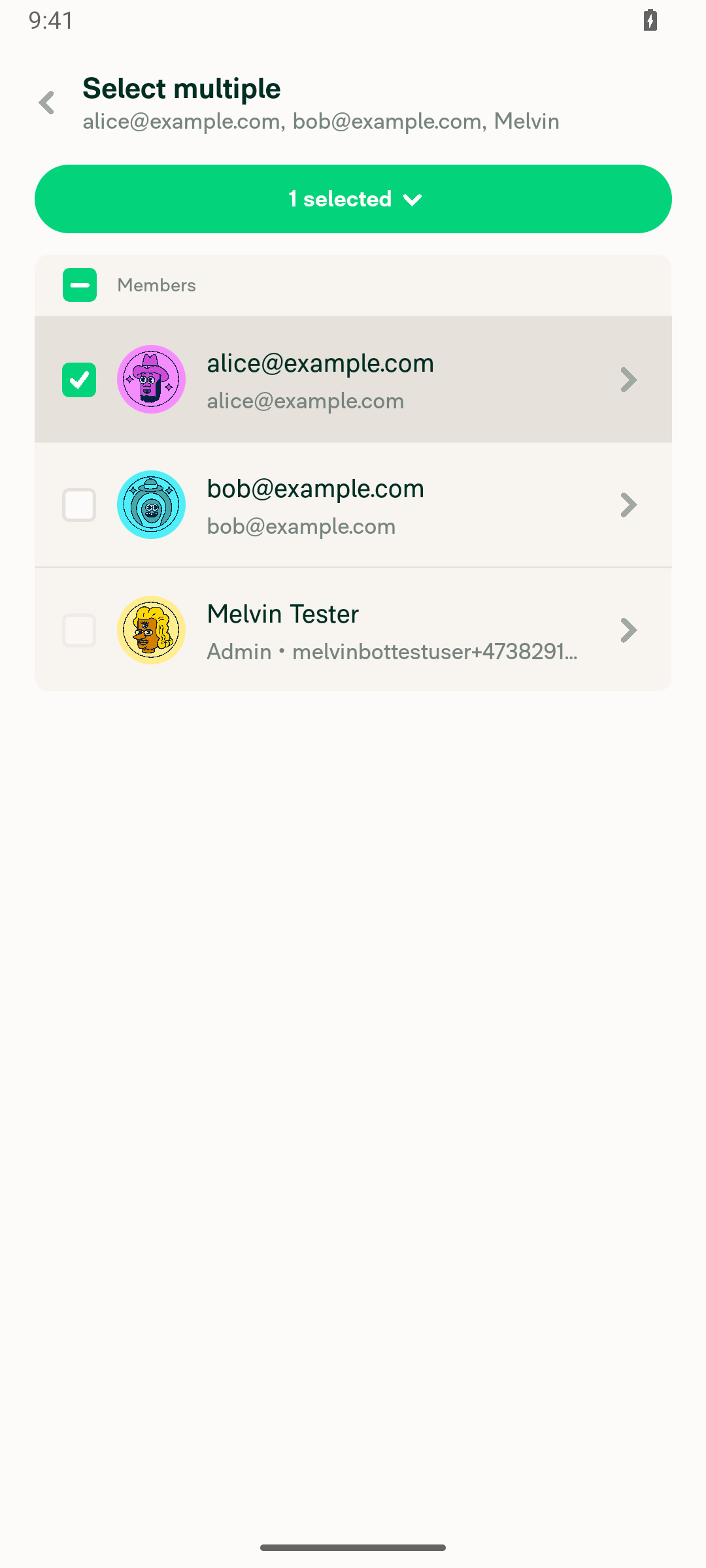
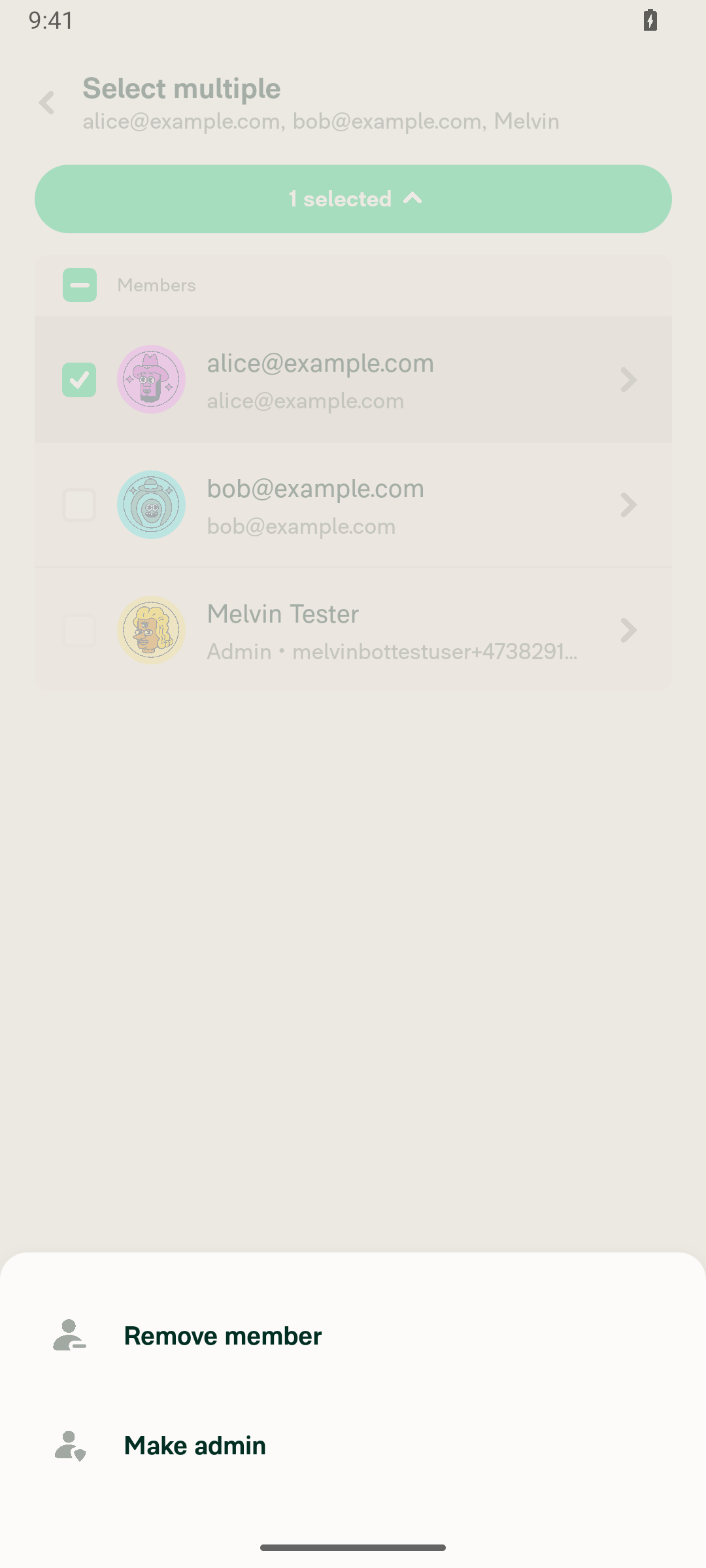
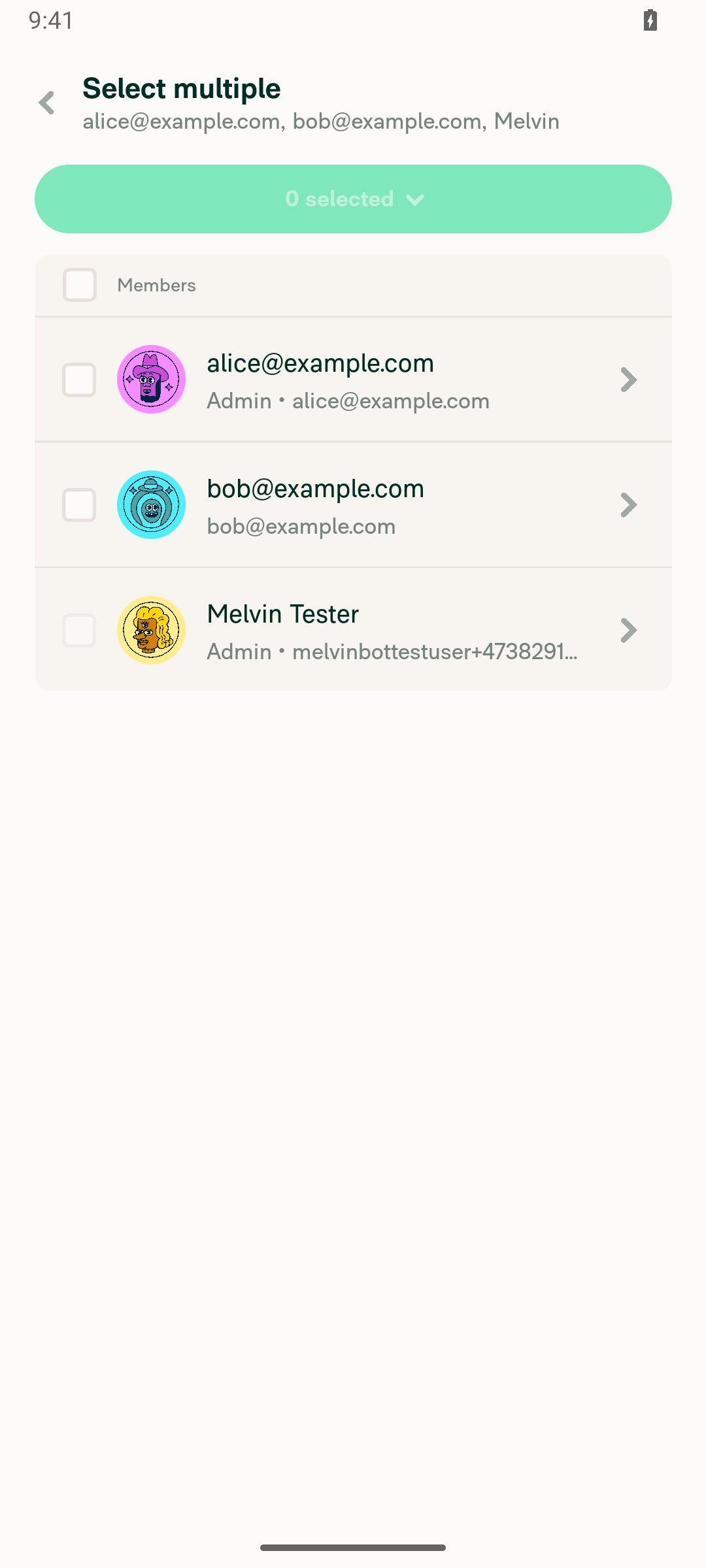
4. Invite / Select / Remove / Make admin / Make member Invite member button present. Long-press a row → Select enters selection mode with per-row checkboxes (the self/admin row's checkbox is correctly disabled). The N selected dropdown offers Remove member + Make admin; after making alice an admin her row updated to Admin • alice@example.com (identical layout to the self admin row), and the dropdown then offered Make member, which reverted her cleanly.
Evidence (screenshots)

New Table layout:
Group members page rendered in the new Table layout on Android: single Members header, avatar + name + subtitle + caret, admin shows Admin dot email

Long-press selection mode:
Long-press selection mode with per-row checkboxes; self/admin row checkbox disabled

Bulk actions:
Bulk actions menu: Remove member and Make admin

After Make admin (alice → Admin, consistent subtitle layout):
After Make admin: alice now shows Admin dot email subtitle, identical layout to the self admin row

Steps not covered on Android native

  • Step 3 (hover tooltip on a long email): not applicable on Android native — hover/tooltip is a pointer-only interaction, so there's nothing to verify here on a touch device. This one should be confirmed on Web/mWeb.
  • Step 5 (non-group participant list renders read-only): not exercised on-device in this run. The read-only branch is gated on isGroupChat (the Invite/select/role UI only renders {isGroupChat && ...}), so it applies to chat rooms, threads, task/expense reports — none of which I could construct cheaply here (a thread I created off the group chat routed its "Members" back to the parent group's editable list, and rooms require a workspace). Worth a quick manual check on a room or expense report, ideally on Web.
Environment note

Verified on the standalone NewDot Android build (the RN/JS that also ships inside HybridApp), so the UI/logic findings are faithful. This run does not cover HybridApp-shell behavior (OldDot native screens / bridge) or iOS.

Sign up for free to join this conversation on GitHub. Already have an account? Sign in to comment

Labels

Projects

None yet

Development

Successfully merging this pull request may close these issues.

7 participants