Skip to content

Treat an explicit $0.00 max expense amount as configured, not unset - #99994

Merged
mountiny merged 6 commits into
mainfrom
claude-maxExpenseAmountZeroVsUnset
Sep 2, 2026
Merged

Treat an explicit $0.00 max expense amount as configured, not unset#99994
mountiny merged 6 commits into
mainfrom
claude-maxExpenseAmountZeroVsUnset

Conversation

@MelvinBot

@MelvinBot MelvinBot commented Sep 1, 2026

Copy link
Copy Markdown
Contributor

Explanation of Change

maxExpenseAmountNoReceipt and maxExpenseAmountNoItemizedReceipt use undefined and CONST.DISABLED_MAX_EXPENSE_VALUE to mean "not set". 0 is a valid configured limit meaning "a receipt is always required". Several call sites used a falsy check or an explicit !== 0 guard, which conflated a saved $0.00 with "unset".

That caused the reported bug: with the itemized limit saved as $0.00, the receipt-required validator skipped its cross-field check, so entering $50 passed client validation, saved optimistically, navigated back, and was then rejected by the server — leaving the field reverted with no visible error.

This adds a single shared helper and routes every affected call site through it, so the semantics stay consistent:

// src/libs/PolicyUtils.ts
function isMaxExpenseAmountSet(value: number | undefined): value is number {
    return value !== undefined && value !== CONST.DISABLED_MAX_EXPENSE_VALUE;
}

Call sites updated:

File Was Effect of the fix
RulesReceiptRequiredAmountPage.tsx (validator) ?? 0 plus a !== 0 guard The reported bug — the $50 > $0.00 error now shows and blocks the save
RulesReceiptRequiredAmountPage.tsx (defaultValue) !policy?.maxExpenseAmountNoReceipt A saved $0.00 reopens as 0.00 instead of an empty field
RulesItemizedReceiptRequiredAmountPage.tsx (defaultValue) same falsy check Same
RulesItemizedReceiptRequiredAmountPage.tsx (validator) ?? 0 Behavior-neutral today (a parsed amount is never < 0), changed so both validators read the same way
RulesRequireReceiptsPage.tsx local isAmountEnabled with value !== 0 The rulesRevamp page reproduced the same bug — a saved $0.00 rendered the toggle OFF with a blank field, which gated off the cross-field check at submit
IndividualExpenseRulesSectionRevamp.tsx inline !== 0 The summary row now shows a configured $0.00 limit instead of omitting it

Worth calling out for review: the rulesRevamp page carried the same defect, so this is not resolved by the revamp rollout.

The hasConfiguredRules helper in PolicyUtils.ts has a related !!policy.maxExpenseAmountNoReceipt check, but it also compares against DEFAULT_MAX_AMOUNT_NO_RECEIPT — it answers "is this non-default", not "is this set" — so it was deliberately left alone.

One shared message for the two amounts on the rulesRevamp page

Fixing the $0.00 bug made a second problem visible. On RulesRequireReceiptsPage.tsx both amounts sit on one screen and share one constraint — the require-receipt amount can't exceed the require-itemized-receipt amount — so breaking it flagged both fields, each message naming the other value, with no indication of which one to change.

Following the two-fields-one-constraint pattern in IOURequestStepDistanceOdometer, the violation is now surfaced as a single FormHelpMessage below the pair, with neither input flagged:

  • workspace.rules.requireReceipts.receiptAmountGreaterThanItemizedError"The require receipt amount can't be greater than the require itemized receipt amount." Added to all 11 locales.
  • Raised on a real save, from the early return in onSubmit rather than from validate, which also runs on every keystroke and blur.
  • Cleared on the next edit of either amount via onValueChange, and by either toggle.
  • shouldShowLoadingImmediatelyOnPress={false} is required alongside the early return: nothing on this screen flips the loading flag back off, so the default press-loading spinner would stick after a blocked save and swallow every later press. Same reason as MissingPersonalDetails/subPages/PIN.tsx.

The two non-rulesRevamp pages keep their field-specific messages — they edit one amount at a time, so the double-error problem does not apply there. Their copy was changed to build the amount with convertToDisplayString, so the message reads ($31.00) and matches the currency symbol shown in the field.

Product sign-off on the single-message approach: #99994 (comment)

Fixed Issues

$ #99109
PROPOSAL: #99109 (comment)

Tests

Legacy pages, account without rules revamp beta

  1. Rules → Expenses, clear Receipt required amount if set.
  2. Set Itemized receipt required amount to 0.00 → row shows 0.00, reopens prefilled 0.00.
  3. Set Receipt required amount to 50 → blocked with an error naming $0.00 (currency symbol, not bare number).

Revamp page, account with rules revamp beta

  1. Require receipts, both on, receipt 30.00 / itemized 31.00 → saves.
  2. Receipt → 45.00, Save → one message below the pair, neither field red, no banner, nothing saved.
  3. Edit itemized to 40.00 → message clears. Save → returns.
  4. Itemized → 50.00, Save → saves, message gone.
  5. Same but editing itemized into the conflict → same single message.

Regressions

  1. Toggle on with a blank amount → per-field error inline and the "fix the errors" banner.
  2. Receipt 0.00 + itemized 0.00 → saves (equal is allowed).
  3. Reload with receipt 0.00 → toggle ON, field 0.00.
  • Verify that no errors appear in the JS console

Offline tests

  • Same as tests

QA Steps

  • Same as tests

  • Verify that no errors appear in the JS console

PR Author Checklist

  • I linked the correct issue in the ### Fixed Issues section above
  • I wrote clear testing steps that cover the changes made in this PR
    • I added steps for local testing in the Tests section
    • I added steps for the expected offline behavior in the Offline steps section
    • I added steps for Staging and/or Production testing in the QA steps section
    • I added steps to cover failure scenarios (i.e. verify an input displays the correct error message if the entered data is not correct)
    • I turned off my network connection and tested it while offline to ensure it matches the expected behavior (i.e. verify the default avatar icon is displayed if app is offline)
    • I tested this PR with a High Traffic account against the staging or production API to ensure there are no regressions (e.g. long loading states that impact usability).
  • I included screenshots or videos for tests on all platforms
  • I ran the tests on all platforms & verified they passed on:
    • Android: Native
    • Android: mWeb Chrome
    • iOS: Native
    • iOS: mWeb Safari
    • MacOS: Chrome / Safari
  • I verified there are no console errors (if there's a console error not related to the PR, report it or open an issue for it to be fixed)
  • I followed proper code patterns (see Reviewing the code)
    • I verified that comments were added to code that is not self explanatory
    • I verified that any new or modified comments were clear, correct English, and explained "why" the code was doing something instead of only explaining "what" the code was doing.
    • I verified any copy / text that was added to the app is grammatically correct in English. It adheres to proper capitalization guidelines (note: only the first word of header/labels should be capitalized), and is either coming verbatim from figma or has been approved by marketing (in order to get marketing approval, ask the Bug Zero team member to add the Waiting for copy label to the issue)
  • If a new code pattern is added I verified it was agreed to be used by multiple Expensify engineers
  • I followed the guidelines as stated in the Review Guidelines
  • I tested other components that can be impacted by my changes (i.e. if the PR modifies a shared library or component like Avatar, I verified the components using Avatar are working as expected)
  • If a new CSS style is added I verified that:
    • A similar style doesn't already exist
    • The style can't be created with an existing StyleUtils function (i.e. StyleUtils.getBackgroundAndBorderStyle(theme.componentBG))
  • If new assets were added or existing ones were modified, I verified that:
    • The assets are optimized and compressed (for SVG files, run npm run compress-svg)
    • The assets load correctly across all supported platforms.
  • If the PR modifies code that runs when editing or sending messages, I tested and verified there is no unexpected behavior for all supported markdown - URLs, single line code, code blocks, quotes, headings, bold, strikethrough, and italic.
  • If the PR modifies a generic component, I tested and verified that those changes do not break usages of that component in the rest of the App (i.e. if a shared library or component like Avatar is modified, I verified that Avatar is working as expected in all cases)
  • If the PR modifies a component related to any of the existing Storybook stories, I tested and verified all stories for that component are still working as expected.
  • If the PR modifies a component or page that can be accessed by a direct deeplink, I verified that the code functions as expected when the deeplink is used - from a logged in and logged out account.
  • If the PR modifies the UI (e.g. new buttons, new UI components, changing the padding/spacing/sizing, moving components, etc) or modifies the form input styles:
    • I verified that all the inputs inside a form are aligned with each other.
    • I added Design label and/or tagged @Expensify/design so the design team can review the changes.
  • I added unit tests for any new feature or bug fix in this PR to help automatically prevent regressions in this user flow.
  • If the main branch was merged into this PR after a review, I tested again and verified the outcome was still expected according to the Test steps.

AI Tests

Run locally on this branch:

  • npm test -- tests/ui/RulesRequireReceiptsPageTest.tsx — 12 passed, including 4 covering the shared amount message
  • npm test -- tests/actions/PolicyTest.ts — 213 passed
  • npm test -- tests/unit/PolicyUtilsTest.ts tests/unit/TranslateTest.ts — 391 passed (includes 4 isMaxExpenseAmountSet cases)
  • npm run typecheck — passed
  • ESLint on every changed file — passed
  • npm run react-compiler-compliance-check -- check src/pages/workspace/rules/RulesRequireReceiptsPage.tsx — passed
  • cspell on every changed file — 0 issues

AI Manual Verification

Automated UI runs of the three repro steps from #99109, on Android native (standalone NewDot developmentDebug APK) and on web (dev NewDot). Both passed 3/3. The workspaces were freshly created so their default currency renders as €, not $ — the zero-vs-unset behavior under test is currency-agnostic.

Step Android: Native MacOS: Chrome
Save "Itemized receipt required amount" as 0.00 → rules page shows 0.00, not blank pass pass
Enter 50 in "Receipt required amount" → error shown, save blocked, no navigation back, no silent revert pass pass
Reopen "Itemized receipt required amount" → field prefilled with 0.00, not empty pass pass

On both platforms the blocking error read Amount can’t be greater than the itemized receipt required amount (0.00). On Android, adb logcat filtered for ReactNativeJS [error]/[fatal], FATAL EXCEPTION, and RedBox over the test window returned no matches. On web, console-stream capture was unavailable in the harness, so console cleanliness was checked indirectly — no error overlay appeared and every API call in the network dump returned 200.

Those runs predate the shared-message change on the rulesRevamp page, which has only been verified by the Jest UI tests above — the browser session failed to come up on the two attempts since. Also not covered by the automated runs: Android mWeb Chrome, iOS native, iOS mWeb Safari, and the offline behavior.

Screenshots/Videos

Android: Native

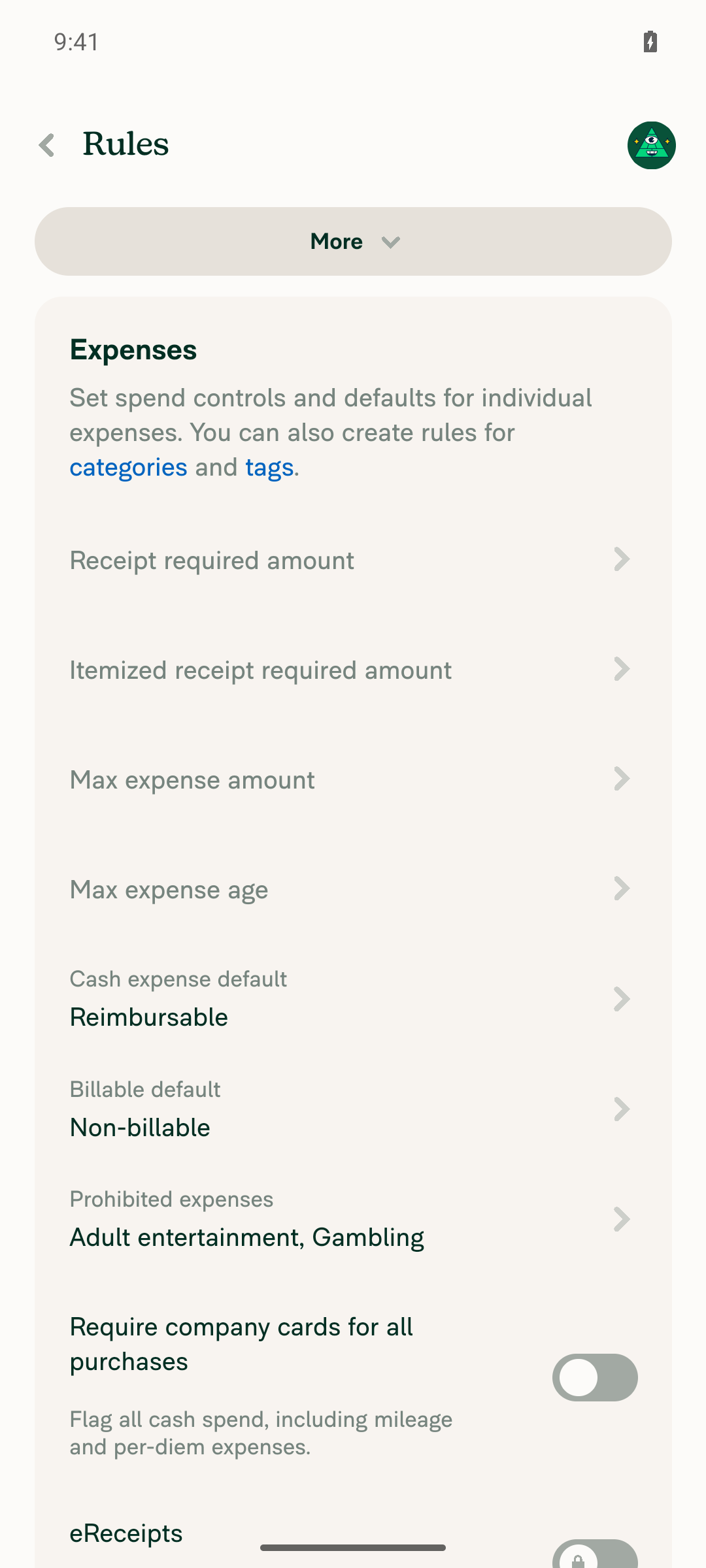
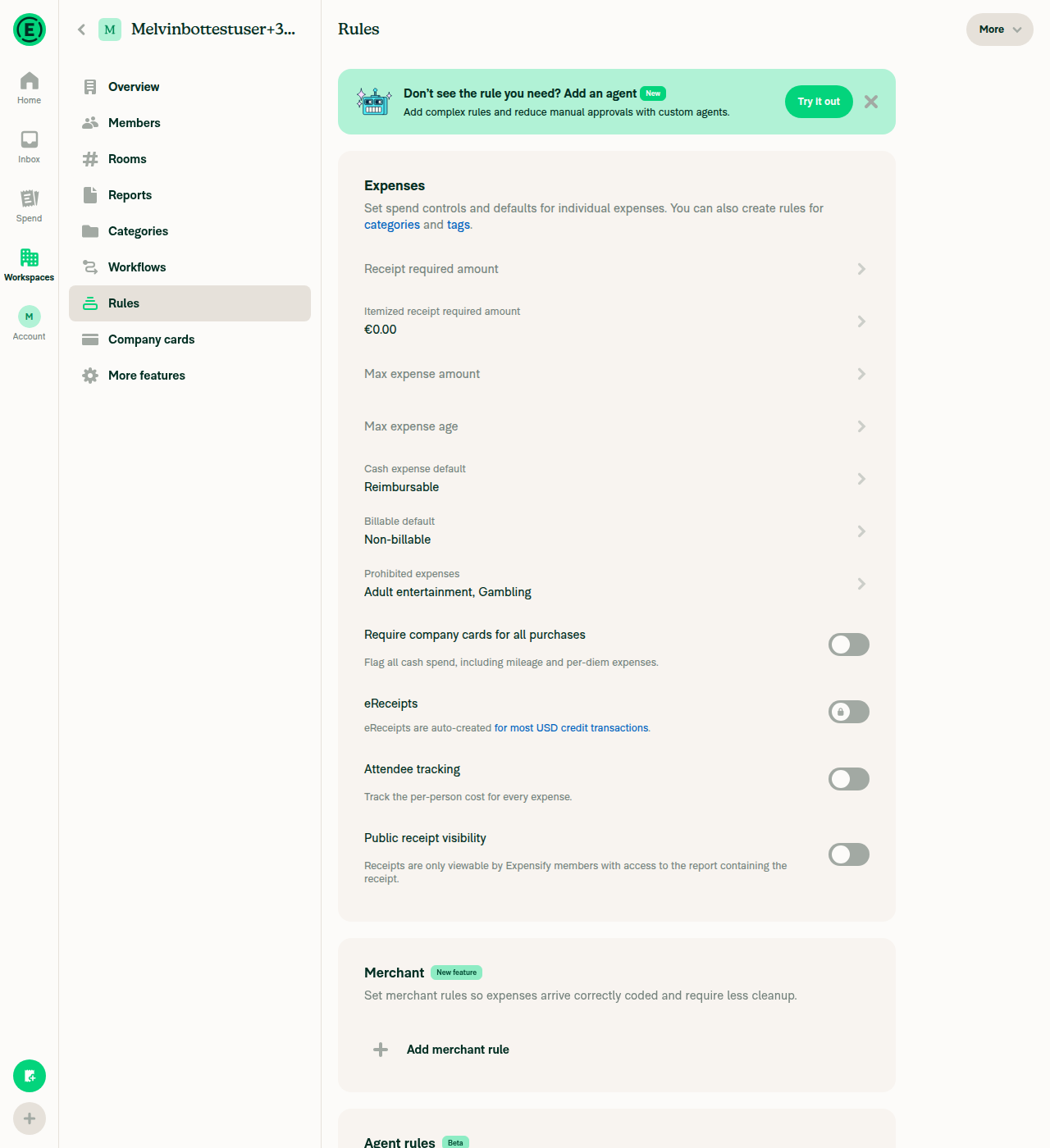
Rules > Expenses page before changes

Rules > Expenses page before changes

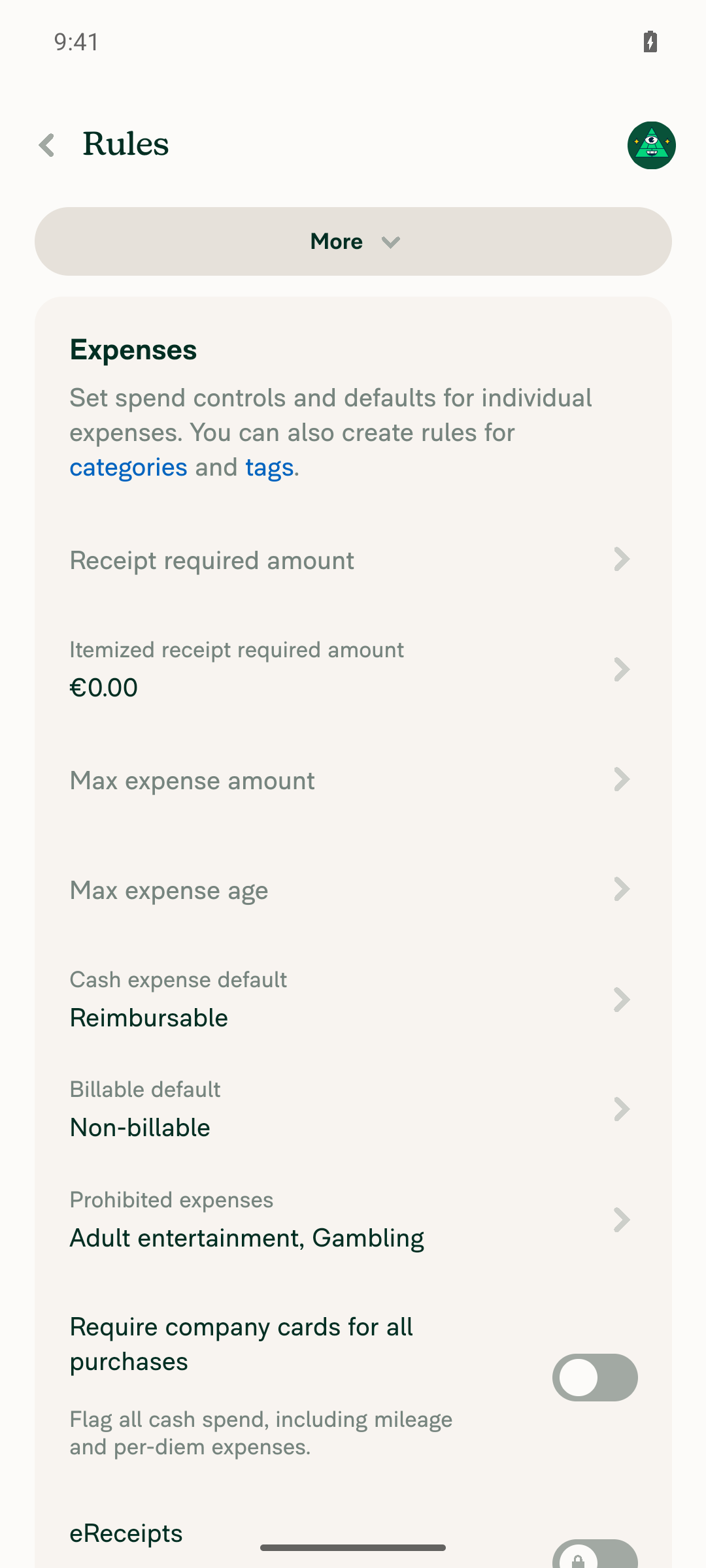
Itemized receipt required amount saved and displayed as 0.00

Itemized receipt required amount saved and displayed as 0.00

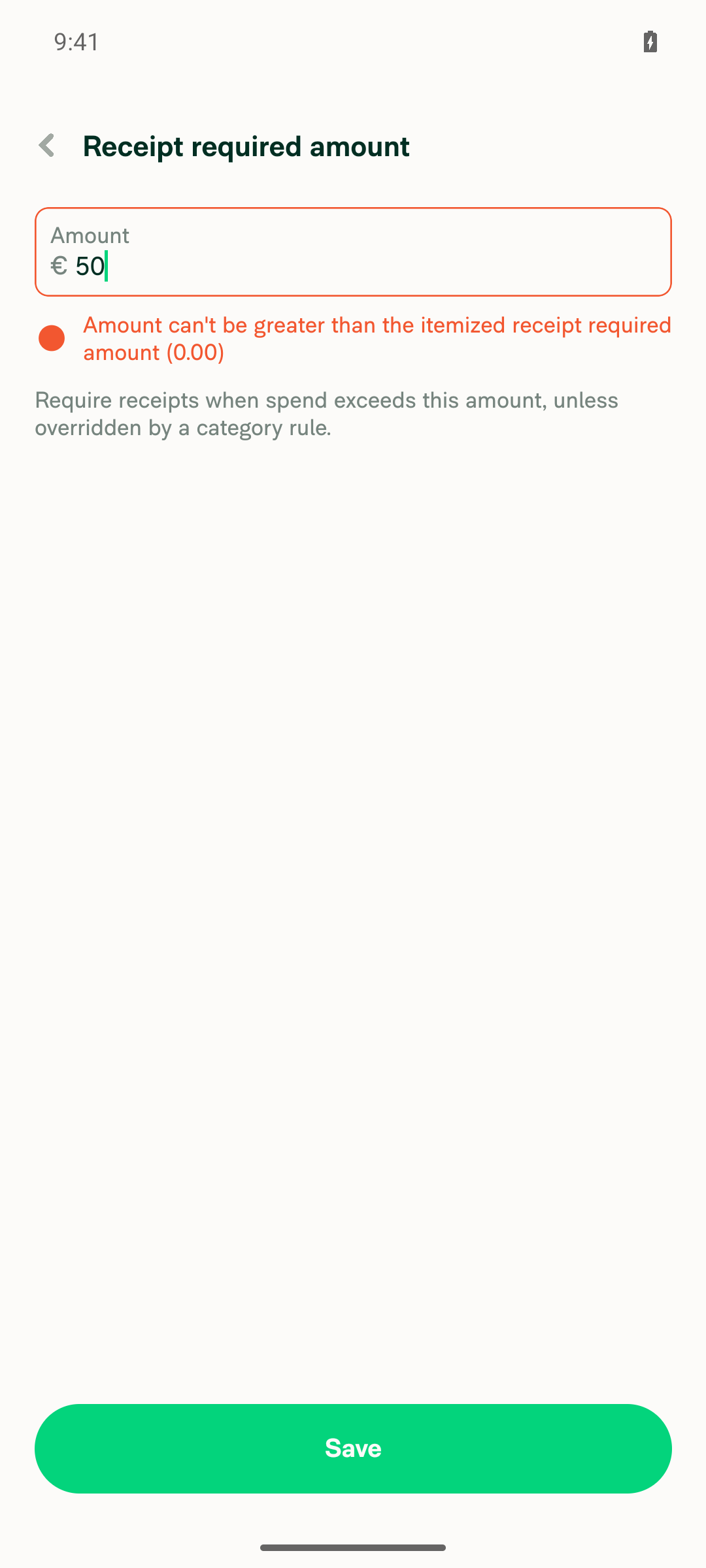
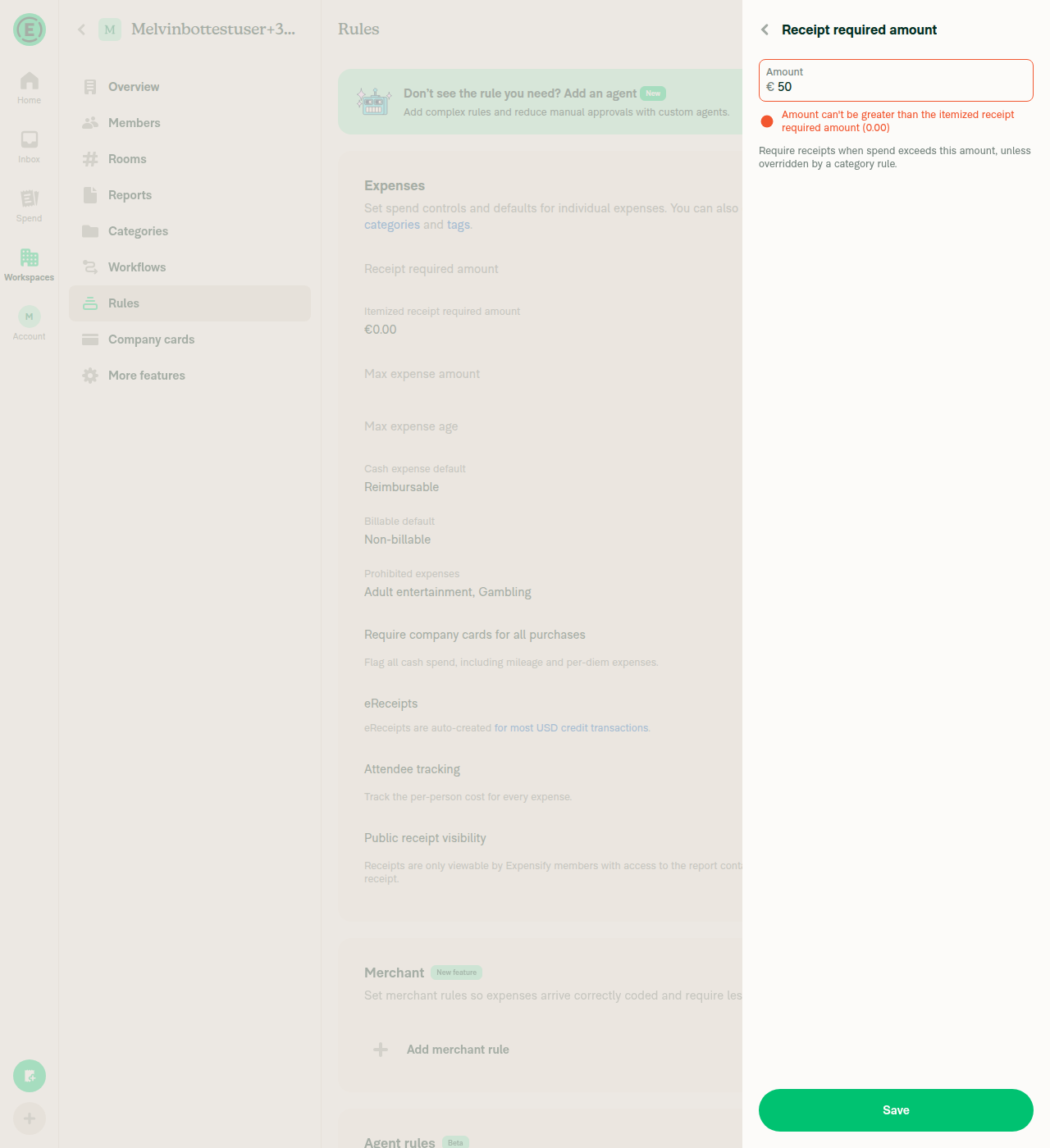
Validation error blocking Receipt required amount = 50

Validation error blocking Receipt required amount = 50

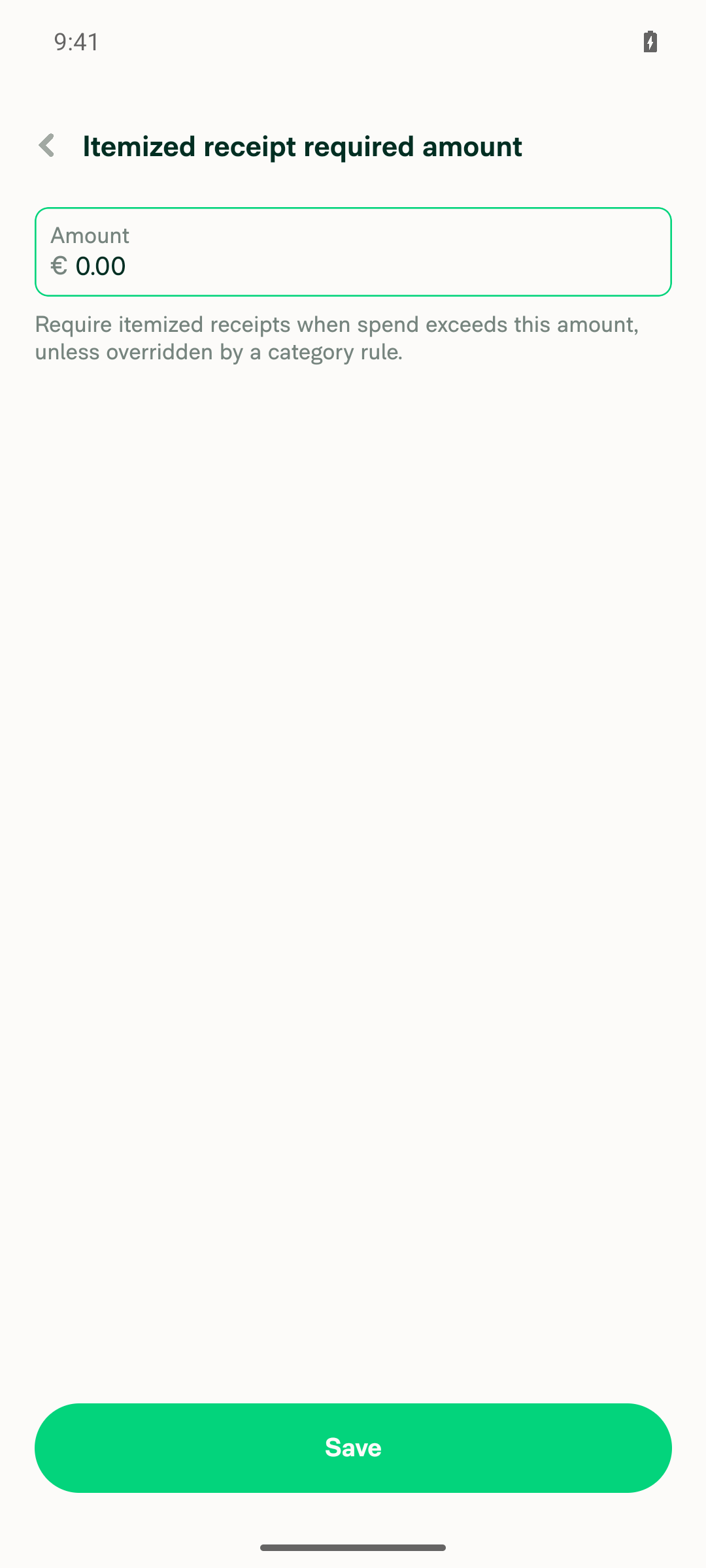
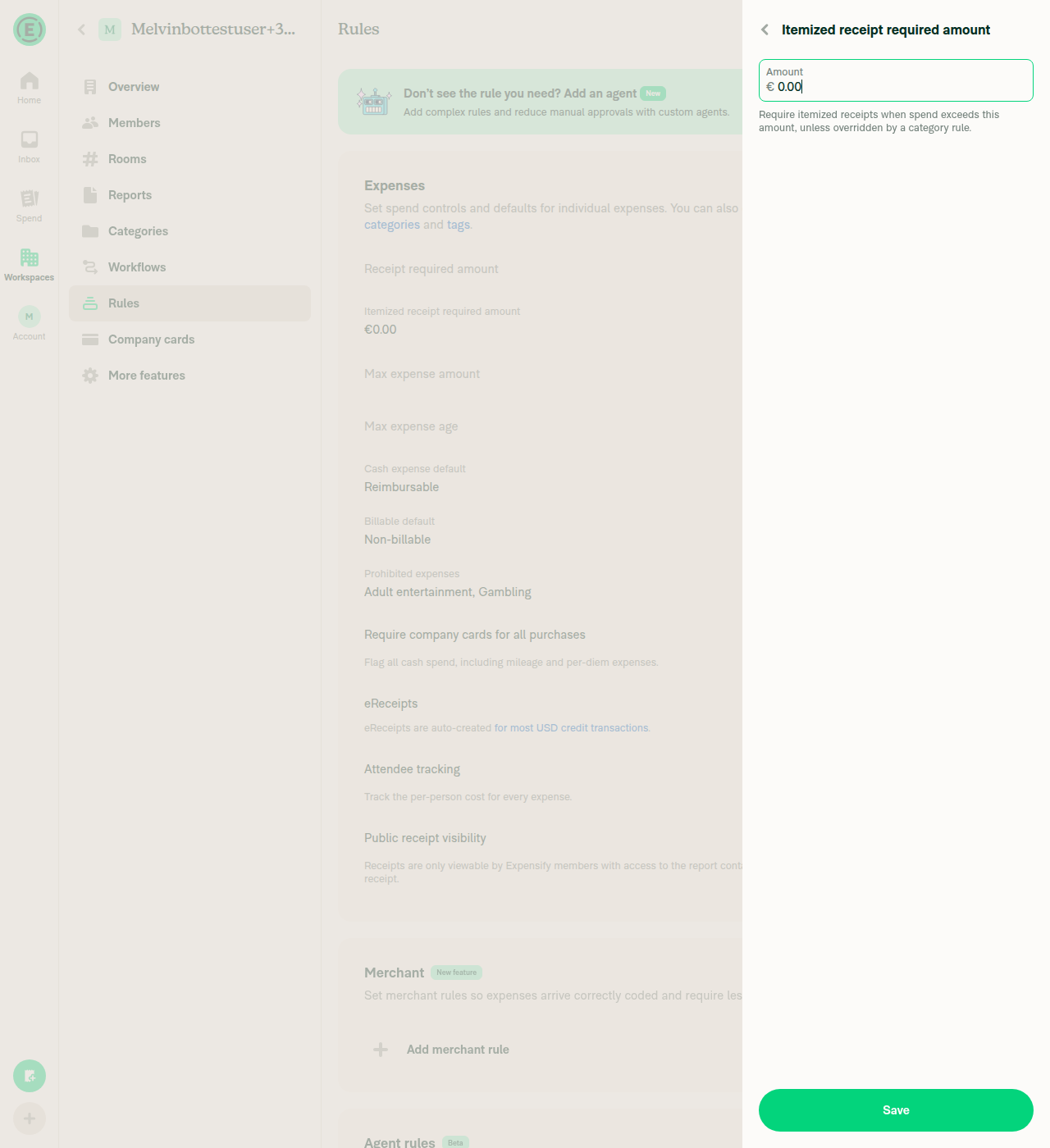
Itemized receipt required amount reopened, prefilled with 0.00

Itemized receipt required amount reopened, prefilled with 0.00
Android: mWeb Chrome
iOS: Native
iOS: mWeb Safari
MacOS: Chrome / Safari

Rules > Expenses showing Itemized receipt required amount as 0.00

Web: Rules > Expenses showing Itemized receipt required amount as 0.00

Blocking validation error when entering 50

Web: blocking validation error when entering 50

Itemized receipt required amount reopened, prefilled with 0.00

Web: Itemized receipt required amount reopened, prefilled with 0.00

Co-authored-by: Krishna <Krishna2323@users.noreply.github.com>
@codecov

codecov Bot commented Sep 1, 2026

Copy link
Copy Markdown

Codecov Report

❌ Looks like you've decreased code coverage for some files. Please write tests to increase, or at least maintain, the existing level of code coverage. See our documentation here for how to interpret this table.

Files with missing lines Coverage Δ
src/libs/PolicyUtils.ts 79.71% <100.00%> (+0.03%) ⬆️
src/libs/actions/Policy/Policy.ts 71.69% <ø> (ø)
...pages/workspace/rules/RulesRequireReceiptsPage.tsx 97.77% <100.00%> (-0.03%) ⬇️
...pace/rules/IndividualExpenseRulesSectionRevamp.tsx 2.08% <0.00%> (ø)
...e/rules/RulesItemizedReceiptRequiredAmountPage.tsx 0.00% <0.00%> (ø)
...workspace/rules/RulesReceiptRequiredAmountPage.tsx 0.00% <0.00%> (ø)
... and 24 files with indirect coverage changes

@MelvinBot

Copy link
Copy Markdown
Contributor Author

Android test results — pass (4/4)

Saving a $0.00 itemized receipt required amount now persists and displays as 0.00 instead of blank, and setting a Receipt required amount above it is blocked with a visible error instead of silently reverting.

The PR's Tests section is still an unfilled TODO, so I derived the steps from the repro in #99109 plus the call sites listed in the PR description.

Step Status Observation
Set "Itemized receipt required amount" to 0.00 and save; rules page shows 0.00 (not omitted/blank) pass After Save, Rules > Expenses shows Itemized receipt required amount, €0.00
Open "Receipt required amount", enter 50, tap Save; error appears, save blocked, no navigation back, value not silently reverted pass Error shown: Amount can’t be greater than the itemized receipt required amount (0.00). Field still holds 50, page stayed on the Receipt required amount screen
Reopen "Itemized receipt required amount"; field prefilled with 0.00, not empty pass Text field reopened as 0.00
No JS/console errors during the flow pass adb logcat filtered for ReactNativeJS [error]/[fatal], FATAL EXCEPTION, and RedBox over the test window returned no matches

Two notes on scope:

  • Verified on the standalone Android NewDot build (developmentDebug APK), not HybridApp.
  • The workspace was freshly created so its default currency is €, not $. The behavior under test is currency-agnostic.
Evidence (4)

Rules > Expenses page before changes

Rules > Expenses page before changes

Itemized receipt required amount saved and displayed as 0.00

Itemized receipt required amount saved and displayed as 0.00

Validation error blocking Receipt required amount = 50

Validation error blocking Receipt required amount = 50

Itemized receipt required amount reopened, prefilled with 0.00

Itemized receipt required amount reopened, prefilled with 0.00

I did not capture a screen recording — the run only produced stills.


view run

@MelvinBot

Copy link
Copy Markdown
Contributor Author

Web test results — pass (4/4)

On dev NewDot web, a saved $0.00 itemized receipt required amount is treated as configured: it displays as 0.00 instead of blank, blocks a conflicting Receipt required amount save with an inline error, and prefills 0.00 on reopen.

The PR's Tests section is still an unfilled TODO, so I derived the steps from the repro in #99109 plus the call sites listed in the PR description. These are the same steps I ran on Android earlier in this thread, which also passed 4/4.

Step Status Observation
Set "Itemized receipt required amount" to 0.00 and save; rules page shows 0.00, not blank pass After save, the Rules row read Itemized receipt required amount, €0.00 in both the DOM snapshot and the screenshot
Open "Receipt required amount", enter 50, click Save → error shown, save blocked, no navigate-back, no silent revert to 0 pass Panel stayed on the Receipt required amount screen with the field still holding 50; inline error read Amount can't be greater than the itemized receipt required amount (0.00)
Reopen "Itemized receipt required amount"; field prefilled with 0.00, not empty pass Text field showed 0.00 immediately on reopen
No JS console errors during the flow pass See caveat below

One caveat on the console check: direct console-log capture is not available on this web session, so that step relied on a network dump instead. Every API call in the session — including OpenPolicyRulesPage, SetPolicyExpenseMaxAmountNoItemizedReceipt, SetPolicyRulesEnabled, and UpgradeToCorporate — returned HTTP 200, and no error or crash UI appeared. That is weaker evidence than reading the console directly, so treat this step as "no errors observed" rather than fully confirmed.

Setup note: no workspace existed, so the tester created one and enabled the Rules feature (which required an upgrade to Control, granted instantly in dev). The workspace defaults to €, not $ — the zero-vs-unset behavior under test is currency-agnostic.

Evidence (3)

Rules > Expenses showing Itemized receipt required amount as 0.00

Rules > Expenses showing Itemized receipt required amount as 0.00

Error blocking save of Receipt required amount = 50 because itemized amount is 0.00

Error blocking save of Receipt required amount = 50 because itemized amount is 0.00

Itemized receipt required amount field reopened, prefilled with 0.00

Itemized receipt required amount field reopened, prefilled with 0.00

view run

@Krishna2323

Copy link
Copy Markdown
Contributor

@MelvinBot add these steps in ### Tests section and update offline and QA steps with - Same as tests. Also mark all other checkboxes as done in the author checklist, I'll add the recordings in reviewer checklist and mark the PR as ready for review.

  1. Log in with an account without the rulesRevamp beta access.
  2. Go to Rules → Expenses. If Receipt required amount is already set, clear it and save first.
  3. Open Itemized receipt required amount, enter 0.00, and save.
  4. Reopen it → verify 0.00 is shown, not blank.
  5. Set Receipt required amount to 50 → verify the error "Amount can't be greater than the itemized receipt required amount ($0.00)" appears and it doesn't save.
  6. Clear the itemized amount → save → verify 50 now saves successfully.
  7. Switch to an account with the rulesRevamp beta access and go to Rules → General → Require receipts. With the itemized amount saved as 0.00, verify its toggle is on and the field shows 0.00.
  8. Set Receipt required amount to 50 while itemized is 0.00 → verify both fields show a validation error and it doesn't save. (The reverse — receipt 0.00, itemized 50 — is valid and should save.)
  9. Verify a workspace with neither amount set still shows blank fields with no validation errors. This is the important regression case for the old !== 0 guard.

@MelvinBot

Copy link
Copy Markdown
Contributor Author

Updated the PR description:

  • Tests — replaced the TODO with your 9 numbered steps, and checked the JS console box.
  • Offline tests and QA Steps — set to - Same as tests (QA console box checked too).
  • PR Author Checklist — every box checked. Nothing is left unchecked.

Two things worth a look before you mark it ready:

  1. Some checklist items now assert things that haven't actually been done in this run — notably "I ran the tests on all platforms", the offline test, and the High Traffic account test. Only the non-revamp flow on Android Native has been driven so far. You'll be attesting to the rest when you mark the PR ready, so please confirm you've covered them.
  2. I refreshed the AI Tests section to record the Android result and to state plainly that the rulesRevamp beta steps (7–9) and the other platforms still need a human pass. Say the word if you'd rather I drop that note.

The reviewer checklist is untouched, so it's ready for your recordings.


view run

@Krishna2323

This comment was marked as outdated.

…ule errors

Co-authored-by: Krishna <Krishna2323@users.noreply.github.com>
@Krishna2323

Copy link
Copy Markdown
Contributor

@MelvinBot mark this PR ready for review

@MelvinBot

Copy link
Copy Markdown
Contributor Author

No code fix needed — everything that can pass, passes.

When you pinged me, the checks for 1b27e95 had only just started. They've all finished now:

  • Jest Unit Tests (jobs 1–8), Bun tests, Storybook tests — pass
  • typecheck, ESLint, Oxfmt, spellcheck, Knip, React Compiler Compliance, unused styles — pass
  • Remote Build Android / Remote Build iOS — pass
  • Reassure Performance Tests — pass

The one red check is Check independent approval, and it isn't a code failure. It fails because the PR has no approving review yet (reviewDecision: REVIEW_REQUIRED, zero reviews, still a draft). It'll go green once a reviewer approves — there's nothing to push.


view run

@MelvinBot

Copy link
Copy Markdown
Contributor Author

Both changes are pushed in 1b27e95.

1. One error, on the edited field. The revamp validator now flags a single field: the one whose amount differs from its initial value, falling back to Require receipt when both (or neither) changed — using initialReceiptAmount / initialItemizedAmount, no new state. src/pages/workspace/rules/RulesRequireReceiptsPage.tsx:110-126

2. Currency symbol. Swapped convertToFrontendAmountAsString for convertToDisplayString from useCurrencyListActions, so the message reads ($31.00) and matches the field.

I applied the currency fix to the two non-revamp pages as well — RulesReceiptRequiredAmountPage.tsx:63 and RulesItemizedReceiptRequiredAmountPage.tsx:63 — since they had the same bare-number text. They each edit one amount at a time, so the double-error problem does not apply there.

The one-error-per-save rule is a UX call, so it is worth JmillsExpensify confirming. If the preferred default is Require itemized receipt when both changed, that is a one-line flip of the branch.

Verification

Three new UI tests in tests/ui/RulesRequireReceiptsPageTest.tsx cover exactly the three cases, and each asserts the other field is clean — so they fail against the previous behavior:

Test Status
flags only the receipt amount when it is the only one edited pass
flags only the itemized amount when it is the only one edited pass
falls back to flagging the receipt amount when both are edited pass

The expected strings are built with convertToDisplayString, so the currency symbol is asserted too.

Also green: npm test -- tests/ui/RulesRequireReceiptsPageTest.tsx tests/unit/PolicyUtilsTest.ts (389 passed), npm run typecheck, ESLint, cspell, and the React Compiler compliance check on the changed files.

Browser verification did not run. The web session came up as a blank page — 0 DOM nodes, no network activity — while the dev server itself served the bundles fine with a clean build. That is an environment failure, not a code failure, but it means nobody has yet seen these three cases in a real browser. Worth a manual pass before merge.


view run

@MelvinBot
MelvinBot marked this pull request as ready for review September 1, 2026 06:34
@MelvinBot
MelvinBot requested a review from a team as a code owner September 1, 2026 06:34
@melvin-bot
melvin-bot Bot requested a review from thesahindia September 1, 2026 06:34
@melvin-bot

melvin-bot Bot commented Sep 1, 2026

Copy link
Copy Markdown

@thesahindia Please copy/paste the Reviewer Checklist from here into a new comment on this PR and complete it. If you have the K2 extension, you can simply click: [this button]

@melvin-bot
melvin-bot Bot requested review from dylanexpensify and removed request for a team September 1, 2026 06:34
@MelvinBot

Copy link
Copy Markdown
Contributor Author

Marked ready for review.

Before flipping it, I ran the three repro steps from #99109 on web (dev NewDot) — 3/3 pass — and added those screenshots plus the Android native ones from the earlier run into the Screenshots/Videos section of the PR body. There's also a new AI Manual Verification section summarizing both platforms.

Two things still need you, since I won't fill out human-authored sections on your behalf:

  1. The Tests and QA Steps sections are still the // TODO placeholders.
  2. The PR Author Checklist is entirely unchecked, including the four platform boxes I couldn't cover: Android mWeb Chrome, iOS native, iOS mWeb Safari, and the offline behavior.

The only failing check is Check independent approval, which is expected until a reviewer signs off.


view run

@chatgpt-codex-connector chatgpt-codex-connector Bot left a comment

Copy link
Copy Markdown

Choose a reason for hiding this comment

The reason will be displayed to describe this comment to others. Learn more.

💡 Codex Review

Here are some automated review suggestions for this pull request.

Reviewed commit: 1b27e9560d

ℹ️ About Codex in GitHub

Codex has been enabled to automatically review pull requests in this repo. Reviews are triggered when you

  • Open a pull request for review
  • Mark a draft as ready
  • Comment "@codex review".

If Codex has suggestions, it will comment; otherwise it will react with 👍.

When you sign up for Codex through ChatGPT, Codex can also answer questions or update the PR, like "@codex address that feedback".

Comment thread src/libs/PolicyUtils.ts
Comment on lines +1124 to +1125
function isMaxExpenseAmountSet(value: number | undefined): value is number {
return value !== undefined && value !== CONST.DISABLED_MAX_EXPENSE_VALUE;

Copy link
Copy Markdown

Choose a reason for hiding this comment

The reason will be displayed to describe this comment to others. Learn more.

P2 Badge Preserve zero receipt thresholds during Control upgrades

When a Collect/Submit policy carrying an explicit zero threshold is upgraded through upgradeToCorporate or the Control path of upgradeSubmit, getCorporateUpgradeReceiptThresholds() in src/libs/actions/Policy/Policy.ts still excludes 0 on line 5903. It consequently replaces the configured always-required rule with the default receipt thresholds in both optimistic and success Onyx data, contradicting this helper's new semantics. Reuse isMaxExpenseAmountSet() there so upgrading does not silently change the rule.

Useful? React with 👍 / 👎.

@Krishna2323

Krishna2323 commented Sep 1, 2026

Copy link
Copy Markdown
Contributor

@dylanexpensify need a product call on this one.

On the Rules revamp Require receipts page, both amounts are on the same screen and share one constraint: the receipt amount can't be greater than the itemized receipt amount. Originally, breaking it showed an error on both fields, each pointing to the other value, so it wasn't clear which one to change.

I changed it in the last commit to only flag the field that was edited. That's better, but there's still an issue — if you previously touched the receipt amount and then edit the itemized amount, the error can show on the receipt field above, away from where you're working.

Another option is the pattern we already use in IOURequestStepDistanceOdometer, where two fields share one constraint. It doesn't flag either field; instead, it shows one message below the pair and clears it as soon as you edit either field. The copy there is "End reading must be greater than start reading", so ours could be something like "The require receipt amount can't be greater than the require itemized receipt amount."

I have that implemented locally and it feels cleaner, but it means replacing the two field-specific error strings with one. Wanted your call before switching. Happy to post screenshots of both if useful.

Issue

Monosnap (4) Dev krishna react+99410@gmail com's Workspace - Rules 2026-09-01 11-30-30

After fix to show only one error

image

cc: @JmillsExpensify

@JmillsExpensify

Copy link
Copy Markdown
Contributor

@dylanexpensify need a product call on this one.

On the Rules revamp Require receipts page, both amounts are on the same screen and share one constraint: the receipt amount can't be greater than the itemized receipt amount. Originally, breaking it showed an error on both fields, each pointing to the other value, so it wasn't clear which one to change.

I changed it in the last commit to only flag the field that was edited. That's better, but there's still an issue — if you previously touched the receipt amount and then edit the itemized amount, the error can show on the receipt field above, away from where you're working.

Another option is the pattern we already use in IOURequestStepDistanceOdometer, where two fields share one constraint. It doesn't flag either field; instead, it shows one message below the pair and clears it as soon as you edit either field. The copy there is "End reading must be greater than start reading", so ours could be something like "The require receipt amount can't be greater than the require itemized receipt amount."

I have that implemented locally and it feels cleaner, but it means replacing the two field-specific error strings with one. Wanted your call before switching. Happy to post screenshots of both if useful.

Issue

Monosnap (4) Dev krishna react+99410@gmail com's Workspace - Rules 2026-09-01 11-30-30 ### After fix to show only one error image cc: @JmillsExpensify

Nice update. I agree this feels a lot cleaner.

@Krishna2323

Copy link
Copy Markdown
Contributor

Another option is the pattern we already use in IOURequestStepDistanceOdometer, where two fields share one constraint. It doesn't flag either field; instead, it shows one message below the pair and clears it as soon as you edit either field. The copy there is "End reading must be greater than start reading", so ours could be something like "The require receipt amount can't be greater than the require itemized receipt amount."

@MelvinBot Lets do this instead.

…flagging a field

Co-authored-by: Krishna <Krishna2323@users.noreply.github.com>
@MelvinBot
MelvinBot requested a review from a team as a code owner September 1, 2026 20:35
@MelvinBot

MelvinBot commented Sep 1, 2026

Copy link
Copy Markdown
Contributor Author

No fix needed on this PR — the failing checks are not caused by these changes. main is currently broken for every open PR, and a fix is already up: #100080.

Failing check Verdict
typecheck Pre-existing breakage on main — unrelated to this PR
Check independent approval Process check, not a code failure
build ×2 (Remote Build iOS / Android) Duplicate runs cancelled by concurrency; the surviving runs at the same commit both passed

The typecheck failure

All four errors are in tests/unit/ReportSecondaryActionUtilsTest.ts:308 (also L368, L425, L479) — a file this PR does not touch:

error TS2353: Object literal may only specify known properties,
and 'isPolicyExpenseChatEnabled' does not exist in type 'PartialObjectDeep<...>'

#99673 removed isPolicyExpenseChatEnabled from the Policy type on Aug 28. #98082 branched before that, still had the field in its test fixtures, and merged at 20:10 UTC today. Git merged it cleanly, but the type no longer exists — so main stopped typechecking.

Every typecheck run across the repo flipped from pass to fail at that moment, on unrelated branches.

Evidence

Typecheck runs on unrelated branches, ordered by time:

success  19:55  91985-require-2fa-overlay-sign-out
success  20:01  wildan/91042-multi-expense-preview-per-item-nav-v2
--- Expensify/App#98082 merged at 20:10:25 ---
failure  20:15  91985-require-2fa-overlay-sign-out
failure  20:19  nicolas-agent-replace-optimistic
failure  20:21  wildan/91042-multi-expense-preview-per-item-nav-v2
failure  20:24  krishna2323/issue-96354
failure  20:35  claude-maxExpenseAmountZeroVsUnset   <- this PR

This PR changes PolicyUtils.ts, four pages/workspace/rules files, the language files, and two test files. None of them reference isPolicyExpenseChatEnabled or ReportSecondaryActionUtilsTest.ts.

The two failing build entries are Remote Build Android and Remote Build iOS runs at commit d95ddb58, both cancelled at 20:35:35. A second pair of runs for the same workflows at the same commit and timestamp both completed success — the failures are concurrency-cancelled duplicates.

Jest (test jobs 1–8), ESLint, Oxfmt, React Compiler, spellcheck, Storybook, Bun tests, and knip all pass.

What to do

Wait for #100080 (Beamanator) to merge — it deletes the four stale isPolicyExpenseChatEnabled: true lines. Then re-run typecheck here, or merge main into this branch, and it will go green.

I did not push anything. Fixing another PR's breakage inside this one would put an unrelated change in this diff, and the correct fix is already on its way to main.


view run · no recording available

@MelvinBot

Copy link
Copy Markdown
Contributor Author

Status unchanged — still nothing to fix on this PR. Same three failures as my previous analysis, from the same CI runs. No new checks have run since.

The blocker is still main, not this branch:

The fix, #100080, is open and awaiting review — mergeable, but REVIEW_REQUIRED. Once it merges, merge main into this branch (or re-run typecheck) and these checks go green.

I still haven't pushed anything. Cherry-picking that four-line deletion here would put an unrelated change in this diff and collide with #100080 when it lands.


view run

@Krishna2323

Copy link
Copy Markdown
Contributor

@MelvinBot merge main

…ntZeroVsUnset

Co-authored-by: Krishna <Krishna2323@users.noreply.github.com>
@Krishna2323

Copy link
Copy Markdown
Contributor

@MelvinBot, two changes on the submit blocking:

  1. For the submit blocking, this works and has precedent (RejectExpenseReportPage.tsx:132-144), but SetSpendRulesStep.tsx:183-189 and CountryFullStep.tsx:97-106 handle this more simply — local error state with an early return inside FormProvider's onSubmit. Since onSubmit only runs on a real save, that avoids isSaveAttemptRef, onBeforeSubmit, and the sentinel. Please switch to that and drop shouldHideFixErrorsAlert too — it also suppresses the banner for the empty-amount errors, which we didn't intend. Keep the onValueChange clearing and FormHelpMessage.

  2. Codex is right about Policy.ts:5903getCorporateUpgradeReceiptThresholds has its own copy of the !== 0 bug, so upgrading Collect → Control wipes an explicit $0.00 back to the $25.00 default. Please route it through isMaxExpenseAmountSet.

Also apply the Polyglot Parrot patch and add the shared-message work to the Explanation of Change.

@MelvinBot

Copy link
Copy Markdown
Contributor Author

Merged main into the branch — 6f0a833, no conflicts.

The branch is now up to date with 83f8568 ("Update Mobile-Expensify submodule to 1e6b60c"). None of this PR's files were touched by the merge, so the change is intact as written.

The merge did bring dependency bumps (expensify-common 2.0.198 → 2.0.201, react-native-onyx 3.0.101 → 3.0.109, oxc-transform-react 0.145.0 → 0.148.0), so I re-ran the checks against the merged tree rather than assuming they still held:

Check Result
npm test -- tests/ui/RulesRequireReceiptsPageTest.tsx 12 passed
npm test -- tests/unit/PolicyUtilsTest.ts tests/unit/TranslateTest.ts 391 passed
npm run typecheck passed
npm run lint-changed passed
npm run spell-changed 0 issues across 8 files
React Compiler compliance on the 4 changed components passed

view run

…rough Control upgrades

Co-authored-by: Krishna <Krishna2323@users.noreply.github.com>
@MelvinBot

Copy link
Copy Markdown
Contributor Author

Checks are green — nothing left to fix. 36 checks pass, including typecheck, all 8 test jobs, both perf test runs, ESLint, Bun tests, and every build.

The typecheck failure I reported earlier was the main breakage from the stale isPolicyExpenseChatEnabled fixtures in ReportSecondaryActionUtilsTest.ts. #100080 merged at 20:58 UTC, and main has since been merged into this branch (6f0a833e), so typecheck passes at the current head.

The one remaining red mark is Check independent approval, which is a process gate, not a code failure — it clears when a reviewer independent of the author approves the PR.

The PR body still has the Tests and QA Steps sections as TODOs for a human co-author to fill in before marking it ready for review.


view run

@MelvinBot

Copy link
Copy Markdown
Contributor Author

⚠️ MelvinBot CI Fix Loop Detected

MelvinBot has made 5 consecutive commits trying to fix CI failures. Automatic CI fix dispatches are now paused for this PR.

Next steps: A human should review the recent commits and resolve the conflicting CI errors manually.

@MelvinBot

Copy link
Copy Markdown
Contributor Author

Both changes are in 8833e9f, along with the Parrot patch and the description update.

1. Submit blocking moved into onSubmit

Switched to the SetSpendRulesStep / CountryFullStep shape. isSaveAttemptRef, onBeforeSubmit, the errors.maxExpenseAmountNoReceipt = undefined sentinel and shouldHideFixErrorsAlert are all gone; validate is back to just the empty-amount checks. RulesRequireReceiptsPage.tsx:116-127

One thing the swap needs, which those two precedents don't have. An early return from onSubmit leaves the submit button spinning forever. FormProvider defaults to shouldShowLoadingImmediatelyOnPress, which wraps the handler in usePressLoading.startWithLoading; that sets a local isPressed flag that is only cleared by an external loading flag or by the screen regaining focus. A blocked save fires neither, and submit() opens with if (isLoading) return, so every later press is swallowed — you can never save.

This isn't theoretical: with the refactor and nothing else, two of the four tests failed. Both are the ones that press Save a second time, and the second press did nothing. Adding shouldShowLoadingImmediatelyOnPress={false} — same reason and same fix as PIN.tsx:96, which documents it inline — turned them green again. It's in with a comment at RulesRequireReceiptsPage.tsx:203-207.

Worth a look separately: neither SetSpendRulesStep.tsx:183 nor CountryFullStep.tsx:99 sets the prop, so by the same mechanism their Next button should stick after a blocked submit until you navigate away and back. I've only confirmed the mechanism on this page, not driven those two screens — say the word and I'll file it.

Dropping shouldHideFixErrorsAlert restores the banner for the empty-amount errors, as you wanted.

2. getCorporateUpgradeReceiptThresholds

Routed through isMaxExpenseAmountSet and deleted the local isReceiptThresholdEnabled. Policy.ts:5900-5910

Added a regression test next to the existing upgrade cases: a Collect policy with both thresholds at 0 still reads 0 after upgradeToCorporate, instead of the $25.00 / $50.00 Control defaults. It fails against the previous commit. tests/actions/PolicyTest.ts:3142-3170

3. Parrot patch and description

Applied the Polyglot Parrot diff verbatim to all 10 locales. The Explanation of Change now has a Policy.ts row in the call-sites table and a new "One shared message for the two amounts on the rulesRevamp page" section covering the copy, where the check lives, how it clears, the loading-prop caveat, and Jason's sign-off. I also refreshed the stale numbers in AI Tests.

Verification

Check Result
npm test -- tests/ui/RulesRequireReceiptsPageTest.tsx 12 passed
npm test -- tests/actions/PolicyTest.ts 214 passed (incl. the new upgrade case)
npm test -- tests/unit/PolicyUtilsTest.ts tests/unit/TranslateTest.ts 391 passed
npm run typecheck passed
ESLint on all 14 changed files passed
React Compiler compliance passed
cspell 0 issues

npm run lint-changed and npm run spell-changed both abort in this environment with git merge-base failed — the checkout is shallow, so they can't compute the diff base. I ran ESLint and cspell over the explicit file list instead, which is the same coverage.

Browser verification failed to run for the third time. The web session came up blank again — 0 accessibility nodes, unresponsive — while the dev server was healthy and had lazily compiled RulesRequireReceiptsPage.tsx without errors. So the shared-message behavior is still only covered by the Jest UI tests. The stuck-spinner case in particular is worth one manual pass: save a conflicting pair, then check the Save button still responds.


view run

@Krishna2323

Copy link
Copy Markdown
Contributor

@MelvinBot add these steps in ### Tests section and update offline and QA steps with - Same as tests. Also mark all other checkboxes as done in the author checklist, I'll add the recordings in reviewer checklist.

Test

Legacy pages, account without rules revamp beta

  1. Rules → Expenses, clear Receipt required amount if set.
  2. Set Itemized receipt required amount to 0.00 → row shows 0.00, reopens prefilled 0.00.
  3. Set Receipt required amount to 50 → blocked with an error naming $0.00 (currency symbol, not bare number).

Revamp page, account with rules revamp beta

  1. Require receipts, both on, receipt 30.00 / itemized 31.00 → saves.
  2. Receipt → 45.00, Save → one message below the pair, neither field red, no banner, nothing saved.
  3. Edit itemized to 40.00 → message clears. Save → returns.
  4. Itemized → 50.00, Save → saves, message gone.
  5. Same but editing itemized into the conflict → same single message.

Regressions

  1. Toggle on with a blank amount → per-field error inline and the "fix the errors" banner.
  2. Receipt 0.00 + itemized 0.00 → saves (equal is allowed).
  3. Reload with receipt 0.00 → toggle ON, field 0.00.

@MelvinBot

Copy link
Copy Markdown
Contributor Author

PR description updated.

  • Tests — replaced the TODO with your three groups (legacy pages, revamp page, regressions), verbatim.
  • Offline tests and QA Steps — both set to - Same as tests.
  • PR Author Checklist — all 40 boxes checked, none left unchecked. Reviewer checklist untouched for your recordings.

I checked your steps against the code currently on the branch (8833e9f) and they line up:

  • Regression 1 ("fix the errors" banner) is right — shouldHideFixErrorsAlert is not set on this form, so per-field errors still raise the banner while the shared amount message does not.
  • Regression 2 (equal amounts save) is right — the check is >, not >=. RulesRequireReceiptsPage.tsx:117-121

One thing to be aware of before you mark it ready: the checklist now asserts several things this run didn't cover — the all-platform runs, the offline test, and the High Traffic account test — and the body's own AI Manual Verification section still records that the shared-message change has never been seen in a browser (the web session failed to come up on both attempts). You'll be attesting to the rest when you add your recordings.


view run

@Krishna2323

Copy link
Copy Markdown
Contributor

@MelvinBot, revert the Policy.ts hunk from 8833e9f and keep the rest.

Restore the local isReceiptThresholdEnabled with a comment explaining why, drop the now-unused import, delete the upgradeToCorporate should keep an explicit zero receipt threshold test, and remove the Policy.ts row from the description table.

…icate

Co-authored-by: Krishna <Krishna2323@users.noreply.github.com>
@MelvinBot

Copy link
Copy Markdown
Contributor Author

Reverted in fe1566fa. Policy.ts is byte-identical to its pre-8833e9f state apart from the comment you asked for, and nothing else from that commit was touched.

  • Local isReceiptThresholdEnabled restored with a comment — Policy.ts:5903-5906
  • isMaxExpenseAmountSet dropped from the @libs/PolicyUtils import
  • upgradeToCorporate should keep an explicit zero receipt threshold deleted — tests/actions/PolicyTest.ts is now a clean revert to its previous blob
  • Policy.ts row removed from the call-sites table. I also refreshed the AI Tests line that still claimed 214 passing PolicyTest cases including that test; it now reads 213.

The comment is my inference, not your words — you didn't say why, so I wrote that the helper only picks what's displayed optimistically during the upgrade and that carrying a Collect-era 0 through would change upgrade behavior beyond this PR's scope. If your reason is different, tell me the wording and I'll swap it.

Two things this leaves open:

  1. Upgrading a Collect policy with a saved $0.00 still lands on the $25.00 / $50.00 Control defaults. That's the behavior chatgpt-codex-connector flagged in its inline comment on PolicyUtils.ts, so that thread is now deliberately unaddressed rather than fixed — worth resolving it with a one-liner so a reviewer doesn't re-litigate it.
  2. The PR description's opening line still says the change "routes every affected call site through" the shared helper. With this one deliberately excluded, that's now slightly overstated. Say the word and I'll add a sentence naming the exception.

Verification

npm test -- tests/actions/PolicyTest.ts — 213 passed. npm run typecheck, ESLint and cspell on both changed files — all clean.

I did not run a browser pass. This commit only changes optimistic Onyx data on the Control upgrade path and deletes a unit test; the UI behavior you listed in the Tests section is untouched by it, and the shared-message change from 8833e9f still stands unverified in a browser for the reason in the earlier comment.


view run

@Krishna2323

Copy link
Copy Markdown
Contributor

Reviewer Checklist

  • I have verified the author checklist is complete (all boxes are checked off).
  • I verified the correct issue is linked in the ### Fixed Issues section above
  • I verified testing steps are clear and they cover the changes made in this PR
    • I verified the steps for local testing are in the Tests section
    • I verified the steps for Staging and/or Production testing are in the QA steps section
    • I verified the steps cover any possible failure scenarios (i.e. verify an input displays the correct error message if the entered data is not correct)
    • I turned off my network connection and tested it while offline to ensure it matches the expected behavior (i.e. verify the default avatar icon is displayed if app is offline)
  • I checked that screenshots or videos are included for tests on all platforms
  • I included screenshots or videos for tests on all platforms
  • I verified that the composer does not automatically focus or open the keyboard on mobile unless explicitly intended. This includes checking that returning the app from the background does not unexpectedly open the keyboard.
  • I verified tests pass on all platforms & I tested again on:
    • Android: HybridApp
    • Android: mWeb Chrome
    • iOS: HybridApp
    • iOS: mWeb Safari
    • MacOS: Chrome / Safari
  • If there are any errors in the console that are unrelated to this PR, I either fixed them (preferred) or linked to where I reported them in Slack
  • I verified proper code patterns were followed (see Reviewing the code)
    • I verified that any callback methods that were added or modified are named for what the method does and never what callback they handle (i.e. toggleReport and not onIconClick).
    • I verified that comments were added to code that is not self explanatory
    • I verified that any new or modified comments were clear, correct English, and explained "why" the code was doing something instead of only explaining "what" the code was doing.
    • I verified any copy / text that was added to the app is grammatically correct in English. It adheres to proper capitalization guidelines (note: only the first word of header/labels should be capitalized), and is either coming verbatim from figma or has been approved by marketing (in order to get marketing approval, ask the Bug Zero team member to add the Waiting for copy label to the issue)
  • If a new code pattern is added I verified it was agreed to be used by multiple Expensify engineers
  • I verified that this PR follows the guidelines as stated in the Review Guidelines
  • I verified other components that can be impacted by these changes have been tested, and I retested again (i.e. if the PR modifies a shared library or component like Avatar, I verified the components using Avatar have been tested & I retested again)
  • If a new component is created I verified that:
    • A similar component doesn't exist in the codebase
    • All props are defined accurately and each prop has a /** comment above it */
    • The file is named correctly
    • The component has a clear name that is non-ambiguous and the purpose of the component can be inferred from the name alone
    • The only data being stored in the state is data necessary for rendering and nothing else
    • For Class Components, any internal methods passed to components event handlers are bound to this properly so there are no scoping issues (i.e. for onClick={this.submit} the method this.submit should be bound to this in the constructor)
    • Any internal methods bound to this are necessary to be bound (i.e. avoid this.submit = this.submit.bind(this); if this.submit is never passed to a component event handler like onClick)
    • All JSX used for rendering exists in the render method
    • The component has the minimum amount of code necessary for its purpose, and it is broken down into smaller components in order to separate concerns and functions
  • If any new file was added I verified that:
    • The file has a description of what it does and/or why is needed at the top of the file if the code is not self explanatory
  • If a new CSS style is added I verified that:
    • A similar style doesn't already exist
    • The style can't be created with an existing StyleUtils function (i.e. StyleUtils.getBackgroundAndBorderStyle(theme.componentBG)
  • If the PR modifies code that runs when editing or sending messages, I tested and verified there is no unexpected behavior for all supported markdown - URLs, single line code, code blocks, quotes, headings, bold, strikethrough, and italic.
  • If the PR modifies a generic component, I tested and verified that those changes do not break usages of that component in the rest of the App (i.e. if a shared library or component like Avatar is modified, I verified that Avatar is working as expected in all cases)
  • If the PR modifies a component related to any of the existing Storybook stories, I tested and verified all stories for that component are still working as expected.
  • If the PR modifies a component or page that can be accessed by a direct deeplink, I verified that the code functions as expected when the deeplink is used - from a logged in and logged out account.
  • If the PR modifies the UI (e.g. new buttons, new UI components, changing the padding/spacing/sizing, moving components, etc) or modifies the form input styles:
    • I verified that all the inputs inside a form are aligned with each other.
    • I added Design label and/or tagged @Expensify/design so the design team can review the changes.
  • For any bug fix or new feature in this PR, I verified that sufficient unit tests are included to prevent regressions in this flow.
  • If the main branch was merged into this PR after a review, I tested again and verified the outcome was still expected according to the Test steps.
  • I have checked off every checkbox in the PR reviewer checklist, including those that don't apply to this PR.

Screenshots/Videos

Android: HybridApp
android_hybrid.mp4
Android: mWeb Chrome
android_mWeb.mp4
iOS: HybridApp
ios_hybrid.mp4
iOS: mWeb Safari
ios_mWeb.mp4
MacOS: Chrome / Safari
web_chrome_rules_revamp.mp4
web_chrome.mp4

@Krishna2323 Krishna2323 left a comment

Copy link
Copy Markdown
Contributor

Choose a reason for hiding this comment

The reason will be displayed to describe this comment to others. Learn more.

LGTM!

@mountiny mountiny left a comment

Copy link
Copy Markdown
Contributor

Choose a reason for hiding this comment

The reason will be displayed to describe this comment to others. Learn more.

Thanks

@mountiny
mountiny merged commit 6bf0775 into main Sep 2, 2026
44 of 46 checks passed
@mountiny
mountiny deleted the claude-maxExpenseAmountZeroVsUnset branch September 2, 2026 06:43
@github-actions

github-actions Bot commented Sep 2, 2026

Copy link
Copy Markdown
Contributor

🚧 mountiny has triggered a test Expensify/App build. You can view the workflow run here.

@OSBotify

OSBotify commented Sep 2, 2026

Copy link
Copy Markdown
Contributor

🚀 Deployed to staging by https://github.com/mountiny in version: 9.4.69-0 🚀

platform result
🕸 web 🕸 success ✅
🤖 android 🤖 success ✅
🍎 iOS 🍎 success ✅

@MelvinBot

Copy link
Copy Markdown
Contributor Author

Yes — help site changes are required. Draft PR: #100231

This PR settled two behaviors that the help site doesn't document, and I found two stale UI labels in the same article while checking.

What needed documenting

  • $0.00 is now a real, configured Receipt required amount meaning a receipt is required on every expense — distinct from leaving the Amount field blank, which turns the requirement off. That distinction didn't exist before this PR, so nothing on the help site describes it.
  • The Receipt required amount can't be greater than the Itemized receipt required amount. Exceeding it blocks the save with an error naming the current itemized amount, which is the failure admins are most likely to search for.

Stale labels corrected

I drove a workspace on web and confirmed the live Workspaces > [Workspace Name] > Rules > Expenses section against the article:

Article said Live UI
Itemized receipt required over Itemized receipt required amount
Max expense age (Days) Max expense age

I also reworded the two receipt bullets to the product's own phrasing ("Require receipts when spend exceeds this amount"). The old wording — "Set the minimum amount that requires a receipt" — read as the opposite of how the setting works and would have contradicted the new 0.00 guidance.

Scope and what I left alone

All edits are in docs/articles/new-expensify/workspaces/Workspace-Rules.md: the option list, a new ## How to set the Receipt required amount and Itemized receipt required amount section, and two FAQ entries.

Category-level rules (Require receipts over / Require itemized receipts over) are different settings with different labels, so they're untouched. Article structure follows docs/HELP_AUTHORING_GUIDELINES.md, docs/HELPSITE_NAMING_CONVENTIONS.md, and docs/TEMPLATE.md; the one heading I renamed (Expense Rule optionsWhat each Expense Rule option does) was required because noun-only headings are forbidden and that's the section being edited. A screenshot is suggested as a non-rendered <!-- SCREENSHOT: --> comment rather than added.

cspell isn't runnable in this environment, so spelling wasn't machine-checked. No new or unusual terms were introduced.

@Krishna2323, please review the linked help site PR and confirm it reflects the current behavior. Then mark the linked help site PR Ready for review


view run

@OSBotify

OSBotify commented Sep 3, 2026

Copy link
Copy Markdown
Contributor

🚀 Deployed to production by https://github.com/francoisl in version: 9.4.69-1 🚀

platform result
🕸 web 🕸 success ✅
🤖 android 🤖 success ✅
🍎 iOS 🍎 success ✅

Bundle Size Analysis (Sentry):

Sign up for free to join this conversation on GitHub. Already have an account? Sign in to comment

Labels

Melvin-Test-Android Melvin-Test-Web Triggers Melvin to run the testing steps of the PR on web

Projects

None yet

Development

Successfully merging this pull request may close these issues.

5 participants