Tab_Display
Display mode options.
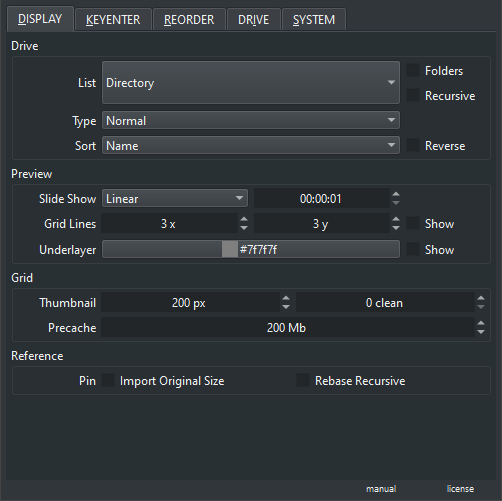
Valid for Preview and Grid mode
- List : Image list source ( Directory, Recent Documents, Reference )
- Type : File type to find ( Normal, Backup~, All )
- Sort : File order in the list ( Name, Time, Size, Type, Dimension )
- Folders : Display folders alongside image files
- Recursive : Search image files recursively ( disables folders view )
- Reverse : Reverse the order of the list sorted
-
Slideshow : Slideshow options
- Slideshow Order : Display order ( Linear, Random )
- Slideshow Time : Time spent on each image
-
Grid Lines : Grid line options
- Gridline X : Amount of vertical gridlines
- Gridline Y : Amount of horizontal gridlines
- Gridline Show : Show gridlines
-
Underlayer : Underlayer options ( displays with transparency )
- Underlayer Color : Color picker dialog for the underlayer
- Underlayer Show : Show underlayer
-
Thumbnail : Thumbnail options
- Thumbnail Size : Thumbnail size ( measured in pixels )
- Thumbnail Clean : How many images away before cleanning them from memory ( measured in image units )
- Precache : Precache load of nearby images ( measured in Megabytes )
-
Pin : Pin options
- Import Original Size : Insert Pin on board with original pixel size
- Rebase Recursive : Rebase will search files recursively