OpenCV Examples
This application runs several examples using the OpenCV library. In most cases, the user needs to check the results saved in the SD card. Assertions check some common execution errors.
The contents of the testFiles folder (OpenCVTests) must be copied to the SD card (/mnt/sdcard/) resulting in mnt/sdcard/OpenCVTests.
- Canny edge detector
- Files required:
- File: /mnt/sdcard/OpenCVTests/data/nature.png
- Output:
- File: /mnt/sdcard/OpenCVTests/results/resultEdge.png
- Files required:
- Haar-based Cascade Face Detector
- Files required:
- /mnt/sdcard/OpenCVTests/data/lena.png
- /mnt/sdcard/OpenCVTests/data/haarface.xml
- Output:
- /mnt/sdcard/OpenCVTests/results/resultFaceDetection.png
- Files required:
- K-means algorithm
- Output:
- /mnt/sdcard/OpenCVTests/results/resultTestKmeans.png
- Output:
- Contours
- Files required:
- /mnt/sdcard/OpenCVTests/results/resultTestContours_1.png
- Output:
- /mnt/sdcard/OpenCVTests/results/resultTestContours_1.png
- /mnt/sdcard/OpenCVTests/results/resultTestContours_2.png
- Files required:
- Histogram/LUT
- Files required:
- /mnt/sdcard/OpenCVTests/data/baboon.png
- Output:
- /mnt/sdcard/OpenCVTests/results/resultDemHist.png
- Files required:
- Delaunay Triangulation
- Output:
- /mnt/sdcard/OpenCVTests/results/delaunay/delaunay[n].png ([n]={0,1,2})
- /mnt/sdcard/OpenCVTests/results/delaunay/delaunay[n]_s.png ([n]={0,1,2})
- /mnt/sdcard/OpenCVTests/results/delaunay/voronoi.png
- Output:
- testPyramidSegmentation
- Files required:
- /mnt/sdcard/OpenCVTests/data/fruits.png
- Output:
- /mnt/sdcard/OpenCVTests/results/resultPyramidSegmentation.png
- Files required:
- testSquareDetector
- Files required:
- /mnt/sdcard/OpenCVTests/data/pic[n].png ([n]={1,2,3,4,5,6})
- Output:
- /mnt/sdcard/OpenCVTests/results/squares/ResultSquarespic[n].png ([n]={1,2,3,4,5,6})
- Files required:
- Watershed
- Files required:
- /mnt/sdcard/OpenCVTests/data/fruits.png
- Output:
- /mnt/sdcard/OpenCVTests/results/resultWatershed.png
- Files required:
- Morphological Operations
- Files required:
- /mnt/sdcard/OpenCVTests/data/baboon.png
- Output:
- /mnt/sdcard/OpenCVTests/results/morphology/baboon_E_OC.png
- /mnt/sdcard/OpenCVTests/results/morphology/baboon_E_ED.png
- /mnt/sdcard/OpenCVTests/results/morphology/baboon_R_OC.png
- /mnt/sdcard/OpenCVTests/results/morphology/baboon_R_ED.png
- /mnt/sdcard/OpenCVTests/results/morphology/baboon_C_OC.png
- /mnt/sdcard/OpenCVTests/results/morphology/baboon_C_ED.png
- Files required:
- Fourier
- Files required:
- /mnt/sdcard/OpenCVTests/data/suit.png
- Output:
- /mnt/sdcard/OpenCVTests/results/dftres2.png
- Files required:
- Inpainting
- Files required:
- /mnt/sdcard/OpenCVTests/data/lena.png
- Output:
- /mnt/sdcard/OpenCVTests/results/inpainted.png
- Files required:
- Min Area Rectangle
- Output:
- /mnt/sdcard/OpenCVTests/results/rectCircle.png
- Output:
- Lucas Kanade
- Files required:
- /mnt/sdcard/OpenCVTests/data/suit.png
- Output:
- /mnt/sdcard/OpenCVTests/results/LKDemo.png
- Files required:
- DOG
- Files required:
- /mnt/sdcard/OpenCVTests/data/DunLoghaire_320x240.png
- Output:
- /mnt/sdcard/OpenCVTests/results/DOG.png
- Files required:
- Dilation
- Files required:
- /mnt/sdcard/OpenCVTests/data/lena_512x512_luma.png
- Output:
- /mnt/sdcard/OpenCVTests/results/dilate2.png
- Files required:
- Harris Corners
- Files required:
- /mnt/sdcard/OpenCVTests/data/lena_512x512_luma.png
- Output:
- /mnt/sdcard/OpenCVTests/results/cornerharris.png
- Files required:
- Median Filter
- Files required:
- /mnt/sdcard/OpenCVTests/data/ref_chroma_median_out_512x512_P444_8bpp.png
- Output:
- /mnt/sdcard/OpenCVTests/results/medianfilter.png
- Files required:
UART: Thread 1 created
UART: Starting run
UART: SD card mounted? 1
UART: + Test 1 passed. OK
UART: + Test 2 passed. OK
UART: + Test 3 passed. OK
UART: + Test 4 passed. OK
UART: + Test 5 passed. OK
UART: + Test 6 passed. OK
UART: + Test 7 passed. OK
UART: + Test 8 passed. OK
UART: + Test 9 passed. OK
UART: + Test 10 passed. OK
UART: + Test 11 passed. OK
UART: + Test 12 passed. OK
UART: + Test 13 passed. OK
UART: + Test 14 passed. OK
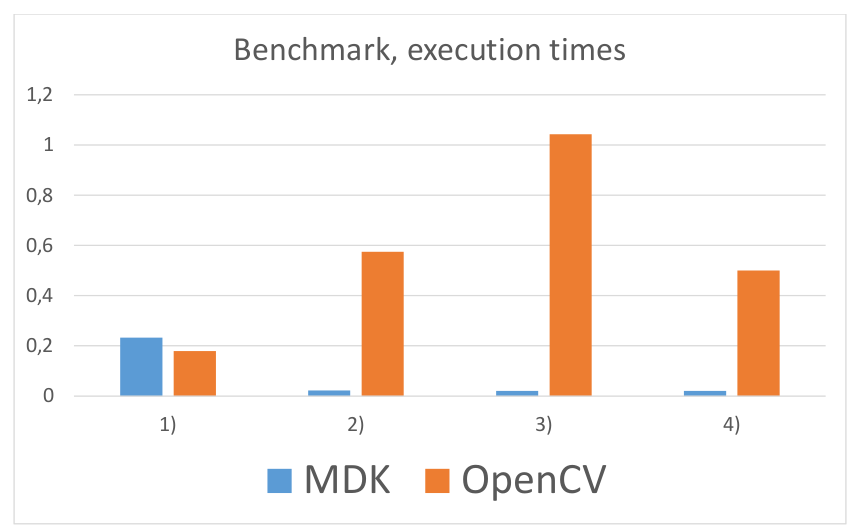
UART: TEST 15 Usec CPU time: 181010
UART: TEST 16 Usec CPU time: 574738
UART: TEST 17 Usec CPU time: 1079811
UART: TEST 18 Usec CPU time: 598534
UART: Unmounting SD card...
UART: Tests ended
The following examples of the MvCV library of the MDK have been implemented using OpenCV:
- SimpleCrossCompilableCVPipe
- SippTutC0
- testHWHarrisCorners
- testHwMedian
The computational time in seconds used for the OpenCV version VS the MvCv version can be shown in the following graph:
Optical flow is the pattern of apparent motion of image objects between two consecutive frames caused by the movement of object or camera. It is 2D vector field where each vector is a displacement vector showing the movement of points from the first frame to the second.
The objective in this task is to obtain the functionality of Lucas-Kanade point tracking.
OpenCV provides a sparse iterative version of the Lucas-Kanade optical flow in pyramids in a single function, calcOpticalFlowPyrLK(). To select the points to track, goodFeaturesToTrack() function is used. First, the algorithm takes the first frame, detects Harris corner points in it, and then iteratively tracks those points using Lucas-Kanade optical flow.
calcOpticalFlowPyrLK() receives the previous frame, previous points and the next frame, returning the next points along with status numbers which have a value of 1 if next point was found, and zero otherwise. In the next step, these points are passed as previous points.
This example takes around 2 seconds to calculate the initial points, and 0.35 seconds for each new picture in the included picture example. Changing the parameters and depending on the configuration necessary for its application, these values can be reduced up to 1 second for the initial point calculation and 0.09 seconds per each new image.
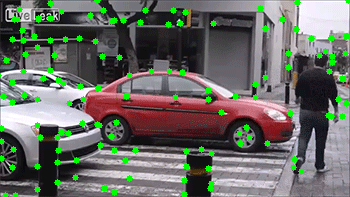
See a demo video of LK optical flow here
See a demo video of LK optical flow (optimized) here
- Crypto
- SDCardIO
- OpenCV