Script Runner
🐱 Custom — built for this fork (not in the original firmware).
Run small Berry scripts from the SD card to poke the LED, GPIO and buttons — no reflashing. Berry is a tiny Python-ish language embedded in the firmware (the VM adds only ~120 KB).
- Put
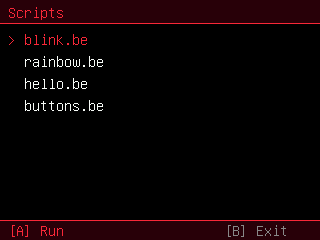
.befiles in a/scriptsfolder on the SD card (created on first run if missing). The four examples in the repo'sdocs/scripts/are a good start. - Open the Script Runner app.
- Up/Down to pick a script, A to run, A again to return to the list, hold B to exit.
-
print(...)output appears on screen. A script that runs longer than ~20 s, or while you hold B, is stopped automatically — an infinite loop can't hang the device.
Global functions available to scripts:
| Call | Does |
|---|---|
print(x) |
print to the on-screen console (and serial) |
delay(ms) |
wait milliseconds |
millis() |
milliseconds since boot (int) |
led(r, g, b) |
set the onboard WS2812 pixel (0–255 each) |
button(name) |
is a button held now? "A" "B" "up" "down" "left" "right" → bool |
pin_mode(gpio, out) |
out truthy = OUTPUT, else INPUT_PULLUP |
pin_write(gpio, v) |
drive a GPIO high/low |
pin_read(gpio) |
read a GPIO (0/1) |
Plus Berry's core: var, for i : range(a,b), while, if/elif/else, lists
[1,2,3], .. for string concat, str(x), math, etc. The os, json, time
and sys modules are not included in this build.
⚠️ pin_*touch raw GPIOs. Almost every pin on this board is wired to the display / SD / PSRAM / I²C / audio — driving the wrong one can crash the device or corrupt the screen. There is very little broken out.led()is the safe way to experiment with colour. See Hardware and Gotchas for the pin map.
# blink.be
print("Blinking the LED 5 times")
for i : range(1, 5)
  led(60, 0, 0)   # dim red
  delay(300)
  led(0, 0, 0)    # off
  delay(300)
  print("tick " .. str(i))
end
led(0, 0, 0)-
hello.be— print + math + a loop -
blink.be— blink the onboard LED -
rainbow.be— cycle the LED through colours (hold B to stop) -
buttons.be— report button presses for a few seconds
The VM is vendored in lib/berry with a trimmed config (string + math), the
const-object headers pre-generated with Berry's coc tool (no build-time
codegen), and the debug hook enabled so berry_engine.cpp can install a
line-hook that aborts on timeout / held-B. print() is routed to the console by
providing be_writebuffer in the firmware.