Reports
Export audit results as CSV, JSON, or HTML for sharing with leads, QA, and producers. Reports always reflect a complete audit snapshot — asset path, rule, severity, suggested fix — with optional milestone labels and diff tracking between runs.
There are five ways to trigger an export. All of them produce the same file formats.
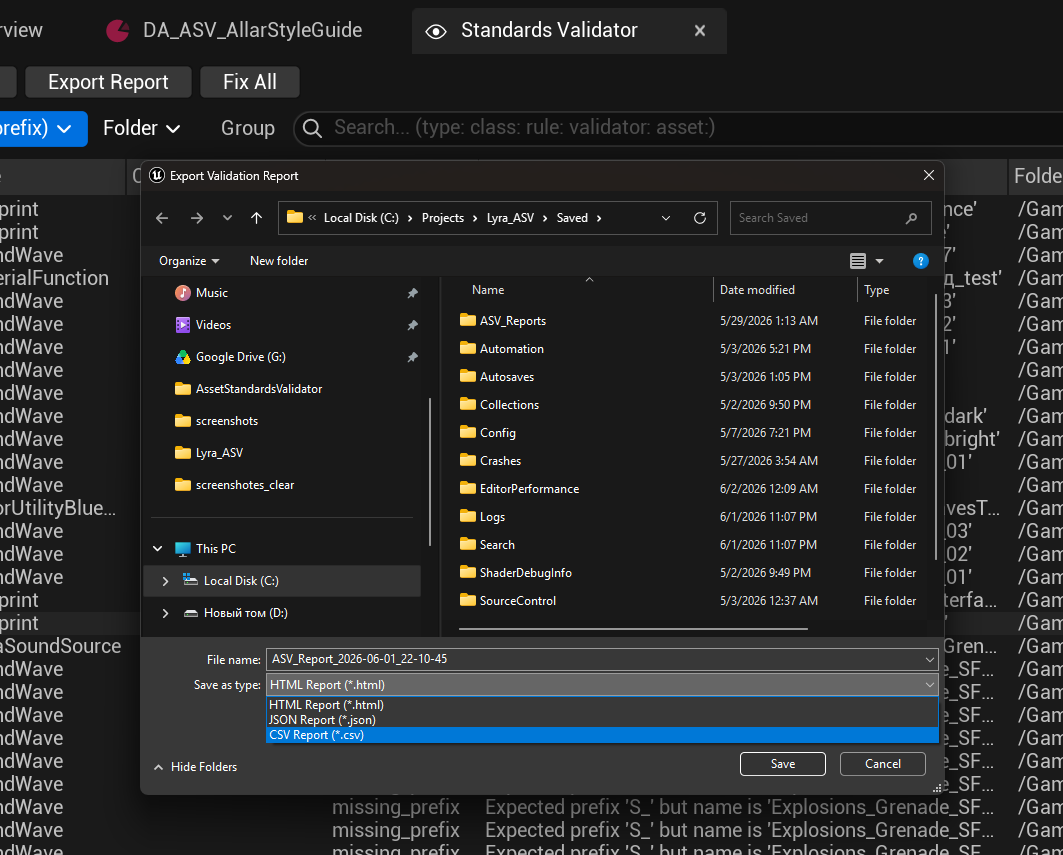
| Where | How to trigger | Source data |
|---|---|---|
| Tools menu | Tools → Asset Standards Validator → Export Report... | Runs a fresh full audit |
| ASV Panel | Click the Export button in the panel toolbar | Current panel results — filtered subset or all results, your choice |
| Message Log | Click [Export Report] in the Content Validation log after an audit | The last completed audit stored in the subsystem |
| Console command | ASV.Export <format> <output_dir> [milestone] |
Runs a fresh full audit |
| Commandlet (CI) | -run=ASVCommandlet -format=html -output=path |
Runs a fresh full audit headlessly |
Tip: The ASV Panel export is the only entry point that can export a filtered subset. If your panel shows 40 of 200 results (e.g. only P0 errors in one folder), the export can capture exactly those 40. All other entry points always run a fresh full audit.
Every export writes two files to the chosen directory:
-
ASV_Report_2026-04-14_14-30-00.<ext>— timestamped file for archiving -
ASV_Report_latest.<ext>— always overwritten, easy to reference from scripts
A companion file ASV_Report_latest.asv-report.json is also written alongside any export. It stores metadata for diff tracking — if the same checker configuration is used on the next run, the report will include a diff section showing new violations and resolved ones.
Comma-separated values, UTF-8. Suitable for import into Excel, Google Sheets, or any data tool.
The first lines start with # and are skipped by most CSV parsers. They contain audit metadata:
# schemaVersion: 1.0
# timestamp: 2026-04-14T14:30:00.000Z
# projectName: MyGame
# asvVersion: 0.5.0
# checkerConfigs: StrictConfig
# scanRoots: /Game/
# auditSource: fresh_audit
# assetsScanned: 1247
# assetsWithViolations: 38
# assetsWithCriticalViolations: 15
# totalViolations: 38
# healthScore: 94.32
# p0: 5  p1: 12  p2: 18  p3: 3  autoFixable: 10
| Column | Description |
|---|---|
AssetPath |
Full content path, e.g. /Game/Characters/BP_Enemy
|
AssetClassName |
UE class name, e.g. Blueprint
|
PackagePath |
Parent folder path, e.g. /Game/Characters
|
RuleId |
Rule identifier, e.g. missing_prefix
|
Severity |
P0 / P1 / P2 / P3 |
Problem |
Human-readable description of the violation |
Suggestion |
Short suggested action, or empty if no fix is available |
AutoFixAvailable |
true / false
|
ProposedFix |
Detailed proposed fix string used by auto-fix |
ValidatorName |
Validator class, e.g. ASVValidator_NamingConvention
|
CheckerName |
Checker config asset that triggered this rule |
TriggerName |
Trigger class that started the audit, e.g. ASVTrigger_Manual
|
Condensed JSON, UTF-8. Structured for programmatic use — CI scripts, dashboards, trend tracking.
{
  "meta": { ... },
  "summary": { ... },
  "diff": { ... },          // only present if a previous report exists with same config
  "violations": [ ... ]
}
| Field | Description |
|---|---|
schemaVersion |
Always "1.0" in this release |
timestamp |
ISO 8601 timestamp: 2026-04-14T14:30:00.000Z
|
projectName |
Project name from FApp::GetProjectName()
|
asvVersion |
Plugin version string |
milestoneLabel |
Label passed via -milestone or console command, or empty string |
auditSource |
fresh_audit, accumulated, or filtered
|
checkerConfigNames |
Sorted array of active checker config names — used for diff matching |
scanRoots |
Array of scanned content paths, e.g. ["/Game/"]
|
| Field | Description |
|---|---|
assetsScanned |
Total assets checked |
totalIssues |
Total violation count |
p0 / p1 / p2 / p3 |
Per-severity counts |
healthScore |
Percentage of assets with no P0/P1 violations: (scanned − criticalAssets) / scanned × 100
|
topRules |
Array of {"rule", "count"}, sorted by count descending, top 10 |
byFolder |
Map of top-level folder → issue count |
byValidator |
Map of validator name → issue count |
top3Actions |
Top 3 most common suggested fixes |
Only present when a companion .asv-report.json from a previous run exists and the checker config matches exactly.
| Field | Description |
|---|---|
previousTimestamp |
Timestamp of the previous run |
deltaTotal |
Net change in total issues (positive = more issues) |
deltaP0 / deltaP1 / deltaP2 / deltaP3 |
Per-severity delta |
newCount |
Violations not in the previous run |
resolvedCount |
Violations from the previous run that are gone |
newViolations |
Array of new violation objects (same shape as items in violations) |
Each item has: assetPath, assetClassName, packagePath, ruleId, severity, problem, suggestion, autoFixAvailable, proposedFix, validatorName, checkerName, triggerName.
A self-contained HTML file — no external dependencies, works offline. Designed for sharing with leads and producers who don't have the editor open.
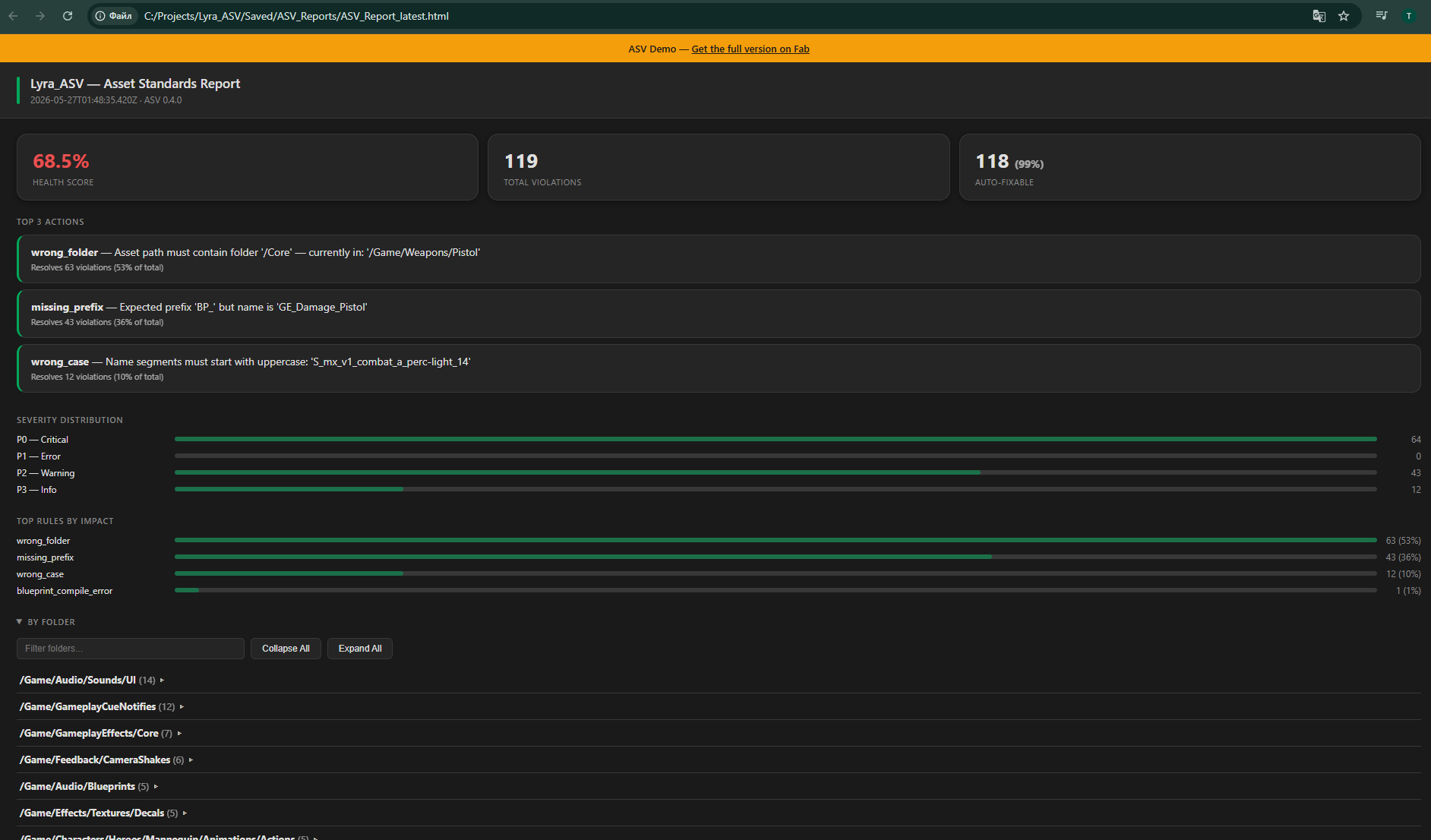
At the top: health score (color-coded green / yellow / red), total issue count with per-severity breakdown, assets scanned, top violated rules, issues by folder, and top suggested actions.
Interactive table with:
- Search — filters across all columns in real time
- Sort — click any column header
- Pagination — 50 rows per page, fast on large reports
- View toggle — switch between violation-per-row and grouped-by-asset views
| Score | Color | Meaning |
|---|---|---|
| ≥ 90% | Green | Pipeline-safe — only minor issues remain |
| 70–89% | Yellow | Needs attention — some P0/P1 violations |
| < 70% | Red | Critical — significant P0/P1 violations found |
Tip: Health score counts assets, not violations. One asset with five P0 violations still counts as one affected asset. This prevents a single badly-named asset from disproportionately tanking the score.
When running from CI, pass export flags alongside the existing commandlet arguments:
UnrealEditor-Cmd.exe MyProject.uproject -run=ASVCommandlet \
  -Root=/Game/Content \
  -severity=P0 \
  -format=html \
  -output=C:/Artifacts/Reports \
  -milestone=Sprint-42
| Flag | Values | Default | Description |
|---|---|---|---|
-format |
csv, json, html
|
none | Export format. If omitted, no export file is written. |
-output |
Directory path | none | Directory to write the report into. Created if it doesn't exist. |
-milestone |
Any string | Empty | Label embedded in the report header (e.g. Sprint-42, Beta-1.3). |
Exit codes:
-
0— success (or violations found but below-severitythreshold) -
1— violations found at or above-severity -
2— export write failure (file path invalid, disk full, etc.)
Run an export from the editor's output console or a -ExecCmds argument:
ASV.Export html C:/Reports/MyProject Sprint-42
| Argument | Required | Description |
|---|---|---|
<format> |
Yes |
csv, json, or html
|
<output_dir> |
Yes | Directory to write to |
[milestone] |
No | Optional label embedded in the report |
The command runs a fresh full audit before exporting. Results are also sent to the UE Output Log and the Content Validation Message Log listing.
Tip: To automate exports in a build pipeline without using the commandlet, add
-ExecCmds="ASV.Export html C:/Reports;Quit"to any editor launch command. TheQuitcommand exits the editor after the export completes.