Releases: Fink692/project-hope
Release list
v1.9.2

v1.9.0
Project Hope 1.9.0: included workspace, new identity, direct downloads
Project Hope 1.8.0 — Bring your contacts 🌱

After a long time building, testing, rebuilding, and caring about the small details, I am proud to release Project Hope 1.8.0. This release makes one of the hardest parts of changing charity software feel calm: bringing your contacts with you.
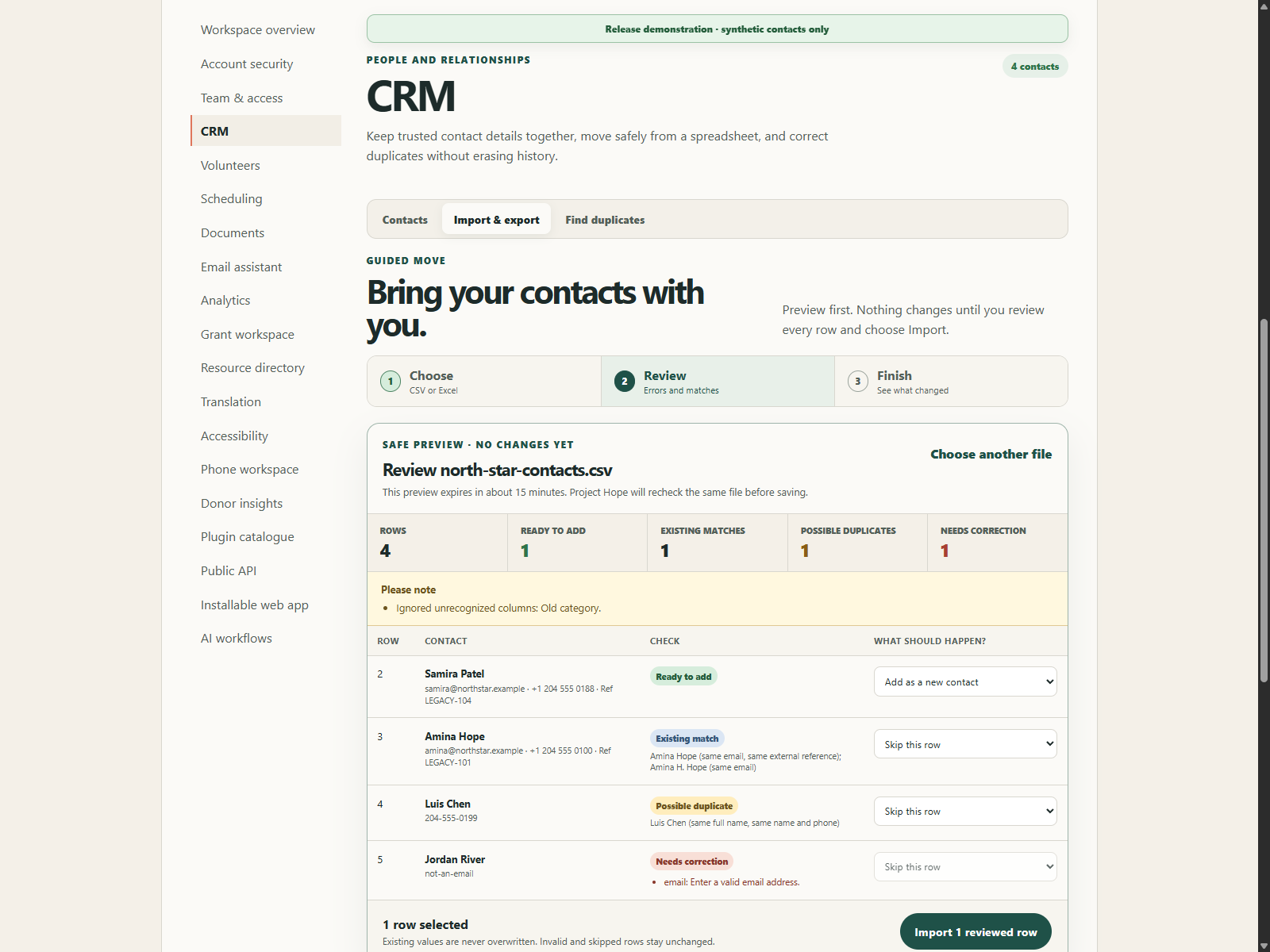
Choose. Review. Finish. Nothing changes until the charity approves it.
Project Hope 1.8 turns one of the most stressful parts of changing software into a guided, reversible workflow. A charity owner can bring a normal Excel or CSV contact list into the CRM, see every error and possible match before anything changes, correct the source file, import only reviewed rows, and export the data again without needing a developer.
Licensing notice: this public repository still does not include an approved software license. Source visibility does not grant reuse or redistribution rights; the planned Community terms remain an owner decision.
A migration flow made for nontechnical teams
- CRM now has dedicated Contacts, Import & export, and Find duplicates views in the browser and desktop app.
- Owners and administrators can download a polished Excel template with instructions, recognized values, filters, frozen headings, and dropdown validation; a simple CSV template is also available.
- XLSX, CSV, and TSV contact lists can be previewed in three steps: choose, review, finish.
- Every row is labelled Ready to add, Existing match, Possible duplicate, or Needs correction, with plain-language reasons and an explicit action.
- New rows default to creation. Matches and possible duplicates default to skip. Invalid rows cannot be imported.
- A reviewer can fill missing details on a selected match without overwriting an existing name, email, phone, or reference. Notes append, while stricter sensitivity and consent states win.
- The completion view reports exactly how many contacts were created, filled in, already complete, skipped, or invalid.
- Coordinators and staff can correct individual contacts. Viewer accounts remain read-only and do not see mutation or bulk-data controls.
The plain-language contact migration guide explains the complete charity journey and troubleshooting path.
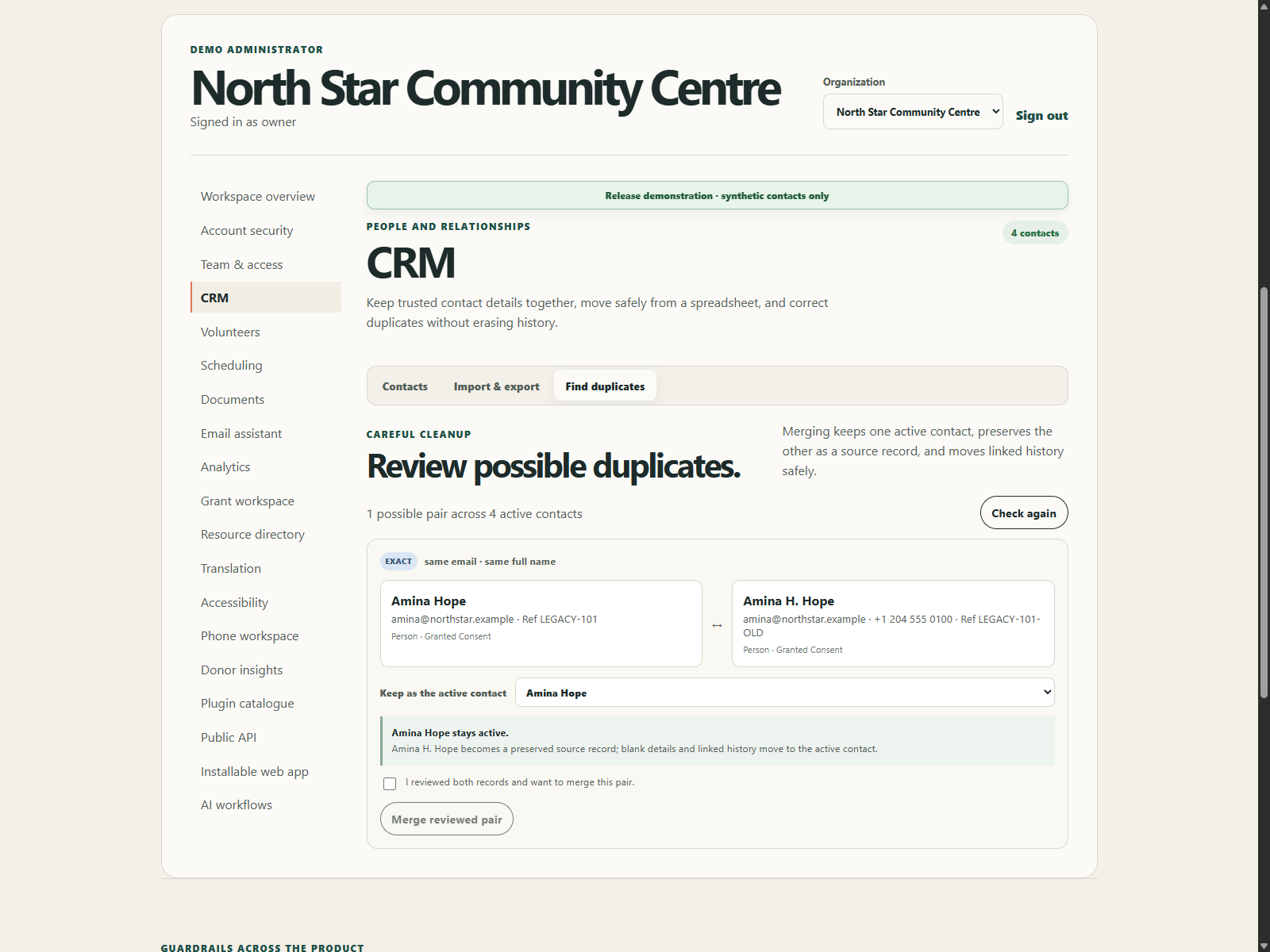
Duplicate cleanup without deleting history
- Deterministic matching explains exact email/reference, strong name-and-phone, and possible full-name/organization matches.
- The reviewer compares both records, chooses which contact remains active, and must explicitly confirm the pair.
- A merge fills blank details, combines notes, preserves the stricter sensitivity and consent state, and moves linked households, interactions, consent, schedules, waitlist entries, email links, donor snapshots, volunteer profiles, and relationships.
- The duplicate becomes a preserved source record pointing to the active contact; it is not hard-deleted.
- Legal holds block merging. Two volunteer profiles also block the merge so a person can resolve that conflict safely.
Spreadsheet and tenant safeguards
- Import defaults are bounded to 5 MB, 2,500 contact rows, and 50 columns; production operators can set approved limits.
- Modern XLSX archives are checked for unsafe paths, excessive members or expansion, dangerous compression ratios, macros, and external workbook links.
- Spreadsheet formulas are rejected at row level and must be replaced by a reviewed text value.
- CSV exports neutralize formula-leading text. Excel exports force contact values to string cells.
- UTF-8 and Windows-1252 CSV input are supported, with explicit warnings when normalization occurs.
- Preview tokens expire after 15 minutes by default and are signed to the schema, user, organization, exact file digest, and row count.
- Commit reparses and revalidates the same upload inside a locked transaction. A changed file, user, organization, match, or expired preview fails closed.
- Project Hope does not persist a separate server-side copy of the preview spreadsheet. Migration audit events record counts, not contact rows or email addresses, and sensitive responses are private and non-cacheable.
Authorization correction
Generic organization record APIs now enforce the documented role boundary consistently: owner, administrator, coordinator, and staff roles can create or edit ordinary records; viewers can read but cannot POST or PATCH. Administrator-only resources and destructive actions retain their stricter controls.
Upgrade action
- Back up the database and verify the approved restore path.
- Deploy the core and web/desktop clients together.
- Install the updated Python dependencies, including
openpyxlanddefusedxml. - Apply migration
modules.0003_contact_merge_state. - Review
PROJECT_HOPE_MAX_CRM_IMPORT_BYTES,PROJECT_HOPE_MAX_CRM_IMPORT_ROWS, andPROJECT_HOPE_CRM_IMPORT_PREVIEW_MAX_AGE_SECONDS; the supplied defaults are 5 MB, 2,500 rows, and 900 seconds. - Use synthetic contacts to download the template, preview an invalid/matched/new file, commit reviewed rows, export both formats, and complete one reversible duplicate rehearsal.
- Read Move your contacts into Project Hope before handling real personal information.
Release verification
- 69 Django tests pass, including malformed and macro workbook rejection, formula handling, row limits, same-file duplicates, short-lived user/tenant/file binding, usable contact identity validation, viewer write denial, legal holds, merge conflicts, related-record reassignment, source preservation, and CSV/XLSX round-trips.
- 21 web and shared-client interaction journeys pass, including owner import, invalid-row correction cues, multipart safety, typed API-client upload/download behavior, contact editing, viewer-only presentation, explicit duplicate confirmation, and automated WCAG A/AA checks.
- Ruff, formatting, Mypy, migration drift, API-client types, OpenAPI parsing, the web production build, mobile type/security/export checks, desktop build, and development/production Compose validation pass.
- The 7-test AI gateway remains green; bounded adapters and human-review controls are unchanged.
- Production dependency audits report no known vulnerabilities for the Python services, web client, or desktop client. The documented mobile build-tool advisories remain covered by the locked parser patch and CI regression test in
SECURITY.md.
Honest boundaries
Automated evidence does not replace a real charity migration. This release still needs a charity administrator to validate vocabulary, map a representative source spreadsheet, perform corrections, confirm a lossless export, and approve the resulting records before the original field exit condition can close.
Project Hope still does not provide a live managed deployment, billing, an approved software license, signed public installers, Apple/Google store publication, an independent penetration test, or external charity/accessibility acceptance. The generic macOS artifact is Apple silicon only. The verified Founding 10 count remains 0/10 until real applicants complete the production confirmation flow.
Project Hope 1.7.0 — Built-in account protection
Project Hope 1.7.0 — Built-in account protection
Project Hope 1.7 adds a complete application-level two-step verification path for charity staff. Browser, desktop, and native mobile sign-ins can now require a standards-based authenticator without depending on a hosted identity service or asking charity users to configure infrastructure.
Licensing notice: this public repository still does not include an approved software license. Source visibility does not grant reuse or redistribution rights; the planned Community terms remain an owner decision.
A guided security experience
- First-time setup is part of the normal signed-in experience: confirm the current password, scan a locally generated QR code or enter the manual key, verify one six-digit code, and save the recovery set.
- Organization names and records remain unavailable while production-required enrollment is incomplete.
- Later browser and native sign-ins use a short-lived, single-use password challenge followed by an authenticator or recovery code.
- Recovery codes contain 50 bits of random material, are shown only once, stored only as keyed hashes, and removed after one use.
- Used TOTP time steps cannot be replayed. Challenge and enrollment attempts are limited through the shared security cache.
- Account security shows enrollment date, unused recovery-code count, regeneration, and disable controls. Regeneration invalidates every earlier recovery code.
- The mobile client supports challenge verification and required first-time enrollment, keeps the challenge only in memory, and stores a native access token only after successful verification.
Security underneath the interface
- TOTP secrets are encrypted at rest with a dedicated operator-owned Fernet key. The setup QR is generated inside Project Hope; no QR or authenticator secret is sent to a third-party image service.
- Password and MFA changes increment a security version, revoke native tokens, and invalidate older browser sessions. Existing accounts with an enabled factor cannot bypass it even when the deployment does not require enrollment for everyone.
- Native tokens are rejected when they predate the latest security change as well as when they exceed the configured lifetime.
- Production now fails closed without PostgreSQL, the MFA encryption key, or a shared Valkey/Redis cache.
- The web response adds a restrictive Content Security Policy plus cross-origin isolation headers while allowing the local MFA QR data image.
- Django administration cannot add, edit, delete, or reveal MFA credentials, encrypted secrets, recovery hashes, or replay counters.
Recovery and rotation for operators
reset_user_mfarequires the user email twice plus a bounded recovery reason. It resets only an active enrolled account, revokes its sessions/tokens, creates an audit event, omits personal data from command output, and sends the user a security notification after the database reset commits.rotate_mfa_encryptionvalidates every encrypted TOTP secret before writing. With--execute, it atomically re-encrypts secrets under the first configured key and audits each credential.- The rotation command warns when unused recovery codes still depend on an older key. Operators must keep old keys configured until those users regenerate codes or complete an approved reset.
- The production guide now includes key generation, custody, clean-device acceptance, recovery, rotation, and old-key retirement procedures.
Upgrade action
- Back up the database and current production environment through the approved encrypted process.
- Generate and store
PROJECT_HOPE_MFA_ENCRYPTION_KEYS; set the newest key first and never commit it. - Confirm
VALKEY_URLpoints to a shared production cache. The supplied Compose file configures the bundled Valkey service. - Apply migration
identity.0007_multifactorcredential_user_security_version. - Deploy the core, worker, web, desktop, and mobile clients together.
- Expect existing native tokens to require sign-in again. Existing browser users are guided into enrollment before organization data opens when production MFA policy is enabled.
- Complete the synthetic enrollment, fresh-browser challenge, recovery-code, operator-reset, and key-rotation checks in production deployment.
Release verification
- 57 Django tests pass, including TOTP/recovery verification, replay prevention, single-use challenges, secret encryption and rotation, stale-session/token invalidation, pre-enrollment metadata blocking, and operator recovery—even when its notification path fails.
- 13 web interaction journeys pass, including two-step sign-in and required guided enrollment with automated WCAG A/AA checks.
- Ruff, formatting, Mypy, migration drift, API-client types, the web production build, mobile type/security/export checks, desktop build, and development/production Compose validation pass.
- The 7-test AI gateway remains green; bounded adapters and human-review controls are unchanged.
- Production dependency audits report no known vulnerabilities for the Python services, web client, or desktop client. The documented mobile build-tool advisories remain covered by the locked parser patch and CI regression test in
SECURITY.md.
Honest boundaries
This release does not provide a live managed deployment, billing, an approved software license, signed public installers, Apple/Google store publication, phishing-resistant hardware factors, OIDC/SSO, an independent penetration test, or external charity/accessibility acceptance. The generic macOS artifact is Apple silicon only. The verified Founding 10 count remains 0/10 until real applicants complete the production confirmation flow.
Project Hope 1.6.0 — Team onboarding and account recovery
Project Hope 1.6.0 — Team onboarding and account recovery
Project Hope 1.6.0 closes the gap between “an operator created a server” and “a charity team can start using it.” Owners can now bootstrap a workspace, invite staff, and manage access without Django admin or command-line account creation.
Licensing notice: this public repository does not yet include an approved software license. Source visibility does not grant reuse or redistribution rights; the planned Community terms remain an owner decision.
A normal first-day experience
- A production operator runs one idempotent
bootstrap_workspacecommand to create the organization and email its first owner. - Owners and administrators use the new Team & access workspace to invite people, choose roles, review delivery, resend links, revoke links, and update active member access.
- New teammates open a private expiring link, choose a policy-validated password, and enter the workspace.
- Existing users accept the link without changing their password, then sign in normally.
- Invitation credentials stay in URL fragments, are never stored in plaintext, expire after seven days by default, rotate on resend, and stop working after acceptance or revocation.
- SMTP failures are recorded and retried by the background worker.
- Mail jobs are claimed atomically before SMTP work, preventing duplicate invitation or recovery messages when worker loops overlap.
Safer account access
- Forgot password? now provides a privacy-preserving response that does not reveal whether an account exists.
- Reset email is queued for the background worker, so public response time does not include SMTP and cannot trivially reveal an existing account through mail latency. The queue stores no reset token, expires undelivered jobs, retries bounded failures, and purges delivery metadata.
- Password reset links expire after one hour by default, are single-use, and use Django's password-reset token invalidation.
- New passwords pass the configured Django password policy.
- A successful reset invalidates password-backed sessions and revokes the user's native API token.
- Browser session login now requires CSRF, while native clients use a separate token endpoint.
- Login attempts have a strict per-account throttle plus a higher shared-IP ceiling so one charity office is not treated like one user.
- User emails are normalized to lowercase and protected by a case-insensitive database constraint, preventing duplicate identities that differ only by letter case.
- Native API tokens now expire after 30 days by default; an expired token is deleted and a successful credential sign-in issues a replacement.
- Production startup now refuses a missing/non-PostgreSQL
DATABASE_URLinstead of silently falling back to a local SQLite file. Tests and isolated previews can opt into a separate SQLite path explicitly. - PostgreSQL URL credentials and connection options are decoded and preserved, including managed-database TLS query options.
- Owner-role updates are serialized per organization, so concurrent requests cannot remove every active owner.
Connected by design
- Project Hope now describes browser and mobile availability as connected workspace access rather than promising offline work.
- The plaintext browser scratchpad and mobile record/note caches have been removed because offline operation is not a product requirement. Mobile upgrades delete the legacy secure-store cache keys after sign-in.
- Installability remains: staff can use the desktop installer, mobile client, or installable web app, all connected to the same hosted organization workspace.
Evidence and documentation
- Identity/API tests cover invitation creation, inspection, weak-password rejection, acceptance, existing users, owner-role boundaries, expiry, resend invalidation, revocation, mail retry, bootstrap idempotency, non-enumerating recovery, reset single-use, token revocation, and browser CSRF.
- Web interaction tests cover account creation from an invitation, in-app invitations, role changes, reset requests, and reset confirmation.
- The API document now distinguishes browser session login from native token login and lists the onboarding/recovery endpoints.
- The v1.6 accessibility evidence records automated and browser-assisted checks for invitation, recovery, and Team & access screens while keeping the external screen-reader/user gate explicit.
- Product-readiness, requirements, and roadmap documents now distinguish implemented code from integrations and external acceptance evidence. They no longer mark unvalidated field workflows as complete.
Operator action
Apply migrations identity.0004_organizationinvitation, identity.0005_normalize_user_email, and identity.0006_passwordresetdelivery; keep the worker running; and configure the exact HTTPS PROJECT_HOPE_PUBLIC_URL plus a verified SMTP relay. Migration 0005 deliberately stops with a clear error if an existing deployment has two user records whose emails differ only by case; resolve that identity conflict before retrying. After deployment, create the first owner with:
python manage.py bootstrap_workspace --organization "Your Charity" --owner-email "owner@your-charity.example"
Optional controls include invitation lifetime/retry settings, password reset timeout, public reset/invitation throttles, and per-account/IP login limits; see .env.example.
Release-candidate verification
- 48 Django tests passed, including invitation/recovery behavior, role boundaries, tenant isolation, per-account/trusted-proxy throttling, atomic mail retry timing, and last-owner protection.
- 11 web interaction tests passed, including automated WCAG A/AA checks on the public, invitation, and Team & access journeys plus a regression proving private credentials are never consumed from query strings.
- 7 AI-gateway tests passed; deterministic fail-closed behavior and human-review gates remain intact.
- The live Ollama smoke suite passed with
qwen3:4bandall-minilm: classification, drafting, translation, plain-language rewriting, evidence-grounded grant answering, 384-dimension embeddings, and the deterministic crisis override all used their intended paths. - Web production build, API-client type check, mobile type/security/export gate, desktop build, development/production Compose validation, and Django production checks passed locally.
- Python service, web, and desktop production dependency audits reported no known vulnerabilities. The mobile build retains its tested, narrowly scoped mitigation for the two documented
image-sizebuild-tool advisories inSECURITY.md.
Honest boundaries
This release does not add OIDC/MFA, a live managed hosting environment, billing, signed public installers, or external charity/accessibility validation. The public repository also still has no approved software license. Those remain explicit release gates in docs/full-build-status.md.
Project Hope 1.5.0 — Founding 10
Project Hope 1.5.0 — Founding 10
Project Hope 1.5 adds the first complete, measurable path from public interest to a verified pilot relationship while preserving the self-hosted product baseline.
Licensing correction: the repository does not include an approved software license. Its source is publicly visible, but free-use, redistribution, and other reuse rights must not be assumed. The Community edition remains an intended offering pending the copyright owner's licensing decision.
What ships
- A polished Founding 10 offer and accessible two-minute application inside the web app.
- Transparent Community, Founding Partner, and Partner Network service paths.
- Campaign and referrer attribution for launch measurement.
- Consent-required, normalized, duplicate-safe application storage.
- Bot honeypot and scoped submission/verification rate limits.
- Expiring signed email confirmation with generic responses that prevent address enumeration.
- Administrator-only, privacy-safe funnel metrics and a
pilot_metricscommand. - Application stages for new, contacted, qualified, active-pilot, converted, and declined relationships.
- Automated retention for expired application records.
- Authenticated SMTP support, public-URL configuration, and production Compose wiring.
- OpenAPI 1.5 documentation, a dedicated privacy notice, commercial runbook, launch copy, and release screenshot.
- A reusable live-model smoke test plus a dedicated AI-gateway CI job.
- Production dependency audits in CI, including patched Django and Starlette releases and regression-tested mitigations for the two unpatched Metro build-time parser advisories.
- Branded cross-platform desktop builds, optional certificate/notarization credentials in the release workflow, and published SHA-256 checksums for every installer artifact.
- A repeatable axe-core CI check and browser accessibility audit, including remediation of the muted palette to a WCAG AA text-contrast baseline.
Commercial model
The intended Community edition is a self-hosted path whose licensing terms remain pending. The Founding Partner pilot offers managed launch, onboarding, updates, encrypted backups, and support for CAD $149/month after the workspace is live, with no pilot setup fee. Applications collect no payment details and create no payment obligation.
Operator action required
Before opening the form publicly, set PROJECT_HOPE_PUBLIC_URL, configure and test authenticated SMTP, publish a monitored privacy/support contact, apply migrations, run the background worker, and complete the synthetic staging check in docs/commercial-readiness.md.
The generic GitHub installers are not a substitute for organization-owned production signing. Configure the documented Windows certificate and Apple Developer/notarization secrets before distributing a warning-free production build to charity staff.
No test, fixture, repeated submission, or unconfirmed address counts toward the Founding 10 metric.
The release smoke run confirmed qwen3:4b served classification, drafting, translation, plain-language, and evidence-grounded grant workflows through Ollama; all-minilm returned 384-dimensional semantic embeddings; and crisis language bypassed the model for the deterministic human-transfer path.
v1.4.0
Project Hope 1.4.0 - Local AI runtime
Project Hope 1.3.2 — Cross-platform installer release
Project Hope 1.3.2 — Cross-platform installer release
Project Hope 1.3.2 completes the native desktop installer pipeline across Windows, macOS, and Linux. It retains the 1.3.1 clean-runner build fix and adds the Debian maintainer and project homepage metadata required for a complete Linux package.
Release assets
- Windows NSIS installer (
.exe) - macOS disk image and archive (
.dmg,.zip) - Linux AppImage and Debian package (
.AppImage,.deb)
All assets are generated from the same hosted-workspace desktop shell and are attached only after the platform matrix passes.
Download the installers or read the desktop installer guide.
Project Hope 1.3.1 — Installer pipeline fix
Project Hope 1.3.1 — Installer pipeline fix
Project Hope 1.3.1 is the installer-ready maintenance release. It keeps the native Windows, macOS, and Linux distribution introduced in 1.3.0 and fixes the release workflow so each clean runner compiles the desktop shell before electron-builder packages it.
Verification
- Desktop build runs explicitly before every platform package.
- Windows NSIS, macOS DMG/ZIP, and Linux AppImage/DEB jobs share the same frozen lockfile and build output.
- Release assets are attached only after all three platform jobs pass.
- The normal backend, web, mobile, onboarding, and Compose quality gates remain required.
Download the latest installers or read the desktop installer guide.
Project Hope 1.3.0 — Install it and get to work
Project Hope 1.3.0 — Install it and get to work
Project Hope 1.3 makes the charity experience feel like a normal desktop application: install one trusted installer, open Project Hope, and work in the hosted workspace prepared for the organization.
What ships
- Native Windows NSIS installer with Start menu and desktop shortcuts.
- Native macOS DMG/ZIP and Linux AppImage/DEB targets.
- Setup partner build command that embeds the organization’s HTTPS workspace address.
- Friendly first-run connection screen for generic installers, with no Docker or database configuration.
- Secure Electron defaults: context isolation, sandboxing, no Node integration in the workspace, origin restrictions, and external links opened outside the app.
- Automatic update checks for signed GitHub releases.
- GitHub Actions matrix that builds and attaches desktop installers to tagged releases.
The charity experience
The setup partner deploys Project Hope once, builds the installer against that HTTPS address, and sends the installer to staff. Staff install it like any other application. They do not set environment variables, run terminals, configure databases, or maintain local copies of the system.
The generic release installer also works: it asks for the organization’s Project Hope address once, checks that it is reachable, remembers it, and opens the workspace from then on.
See the desktop installer guide and charity distribution guide.