
Welcome to the Real-Time Face Morphing project! This project explores face morphing, a technique that transforms one face into another. Face morphing involves creating a smooth transition between two facial images, generating intermediate frames to produce a fluid animation of the morphing process. However, in this project, a simpler method is explored, which consists of pasting a face onto another in a coherent way.
Face morphing using Delaunay triangulation involves organizing facial landmarks into triangles, providing a structured mesh for seamless transitions. Each triangle serves as correspondence between key facial features, such as eyes, nose, and mouth, ensuring consistent alignment across frames. The process begins by detecting facial landmarks using tools like dlib, and these points are strategically chosen for optimal morphing.
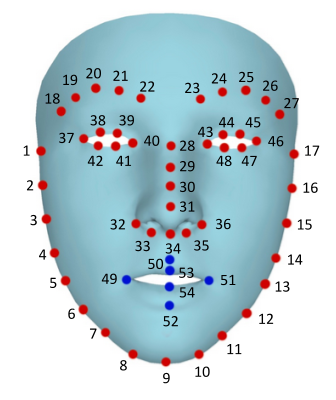
Delaunay triangulation, implemented through techniques like OpenCV's Subdiv2D, creates triangles that help interpolate and blend the features smoothly during the morphing sequence. This approach ensures a visually appealing and realistic transformation between two facial images.
As face morphing is a popular computer vision technique, many GitHub repositories already exist for this. On this repository, the same technique as the one described in this project is studied. In this other repository, a more advanced technique produces a fluid transformation from one face to the other. For this project, the implementation was inspired by the one described in this video (and the following ones).
This project distinguishes itself by performing face morphing in real-time, allowing users to witness the transformation as it happens. The real-time aspect enhances user interaction and opens up possibilities for creative applications.
Rather than restricting morphing to predefined faces, this project incorporates the use of randomly generated faces. To do so, these faces are fetched from https://thispersondoesnotexist.com/. This adds an element of surprise and showcases the flexibility of the morphing algorithm across a variety of facial features and expressions.
To provide a user-friendly experience, a small application has been developed using Streamlit. This application allows users to interactively choose whether to perform Morphing or simple face detection or to generate new random faces.
Understanding the inner workings of face morphing can be complex, especially when some powerful Open-CV functions are used. To facilitate comprehension, extensive comments have been added throughout the codebase. These comments explain each step of the morphing process, making it accessible for beginners.
To get started with the Real-Time Face Morphing project, follow these steps:
- Clone the repository to your local machine.
git clone https://github.com/Florent-LC/Morphing.git
- Install the required dependencies.
conda create --name <env_name> python=3.9.18pip install -r requirements.txt
- Follow the instructions at the beginning of each script to run the tests or the Morphing script.
Happy morphing! 🚀
The current setup is a strong base for real-time face morphing with Streamlit, but there are many opportunities for additional exploration and enhancement:
- Black Edges
Despite efforts, visible black edges persist between the Delaunay triangles in the rendered images, and these artifacts have proven challenging to remove. With more time at disposal, other GitHub projects could have been studied to understand how to get rid of these edges.
- Fluid Transformation:
Consider exploring fluid transformations to enhance the morphing process. This could involve experimenting with advanced algorithms or techniques that provide even smoother transitions between facial features. Investigating research papers or libraries dedicated to fluid transformations may yield promising insights.
- Interactive Cursor Controls:
Introduce cursor controls within the Streamlit application to allow users more interactive control over the morphing parameters. Implementing sliders, buttons, or a cursor interface could provide users with a hands-on experience, enabling them to dynamically adjust morphing parameters in real-time.
- User Customization:
Enhance user customization by incorporating options to choose morphing styles, speeds, or even experiment with different facial feature correspondences. This would add a layer of creativity and personalization to the morphing experience, making it more engaging for users.
- Facial Expression Morphing:
Extend the project by exploring facial expression morphing in addition to shape morphing. This could involve capturing and morphing various facial expressions, providing a more comprehensive and expressive morphing experience.
- Performance Optimization:
Investigate opportunities for performance optimization, especially for real-time applications. Consider exploring parallel processing, GPU acceleration, or other optimization techniques to ensure smooth and efficient face morphing even with higher resolution images or video streams.