V4 PRE 1 updated July 15, 2026
Pre-release
Download plugin and see installation instructions.
See also How to make V3.4 and V4 PRE coexist in Lightroom near the end of this release note.
Feature Pre-Release
Version 4 is the largest update since the project was revived. It fundamentally changes how Focus Point Viewer integrates with Lightroom. You can now keep the viewer open while continuing to work in Lightroom, choose between multiple rendering methods depending on your workflow, and benefit from significantly faster image display.
These changes make the plugin considerably faster and much more convenient to use while working in Lightroom.
Unlike previous releases, Version 4 is planned to undergo a longer pre-release phase. The new workflow affects nearly every aspect of using the plugin, so I'd really appreciate long-term feedback from real-world use to help refine the experience.
Is Version 4 for you?
If you frequently inspect focus points while editing images, especially on a second monitor, Version 4 offers a much smoother workflow and is exactly the type of feedback I'm looking for.
New features and changes:
-
User Interface
- Second Screen mode: A new workflow that keeps the plugin available while editing. #379
- Multiple display modes on both Windows and macOS #388
- Introduce "Direct View" on Windows #393
For a detailed description of the new features, see Focus Points V4: What's New.
If you want to make the most of this new version, this is a must-read!
Limitations
Some new features in this pre-release version are currently affected by limitations in the Lightroom Classic SDK. These are outside the control of Focus Point Viewer and are expected to disappear as Adobe addresses the underlying SDK issues.
Please refer to Known Limitations for a complete list of the current limitations, their impact, and any available workarounds.
You can help. If one of these limitations affects your workflow, please consider voting for the corresponding Adobe bug report. Community votes help increase the visibility of these issues and provide Adobe with a clearer indication of which problems matter most to users.
How to make V3.4 and V4 PRE coexist in Lightroom
You don't need to replace your existing installation. Version 3.4 and Version 4 PRE can coexist in Lightroom, making it easy to switch between them whenever you like.
The 'trick' is to install both versions of the plugin in separate folders, for instance:
- V3.4 in 'focuspoints.lrplugin'
- V4 PRE in 'focuspoints.v4.lrplugin'
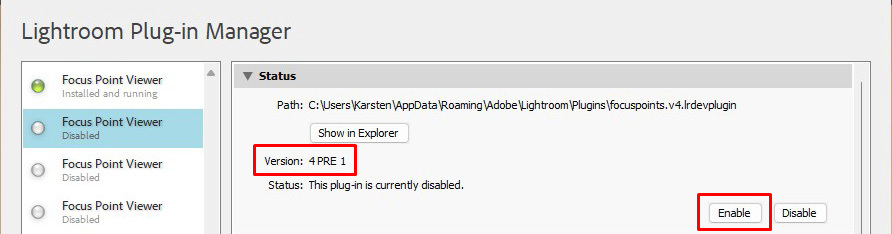
You add both plugins to Lightroom's Plugin Manager from the two different folders. Since both plugins use the same Lightroom plugin identifier, Lightroom allows only one of them to be enabled at a time.
Inspect the 'Version' information and enable the version with which you want to work. If another version has been enabled, this will be disabled automatically. To switch back, follow the same procedure.
This method allows you to have as many versions of the plugin as you want available in Lightroom:
Please join the discussion by clicking the button below and sharing your questions, comments and feedback on this pre-release.