Repository navigation
Releases: Frane12/Testturnip
Release list
Blender v1.1 — ARM64 Android Preview

Blender v1.1 — ARM64 Android Preview
Unofficial experimental release. Blender 4.5.14 LTS (Windows ARM64) running on Android through the DRNAS Wine/X11/Vulkan compatibility environment. Not an official Blender Foundation app.
Hotfix R62 — installation
- Improved first-run Blender/Wine environment installation checks.
- Added SHA-256 verification and safe retry/recovery after an incomplete setup.
- Preserves a backup of an incomplete Wine prefix instead of deleting user data.
R62 is an experimental installation hotfix; behavior still requires verification on individual devices. Back up important .blend projects before updating.
Highlights
- Smooth 3D viewport zoom: floating ZOOM slider with smooth distance interpolation; +/− buttons and long-press ZOOM for the wheel fallback.
- Safe fullscreen: Blender's Window → Toggle Window Fullscreen (DRNAS) changes Android's display layout, avoiding a native Wine fullscreen transition that previously froze the GUI.
- Touch-friendly editing: compact mouse pointer, LMB/RMB and collapsible Blender keyboard with tested sizing.
- Android project folder D:\: choose the project folder at startup, then use D: in Blender's Open/Save dialog.
- Quiet performance defaults: expensive continuous X11 frame/input tracing, stack watchdog and PanVK startup debug disabled; lightweight error logs, manually enabled diagnostic logging and timed performance tests remain.
GPU auto-selection (experimental)
| GPU | Automatic Vulkan route | Current status |
|---|---|---|
| Adreno A6xx/A7xx (recognized models) | Mesa Turnip candidate → system Vulkan fallback | Chip-family selection implemented; per-device results vary |
| Adreno 810 / 830 / 840 | Matched DRNAS Turnip/NeuroFlow candidate → system fallback | Adreno 840 used successfully for editing and zoom; other chips not all verified |
| Mali G52 / G72 / G76 | Matched experimental PanVK candidate on eligible Android versions → system fallback | Experimental, not confirmed on every device |
| Other Mali chips (e.g., G57/G610/G720) | Firmware system Vulkan; no unsupported PanVK injection | Unverified; depends on device firmware |
| Samsung Xclipse (e.g., Xclipse 920/940) | Samsung/AMD firmware Vulkan only, never Turnip/PanVK | Auto-detection implemented; Xclipse 940 rendering not yet device-verified |
| Other Vulkan-capable Android devices | Firmware Vulkan | Compatibility not guaranteed |
Detecting a GPU or passing a Vulkan preflight does not guarantee Blender renders successfully. Actual support depends on GPU driver, Vulkan features and Wine's presentation path. Samsung proprietary Vulkan drivers are not bundled.
Setup
- Download Blender-v1.1-r62-PrefixFix-STABLE-SIGNED.apk for the latest installation hotfix (the original v1.1 APK is retained below). Install on ARM64 Android and allow access to an Android folder when prompted. Updating in place requires the same package signature.
- Choose your project directory. Blender's Open/Save dialog exposes it as D:\.
- Wait for Blender's Windows ARM64 environment to start. Start with the default cube.
- Use ZOOM, mouse buttons and keyboard toolbar to work. For fullscreen, use the DRNAS option, not native Wine fullscreen commands.
- If a GPU or input issue occurs, open the in-app menu and export a log. Enable detailed diagnostics only for troubleshooting.
Known limitations
This is not a native Blender Android build. Loading, rendering, ray tracing, large scenes, file dialogs and individual GPUs may behave differently across devices. Save frequently and back up your .blend projects. The safe Android fullscreen is a workaround; native Wine fullscreen is not fully implemented.
Attribution and source
Blender, Wine/Proton, Mesa Turnip/PanVK, DXVK, FEX and X11 libraries are third-party projects with separate open-source licenses. Their copyrights and licenses remain with their contributors. This APK is unofficial, and no upstream project endorses it.
For Blender upstream source and license, see Blender's source repository and Blender's license information. Wine/Proton and Mesa upstream development sources are available at WineHQ, Valve Proton, and Mesa. Those links identify upstream projects; they do not by themselves document all bundled exact revisions or modifications. License notices for bundled components must be honored; corresponding-source requests and redistribution compliance remain the publisher's responsibility.
Warning: GitHub's automatically generated "Source code" archives on this Testturnip release contain the Testturnip repository tree, not the complete source for all bundled APK components.
Feedback: include your device model, Android version, GPU and exported DRNAS log when reporting failures.
Preview release — use at your own risk.
Blender v1.0 r38

Blender v1.0 r38 — Windows ARM64 Blender on Android
DRNAS EMU · Experimental Public Pre-release · Android ARM64
Warning
EXPERIMENTAL / NOT FULLY TESTED — MAY NOT WORK AT ALL ON YOUR DEVICE.
This is an early public test build, not a stable release. Testing has been limited to a small number of development scenarios; compatibility with your device is unverified. It may fail to start, crash, freeze, render incorrectly, or be completely unusable. Successful Eevee testing on the developer's Adreno 840 device does not establish support for other devices or all Blender features. Keep backups of your projects.
Important
FILE ACCESS — ENABLE ANDROID STORAGE PERMISSIONS BEFORE OPENING OR SAVING PROJECTS.
Open Android Settings → Apps → Blender DRNAS / DRNAS EMU → Permissions and allow the file/storage permissions offered for this app. If Android exposes a separate All files access setting, find it under Settings → Apps → Special app access → All files access (on some phones: Privacy protection → Special permissions → All files access) and enable it for this app. Menu names vary by Android version and manufacturer; you can search Settings for All files access. Enable this only if you are comfortable granting the app broad access to shared storage.
Then reopen the app, select your project folder at startup, and confirm Use this folder → Allow. That folder appears as D: inside Blender. Selecting a folder alone may not be enough if Android file access is disabled. If files are missing or saving fails, check both the Android permissions and the selected folder, then restart the app.
This public preview brings the Windows ARM64 edition of Blender to Android through the experimental DRNAS EMU compatibility environment. Blender's ARM64 executable runs on ARM64 CPU hardware, while the DRNAS runtime provides Windows API compatibility, Android window/display integration, input handling and access to a user-selected project directory.
This is not an official Blender Android release, a native Android port of Blender's UI, or a guarantee of compatibility with all phones. It is an early technical preview for testing and feedback; functionality on your device is not guaranteed.
Tested: Blender viewport, project/file dialogs, Eevee GPU operation and animation playback on the developer's Adreno 840 test device. Broader compatibility, render quality, frame pacing, and stability still require testing.
Download and installation
- Under Assets, download
Blender-DRNAS-r38-Render-Transfer-FPS-STABLE-SIGNED.apk(approximately 396 MB). - Install it on an Android ARM64 device. Android may require you to allow installation from the app you used to download the APK.
- Launch the application and follow the folder selection instructions below. The initial setup may take some time on slower devices.
The app is experimental and requires sufficient storage and available RAM. It does not require root access.
Existing DRNAS installations: The Blender package uses the DRNAS application ID (
com.drnas.console). Back up projects and application data before installing. An in-place update is possible only with a compatible signing certificate and version code; otherwise Android may require uninstalling the older application.
IMPORTANT — Select your Android project folder at startup
Blender needs access to an Android folder before it can open and save your own .blend files. The folder you authorize becomes drive D: inside Blender.
- Start Blender DRNAS. When Android displays the system folder picker, browse to the folder where you want to keep your Blender projects.
- Select the folder itself, not an individual
.blendfile. You can use a dedicated folder such asDocuments/BlenderProjects. - Tap Use this folder (or the corresponding confirmation button shown by Android), then Allow when Android asks you to grant access.
- Wait for Blender to load. In Blender, choose File → Open, navigate to
D:and open the.blendproject located in your selected folder. - To export your project, use File → Save As and save it under
D:. The saved files are then accessible to Android in the folder you selected.
Example:
| Android | Inside Blender DRNAS |
|---|---|
Selected folder: Documents/BlenderProjects |
D:\ |
File: Documents/BlenderProjects/test.blend |
D:\test.blend |
Saved project: D:\scene.blend |
Documents/BlenderProjects/scene.blend |
In this r38 configuration the file browser is intentionally simplified to expose D: as the user-facing project drive. Files outside the folder you approved will not automatically appear there. If a project does not show up, first confirm that the correct folder was selected, permission was granted and the file is actually inside it.
Graphics and GPU rendering
The primary verified GPU scenario for this preview is Eevee on a Qualcomm Adreno 840 test device. Blender's Vulkan GPU backend was exercised during development, including scene rendering. This is specific on-device evidence, not a promise of full Vulkan support across all Adreno, Mali or other GPUs.
For an initial GPU test:
- Open Blender and select Eevee in Render Properties → Render Engine.
- Where supported in your Blender build, inspect Edit → Preferences → System for the GPU backend and select Vulkan if available. A Blender restart may be needed after changing the backend.
- Start with the default cube or a small, low-complexity project. Try viewport navigation, a short animation and a simple Eevee render.
- Watch for artifacts, missing objects, application freezes, excessive memory use or unexpected window behavior. If Vulkan fails, record the device and logs before trying alternate settings.
Important limitation: Cycles GPU rendering, hardware ray tracing and universal GPU acceleration have not been validated by this release. Avoid treating the successful Eevee experiment as proof that all rendering engines and devices are supported.
Display, touch and performance
The app includes Android touch/input integration and on-screen controls for desktop-oriented interactions. The desktop is still driven by an experimental Windows/Wine/X11 display path, so mouse focus, secondary windows, shortcuts and scaling may not always behave like a native desktop installation.
r38 technical changes include more efficient X11 image/request transfer with bounded reusable buffers, fewer unnecessary frame copies and an on-screen FPS indicator. The FPS indicator measures Android desktop draw callbacks; it is not a Blender render benchmark or a direct Vulkan Present FPS counter. Complex scenes may still render slowly.
Real device screenshots
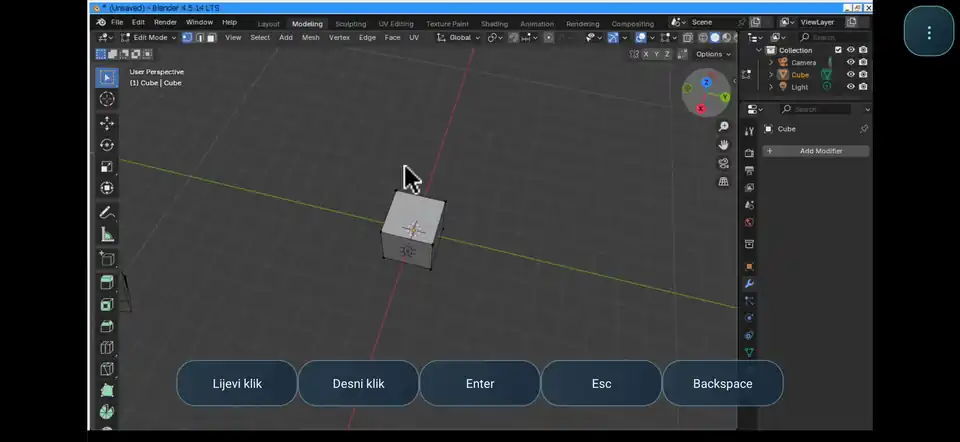
These are genuine screenshots from earlier DRNAS Blender development builds, not mock-ups or stock Blender promotional images. They illustrate the working Windows ARM64 Blender GUI and file dialog on Android. They are not screenshots of the final r38 folder picker; early test builds may show older drive listings or control layouts.
3D viewport on Android (early development capture):
Blender file-browser/window integration (early development capture):
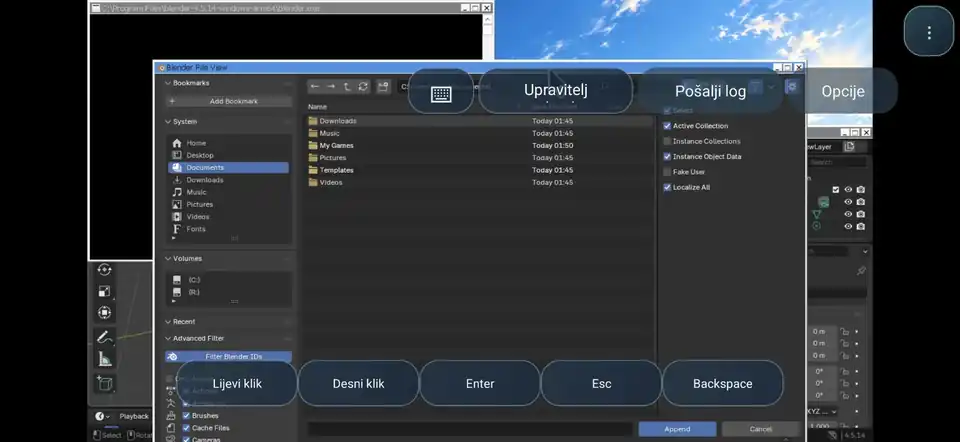
For r38, follow the D: folder mapping steps above rather than the older disk layout visible in historical screenshots. Device-specific r38 captures of Android folder selection, the D: file view and Eevee rendering are welcome in test reports.
Known limitations
- Pre-release quality: Crashes, stalls, rendering artifacts and incompatible Blender features remain possible.
- GPU compatibility: Eevee was exercised on Adreno 840; other models require individual validation.
- Rendering: Performance and correctness vary by scene. Ray tracing/Cycles GPU should not be assumed functional.
- Window management: Pop-up dialogs and secondary windows may show focus, visibility or positioning issues.
- File permissions: The D: project drive maps to the user-selected folder. Android file/storage permissions may also need to be enabled manually; granting All files access gives the app broader shared-storage access.
- Performance metrics: The built-in FPS display reports Android UI draw activity, not Blender's render throughput.
Reporting a problem
Please open an issue in Testturnip and include your device model, GPU, Android version, APK revision (r38), Blender settings, exact reproduction steps, logs and screenshots. For GPU/rendering reports, note the Eevee/Vulkan configuration, scene complexity, resolution, memory behavior and whether the issue reproduces after a clean restart.
Integrity and credits
- Release APK:
Blender-DRNAS-r38-Render-Transfer-FPS-STABLE-SIGNED.apk - SHA-256:
2bf07aba309c388d540d56dba772da81f64cd4b4e847096102c433aafe66e3b7 - Android application ID:
com.drnas.console - Project: DRNAS EMU / EmuExperimental — independent experimental Android integration by Frane12.
Blender is developed by the Blender Foundation and contributors. Wine, Mesa and related compatibility/graphics components are separate upstream projects with their own authors and licenses. DRNAS EMU is not affiliated with or endorsed by the Blender Foundation, Qualcomm or the ...
Drnas-Turnip NeuroFlow A840 H2.9 Aggressive — TESTING ONLY
Drnas-Turnip NeuroFlow — A840 H2.9 Aggressive
PRE-RELEASE · TESTING ONLY · EXPERIMENTAL
For Adreno 840 (A840) · Android ARM64 / KGSL · Mesa 26.3.0-devel · Vulkan Turnip
H2.9 is the tested aggressive NeuroFlow development build, published separately from the newer H3.0 decision-cache experiment. Its original H2.9 compiled Vulkan driver is preserved byte-for-byte; only the ZIP name and installer's meta.json are adjusted for this public test release.
⚠️ This is experimental, not a stable update. It may have compatibility problems, crashes, visual artifacts or performance regressions on other games/devices. Keep your working driver (for example the previous public A840 H2.8) for rollback. Do not install on A810 or A830.
What's in H2.9
- A840-specific aggressive NeuroFlow policy, enabled by default with
TU_FRANE_A840_AGGRESSIVE=1. Designed to pursue responsive GMEM/SYSMEM decisions under guarded GPU-timed A/B/A comparison. - Native Mesa fallback when the H2.9 decision is invalid, rather than forcing SYSMEM.
- Retains H2.8's adaptive memory / TEX handling, confidence checks and guards for stale or noisy measurements.
- Uses the A840 hardware-specific path, including the tested GPU chip ID
0xffff44050A31. Other Adreno chips are not validated. - Built for Android ARM64, with compatible KGSL/Turnip driver managers and Android API level 34+.
This is CPU-side learning and GPU timing feedback; it does not use the Qualcomm Hexagon NPU.
Real-device observation (one user test)
On Poco F8 Ultra / Adreno 840, Far Cry 4 at 1280×720, nearly all settings Very High except Medium shadows, with 4 CPU cores and an FPS cap of 40, was reported smooth at the 40 FPS lock, with no visible artifacts during that test. This is an individual observation, not a controlled multi-run benchmark, and does not prove improvements across other games or longer sessions.
Installation
- Download
Drnas-Turnip-NeuroFlow-A840-H2.9-TESTING-ONLY.zipfrom the assets below. - Install the ZIP with an AdrenoTools / compatible Winlator Turnip driver manager in a separate test container.
- Fully restart the emulator / game. Keep DXVK, FEX, resolution, FPS cap, Max Frame Latency, CPU affinity and cooling the same when comparing against H2.8 or H3.0.
- Compare cold and warm runs; note FPS, frametime / 1% lows, stutter, temperature, GPU errors and visual correctness. H2.9 may behave differently from H3.0 and H2.8.
For profiled autotuning, use:
TU_AUTOTUNE_ALGO=profiledOptional controls
| Variable | Default | Description |
|---|---|---|
TU_FRANE_A840_AGGRESSIVE=1 |
ON | 0 disables H2.9 aggressive selection while retaining the underlying adaptive path. |
TU_FRANE_A840_ADAPTIVE=1 |
ON | 0 disables the A840 adaptive controller for an A/B comparison. |
TU_FRANE_A840_TEX_DYNAMIC=1 |
ON | 0 disables A840 dynamic TEX handling. |
TU_FRANE_A840_TRACE=1 |
OFF | 1 enables diagnostic traces (with overhead). |
No additional profile ID is required for basic H2.9 operation. Use separate game profiles only if you deliberately manage their caches. Restore a known-good driver if you encounter artifacts or instability.
Provenance / integrity
- Derived from the successful private H2.9 Android ARM64 build of 17 October 2026.
- Original private driver ZIP SHA-256:
db7de5fb855f35b341939006ebf64d986b0616f50b4c3bc650a9de387bb1d961. - The public package changes metadata only, preserving the original
libvulkan_freedreno.sobytes. - Download
SHA256SUMS.txtfor checksums of the public ZIP and embedded Vulkan binary.
Author: Frane12 · Status: Experimental / TESTING ONLY · Bug reports and reproducible A/B results welcome.
Drnas-Turnip A810 S Ultimate v1.0
Drnas-Turnip A810 S Ultimate v1.0
First public release of S Ultimate for Adreno 810
Android AArch64 / KGSL · Mesa 26.3.0-devel · Vulkan Turnip
This release packages the audited RC1 binary unchanged. Only the installer's displayed name, package version and ZIP filename differ from RC1. No further autotuner changes were made after the successful RC1 Android CI build.
Features
- Dynamic V3 category learning: a lightweight four-slot cache of measured GMEM/SYSMEM winners per render-pass context. It can resume an already learned category when it reappears.
- Confidence-based decisions: existing 16-entry AT3 GPU timestamp history remains authoritative; weak, stale, noisy or unmatched measurements cannot force a cached winner.
- Controlled response: phase confirmation, winner votes and dwell time reduce rapid GMEM/SYSMEM switching. Fixed A-B-A-B transition counting and a concurrent active-phase recheck in the final audit.
- Protected rendering: existing AT4 exploration and AT8/AT7/AT63 selection, depth logic and GMEM safety paths remain available. The regressive AT9 FC2 forced prior is not included.
- Optional detailed diagnostics: context decision/cache reasons, GPU timestamp CSV and CPU submission trace are off unless explicitly enabled.
- DXVK HUD name: Vulkan reports
Drnas-Turnip A810 S Ultimate v1.0for A810, which can appear underDXVK_HUD=devinfo,fps. SetTU_FRANE_ULTIMATE_HUD_BRAND=0to return to the standard GPU name. Original GPU/vendor IDs and pipeline UUID are preserved.
Compatibility and installation
Target: Adreno 810, Android ARM64 with KGSL. This ZIP has been built with the install manifest's minApi=34. Other GPU models and other Vulkan/DXVK variants are not validated.
Install Drnas-Turnip-A810-S-Ultimate-v1.0.zip using your Winlator/Ludashi compatible Turnip driver manager. Choose the driver for your container, fully restart it, and select:
TU_AUTOTUNE_ALGO=profiledThe primary ATUltimate, Dynamic V3, fast learning and cooldown logic are enabled by default; extra env vars are not needed for a normal run.
Optionally use DXVK_HUD=devinfo,fps to inspect the GPU name and FPS. Some DXVK builds may abbreviate or omit the device name; the Vulkan driverInfo and adapter name have been updated, not the DXVK DLL itself.
Tuning / rollback
| Variable | Default | Use |
|---|---|---|
TU_FRANE_ATU=1 |
ON | 0 disables the ATUltimate family toward the AT8 baseline |
TU_FRANE_ATU_DYNAMIC=1 |
ON | 0 disables dynamic winner routing |
TU_FRANE_ATU_V3=1 |
ON | 0 compares the previous Dynamic V2 path |
TU_FRANE_ATU_FAST=1 |
ON | 0 disables the earliest high-confidence 2-pair path |
TU_FRANE_ATU_PHASE_HITS=3 |
3 | Increase to 4–5 for less sensitive new-phase detection |
TU_FRANE_ATU_DWELL=24 |
24 | Increase to 32–48 for more stable winner switching |
TU_FRANE_ULTIMATE_HUD_BRAND=1 |
ON | 0 restores native Adreno Vulkan adapter name |
Restart the container after changing runtime variables. Keep Max Frame Latency and other emulator settings consistent during comparisons.
Optional debug logging
Only activate for a separate diagnostic session because CSV writing changes measured FPS:
TU_AUTOTUNE_ALGO=profiled
TU_FRANE_ATU_CONTEXT_TRACE_PATH=/storage/emulated/0/Download/atu_v1_context.csv
TU_FRANE_A810_RFC1_TRACE_PATH=/storage/emulated/0/Download/atu_v1_gpu.csv
TU_FRANE_A810_CP1_TRACE_PATH=/storage/emulated/0/Download/atu_v1_cpu.csv
Confirm your container can write into that Android folder. The context logger reports category identity, cached winner, candidate, votes, cooldown and reasons such as USED, PHASE_WAIT, NO_PAIRED, NOISY_HISTORY, STALE_HISTORY, WAIT_DWELL and AT4_PRIORITY. Independent GPU trace timestamps should not be mistaken for frame-perfect joins to context decisions.
Benchmark evidence and limitations
The strongest pre-RC Dynamic V3 user Crysis TimeDemo evidence (four passes, 2000 frames each) reported 37.16 average FPS across the warm passes, and 53.59 seconds / 37.32 FPS in its quickest individual pass. This is a reference result for the preceding V3, not a benchmark measured on this final audited binary.
The RC1 source audit, UBSan tests, Android AArch64 build and packaging passed in GitHub Actions run 38127891483. No complete multi-game validation or on-device RC1 GPU/context trace is available at the moment of public release. Actual performance and visual behavior can vary with game engine, FEX, DXVK, thermals and device memory pressure.
Binary provenance: the libvulkan_freedreno.so shipped here has SHA-256
55d05eb150d40121770c74fe9c90c3f79b92ea4de28611f2cfce53602e019f80.
The RC1 baseline and complete patch set are in the attached source ZIP; a SHA256SUMS.txt contains release artifact hashes.
Download assets
Drnas-Turnip-A810-S-Ultimate-v1.0.zip— installable Turnip driverDrnas-Turnip-A810-S-Ultimate-v1.0-Source.zip— audited complete source patch and testsSHA256SUMS.txt— SHA-256 checksums
The code is open for review and testing. Please report the exact device, emulator version, DXVK/FEX combinations and benchmark details when comparing performance.
Drnas-Turnip A825 S Ultimate v0.1 D1 TEST
A825 S Ultimate v0.1 D1 — experimental test build
Android arm64 / KGSL driver for Adreno 825, built from Mesa 26.3.0-devel with the Ultimate adaptive render-pass policy.
- Correct A825 chip ID:
0x44030000; Mesa fallback record:0xffff44030000. - Dedicated two-slice, four-CCU cache profile; GMEM capacity comes from the kernel.
- Bounded recent GPU timing feedback, fresh paired winner votes and occasional GMEM/SYSMEM reassessment.
- A825 custom features are enabled by default. Native CSV logging is disabled by default.
A825 hardware startup, rendering correctness and performance are not yet confirmed. Android compilation and host lookup, allocator, feedback, concurrency and CSV tests passed. Please treat this as a test build; no FPS improvement is claimed.
Test and report
Import the driver ZIP in your emulator, restart the process and run four benchmark passes without logging. Report the exact device, Android version, emulator, DXVK/VKD3D, game, resolution, settings, per-run FPS/playtime and any artifacts or crashes.
Optional diagnostic run only, with a native Android path writable by your emulator:
TU_FRANE_A825_TRACE_PATH=/storage/emulated/0/Download/a825_ultimate.csv
Exit the game normally to flush the CSV. It records chip ID, raw GPU ID, slice/CCU count, mode, decision source and existing GPU timestamp ticks. Attachment bytes are modeled estimates, not measured DRAM bandwidth.
Restart after changing an option:
TU_FRANE_A825_ULTIMATE=0
Disables the A825 custom policy while preserving device registration, cache layout and safety checks.
TU_FRANE_A825_GMEM=0
Forces the guarded A825 path to SYSMEM for diagnosing GMEM artifacts.
Minimum Android API: 34. This release contains the exact previously built test ZIP, verified by SHA-256 before publishing.
.
Turnip-Drnas A830 S2-BW1 — Experimental
Turnip-Drnas A830 S2-BW1 — INTERNAL DRAFT
Experimental A830 bandwidth/tile-memory build derived from S2-D2 Upstream 2026-10-07.
What changed
1. A830 GMEM eligibility envelope
The older SMART-GMEM helper originated on A810 and still had a 2 MiB physical-GMEM sanity ceiling. On A830 that can reject otherwise valid runtime metadata before the Smart/PROFILED selector gets a chance to use it.
BW1 widens only that sanity envelope to 16 MiB. It does not hard-code an A830 allocation size: Mesa's runtime-reported physical GMEM, usable GMEM, selected layout and allocator limits remain the source of truth.
2. Bandwidth/tile-memory prior
BW1 adds an A830-only structural prior using:
- Mesa's existing SYSMEM vs GMEM attachment bandwidth-per-pixel estimates;
- the allocator-selected tile area;
- selected tile occupancy relative to layout capacity;
- estimated tile count for the real render area;
- draw reuse density per tile;
- live attachment bytes and plane count.
The prior only adjusts the existing SMART structure score. It does not program GMEM offsets, registers, barriers, resolves or synchronization.
3. Existing measured logic remains authoritative
S1/S2-D2 measured PROFILED history, the tail learner, sparse audit behavior and the exact A830 GMEM safety gate are retained. A strong measured SYSMEM result can still win.
A/B controls
No variable is required for the first run.
TU_FRANE_A830_BW1=1— default, enable BW1 prior.TU_FRANE_A830_BW1=0— disable only BW1.TU_FRANE_A830_FOOTPRINT=0— disables the S2-D2 footprint metadata path; BW1 then has no selected-tile metadata and naturally becomes inactive.TU_FRANE_A830_GMEM=0— full A830 GMEM safety fallback to SYSMEM.
Suggested first tests
Use the same Winlator/DXVK settings and Max Frame Latency state as the current A830 baseline. Compare at least two warm runs per title and watch for:
- average FPS and 1%/frametime smoothness;
- power draw;
- RAM growth;
- square/color artifacts;
- KGSL page faults or device loss.
Recommended first titles: Crysis/CryEngine, Far Cry 3 and GTA IV.
Status: host-policy tested + Android ARM64 compile gate. No claim of on-device stability or performance until A830 hardware results exist.
Turnip A810 V38 AUTOTUNER
Experimental branch on V38 GMEM-SEARCH: context-aware PROFILED histories split coarse draw/tile/depth-bandwidth workloads, plus a two-probe >=20% phase-change detector that recenters stale strong preferences. A/B with TU_A810_V38_CONTEXT_AUTOTUNER=0 for exact V38 autotuner behavior.
Turnip-Drnas S2 A810 — GMEM & Shader Scheduling
Turnip-Drnas S2 A810
Adreno 810 · Android ARM64 / KGSL · Mesa 26.3.0-devel
S2 brings the tested V38-derived render path together with allocator-aware GMEM decisions and revised shader instruction ordering. The aim is practical: make better use of the A810's limited on-chip memory while keeping camera movement and busy scenes smooth.
What changes from S1?
S1 established an endurance candidate around Tail Guard, paired timing evidence and frequency/signature-gated scanning. S2 promotes a separately tested V38-derived branch. It is a change of tuning approach, rather than a cumulative merge of every S1 feature.
| Area | S1 release | S2 release |
|---|---|---|
| Development base | Endurance branch with Tail Guard and scan/learner refinements | Selected V38-derived GMEM and shader branch |
| GMEM decisions | Timing evidence and tail/recurrence handling | Adds a bounded footprint score based on the actual selected allocator layout and tile |
| Shader scheduling | Existing A810 scheduling stack | Revised ordering: register release at higher estimated pressure, upstream delay/consumer tie-breaks below the threshold |
| Validation focus | Longer sessions and stability | Tested Crysis base, real-game feedback and automated build/policy/shader checks |
Main changes
- Allocator-aware GMEM footprint: considers the chosen layout's capacity, actual tile size and peak live color/depth/stencil storage per subpass. MSAA storage and the separate D32S8 stencil plane are included.
- Bounded GMEM preference: the extra score is capped at 22 points. Missing, inconsistent or overflowing metadata contributes zero. It cannot directly force GMEM or override a strong measured SYSMEM preference.
- Pressure-aware shader ordering: retains register-release priority under higher estimated pressure, with upstream scheduling tie-breaks below it. The default threshold is 35; this is a compiler estimate, not a hardware occupancy measurement.
- Shader cache identity: includes the selected shader mode and normalized pressure threshold.
- Consistent driver labels: the importer displays Turnip-Drnas A810 S2 and Mesa 26.3.0-devel separately.
The tested V38-derived allocator, LRZ and synchronization behavior are retained. There is no claim that S2 contains every later S1 policy.
Crysis benchmark — CryEngine 2
The selected S2 base reached 34.17 FPS in the built-in Crysis GPU benchmark.
| Metric | Previous test base | Selected S2 base | Change |
|---|---|---|---|
| Warm-run average FPS | 33.71 | 34.17 | +1.36% |
| Lowest reported minimum, warm runs | 21.84 | 22.00 | +0.16 FPS |
| Mean warm-run completion time | 59.34 s | 58.54 s | 0.80 s faster |
Source: user-supplied Crysis Bin32/Benchmark_GPU.bat results, CryEngine 2, 960 × 544, three passes with 2,000 frames per pass. The first pass is warm-up; the two remaining passes are used for average FPS and time. Raw pass values are included in benchmark-evidence.json inside the source archive.
The comparison above is against the previous test base, not the published S1. A matched S1-versus-S2 benchmark has not been recorded. The owner also reported smoother real-game camera movement, but frametime percentiles and 1% lows were not measured.
This is a modest measured difference from one test session, not a guaranteed uplift across games. The release is rebuilt from the selected source with display-name changes; the final release binary has not yet received a separate device benchmark.
Installation
Download Turnip-A810-S2.zip and import it through your application's custom Vulkan driver manager.
- Target: Adreno 810, Android ARM64 / KGSL.
- Minimum Android: Android 14 / API 34.
- Recommended autotuner:
TU_AUTOTUNE_ALGO=profiled. - GMEM footprint and the selected shader policy are enabled by default.
For controlled comparisons, TU_FRANE_GMEM_FOOTPRINT=0 disables the extra footprint score. TU_FRANE_SHADER_MODE=0 restores the V38 shader-order policy. Restart the container after changing either setting and allow the shader cache to warm up.
Build and source
The publishing workflow runs host policy checks, the IR3 shader compilation corpus and delay/disassembly tests, then builds the Android AArch64 driver. Packaging checks cover ELF architecture, driver labels, ZIP integrity and SHA-256 hashes. These checks complement device testing; long-session and wider game compatibility testing remain open.
- Selected source base
- S2 source and publishing branch
- Mesa snapshot:
eda9aceb39d5ff169b096444abe366bdf2269e24 - Release assets include the installable driver, applied Mesa source patch/build provenance and SHA-256 checksums.
Built on Mesa / Freedreno / Turnip. Thanks to the upstream contributors and everyone testing the A810.
Drnas-Turnip NeuroFlow — A810/A830/A840 (TESTING ONLY)
Drnas-Turnip NeuroFlow — A810 / A830 / A840
PRE-RELEASE · TESTING ONLY · EXPERIMENTAL
Android ARM64 / KGSL · Mesa 26.3.0-devel · Vulkan Turnip · AdrenoTools-compatible driver ZIPs
⚠️ Experimental GPU drivers for volunteer testers, not stable production releases. There is no guaranteed FPS improvement, crash-free operation or universal compatibility. Visual corruption, depth/shadow problems, startup failures and regressions may occur. Keep a known-good driver available.
NeuroFlow experiments with lightweight learning, hardware measurements and adaptive driver policies. These versions rely on CPU-side logic and existing GPU timestamp feedback — not on the Qualcomm Hexagon NPU. The three packages contain three distinct compiled drivers, not one driver renamed for different GPUs.
Downloads
| GPU | Installable driver | Experimental focus |
|---|---|---|
| Adreno 810 | Drnas-Turnip-NeuroFlow-A810-H2.7-TESTING-ONLY.zip |
Dynamic TEX windows and GPU feedback |
| Adreno 830 | Drnas-Turnip-NeuroFlow-A830-H2.4-TESTING-ONLY.zip |
Confidence-controlled neural warm start |
| Adreno 840 | Drnas-Turnip-NeuroFlow-A840-H2.8-TESTING-ONLY.zip |
Adaptive GMEM/SYSMEM memory and TEX decisions |
Do not cross-install these packages. A840 experimental hardware scope includes exact chip ID 0xffff44050A31, without assuming compatibility with other A840 variants. Android API ≥34 and compatible KGSL/Turnip manager are expected.
A810 — NeuroFlow H2.7 TEX Feedback
- Selects between precompiled fragment shader TEX windows 4 and 6 using completed GPU timestamp feedback on comparable command contexts.
- Uses A/B/A evaluation with noise, stale-result and context mismatch rejection. Applies cooldown before changing a winner.
- Retains the H2.6 GPU-memory layer and NeuroFlow learning; falls back to static window 6 when evidence or variants are missing.
- Initial shader compilation may add cold-start overhead. Compare warm runs.
A830 — NeuroFlow H2.4 Confidence Warm Start
- Loads H2.3-compatible per-game neural model cache; validates records before reuse.
- HIGH, GUARDED and REJECT confidence categories use prior paired timing evidence, votes and jitter. Restored entries require fresh confirmation.
- Optional disk priors and status TXT; live learning still runs when cache is disabled.
- Please check GMEM faults, square artifacts, color, depth and shadows in particular.
A840 — NeuroFlow H2.8 Adaptive Memory
- Uses native A840 gen2 cache and register capacities, not the A810 GMEM allocator or A810 disk model.
- A/B/A GPU-timed GMEM/SYSMEM trials guard against jitter, drift, stale results and context changes.
- Additional probing pauses above 85% of reported Vulkan heap use and resumes below 75% — this is not total Android RAM.
- Limits shader/TEX variant proliferation and yields to explicit manual overrides.
- No on-device A840 FPS or long-term stability claims.
Installation and A/B testing
- Install the ZIP for your exact GPU in a Winlator/Ludashi-compatible Turnip driver manager in a separate test container. Preserve a working stable driver for rollback.
- Restart the whole game/container. Use
TU_AUTOTUNE_ALGO=profiledif your launcher overrides the profiled default. - Keep graphics settings, DXVK/FEX build, scene, resolution, FPS cap, CPU affinity, Max Frame Latency and cooling consistent between baseline and NeuroFlow.
- Run one cold launch and 2–4 warm runs. Record average FPS, 1% lows/frametimes, artifacts, crashes, heat and memory usage. Send exact model, Android version, emulator and logs.
Controls and rollback
| GPU | Setting | Default | Alternative |
|---|---|---|---|
| A810 | TU_FRANE_TEX_DYNAMIC=1 |
ON | 0 uses static window 6 |
| A810 | TU_A810_26317_TEX_WINDOW_MAX |
unset | 4 or 6 for fixed comparisons; overrides dynamic feedback |
| A810 | TU_FRANE_GPU_MEM=1 |
ON | 0 disables H2.6 GPU memory layer |
| A830 | TU_FRANE_A830_NEURO=1 |
ON | 0 disables A830 learner |
| A830 | TU_FRANE_A830_NEURO_CACHE=1 |
ON | 0 disables disk priors |
| A830 | TU_FRANE_A830_NEURO_CACHE_STATUS=1 |
ON | 0 disables status TXT |
| A840 | TU_FRANE_A840_ADAPTIVE=1 |
ON | 0 disables H2.8 adaptive controller and TEX layer |
| A840 | TU_FRANE_A840_TEX_DYNAMIC=1 |
ON | 0 disables dynamic TEX alone |
| A840 | TU_FRANE_A840_TRACE=1 |
OFF | 1 enables diagnostic traces with overhead |
A810: remove explicit TU_A810_26317_TEX_WINDOW_MAX when benchmarking dynamic feedback. A830: use a stable per-game TU_FRANE_PROFILE_ID, such as crysis; cache defaults to /storage/emulated/0/Download/DrnasTurnip-NeuroFlow/. Back up old cache snapshots and never mix GPU-specific cache files.
Evidence and limitations
The three compiled Android ARM64 libvulkan_freedreno.so binaries originated in successful GitHub Actions builds in the development repository. Binary bytes are unchanged; release packaging updates only meta.json and ZIP filenames. Attached checksums allow testers to verify both install packages and ELF binaries.
Build success is not real-device validation, and no untested FPS improvements are claimed. Report reproducible A/B performance and any regressions so unsafe decisions can be removed or guarded.
Author: Frane12 · Status: TESTING ONLY · Feedback welcome.
Drnas-Turnip S1 A830 — Smart Performance
Drnas-Turnip S1 A830 — Smart Performance
Status: Public experimental / A830 performance branch
Target: Adreno 830 · Android ARM64 / KGSL
Base: Mesa 26.3.0-devel snapshot + Drnas A830 RC1 stack
S1 A830 is the Smart Performance branch for the stronger A830 target. The goal is not power-max or forced clocks; it is to make the render path spend less time re-deciding the same GMEM/SYSMEM situations while keeping hard safety gates around GMEM.
Default behavior
Guarded A830 GMEM is enabled by default.
TU_FRANE_A830_GMEM=0 disables the A830 GMEM path and returns those passes to SYSMEM.
This does not blindly force every render pass into GMEM. With the default enabled, a pass must still satisfy the A830 safety scope before the normal/Smart selector is allowed to choose GMEM. Unsupported or suspicious passes remain on SYSMEM.
TU_FRANE_SMART=0 disables the Smart scene-history layer and falls back to the existing selector.
TU_DEBUG=sysmem remains an explicit forced-SYSMEM control.
Important: A830 GMEM write page faults have been reported in community/mainline drivers. This build adds bounds/scope protection and the latest reviewed fixes, but it does not claim that the underlying hardware/firmware page-fault issue is proven solved. The public build is therefore marked experimental.
Smart scene memory
Repeated render patterns no longer need to pay the full decision cost every time. S1 stores bounded history and promotes patterns through four confidence tiers:
| State | Evidence | Behavior |
|---|---|---|
| COLD | insufficient / stale paired evidence | one GMEM/SYSMEM control pair per 8 recurrences; otherwise base selector |
| WARM | confidence ≥ 4/8 and ≥ 8 fresh pairs | remembered winner; 2 measurements per 64 recurrences |
| TRUSTED | confidence ≥ 6/8 and ≥ 12 pairs | 2 measurements per 128 recurrences |
| LOCKED | confidence 8/8 and ≥ 16 pairs | 2 measurements per 256 recurrences |
The A830 history key includes render area, render-pass structure, draw-count bucket and GMEM layout so a materially different scene does not inherit an old answer. Strong contradictory evidence can demote or reverse a learned decision; stale history expires.
The Smart helper itself adds no new mutex, wait, timer or per-decision allocation. Decision ownership and measurement ownership stay single-path to avoid duplicate work.
A830 GMEM safety scope
Before an A830 pass is allowed to use the experimental GMEM path, the driver checks:
- A830 GPU ID gate;
- one layer / one view;
- no FDM or MSRTSS;
- no MSAA or resolve path in the guarded scope;
- physical and usable GMEM limits;
- tile-pixel limits;
- attachment offset/end bounds;
- separate D32S8 stencil range;
- CCU/VPC cache-reservation arithmetic before unsigned subtraction;
- custom depth/stencil resolve exclusions.
If any guard fails, the pass falls back to SYSMEM.
Included driver work
- Smart GMEM/SYSMEM scene-memory policy adapted for A830.
- A830-specific history signature and lower-frequency re-probing once confidence is established.
- Retained A830 V59 LRZ-CLEAN logic.
- Mesa
CmdClearAttachmentsGMEM blit-write access/barrier fix. - KGSL fixed-address
munmapcleanup. - ION handle/fd allocation-failure cleanup.
- KGSL dma-buf import cleanup on
GPUOBJ_INFOfailure. - Existing suballoc NULL cleanup retained.
- No clock unlock, no thermal-governor bypass and no A810 power-max path.
Controls
TU_FRANE_A830_GMEM=1   # default; enable guarded A830 GMEM eligibility
TU_FRANE_A830_GMEM=0   # disable A830 GMEM path / use SYSMEM fallback
TU_FRANE_SMART=1       # default; Smart scene history enabled
TU_FRANE_SMART=0       # disable Smart history, keep existing selector
For normal testing, leave the variables unset first. Use TU_FRANE_A830_GMEM=0 as the clean comparison / recovery control if you see a page fault, device-lost event, hang or rendering corruption.
CI / host validation
Executed for this branch:
- 716,040 Smart-policy combinations across confidence, pair counts, PROFILED boundaries, tail risk, instability and both winners;
- freshness, reused/old sample rejection, completion-order inversion, uint32 rollover, ties, saturation and UINT64_MAX;
- cadence and moving probe position across 128 blocks;
- synthetic regime change at occurrence 4096;
- 830 A830 GMEM arithmetic cases against an independent 128-bit oracle;
- A830 history-key construction with render-area / pass / draw-bucket / layout separation;
- ASan + UBSan host tests;
- source-order / safety-gate / KGSL cleanup checks;
- full Android ARM64 NDK r29 Turnip build;
- ZIP integrity, ELF64 AArch64 identity and runtime-option verification.
Device validation status
Not yet claimed as completed: Vulkan CTS on A830 hardware, long-session game endurance, FPS/frametime/temperature measurements, or proof that the known A830 GMEM write page fault cannot occur.
Please report the game, Winlator/Ludashi build, FEX/Box64 version, DXVK version, resolution, and whether TU_FRANE_A830_GMEM=0 changes any fault or artifact.
Built from the dedicated drnas-a830-s1-smart-performance-2 branch.
AI provenance: Generated-by: LLM.