Android MPEG–H offload playback and UI handling
This document outlines a concept for MPEG-H integration into the Android OS, focusing on enabling MPEG-H offload playback and defining the API usage for 2-way MPEG-H UI XML message communication between the MPEG-H decoder running in Audio HW layer and an OTT/OTA application.
- MPEG-H decoder and MPEG-H UI manager part of Audio HW / SoC HW (accessible via Audio HAL)
- MPEG-H bitstream offload playback using AudioTrack API as ENCODING_MPEGH_* audio format
- New MEPG-H AudioSceneInformation availability event using AudioTrack API
- 2-way MPEG-H UI XML message communication using AudioManager system service

Enable MPEG-H offload playback using AudioTrack API:
- MPEG-H Audio HAL offload support for AUDIO_FORMAT_MPEGH_* types
- as defined in system/media/audio/include/system/audio-hal-enums.h
- AUDIO_FORMAT_MPEGH_BL_L3
- AUDIO_FORMAT_MPEGH_BL_L4
- AUDIO_FORMAT_MPEGH_LC_L3
- AUDIO_FORMAT_MPEGH_LC_L4
- as defined in system/media/audio/include/system/audio-hal-enums.h
- MPEG-H offload playback using ENCODING_MPEGH_* audio formats with AudioTrack API
- as defined in frameworks/base/core/jni/android_media_AudioFormat.h or frameworks/base/media/java/android/media/AudioFormat.java
- ENCODING_MPEGH_BL_L3
- ENCODING_MPEGH_BL_L4
- ENCODING_MPEGH_LC_L3
- ENCODING_MPEGH_LC_L4
- as defined in frameworks/base/core/jni/android_media_AudioFormat.h or frameworks/base/media/java/android/media/AudioFormat.java
To enable an OTT/OTA application to identify the supported MPEG-H profiles and levels on the device, it is advisable to expose the supported ENCODING_MPEGH_* encoding formats with the AudioManager→AudioDeviceInfo→getEncodings() API.
To enable an OTT/OTA application to identify the supported MPEG-H profiles and levels of the connected HDMI sink device, it is advisable to expose the supported ENCODING_MPEGH_* encoding formats with the AudioManager→AudioDeviceInfo→getEncodings() API according to the HDMI EDID MPEG-H SAD
If the HDMI sink device capability will not be exposed with AudioManager→AudioDeviceInfo→getEncodings() API, it is advisable at least to expose the HDMI EDID of the connected soundbar in AudioManager→AudioDeviceInfo→getAudioDescriptors() API using the AudioDescriptor::STANDARD_EDID type
The MPEG-H UI XML communication needs to be implemented using AudioManager service. The AudioManager service API allows:
- request data from Android audio system (from Audio HAL implementation)
- send data to Android audio system (to Audio HAL implementation)
NOTE: the AudioTrack API doesn't provide a way to send custom messages (in this case MPEG-H UI XML commands) to the Android audio system.
A notification about availability of a new MPEG-H Audio Scene Configuration shall be signaled using:
- [for OTT applications] AudioTrack.OnCodecFormatChangedListener interface
- [for LiveTV applications] TvInputService.Session.notifyTvMessage TIF API interface

As soon as the MPEG-H UI manager, integrated in SoC HW, will provide a new MPEG-H Audio Scene Configuration XML, a notification needs to be sent
to a registered OTT/OTA application.
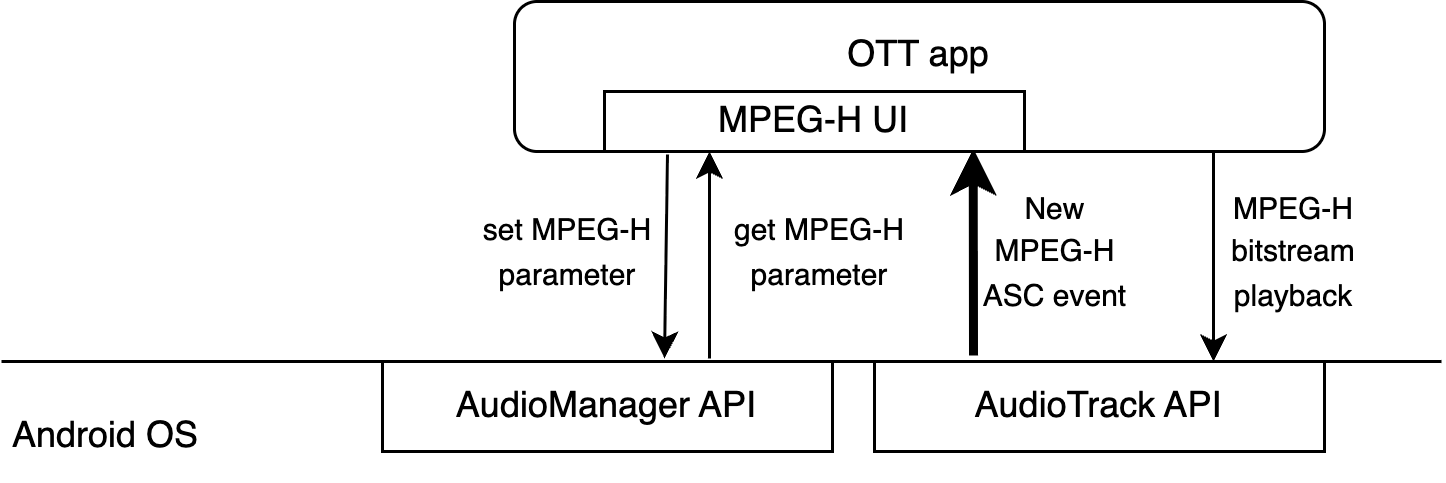
Android audio system (from Audio HAL implementation) signals and delivers a new MPEG-H Audio Scene Configuration to the OTT application using the AudioTrack.OnCodecFormatChangedListener callback.
Since the AudioMetadata.Format class doesn't contain a suitable key definition the OTT application needs to create MPEG-H specific key type "mpegh_audiosceneconfig"
NOTE: the Android audio system (from Audio HAL implementation) needs to call the AudioTrack::OnCodecFormatChanged with the same key definition.
...
@NonNull public static final AudioMetadata.Key<String> KEY_MPEGH_AUDIOSCENECONFIG =
        createKey("mpegh_audiosceneconfig", String.class);

public static <T> AudioMetadata.Key<T> createKey(@NonNull String name, @NonNull Class<T> type) {
    // Implementation specific.
    return new AudioMetadata.Key<T>() {
        private final String mName = name;
        private final Class<T> mType = type;

        @Override
        @NonNull
        public String getName() {
            return mName;
        }

        @Override
        @NonNull
        public Class<T> getValueClass() {
            return mType;
        }

        /**
         * Return true if the name and the type of two objects are the same.
         */
        @Override
        public boolean equals(Object obj) {
            if (obj == this) {
                return true;
            }
            if (!(obj instanceof AudioMetadata.Key)) {
                return false;
            }
            AudioMetadata.Key<?> other = (AudioMetadata.Key<?>) obj;
            return mName.equals(other.getName()) && mType.equals(other.getValueClass());
        }

        @Override
        public int hashCode() {
            return Objects.hash(mName, mType);
        }
    };
}
...

@Override
public void onCodecFormatChanged(AudioTrack audioTrack, AudioMetadataReadMap info) {
    if (info.containsKey(KEY_MPEGH_AUDIOSCENECONFIG)) {
        String mpegh_audiosceneconfig_xml = info.get(KEY_MPEGH_AUDIOSCENECONFIG)
        // Pass the received mpegh_audiosceneconfig_xml to the MPEG-H UI renderer component
    }
}
The Android audio system (from Audio HAL implementation) needs also to support polling method to retrieve the MPEG-H Audio Scene Configuration using AudioManager.getParameters function:
...
String mpegh_audiosceneconfig_xml = audioManager.getParameters("mpegh_audiosceneconfig");

// process the retrieved MPEG-H AudioSceneConfig XML
Note:
In a case the Audio HAL implementation supports multiple MPEG-H offload playback sessions and only one MPEG-H UI manager instances runs, the Audio HAL implementation shall return MPEG-H Audio Scene Configuration from a running MPEG-H UI manager instance.
The Audio HAL implementation may prefix the return value with the
HW_SYNC_IDparameter, for example:
hw_sync_id=<ID>;mpegh_audiosceneconfig=<AudioSceneConfig .../>This allows the OTT application to retrieve the required
HW_SYNC_IDfor subsequent calls in cases where the MPEG-H UI renderer component and Audio Sink implementation cannot easily communicate to obtain theHW_SYNC_IDfrom the createdAUDIO_SESSION_ID.If the Audio HAL implementation supports multiple MPEG-H offload playback sessions and multiple MPEG-H UI manager instances are running, the Audio HAL implementation shall return
NULLas the parameter value.
The processing of indication and delivery of a new MPEG-H Audio Scene Configuration in OTA use cases involves following components:
- TIS input service → responsible to communicate to the Android audio system
- LiveTV app → responsible for visualization of the MPEG-H User Interface

The TV input service acts like an OTT application. The handling to receiving a new MPEG-H Audio Scene Configuration is identical to the process described above (see "OTT use case handling").
After the new MPEG-H Audio Scene Configuration is received by the TV input service it will be forwarded to the LiveTV app using the TvInputService.Session.notifyTvMessage function:
...
class TvInputSessionImpl extends TvInputService.Session implements AudioTrack.OnCodecFormatChangedListener {

    ...
    @Override
    public void onCodecFormatChanged(AudioTrack audioTrack, AudioMetadataReadMap info) {
        if (info.containsKey(KEY_MPEGH_AUDIOSCENECONFIG)) {
            String mpegh_audiosceneconfig_xml = info.get(KEY_MPEGH_AUDIOSCENECONFIG);
            // Pass the received MPEG-H Audio Scene Configuration to the LiveTV app
            Bundle bundle = new Bundle();
            bundle.putString("android.media.tv.TvInputManager.TV_MESSAGE_KEY_MPEGH_AUDIO_SCENE_CONFIG", mpegh_audiosceneconfig_xml);
            this.notifyTvMessage(TvInputManager.TV_MESSAGE_TYPE_OTHER, bundle);
        }
    }
   ...
The LiveTV app will receive the sent message using the TvView.TvInputCallback.onTvMessage callback:
...
class TvInputCallbackImpl implements TvView.TvInputCallback {

   ...
   @Override
   public void onTvMessage(String inputId, int type, Bundle data) {
      if (type == TvInputManager.TV_MESSAGE_TYPE_OTHER) {
         String mpegh_audiosceneconfig_xml = bundle.getString("android.media.tv.TvInputManager.TV_MESSAGE_KEY_MPEGH_AUDIO_SCENE_CONFIG");

         // process rendering of the new received MPEG-H Audio Scene Configuration
         ...
      }
   }
...The OTT/OTA application will use AudioManager.setParameters() function to submit the MPEG-H Preferred Audio Settings such as:
- Preferred Audio Language
- associated parameter key: "mpegh_audio_lang"
- Preferred Label Language
- associated parameter key: "mpegh_label_lang"
- Accessibility Mode
- associated parameter key: "mpegh_accessibility"
- Preferred DRC Effect
- associated parameter key: "mpegh_drc_effect"
- DRC Album Mode
- associated parameter key: "mpegh_drc_album"
- DRC Boost Factor
- associated parameter key: "mpegh_drc_boost"
- DRC Attenuation Factor
- associated parameter key: "mpegh_drc_att"
- Target Loudness
- associated parameter key: "mpegh_tl"
Pseudo-code example to set MPEG-H Preferred Audio Language to English and to disable MPEG-H Accessibility Mode:
audioManager.setParameters("mpegh_audio_lang=eng;mpegh_accessibility=0");The parameter values are defined in MPEG-H UI manager specification
Note:
The OTT/OTA application may set MPEG-H Preferred Audio Settings before MPEG-H playback begins. Therefore, the Android audio system (Audio HW layer) should cache these settings and apply the cached parameters as soon as the MPEG-H UI manager instance is created.
Pseudo-code example for parameter cache handling:
std::unordered_map<std::string, std::string> mpegh_preferred_settings;

...

void process_setParameters(const std::string& param) {
    std::unordered_map<std::string, std::string> parameters = parseSetParameters(param);
    for (const auto& pair : parameters) {
        std::cout << "key: " << pair.first << ", value: " << pair.second << std::endl;

        if (pair.first == "mpegh_audio_lang" ||
            pair.first == "mpegh_label_lang" ||
            pair.first == "mpegh_accessibility" ||
            pair.first == "mpegh_drc_effect" ||
            pair.first == "mpegh_drc_album" ||
            pair.first == "mpegh_drc_boost" ||
            pair.first == "mpegh_drc_att" ||
            pair.first == "mpegh_tl") {
            // cache the received MPEG-H preferred setting
            mpegh_preferred_settings[pair.first] = pair.second;
        } else if (/* other conditions */) {
            // handle other parameters
        }
        // ...
    }
}

...
Pseudo-code example to pass the cached preferred settings after MPEG-H UI manager instance creation:
std::unordered_map<std::string, std::string> mpegh_preferred_settings;

void init_playback() {
    // ... (other initialization code)

    HANDLE_MPEGH_UI_MANAGER mpegh_uim = mpegh_UI_Manager_Open();

    for (const auto& pair : mpegh_preferred_settings) {
        std::string mpegh_action_event;

        if (pair.first == "mpegh_audio_lang") {
            mpegh_action_event =
                "<ActionEvent uuid=\"00000000-0000-0000-0000-000000000000\" "
                "version=\"1.1.0\" actionType=\"70\" paramText=\"" + pair.second + "\"/>";
        } else if (pair.first == "mpegh_label_lang") {
            // ... handle label language
        }
        // ... handle other keys

        // apply preferred audio setting
        mpegh_UI_ApplyXmlAction(mpegh_uim, mpegh_action_event.c_str(), mpegh_action_event.size(), &flags);
    }

    // ... (other code)
}
Note:
OTT/OTA applications can retrieve the cached MPEG-H Preferred Settings using the
AudioManager.getParameters()function.
- Example:
String mpegh_preferred_audio_language = audioManager.getParameters("mpegh_audio_lang");For the OTA use case, the TV input service is responsible for setting the MPEG-H Preferred Settings.
- These settings are global and should not be bound to individual audio sessions, especially if the Audio HAL implementation supports multiple MPEG-H offload playback sessions.
The MPEG-H Preferred Settings message will not be prefixed with
HW_SYNC_ID.
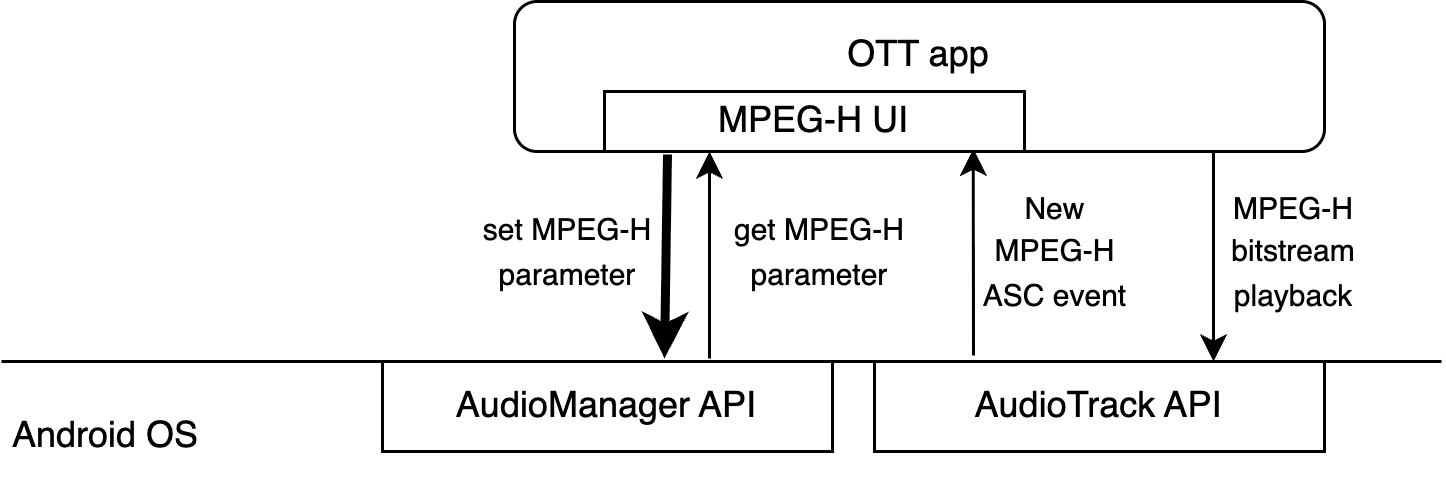
An OTT application will use AudioManager.setParameters() function to pass the user selections as MPEG-H ActionEvent XML messages according to the MPEG-H UI manager specification:
...

// create and send action event 1
String action_event_xml = "<ActionEvent uuid=\"12345678-1234-1234-1234-123456789012\" version=\"1.1.0\" actionType=\"41\" paramInt=\"1\" paramFloat=\"-6.0\" />";

audioManager.setParameters("mpegh_action_event=" + action_event_xml);

// create and send action event 2
action_event_xml = "<ActionEvent uuid=\"12345678-1234-1234-1234-123456789012\" version=\"1.1.0\" actionType=\"42\" paramInt=\"1\" paramFloat=\"160.0\" />";

audioManager.setParameters("mpegh_action_event=" + action_event_xml);

...
Note:
- The OTT application may send multiple MPEG-H ActionEvent XML messages in sequence. Therefore, the Android audio system (Audio HAL implementation) should cache received messages in a queue if they cannot be immediately passed to the MPEG-H UI manager instance.
- The OTT application may prefix the
mpegh_action_eventmessage with the HW_SYNC_ID, e.g.,hw_sync_id=<ID>;mpegh_action_event=<ActionEvent ...>.
This allows the Audio HAL implementation to route the MPEG-H Action Event to the correct MPEG-H UI manager instance if multiple MPEG-H offload playback sessions are supported.- If the
mpegh_action_eventmessage is not prefixed with HW_SYNC_ID and there is only one running MPEG-H offload playback session, the Audio HAL implementation should pass the receivedmpegh_action_eventmessage to the running MPEG-H UI manager instance.
Pseudo-code example for MPEG-H ActionEvent XML messages handling in case the MPEG-H UI manager instance can be used in thread-safe mode:
void process_setParameters(const std::string& param) {
    std::unordered_map<std::string, std::string> parameters = parseSetParameters(param);

    for (const auto& pair : parameters) {
        std::cout << "key: " << pair.first << ", value: " << pair.second << std::endl;

        if (pair.first == "mpegh_action_event") {
            mpegh_uim_mutex.lock();
            mpegh_UI_ApplyXmlAction(mpegh_uim, pair.second.c_str(), pair.second.size(), &flags);
            mpegh_uim_mutex.unlock();
        } else if (/* other condition */) {
            // ...
        }
        // ...
    }
}
Pseudo-code example for MPEG-H ActionEvent XML messages handling in case the MPEG-H UI manager instance cannot be used in thread-safe mode:
std::queue<std::string> mpegh_action_event_queue;

...

void process_setParameters(const std::string& param) {

    std::unordered_map<std::string, std::string> parameters = parseSetParameters(param);

    for (const auto& pair : parameters) {

        std::cout << "key: " << pair.first << ", value: " << pair.second << std::endl;

        if (pair.first == "mpegh_action_event") {

            // put the received MPEG-H ActionEvent XML to the queue
            mpegh_action_event_queue.push(pair.second);

        } else if (/* other condition */) {
            // ...
        }
        // ...
    }
}

...

void process_MpeghFrame(...) {
    // Pass all cached MPEG-H ActionEvent XML messages to MPEG-H UI manager
    while (!mpegh_action_event_queue.empty()) {
        const std::string& xml = mpegh_action_event_queue.front();
        mpegh_UI_ApplyXmlAction(mpegh_uim, xml.c_str(), xml.size(), &flags);
        mpegh_action_event_queue.pop();
    }

    // ...
    mpegh_UI_FeedMHAS(mpegh_uim, ...);
}
For the OTA use case:
- the LiveTV app sends the user selections as MPEG-H ActionEvent XML messages using the TvView.sendAppPrivateCommand() function
- the TV input service forwards the received MPEG-H ActionEvent XML messages from the LiveTV app to the Audio HAL implementation using the AudioManager.setParameters()
Pseudo-code for the LiveTV app:
...

class TvViewImpl extends TvView {

    ...

    @Override
    public void onUserEvent(...) {
        ...
        String mpeghActionEventXml = createMpeghActionEventXML(...);

        Bundle bundle = new Bundle();
        bundle.putString(
            "android.media.tv.TvInputManager.TV_MESSAGE_KEY_MPEGH_ACTION_EVENT",
            mpeghActionEventXml
        );

        this.sendAppPrivateCommand(
            "android.media.tv.TvInputManager.TV_COMMAND_MPEGH_ACTION_EVENT",
            bundle
        );
        ...
    }
    ...
Pseudo-code for the LTV input service:
...

class TvInputSessionImpl extends TvInputService.Session implements AudioTrack.OnCodecFormatChangedListener {

    ...

    @Override
    public void onAppPrivateCommand(String action, Bundle data) {
        if (action.equals("android.media.tv.TvInputManager.TV_COMMAND_MPEGH_ACTION_EVENT")) {
            // Get MPEG-H Action Event XML message
            String mpeghActionEventXml = data.getString(
                "android.media.tv.TvInputManager.TV_MESSAGE_KEY_MPEGH_ACTION_EVENT"
            );

            // Pass the received MPEG-H Action Event XML message to the Audio HAL implementation
            audioManager.setParameters("mpegh_action_event=" + mpeghActionEventXml);
        }
    }
...In order to allow the MPEG-H Persistency handling, the Android audio system (Audio HAL implementation) shall allow to set/get MPEG-H UI manager persistency context using the AudioManager.setParameters() and AudioManager.getParameters() functions.
The OTT/OTA application will set the MPEG-H persistency context before the MPEG-H offload playback starts and request this, for further saving to a permanent storage, after the MPEG-H offload playback is finished. Therefore the Android audio system (Audio HAL implementation) shall:
- cache the set MPEG-H persistency context received from OTT/OTA application and pass to the MPEG-H UI manager immediately after the MPEG-H UI manager instance is created
- retrieve and cache the MPEG-H persistency context before the MPEG-H UI manager instance is destroyed.
Pseudo-code example to handle received MPEG-H persistency context from OTT/OTA application:
std::string mpegh_persictency_context;

...

void process_setParameters(const std::string& param) {
    std::unordered_map<std::string, std::string> parameters = parseSetParameters(param);

    for (const auto& pair : parameters) {
        std::cout << "key: " << pair.first << ", value: " << pair.second << std::endl;

        if (pair.first == "mpegh_persistency_ctx") {
            // cache the received MPEG-H persistency context
            mpegh_persistency_context = pair.second;
        } else if (/* other conditions */) {
            // ...
        }
        // ...
    }
}

void init_playback() {
    // ...

    HANDLE_MPEGH_UI_MANAGER mpegh_uim = mpegh_UI_Manager_Open();

    // base64 decoding
    char* binary_data = nullptr;
    int binary_size = 0;
    std::tie(binary_data, binary_size) = Base64Decode(mpegh_persistency_context);

    mpegh_UI_SetPersistenceMemory(mpegh_uim, binary_data, binary_size);

    // ...
}

...
Pseudo-code example to handle the OTT/OTA application request for the MPEG-H persistency context:
std::string mpegh_persistency_context;

...

std::string process_getParameters(const std::string& parameters) {
    std::vector<std::string> parameter_keys = parseSetParameters(parameters);
    std::string rval;

    for (const auto& key : parameter_keys) {
        std::cout << "requested parameter: " << key << std::endl;

        if (key == "mpegh_persistency_ctx") {
            if (mpegh_uim != nullptr) { // get from running MPEG-H UI manager instance (should be thread-safe)
                char* binary_data = nullptr;
                int binary_size = 0;
                mpegh_UI_GetPersistenceMemory(mpegh_uim, binary_data, binary_size);
                rval += "mpegh_persistency_ctx=" + Base64Encode(binary_data, binary_size) + ";";
            } else { // otherwise return cached persistency context
                rval += "mpegh_persistency_ctx=" + mpegh_persistency_context + ";";
            }
        } else if (/* other conditions */) {
            // ...
        }
        // ...
    }

    return rval;
}

...

void stop_playback() {
    // ...

    char* binary_data = nullptr;
    int binary_size = 0;
    mpegh_UI_GetPersistenceMemory(mpegh_uim, binary_data, binary_size); // get MPEG-H persistency context
    mpegh_persistency_context = Base64Encode(binary_data, binary_size); // encode as base64 string and cache
    mpegh_UI_Manager_Close(mpegh_uim);

    // ...
}

...
Note:
Since the AudioManager set/get API supports only string values, the MPEG-H persistency context must be handled as follows:
- Base64 encode the data after retrieving it from the MPEG-H UI manager before returning it to the OTT/OTA application.
- Base64 decode the received MPEG-H persistency context from the OTT/OTA application before passing it to the MPEG-H UI manager.
For the OTA use case, the TV input service is responsible for MPEG-H persistency handling:
- The TV input service loads and stores the MPEG-H persistency context from/to permanent storage.
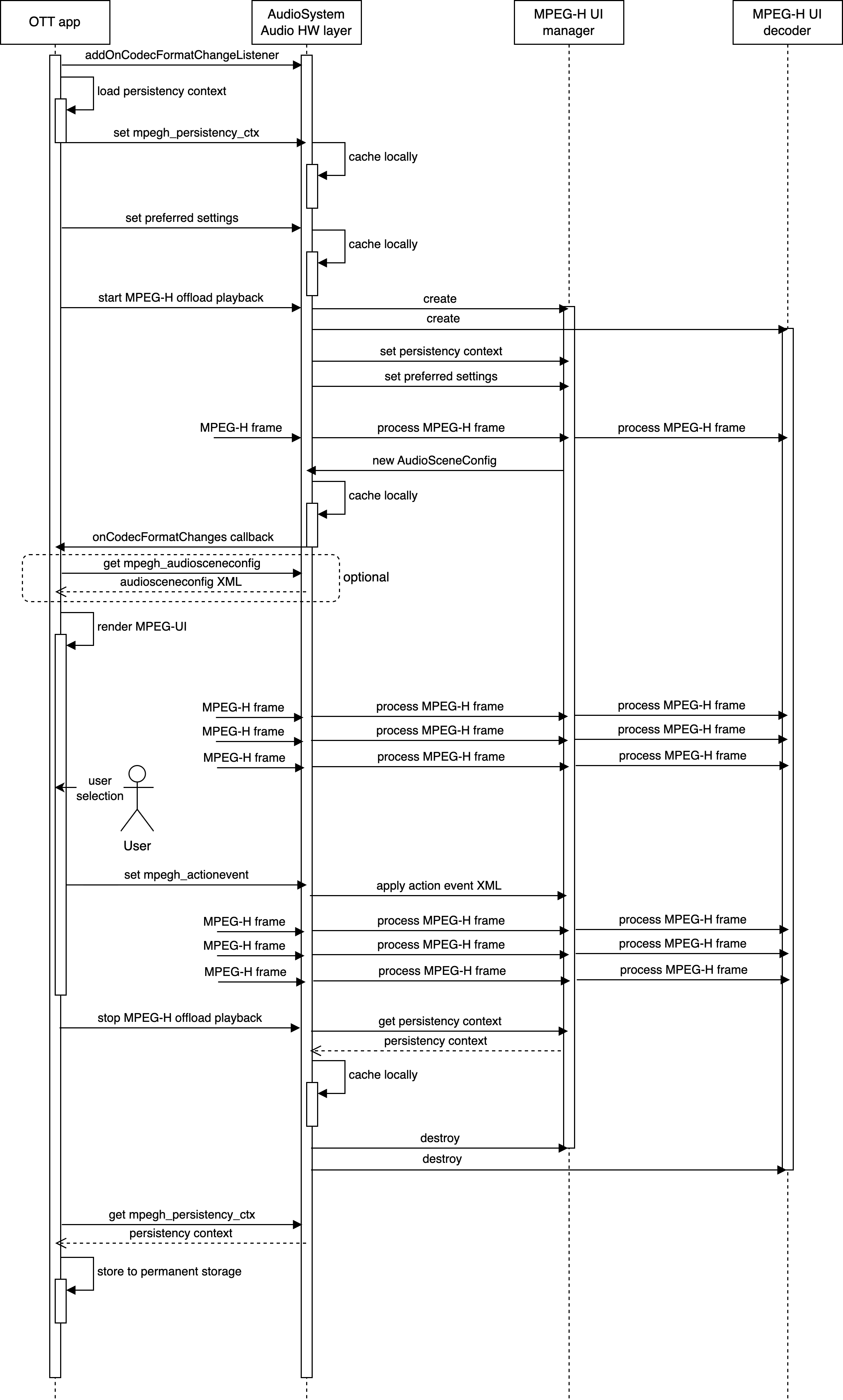
Following diagram shows overall workflow for MPEG-H offload playback and MPEH-UI manager handling for OTT use case
Following diagram shows overall workflow for MPEG-H offload playback and MPEH-UI manager handling for OTA use case
