Repository navigation
Table filters
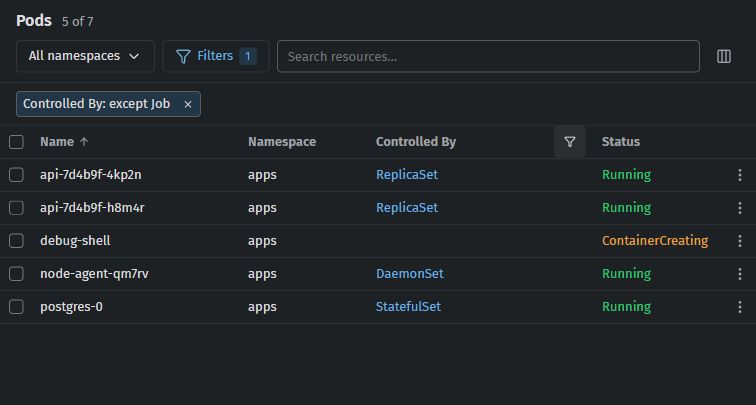
Since Sextant 0.25.2 every resource table can be filtered by its columns — contributed by @VasiliyIsaichkin in #293. For example, Pods → Controlled By → Everything except selected → Job hides the Pods of Jobs and keeps the others, including Pods with no owner.
Contents: Where they are · Values · Conditions · Advanced conditions · Clearing · Saved per cluster and table · What they work on · Known limitations
- Filters sits between the namespace filter and the search box. Its badge counts the conditions in use. It opens a searchable list of the table's columns — the ones with conditions first, with their counts, hidden columns too — and at its foot Advanced conditions… and Clear all filters.
- Every column header has its own filter button, shown on hover or keyboard focus and always while that column is filtered. It does not change sorting or resizing.
- Under the toolbar a chip sums up each condition ("Controlled By: except Job"). Click a chip to edit it; its × removes it.
A column's Values tab lists the values of the loaded objects:
- Only selected keeps the rows with a ticked value; Everything except selected hides them.
- (empty) stands for rows without a value and comes first.
- Find or enter a value… searches the list; press Enter to add an exact value that no loaded object has yet.
- A change applies at once, and a value stays in the list after you apply it, so you can untick it again.
The Condition tab offers the comparisons that fit the column, then Apply (Cancel, Escape or closing the editor drops a condition you did not apply):
| Column | Comparisons |
|---|---|
| Text | equals, does not equal, contains, does not contain, starts with, ends with |
| Number | equals, does not equal, greater than, at least, less than, at most, between (inclusive) |
| Age | older than, younger than, comparisons and ranges, in seconds, minutes, hours or days |
| CPU, memory | comparisons in millicores or cores, B, KiB, MiB, GiB or TiB |
| Yes/no, any column | yes or no; is empty, is not empty |
Text comparisons ignore case. "Does not equal", "does not contain" and Everything except selected keep rows without a value unless you exclude (empty); number comparisons never match a missing value. Zero and "no" are values, not empty. An age condition follows the clock: "older than 2 hours" picks up a pod as it gets older, without a change to the pod. No regular expressions and no code are run.
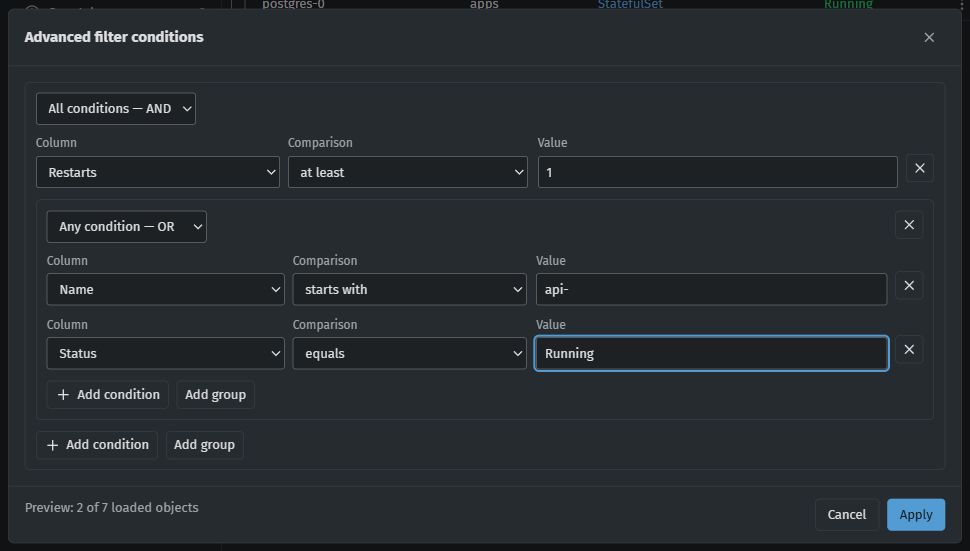
Advanced conditions… opens a dialog for nested groups — All conditions — AND and Any condition — OR — with Add condition, Add group and a preview ("Preview: 2 of 7 loaded objects"), applied with Apply. Quick conditions and the advanced expression are combined with AND.
- Clear this column in a column's editor, or a right-click on its header filter button, removes every rule of that column, advanced ones included, with Undo.
- Clear all filters removes the filters only: the namespace filter, the search and the sort stay.
Filters are saved in the settings for each cluster and each table, so a table comes back filtered after you switch tables or restart Sextant. If the settings cannot be written, the filters still apply in this session and the table says so, with Try saving again.
Saved views keep the table's filters; opening a view saved before 0.25.2 clears the filters of that table. The settings export (version 4) carries the views' filters and each cluster's table filters; an import puts the file's tables over the same tables of the very same cluster (same kubeconfig file and context) and leaves your other tables alone. See Views and workspaces.
- The main resource tables, custom resources with their printer columns, custom columns and the Events page. Helm releases and the tables inside an object's details are not filtered.
- A hidden column keeps filtering. When a column is not there any more (a CRD without that printer column, say), its quick conditions are paused and say so, and an advanced expression that uses it is paused as a whole rather than changed.
- Filters work on the objects Sextant has loaded: they send no selector to the cluster. On a list that stops at the table limit (Large clusters), the table says that filters apply to the loaded part. The selection, its actions and the row count use only the rows the filters keep.
The rough edges found in review (#294) are fixed:
- A CPU or memory condition never empties the table while the metrics load or fail: it uses the last values Sextant had, and before the first answer its chip shows as paused ("The values of … are not available right now").
- "Greater than" and "less than" work on text that is a number, such as a label
replicas=3. - Ages are filtered with conditions only ("older than 2 hours"); the date columns of OLM, Argo Workflows, CloudNativePG, KubeRay, External Secrets, OpenShift, storage and k3s are ages too.
- The filter popup keeps the keyboard inside it and never covers a dialog; a second press of Filters closes it.
- A custom column on a field that holds secret material (a BuildConfig's webhook secrets, a k3s or RKE2 node's arguments) cannot be added, so such values never end up in a filter.
A Controlled By condition compares the owner's kind (Job, ReplicaSet), as its value list shows, not its name.