Repository navigation
Gateway API
Sextant reads the Kubernetes Gateway API (gateway.networking.k8s.io) and shows how traffic gets from a Gateway to your pods: which listeners work, which routes attached, where a request goes, and why something is broken, in plain words. It works with any implementation (Envoy Gateway, Istio, Cilium, NGINX Gateway Fabric, Kong and others), because it reads only the Gateway API objects and the status their controllers write.
Everything here is read-only. Gateway API objects have the usual Edit and Delete actions, and nothing else on this page changes the cluster: Copy ReferenceGrant YAML only copies text, and the request check reasons from the objects without sending a single request.
Contents: The section and its tables · Gateway details · Route details · Other kinds · Seen from a Service, a Secret or a policy target · Topology · Request check · Hostnames · For contributors: the test cluster
The Gateway API section appears in the sidebar only when the cluster serves gateway.networking.k8s.io (Gateway API CRDs installed after you connected show up without reconnecting). It lists only the kinds the cluster serves:
| Entry | Columns |
|---|---|
| Gateway Classes | Name, controller, accepted, description, age |
| Gateways | Name, namespace, class, addresses, listeners programmed (2/2 green, 3/4 red), attached routes, status (Programmed, or what is wrong: Listener https: InvalidCertificateRef), age |
| HTTP Routes, GRPC Routes, TLS Routes | Name, namespace, hostnames (the first one and +N), parents with their status (public-gw ✓, internal-gw ✗ NoMatchingListenerHostname), rules, age |
| TCP Routes, UDP Routes | The same without hostnames |
| Reference Grants | Name, namespace, from, to, age |
| Backend TLS Policies | Name, namespace, targets, hostname, status, age |
| Policies | Policies attached through spec.targetRefs: BackendTLSPolicy and the implementations' own (for example Envoy Gateway's BackendTrafficPolicy and SecurityPolicy, Kuadrant's AuthPolicy and RateLimitPolicy), with kind, name, namespace, targets and status |
| Request check | Where does a request go, and the hostname map |
Policies lists custom kinds whose name ends in Policy and whose objects name their targets in spec.targetRefs (or the older spec.targetRef), so unrelated policy kinds (Kyverno's, Calico's) stay out.
Hover a status to read the plain-language explanation of its reason and the controller's message.

Problems. The section shows a red counter: how many GatewayClasses, Gateways, routes and BackendTLSPolicies a controller rejected (a condition such as Accepted, Programmed or ResolvedRefs is False). Objects no controller has processed yet are shown as Pending and are not counted. Tick Only problems above a table to keep only those objects; ReferenceGrants have no status, so their table has no such filter.
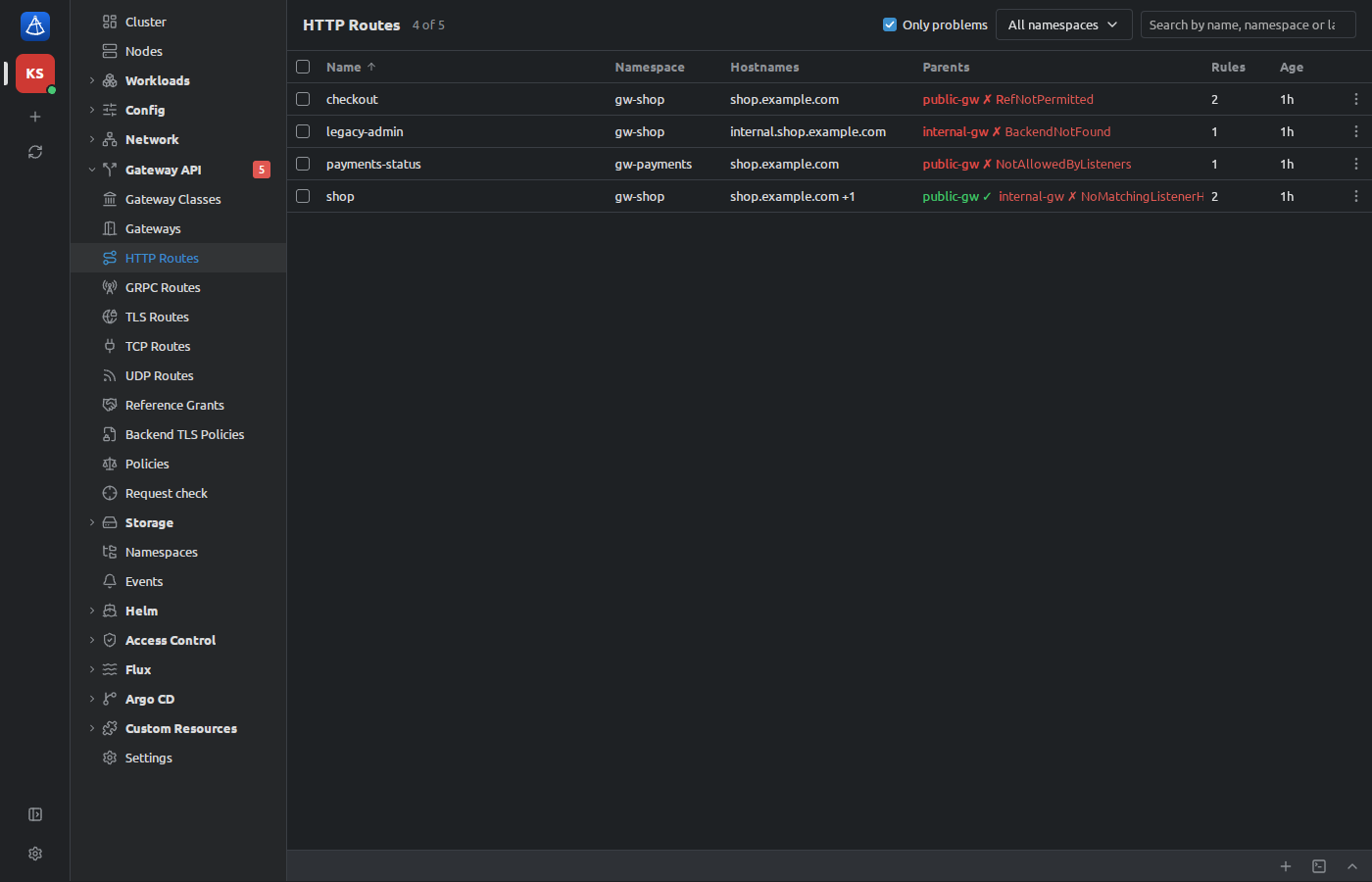
Click a Gateway to open its details:
-
Overview: cards with the class (a link), the addresses, the listeners (
2 of 2 programmed) and the number of attached routes. Check a request… opens the request check filled in with a request this Gateway serves. - A red banner for each broken listener, and for the Gateway itself when it is not accepted or not programmed, with the reason in plain words.
-
Listeners: name, port / protocol, hostname (
anywhen none), TLS certificates (links to the Secrets, orPassthrough), allowed routes (Same namespace,All namespaces,Namespaces with <selector>, andonly HTTPRoutewhen the kinds are limited), attached routes, and the status with its reason. -
Attached routes: kind, name, namespace, listener and status; Not attached lists the routes that name this Gateway but were refused, with the reason (
NotAllowedByListeners,NoMatchingListenerHostname, …).
When a listener's certificate is in another namespace and no ReferenceGrant permits it, the banner has Copy ReferenceGrant YAML (see below).

HTTPRoute, GRPCRoute, TLSRoute, TCPRoute and UDPRoute details show:
- Hostnames (or "Any hostname the listener accepts"); for HTTP and GRPC routes, Check a request… opens the request check with a request this route serves.
- Parents: each Gateway and listener the route names (links), Accepted and Resolved refs with their reasons. A parent with a problem (the route refused, or a reference that does not resolve) gets a red banner with the explanation; when the cause is a backend, the banner points to the rule below.
-
Rules, written out readably: the matches and the backends with their weights (
PathPrefix /api · header x-env=prod → api-v2:8080 90%, api-v1:8080 10%), a Filters line (set header x-gateway=public,Redirect to https, same host and path (301),mirror → …), and each backend Service as a link with its readiness (3/3 pods ready,no endpoints).
A rule with a broken backend is outlined in red and says why: not found (the Service does not exist), not permitted (a Service in another namespace without a ReferenceGrant), kind not supported. A rule without backends that does not answer by itself (a redirect does) says that requests get an error response.
Copy ReferenceGrant YAML. For a RefNotPermitted reference, the button copies a ReferenceGrant to create in the target namespace: it lets exactly this kind of object from this namespace refer to exactly this backend (or certificate), with the ReferenceGrant version the cluster serves. Apply it with kubectl apply -f -; Sextant does not create it for you.

Explanations exist for the common reasons, among them NotAllowedByListeners, NoMatchingListenerHostname, NoMatchingParent, RefNotPermitted, BackendNotFound, InvalidKind, InvalidCertificateRef, UnsupportedProtocol, InvalidListeners, ListenersNotValid, HostnameConflict, PortUnavailable, AddressNotAssigned and Pending. A reason Sextant does not know is shown as the controller wrote it, with the controller's message.
- GatewayClass: controller, description, accepted, parameters, supported features, and Gateways of this class.
- ReferenceGrant: Permitted references in one sentence ("HTTPRoute in namespace gw-shop may refer to Service payments-api in namespace gw-payments.") and as From and To tables.
- BackendTLSPolicy: hostname and CA certificates, Targets (links) and Status per Gateway.
Other objects' details show how the Gateway API uses them, when it does:
-
Exposed by on a Service: every way in from outside, one row per route, Gateway and listener: the address (
https://shop.example.com/apiwith the conditions of the match and the Service's share of the traffic), the route, the Gateway / listener and the state: Serving, Mirrored, Redirect, Not attached, Not permitted or Pending. Ingresses that reach the Service are listed here too. - Used by listeners on a TLS Secret: the Gateway listeners whose certificates name it, with their status, and "Not permitted" when the Secret is in another namespace and no ReferenceGrant lets the Gateway use it.
-
Policies attached on Gateways, routes, Services (and ListenerSets, ServiceImports): kind, name, section and status of each policy whose
targetRefsname the object.

A Gateway's details have a Topology tab next to Overview: the tree Gateway → listeners → routes → rules → backends (Services with pod readiness), each node with a green, yellow or red dot and, when broken, a short reason (backend not found, InvalidCertificateRef, 1 of 4 listeners broken). Routes the Gateway did not accept are gathered under Not attached with their reasons. Every object is a link. Only problems keeps just the paths that lead to something broken.

Request check (in the section, or Check a request… on a Gateway, an HTTPRoute or a GRPCRoute) answers "Where does this request go?". Enter a method (or tick gRPC and give the method as the path, /package.Service/Method), a URL and optional headers (name: value, one per line), and press Check. Sextant shows, step by step:
- Gateway: the Gateway and listener that take the request, and why (port, protocol, the most specific hostname);
- Route: the route, rule and match, and why this rule beat the others;
- Filters: header changes, rewrites, mirrors, a redirect;
- Backends: the Services with their share of the requests and pod readiness, or a broken backend with its reason (and Copy ReferenceGrant YAML where it helps);
-
Answer, when the Gateway answers by itself: a redirect with the computed
Location,404 Not Foundwhen no rule matches,500 Internal Server Errorwhen the rule has no usable backend (for gRPC:UNIMPLEMENTEDandUNAVAILABLE).
Also considered lists every other listener, route and rule with the reason it lost ("Another port", "The path does not match", "Matches, but loses on path …", "Not accepted by the Gateway: NotAllowedByListeners"). Notes point out where the answer depends on your implementation. The form of each cluster is kept while Sextant runs.
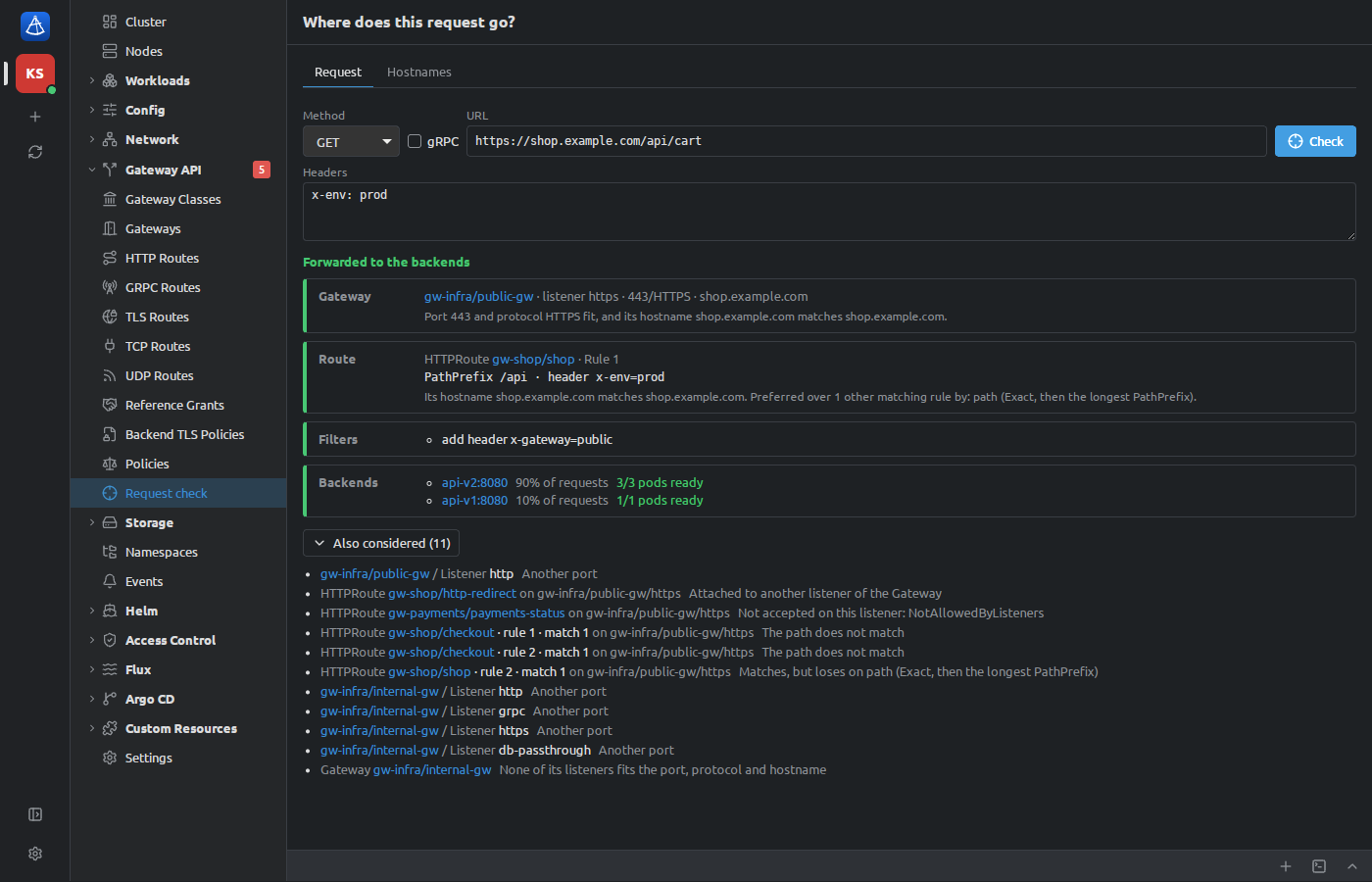
What the matching follows (Gateway API v1):
- Listener: the same port and protocol (
http→ HTTP,https→ HTTPS), then the most specific hostname: exact, then wildcards, then none.*.example.commatches any number of labels in front, neverexample.comitself. - Route: attached to that listener and accepted there, from a namespace and of a kind the listener allows, with the request's host among its hostnames.
- HTTPRoute precedence, across all rules of those routes: the most specific hostname, an Exact path, the longest PathPrefix, the method, the most header matches, the most query parameter matches, then the oldest route,
namespace/namein alphabetical order, and rule order. - GRPCRoute precedence: hostname, the longest service, the longest method, header matches, then the same tie-breaks.
- Several Gateways can serve the same host name; which one gets the request depends on DNS, so the one where a route matches is shown, with a note. A URL that names a Gateway's address (
http://172.18.255.200/) checks that Gateway only.
Choices the specification leaves to the implementation, each marked with a note in the result:
- A RegularExpression path ranks between Exact and PathPrefix (as Envoy Gateway does); your implementation may rank it otherwise.
- Regular expressions (paths, headers, query parameters, gRPC methods) are evaluated in the JavaScript dialect as full matches; implementations use RE2 or PCRE, which differ in some constructs.
- For a gRPC call that both an HTTPRoute and a GRPCRoute could take, the hostname decides first, and on equally specific hostnames the GRPCRoute is preferred. The specification does not merge the two kinds, so your implementation may rank them otherwise. A plain HTTP request is never matched against GRPCRoutes.
- A listener that admits routes by a namespace selector needs the namespaces' labels, which the check does not read: the route counts as admitted, with a note.
The check reasons from the objects and their status: it reads Gateways, routes, Services, EndpointSlices and ReferenceGrants while the page is open, and does not send traffic. It cannot see your implementation's data plane, DNS or network policies, and it trusts what the controllers wrote in the status.
The Hostnames tab of the request check maps every hostname served through an HTTP or HTTPS listener: Hostname, Gateway / listener (with port and protocol), Route (accepted there, or not and why), Backends and Conflicts. Two routes that claim the same hostname with an identical match are marked, and the conflict says which one gets the traffic. Route namespace keeps the routes of one namespace. Click a row to check a request to that hostname on the Request tab.

The kind test cluster can carry a Gateway API scene with typical faults:
scripts/test-cluster.sh up --gateway # flags combine with --prometheus and --gitopsIt installs the Gateway API CRDs (standard channel, a fixed version, from the official release) and the fixtures of scripts/fixtures/gateway-api/ in the namespaces gw-infra, gw-shop and gw-payments: the GatewayClass sextant-demo, the Gateways public-gw (healthy) and internal-gw (one listener with a missing certificate), HTTP, GRPC and TLS routes, a ReferenceGrant and a BackendTLSPolicy. Some routes are broken on purpose: a backend in another namespace without a ReferenceGrant, a missing Service, a namespace a listener does not allow, a hostname no listener matches.
The script needs openssl to make the self-signed certificate of public-gw (gw-infra/shop-tls). There is no Gateway controller in the test cluster: the script writes the status from scripts/fixtures/gateway-api/status.yaml through the status subresource, the way a controller would. See Development for the rest of the test cluster.
Next: Using Sextant, Troubleshooting.