Repository navigation
MCP server
Sextant has a built-in MCP server. It lets an AI agent such as Claude Code, Claude Desktop or Cursor look at your clusters through Sextant: list resources, read events and logs, and, if you allow it, change things.
You stay in control:
- the server is off until you turn it on, and it works only while Sextant is open;
- it listens on this computer only (
127.0.0.1) and needs a token; - every cluster starts with no access for agents; you choose, per cluster, which namespaces, kinds of resources and actions an agent may use;
- changes, deletes, commands in containers and port forwards ask you first in the Sextant window (unless you switch that off for a rule);
- Secret values never reach an agent unless you explicitly allow it;
- every call is written to an activity log you can read in the app.

Contents: Turn it on · Connect an agent · Choose what an agent may do · Confirmations · Activity log · Tools · Security · Limits · Troubleshooting
Open Settings (the gear at the bottom of the cluster list) and find AI agents (MCP).
- Switch on Enable MCP server. The status line changes to Running at http://127.0.0.1:47391/mcp.
- Optionally change the Port (a whole number from 1024 to 65535, default 47391) and press Apply. Changing the port restarts the server and ends the agents' sessions. If the port is taken, the status says "Port 47391 is in use — another Sextant or program?" and Sextant keeps working; pick another port.
- Switching it off closes the port and every agent session.
The server starts together with Sextant when it was left on, and stops when you close the window or quit. Port forwards and other things an agent started stop with it.
Nothing is allowed yet: until you give an agent access to a cluster (see Choose what an agent may do), every call to that cluster is refused.
Every request must carry a token. Sextant creates it the first time the server starts: 32 random bytes, encoded as base64url.
- It is stored in the file
mcp-tokenin Sextant's settings folder (see Settings for the folder of your system), readable only by you (mode0600on Linux and macOS). - In Settings it is hidden. Show reveals it, Copy puts it on the clipboard, Hide hides it again.
- Regenerate (with a confirmation) makes a new token. The old one stops working at once and all agent sessions are closed; you must give every agent the new token.
- The token is not written to logs, error messages or the activity log.
Treat it like a password: anyone on your computer who can read it can ask the server for whatever you have allowed. The files are protected by your account's permissions, not by encryption.
Under Connect an agent in the same Settings section there are three tabs with ready-to-copy configuration. The token in the snippets is hidden on screen, but Copy copies the real one. Below, <token> stands for it.
Sextant must be running with the server turned on whenever an agent uses it.
Run in a terminal:
claude mcp add --transport http sextant http://127.0.0.1:47391/mcp --header "Authorization: Bearer <token>"(Use your port if you changed it.) Then in Claude Code, /mcp should show sextant as connected.
Add to ~/.cursor/mcp.json (or .cursor/mcp.json in a project):
{
  "mcpServers": {
    "sextant": {
      "url": "http://127.0.0.1:47391/mcp",
      "headers": {
        "Authorization": "Bearer <token>"
      }
    }
  }
}
Claude Desktop starts MCP servers as commands, so it uses sextant mcp, a small bridge that forwards the conversation to the running Sextant. Add to the mcpServers section of claude_desktop_config.json:
{
  "mcpServers": {
    "sextant": {
      "command": "/path/to/sextant",
      "args": ["mcp"]
    }
  }
}
The snippet in Settings already contains the real path of the Sextant program that is running. Typical places, if you want to write it yourself:
| System | command |
|---|---|
| Linux (.deb) | /usr/bin/sextant |
| Linux (AppImage) | the snippet shows a path inside the AppImage's temporary mount, which is gone when Sextant exits; use the path of the .AppImage file instead (an AppImage passes its arguments to the program, but this setup is not tested by the project) |
| macOS | /Applications/Sextant.app/Contents/MacOS/sextant |
| Windows |
sextant.exe in the folder Sextant was installed to |
There is no token in this snippet: sextant mcp reads the port from settings.json and the token from mcp-token, in the same folders the app uses. Restart Claude Desktop after editing the file.
How sextant mcp behaves:
- it reads JSON-RPC messages from standard input, sends them to
http://127.0.0.1:<port>/mcpand writes the answers (JSON or event streams) to standard output, one message per line; - standard output carries nothing but JSON-RPC; diagnostics go to standard error;
- if Sextant is not running or the server is off, it answers the first request with the error "Sextant is not running or its MCP server is off — open Sextant and enable it in Settings → AI agents (MCP)" and exits with code 1;
- if you regenerate the token or change the port, restart the MCP client.
You can use sextant mcp with any client that starts stdio servers, not only Claude Desktop.
Rules are per cluster and shared by all agents. Open the cluster's settings (right-click the cluster in the cluster list → Settings) and find AI agent access.

Pick one of the sets:
| Set | What the agent can do |
|---|---|
| Off (default) | Nothing. The cluster appears in the agent's list (with access: "off") but every call to it is refused. |
| Read-only | Read all resources in all namespaces and fetch pod logs. Secret values are hidden. |
| Read + write (no delete) | Everything in Read-only, plus change resources, run commands in containers and open port forwards. Each of those asks you first. Cannot delete. Secret values are hidden. |
| Full | Everything above plus delete, in all namespaces. Changes, deletes, commands and port forwards ask you first. Secret values are hidden. |
| Custom | Your own rules. |
The sets are fixed. Choosing Custom copies the rules of the set you had selected into the rule editor so you can edit them from there.
A rule has three parts and one switch:
-
Namespaces: All namespaces, or Selected namespaces, chosen from the list the cluster reports (when the cluster is connected) or typed by name.
-
Kinds: All kinds, or Selected kinds: pick from the kinds of the cluster, including custom resources (Flux, Argo CD and any other CRD), type
Kindorgroup/Kind(for examplePodorapps/Deployment), or pick Helm releases from the list. -
Actions:
Action Allows Read List and get objects, read events and metrics Modify Apply, patch, scale, restart, roll back Deployments, Stateful Sets and Daemon Sets, cordon, drain, trigger/suspend CronJobs, GitOps actions, install/upgrade/roll back Helm releases Delete Delete objects, uninstall Helm releases (and the pod eviction of a drain) Logs Read pod logs Exec / shell Run commands in containers ( exec_command)Port forward Open port forwards to pods and services Secret values See the values of Secrets and of Helm releases (see below) -
Ask before running: on by default for a new rule. It applies to Modify, Delete, Exec and Port forward (it does nothing for Read, Logs or Secret values).
Add as many rules as you like with Add rule; remove one with its Remove rule button.
- An action is allowed if at least one rule covers it: the cluster, the namespace, the kind and the action all match. Otherwise it is refused.
- It asks for your confirmation if any covering rule has Ask before running on.
- A rule with an empty list of namespaces or kinds covers nothing.
- Changes take effect on the agent's next call; no restart of the server or the agent is needed. Removing a rule or switching a cluster to Off cuts access at once.
Nodes, Namespaces, PersistentVolumes, CustomResourceDefinitions, ClusterRoles and other cluster-scoped kinds belong to no namespace. They are covered only by a rule with All namespaces. A rule such as "namespace team-a, all kinds, Delete" does not let the agent delete a Node, even if the agent passes a namespace in its request.
When an agent lists resources without naming a namespace and you have rules for only some namespaces, it gets only the allowed namespaces.
Without the Secret values action:
- Secrets are returned without their values (keys only, marked as hidden), exactly as in the Sextant interface;
-
get_secret_valueis refused (andlist_resourcesnever returns Secret values, even with the permission); - for Helm releases the agent gets status, chart, revisions and notes, but not the user values or the rendered manifest (both can contain secrets).
- a dry run of
apply_yamlorpatch_resourcethat touches a Secret is refused.
Grant Secret values only in a rule for the namespaces the agent really needs. It is never part of a set: you must add it in a Custom rule yourself. Secrets hidden this way are the core Secret kind only; the contents of other kinds (a ConfigMap, a SealedSecret, an ExternalSecret, any CRD) are returned as they are if the agent may read them.
Helm releases are treated as a kind named Helm releases (helm.sh/Release). Reading releases needs Read on it, installing, upgrading and rolling back need Modify, and uninstalling needs Delete. Its values and manifest need Secret values.
When a call needs your approval, Sextant shows a dialog on top of everything and asks the operating system to draw your attention to the window. If the window is minimized or hidden in the tray (see Settings), it is brought back and focused first:

It shows the agent (the client's name), the cluster, the action, the target and the details: the first 200 lines of the YAML for apply_yaml and patch_resource, the command for exec_command, the ports for a port forward. Choose Allow or Deny. A dry run is never asked about: it changes nothing.
- No answer within 120 seconds counts as a refusal, and the agent is told so.
- Several requests wait in a queue; you see them one at a time, with a count of those still waiting.
- If you close Sextant or turn the server off, waiting requests are refused.
- Without a window to ask in, a call that needs approval is refused.
What the agent reads when refused:
| Case | The agent is told |
|---|---|
| Not allowed by the rules | "Sextant denied action on kind ns/name in cluster name. The user can allow it in Sextant → cluster settings → AI agent access." |
| You pressed Deny | "The user declined tool on target in cluster name." |
| No answer in time | "No answer from the user in 120 s: tool on target in cluster name was not run." |
| Access to the cluster is Off | "Sextant denied access to cluster name: AI agent access to it is off." |
Refusals come back as ordinary tool errors, so the agent can explain them to you.
Everything an agent asks is recorded. Open Agent activity from the button in the cluster list (it is visible while the server is on, and shows a dot for 10 seconds after each call) or with Open activity log in the MCP settings.
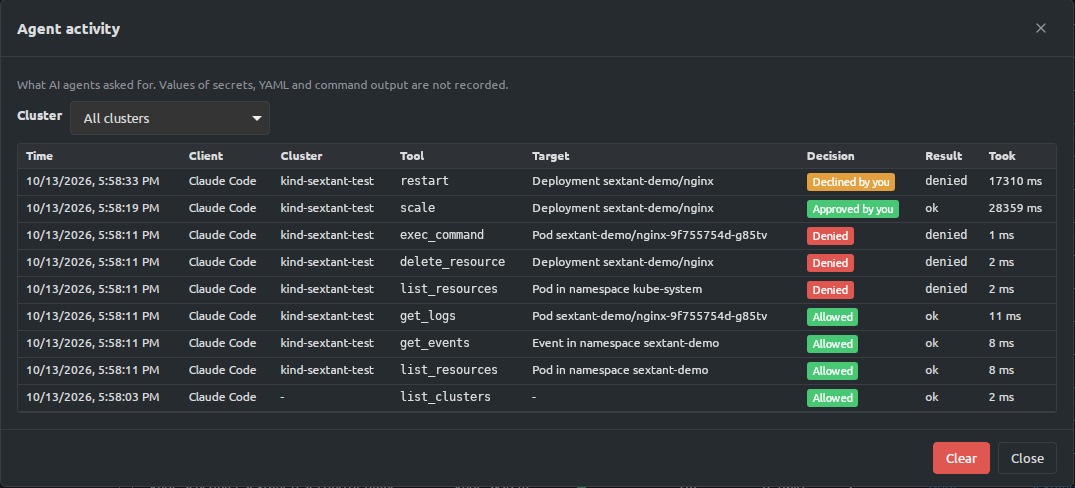
Each entry has the time, the client, the cluster, the tool (a dry run is marked "(dry run)"), the target, the decision (Allowed, Denied, Approved by you, Declined by you, No answer, or Not checked for a call that ended before any access check — malformed arguments, an unknown cluster, or a tool that needs no cluster such as listing clusters), the result (ok or an error code such as denied or forbidden; a call you declined also shows denied) and how long it took (including the time you took to answer). You can filter by cluster and Clear the log. New entries appear immediately in an open log.
The last 2000 entries are kept between runs in mcp-audit.jsonl in Sextant's data folder (see Settings). The log holds only a summary: it never stores Secret values, YAML or command output.
The agent sees these tools. Needs is the permission on the kind named; ns is the namespace of the object.
| Tool | What it does | Needs |
|---|---|---|
list_clusters |
Clusters from your kubeconfig, with state and the agent's access set (off, readOnly, …). Works for every cluster. |
nothing |
list_kinds |
Kinds of a cluster the agent has some permission on (built-in, CRDs, Helm releases). Connects the cluster if needed. | any permission on the kind |
list_resources |
Objects of one kind, by namespace and label/field selector. Up to 100 by default (limit up to 500); truncated says there are more. Secrets always come without values here. |
Read on the kind |
get_resource |
One object as JSON, without managedFields. |
Read on the kind; Secret values for Secret data |
get_events |
Events of an object, a namespace or all readable namespaces, newest first. | Read on Event
|
get_logs |
Last lines of a container log (200 by default, at most 2000), optionally of the previous instance. | Logs on Pod
|
get_metrics |
Current CPU and memory of pods or nodes (metrics-server or Prometheus). | Read on Pod / Node
|
helm_list_releases |
Helm releases with chart, version and status. | Read on Helm releases |
helm_get_release |
One release: status, chart, notes, history. Values and manifest only with the permission. | Read on Helm releases; Secret values for values and manifest |
get_secret_value |
The decoded value of one key of a Secret. | Secret values on Secret
|
| Tool | What it does | Needs |
|---|---|---|
apply_yaml |
Server-side apply of one or more YAML documents. Every document is checked first; if one is not allowed, nothing is sent. With dryRun: true nothing is changed: see Dry runs. |
Modify on the kind of every document; a dry run touching a Secret also Secret values |
patch_resource |
Merge patch or JSON patch of one object. With dryRun: true nothing is changed: see Dry runs. |
Modify on the kind; a dry run on a Secret also Secret values |
delete_resource |
Deletes one object (dependents are removed in the background). | Delete on the kind |
scale |
Sets the replicas of a Deployment, StatefulSet, ReplicaSet or another kind with a scale subresource. | Modify on the kind |
restart |
Rollout restart of a Deployment, StatefulSet or DaemonSet. | Modify on the kind |
rollout_undo |
Rolls a Deployment, StatefulSet or DaemonSet back to an earlier revision of its pod template, like kubectl rollout undo --to-revision: toRevision, or the revision before the current one when it is left out. A paused Deployment is refused; a revision that already matches what runs changes nothing (the answer says "skipped"). The same change as Roll back… in the window (see Rollout history and rollback). |
Modify on the kind |
cordon_node |
Cordons or uncordons a node. | Modify on Node
|
drain_node |
Cordons a node and evicts its pods like kubectl drain (options force, deleteEmptyDirData). |
Modify on Node and Delete on Pod in all namespaces |
trigger_cronjob |
Starts a Job from a CronJob now. | Modify on CronJob
|
suspend_cronjob |
Suspends or resumes a CronJob. | Modify on CronJob
|
gitops_action |
Flux: reconcile, suspend, resume. Argo CD Application: sync, refresh, hardRefresh. Done through the Kubernetes API. |
Modify on the object's kind |
helm_install |
Installs a chart from a repository already added in Sextant, with an optional version and values. | Modify on Helm releases |
helm_upgrade |
Upgrades a release with new values. | Modify on Helm releases |
helm_rollback |
Rolls a release back to an earlier revision. | Modify on Helm releases |
helm_uninstall |
Uninstalls a release. | Delete on Helm releases |
exec_command |
Runs a command in a container without a terminal and without input: a list such as ["ls", "/"] or ["sh", "-c", "…"]; timeout up to 60 s; stdout and stderr up to 64 KB each; returns the exit code. Refused in a node shell pod and in a debug copy of a pod, whatever the rules. |
Exec on Pod
|
port_forward_start |
Forwards a port on 127.0.0.1 to a pod or a service. It appears in Sextant's Port Forwarding page and closes with the cluster or the application. |
Port forward on Pod / Service
|
port_forward_list |
The forwards agents started (not your own). | a cluster whose access is not Off |
port_forward_stop |
Stops a forward an agent started. It cannot stop yours. | no rule (it works only on forwards an agent started) |
apply_yaml and patch_resource take dryRun: true (dry_run and dryrun are accepted too). The API server then checks the change with dryRun=All — defaulting, admission webhooks and validation included — and nothing is changed. The agent gets, per object, whether it would be created, updated, left unchanged or refused (with the server's message), and the fields that would change (path: before → after, up to 50 per object, each shortened like the activity log). This is the same check as Preview changes in the window (see Safe apply).
- A dry run needs the same permissions as the change and follows the same rules and refusals (node shell pods included), but it is never confirmed in the window, even where the rule says "Ask before running", because nothing changes. It is recorded in the activity log as
apply_yaml (dry run)/patch_resource (dry run). - A dry run that touches a core Secret also needs Secret values. Its answer for a Secret is only create, write or refused, with the keys the agent's own input names — never whether a value would differ, so a dry run cannot be used to guess a value.
-
Unknown arguments are refused by the write tools: a misspelt flag (for example
dry-runordryRunOnly) makes the call fail instead of making the change.
helm_install, helm_upgrade, helm_rollback and helm_uninstall need the helm program, as in the app (see Settings).
Because an exec_command can run any shell command, allow Exec / shell only where you would be comfortable giving the agent a shell. A shell command counts as one Exec call, not as the individual commands inside it.
Tool results are compact. An answer longer than about 256 KB is cut and marked as cut; for logs the end is kept.
-
Local only. The server listens on
127.0.0.1, never on a network address. There is no remote access and no TLS (traffic never leaves the computer). -
Token. Every request needs
Authorization: Bearer <token>. The token is compared in constant time. A missing or wrong token gets401with no details. -
Browsers cannot reach it. A request with an
Originheader (a web page) or with aHostother than127.0.0.1:<port>orlocalhost:<port>(DNS rebinding) gets403. Bodies over 4 MB are refused. - Rules are re-read on every call. The server never remembers an earlier decision; a changed rule or a switched-off cluster applies to the next call.
- What does not go to the agent: your kubeconfig and its credentials, exec-plugin secrets in error messages, the token, Secret values (unless you allowed them), and Helm values and manifests (unless you allowed them).
- What the agent can do is exactly what the rules in the cluster settings say, using Sextant's own connection to the cluster with your kubeconfig's identity. Kubernetes RBAC still applies on top: the agent can never do more than your own account can.
- The log records the summary of every call, including refusals.
-
The user's own tools stay the user's. There is no tool for a shell on a node, a debug container or copying files to or from a container, and
exec_commandis refused in node shell pods and in debug copies (pods labelledapp.kubernetes.io/managed-by=sextantandsextant.dev/debug-copy=true), so an agent never runs commands inside your debugging session. Sextant reads the pod right before the command; if it cannot read it, the call is refused.
- The server runs only while Sextant is open. There is no background service.
- Local access only; no remote or shared server, no OAuth, no per-agent permissions. One set of rules per cluster is shared by all agents that have the token.
- Commands run without a terminal (no TTY, no input), so interactive programs such as
viortopdo not work. Use a non-interactive form. -
sextant mcpon Windows is checked only by the automated tests of the bridge on the project's CI; it has not been tried in a live Claude Desktop session on Windows. The Windows build is a GUI program, so the bridge relies on the standard input and output pipes the MCP client gives it. - Secrets inside other kinds (a ConfigMap with credentials, a SealedSecret, an ExternalSecret) are not hidden; only core Secret values and Helm values are.
-
exec_commandanddrain_nodecan leave work running after a timeout; a timeout does not cancel what already started in the cluster.
The status shows "Port … is in use". Another program, or a second copy of Sextant, has the port. Choose another port and press Apply, then update the agent's configuration with the new URL (Claude Desktop reads the port itself).
Claude Desktop says the server failed to start or "Sextant is not running…". Open Sextant and switch on Enable MCP server; then restart Claude Desktop. Check that command in claude_desktop_config.json is the correct path and that you can run <command> mcp from a terminal.
The agent gets 401 / "did not accept the MCP token". The token changed (Regenerate) or the snippet is old. Copy the configuration again from Settings and update the agent. Restart the MCP client after changing the token or port.
The agent gets 403. Something is sending an Origin header or a different Host, which is usually a proxy or a browser-based client. Connect directly to http://127.0.0.1:<port>/mcp.
The agent can see the cluster but every call is refused. The cluster's access is Off. Open the cluster's settings → AI agent access and choose a set.
A write call hangs. It is waiting for you: look for the confirmation dialog in Sextant. It is refused after 120 seconds.
A call fails with "forbidden". The rule allowed it, but Kubernetes did not: your own account lacks that permission in the cluster.
get_resource on a Secret shows empty values. The rules do not include Secret values for that namespace; this is intended.
The activity log button is missing. It is shown only while the MCP server is enabled.
See also: Settings, Troubleshooting, Using Sextant.