
A wearable, tactile control surface for AI-assisted Vibe Coding—built around the M5Stack StopWatch.
Created for the M5Stack Global Innovation Contest 2026.

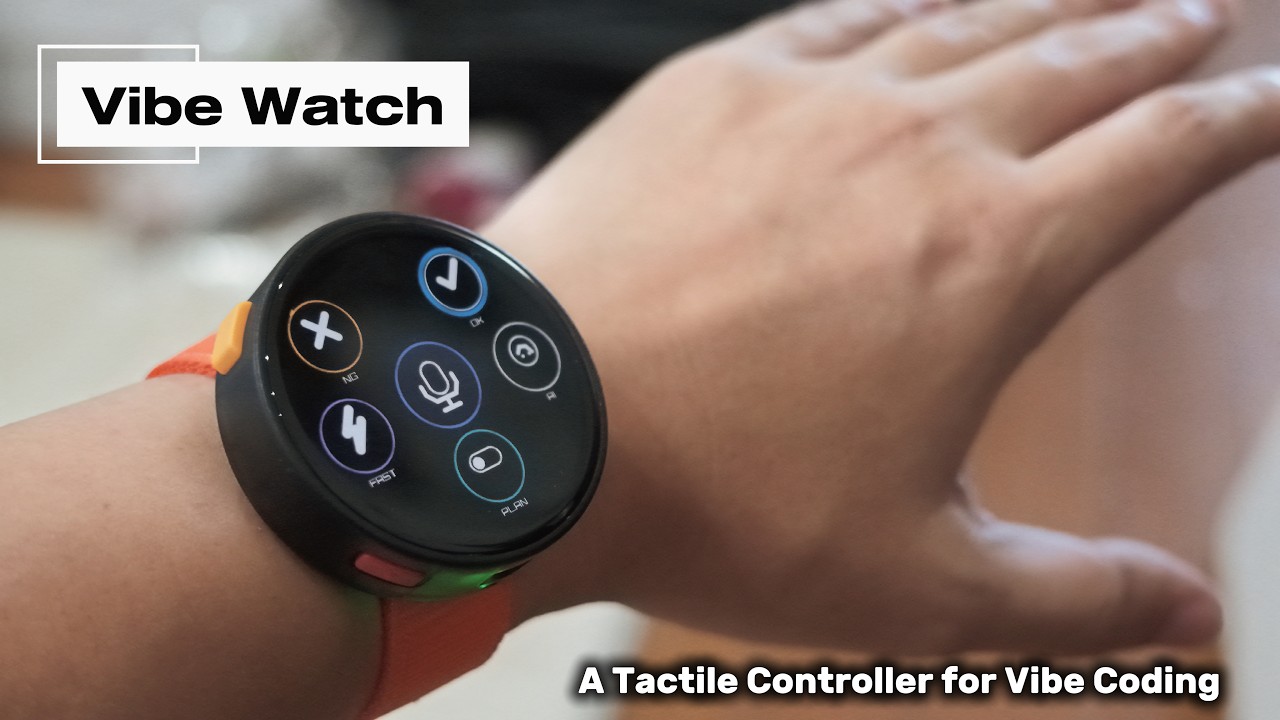
Vibe Watch moves frequent AI-agent interactions away from crowded desktop UI and onto a dedicated wireless device. It keeps six agent states visible at a glance, makes approve/reject decisions physical, and puts Plan mode, assistant access, and push-to-talk on the wrist.
The goal is simple: spend less attention operating the AI and more attention creating with it.
Running multiple AI-agent sessions in parallel has become normal in Vibe Coding. That creates a new interaction problem: I want to know the instant a task finishes, select the right session, and speak the next prompt without searching across windows or returning to the keyboard.
After purchasing an OpenAI Codex Micro, I was inspired by the idea of dedicated hardware for AI coding. I believed the experience could become even smaller, more glanceable, and more expressive by combining a round display with direct controls, motion, sound, haptics, and voice input. That idea became Vibe Watch: a wearable AI cockpit for parallel sessions.
The main Agent layer arranges six live agent indicators around the circular screen. Host-provided color, brightness, and animation communicate activity, while a fast spring motion moves the selection ring from one agent to the next.
Pressing both hardware buttons transforms the interface into the Action layer:
| Control | Experience |
|---|---|
| FAST | Triggers a quick action |
| NG / OK | Rejects or approves with distinct square-wave sounds and haptics |
| PLAN | Toggles Plan mode with a visible state change |
| AI | Invokes the assistant |
| Center microphone | Provides hold-to-talk control |
The orange left button maps to NG and the blue right button maps to OK. Colored rails visually join each physical button to its on-screen action, making the relationship understandable without instructions.
 Purpose-built startup A fading identity, original chiptune, and animated measured battery level. |
 Six parallel agents Live state and selection remain visible without covering the coding workspace. |
 Action layer FAST, NG, OK, PLAN, AI, and push-to-talk become immediate wrist controls. |
 On-device settings Pairing, sound volume, vibration strength, and state-change haptics stay on the watch. |
Vibe Watch is not a macro pad with a decorative screen. Its visual motion, audio cues, vibration, touch controls, and physical buttons all describe the same interaction state.
- A rising square-wave phrase confirms OK; a descending phrase confirms NG.
- Pairing success is acknowledged with both sound and vibration.
- Agent-state updates can signal silently through adjustable haptics.
- Sound volume, vibration strength, and state-change vibration are configurable on-device and retained after restart.
The M5Stack StopWatch is the complete product interface—not a passive display attached to another controller.
- Its ESP32-S3 runs the UI, preferences, battery monitoring, and Bluetooth Low Energy HID communication.
- The 466 × 466 round touchscreen presents the six-agent spatial interface and action controls.
- The two physical buttons provide eyes-free navigation and approve/reject decisions.
- The built-in speaker and vibration motor provide immediate, recognizable feedback.
- The integrated battery makes the controller wireless and portable.
This tight hardware integration turns an off-the-shelf M5Stack controller into a purpose-built human–AI interface.
Vibe Watch repurposes the official Watch Accessory Kit for the M5Stick Series as a wrist mount. The kit is designed for rectangular M5Stick devices, so its plastic Watch Mount Accessory needs a small physical modification before it can carry the round StopWatch.
- Remove the plastic mount from the device and strap before cutting.
- Use flush cutters or small nippers to cut away the raised M5Stick retaining hooks, removing a little material at a time.
- Trim any remaining burrs or sharp edges until the mount presents a flat bonding surface.
- Clean and completely dry both the mount and the flat rear surface of the StopWatch.
- Cut high-strength double-sided tape so it fits inside the mount footprint. Keep buttons, connectors, and openings clear.
- Center the mount on the rear of the StopWatch, press it down firmly, and allow the adhesive to reach its specified bond strength.
- Refit the nylon strap and perform a firm pull test before wearing it.
 1. Choose the watch mount Use the rectangular Watch Mount Accessory supplied with the official kit. |
 2. Remove the retaining hooks Cut each raised M5Stick hook carefully with small nippers. |
 3. Make the surface flat Trim the remaining plastic and remove sharp edges. |
 4. Bond and test Attach the centered mount with high-strength double-sided tape, then pull-test it before wearing. |
The conversion preserves the original StopWatch case and uses only the modified kit part plus adhesive. It makes the interface instantly available while moving around, not only when sitting at a desk.
Vibe Watch removes tiny but frequent interruptions from AI-assisted work. It keeps multi-agent activity visible, reduces approval to a confident physical decision, and makes voice interaction instantly available—even away from the keyboard.
The same interaction model can extend beyond coding to accessibility tools, creative applications, multi-agent operations, and other workflows where attention is more valuable than screen space.
| Item | Quantity | Role |
|---|---|---|
| M5Stack StopWatch | 1 | Controller, display, input, audio, haptics, BLE, and power |
| M5Stack Watch Accessory Kit for M5Stick Series | 1 | Nylon wrist strap and modified Watch Mount Accessory |
| High-strength double-sided tape | 1 piece | Bonds the modified mount to the StopWatch |
| macOS computer with Bluetooth | 1 | AI coding host |
Tools for the wrist conversion: flush cutters or small nippers, an optional fine file, and eye protection.
Install PlatformIO Core, then clone and build the public repository:
git clone https://github.com/GOROman/vibewatch.git
cd vibewatch
python3 -m platformio run -e m5stack-stopwatch
Connect the StopWatch and upload:
python3 -m platformio run -e m5stack-stopwatch --target uploadOpen Settings on Vibe Watch, select one of the three device slots, tap PAIR, and connect to Vibe Watch #n from macOS Bluetooth settings.