Releases: GPTmadeit/WTAK
Release list
WTAK v1.9.1 — update screen fix

Fixes a confusing red error on the update screen. If you are on v1.9.0, take this one — it is a small fix and you can install it from the watch.
What was wrong
Tapping Check again showed this, in red, as though GitHub had failed:
The coroutine scope left the composition
Nothing was actually wrong with the check. Two bugs behind it:
- The update work ran inside the screen. The first thing a check does is switch the screen to "Checking…", which removes the button you just pressed — killing the work that button had started.
- That cancellation was then caught and displayed as if it were a network error, so internal plumbing ended up on your wrist.
What changed
- Updates now run at app level, so a download or install survives scrolling, recomposition and navigating away. A 10 MB download no longer dies because you moved.
- Cancellation is no longer reported as a failure.
- Real network problems now say something useful — "No connection", "GitHub timed out" — instead of showing a raw error.
Verified on a Wear OS 6 emulator: five Check again taps in a row, no errors.
Install
No computer needed — WatchPush sideloads the APK from your phone. Or, if you are already on v1.9.0, just use Settings → Update on the watch.
From a computer:
adb install -r WTAK-1.9.1.apk
Settings, waypoints and enrolled certificates are preserved.
WTAK v1.9.0 — updates itself from the watch
WTAK can now update itself from GitHub, on the watch. No phone, no cable, no computer.
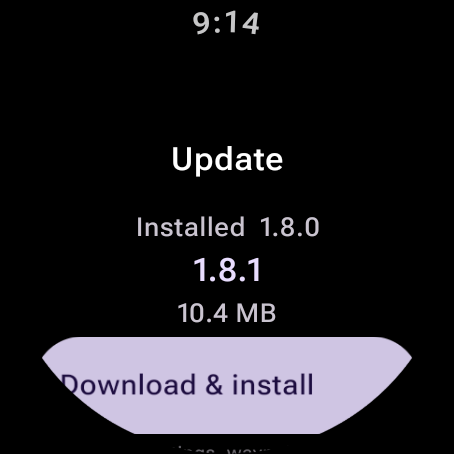
Settings → Update
- Checks this repository's Releases and compares against the running build
- Shows the version, size and release notes before downloading anything
- Downloads the signed APK over HTTPS
- Verifies it before installing — right package, and a signing certificate matching the installed app
- Hands it to the platform's installer, which asks you to confirm
Nothing installs without you tapping through it, and an APK signed with any other key is refused.
First update needs one extra tap
Wear will say it "isn't allowed to install unknown apps from this source". Tap Settings, allow it, confirm. One-time — later updates go straight to the confirmation.
Verified
End to end on a Wear OS 6 emulator: a build stamped 1.8.0 found the published 1.8.1, downloaded it from GitHub, verified the signature and installed, coming back up as 1.8.1.
Also re-ran the gesture suite on this build — back swipe works from every screen, panning the map never exits.
Install this one the old way
This is the release that adds the updater, so it needs a cable once:
adb install -r WTAK-1.9.0.apk
After that, updates come from the watch. Settings, waypoints and enrolled certificates are preserved.
WTAK v1.8.1 — back gesture fix
Fixes the back gesture, which v1.8.0 broke on Wear OS 6. If you are on v1.8.0, update — no screen could be swiped back from.
What was wrong
v1.8.0 set android:windowSwipeToDismiss=false to stop map panning from closing the app. That was the wrong layer.
Wear's back swipe is a full-screen gesture owned by the platform, and the Compose nav host takes its gesture from the platform. Disabling the window attribute doesn't hand back navigation to the app — it removes the gesture source from every screen.
It got through testing because the emulator in use was Wear OS 4, where the older dismissal path still applied. It only breaks on Wear OS 6.
The fix
Leave the platform gesture enabled and exclude the map's interior from it, which is what setSystemGestureExclusionRects is for. The map's leading 24 dp still goes back; the rest of it pans.
| back from menu | back from radar | pan the map | |
|---|---|---|---|
| v1.8.0 | ✗ nothing happens | ✗ nothing happens | safe |
| v1.8.1 | ✓ returns to map | ✓ returns to map | safe |
Verified with the signed release build on Wear OS 6 / API 36 and Wear OS 4 / API 34.
Install
adb install -r WTAK-1.8.1.apk
Upgrades in place over any earlier version — settings, waypoints and enrolled certificates are kept.
Everything from v1.8.0 is included: the radar scope, the Meshtastic LoRa link with one-tap TAK radio configuration, expressive motion, and the map cut around its controls.
WTAK v1.8.0 — radar scope, Meshtastic link, expressive motion (superseded by v1.8.1)
Warning
Superseded — do not install this build. v1.8.0 broke the back gesture on
Wear OS 6: no screen could be swiped back from. Fixed in
v1.8.1, which
contains everything below.
Standalone Wear OS TAK client. Side-load wtak-1.8.0.apk with
adb install -r wtak-1.8.0.apk, or build from source — there are no API keys
or gated SDKs involved.
Requires Wear OS 3 or newer (API 30+). Built and tuned for the Pixel Watch 4.
Highlights
Proximity radar — a tile-free scope with you at the centre and everyone else
by range and bearing. Auto-ranges on a 1-2-5 ladder, paints blips with the
sweep, pins off-scope contacts to the rim as chevrons, and shows stale contacts
hollow rather than hiding them. Tap for detail, long-press to navigate.
Meshtastic LoRa link — the watch talks straight to a Meshtastic radio over
BLE and uses the mesh as the team link: no server, no IP network, no phone.
Position and GeoChat ride the ATAK_PLUGIN port as TAK Packets, so a phone
running Meshtastic's own ATAK plugin interoperates. Plain Meshtastic nodes still
appear as contacts. Position is paced for airtime rather than spammed.
Configure the radio as the TAK connector — reads back the radio's firmware,
role, region, preset and channel, and can set its device role to TAK and write
your team and role into it in one tap. Region is reported but never written:
which band you may transmit on is a licensing decision, not the app's.
Expressive motion — every animation resolves from Wear Material 3's own
MotionScheme.expressive(). The map is genuinely cut around its edge controls
the way Wear shapes content around them, the scope powers on and zooms between
ranges, and readouts transition instead of flickering. Ambient stays still.
The back gesture, fixed properly — Wear dismisses an app on any
left-to-right swipe, at the window level, which on a map is the same movement as
a pan. Turning off android:windowSwipeToDismiss hands back navigation to the
app entirely; the map restricts dismissal to its leading edge, so panning is
just panning. Leave the app with the side button.
Also in this build
- GPS and compass hoisted to app scope, so leaving the map no longer freezes
your own position while the transports keep broadcasting it - GeoChat, range rings, breadcrumb trail, bloodhound navigation
- Emergency beacon on the ecosystem's own
b-a-o-*alert types - Offline tile archives, MGRS, MIL-STD-2525 symbology, ATAK team palette
- TLS certificate enrollment against a TAK server's Marti API
Honest limits
The Meshtastic link has not been run against physical hardware — the wire
format is unit-tested against bytes built from the published schemas, and the UI
degrades honestly with no adapter, but the first connection to a real radio is
the acceptance test. adb logcat -s MeshtasticLink narrates each stage.
77 unit tests pass. Full notes in the README.