Release 2.5.0
Released: 2026-05-23 Minimum Indigo version: 2025.2

This release introduces the Public Tempest Station — a new device type that lets you monitor any publicly-shared WeatherFlow station without a personal API token or WeatherFlow account. Add as many as you like to build a network of weather reference points surrounding your Indigo location. Each device includes distance and direction states that tell you precisely where the station sits relative to your Indigo server.
A new Public Tempest Station device type is now available alongside the existing Tempest Weather Station and WeatherFlow Hub.
To add one:
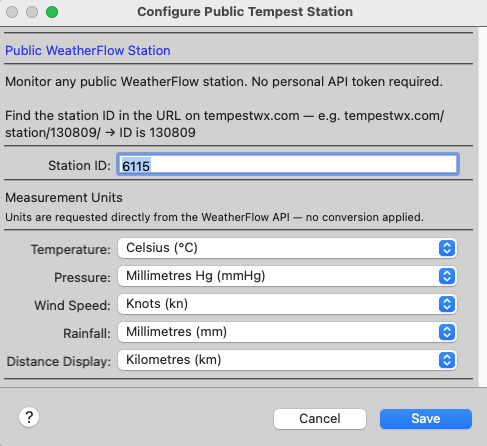
- Go to Devices → New Device → WeatherFlow Tempest Weather Station.
- Choose Public Tempest Station.
- Enter the station ID from its tempestwx.com URL (e.g.
tempestwx.com/station/130809/→130809). - Select your preferred units and click Save.
No API token is required. Any station marked as public on tempestwx.com can be monitored. The device polls every 120 seconds.
Each Public Tempest Station device automatically calculates where the station sits relative to your Indigo server (uses the latitude and longitude set in Indigo → Preferences → Location):
| State | Example | Description |
|---|---|---|
distance_km |
14.32 |
Great-circle distance to the station in kilometres |
distance_mi |
8.90 |
Same distance in miles |
bearing |
22.5 |
Bearing from Indigo to the station (0° = North, clockwise) |
bearing_cardinal |
NNE |
16-point compass: N, NNE, NE, ENE, E, ESE, SE, SSE, S, SSW, SW, WSW, W, WNW, NW, NNW |
distance_description |
14.3 km NNE |
Human-readable label — auto-scales (metres below 1 km, feet below 0.1 miles) |
The bearing_cardinal represents the direction from your Indigo server toward the station — NNE means the station is to your north-north-east.
The distance_description state is designed for direct use in Control Pages and notifications without any scripting.
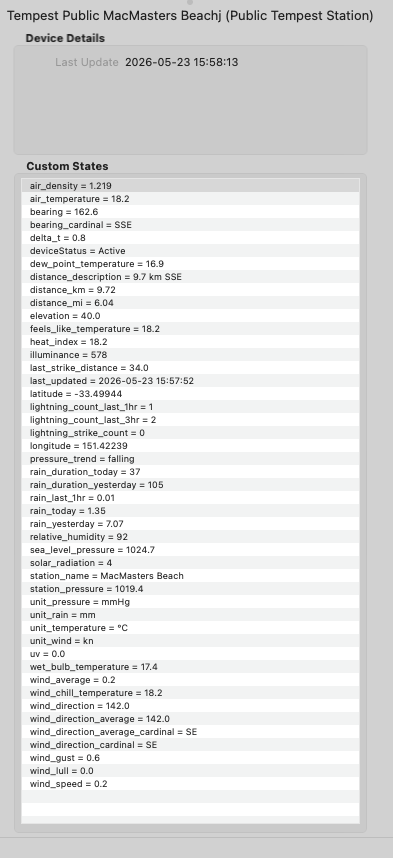
Public Tempest Station devices expose the same comprehensive weather data as a local Tempest device:
- All temperature variants: ambient, feels-like, dew point, wet bulb, wind chill, heat index, delta-T
- Atmospheric: humidity, station pressure, sea-level pressure, pressure trend, air density
- Wind: average, gust, lull, direction (degrees and cardinal)
- Rain: today's total, yesterday's total, last-1-hour rolling total, rain duration today and yesterday
- Lightning: total count, last-1-hour and last-3-hour counts, last strike distance
- Light: UV index, solar radiation, illuminance
- Station identity: name, latitude, longitude, elevation
All values are rain-check corrected where applicable and arrive already in the user's chosen units.
Because each Public Tempest Station is a standalone Indigo device, you can add as many as needed. Suggested uses:
- Monitor upwind stations to anticipate incoming rain or temperature changes
- Compare coastal vs. inland temperatures or UV across different microclimates
- Track lightning at multiple distances to gauge storm approach direction
- Display a ring of surrounding stations on a Control Page, each labelled by its
distance_description
- Independent polling loop: the public station poller runs in a dedicated asyncio task completely separate from the existing UDP and Web API pollers — no interference with existing device polling
- Consecutive failure tracking: warns after 1–2 failures, suspends polling after 3; edit and save the device to reset
-
Auto-restart:
runConcurrentThreaddetects if the public poller exits unexpectedly and restarts it automatically, consistent with the existing web poller pattern
- New wiki page: Public Tempest Station
- README updated with Public Tempest Station section, updated features table, and navigation links
- Wiki sidebar updated with new Public Tempest Stations section
- Existing Tempest Weather Station and Hub devices are unaffected — no configuration changes needed.
- Public Tempest Station devices must be created manually (there is no auto-generate button for public stations, as discovery of public stations is not automated).
- Indigo's location must be configured (Indigo → Preferences → Location) for the distance and direction states to populate.
WeatherFlow Tempest
Getting Started
Public Tempest Stations
Web API
Reference
Help
Releases