Releases: Gingerbreadfork/greenhouse
Release list
Greenhouse 0.2.0

Greenhouse can now look after itself: it follows feeds, watches a folder, keeps
running with the window closed, and plays a film while it is still downloading.
New
- Feeds. Follow an RSS or Atom feed and new releases are added as they
appear. Filter by words in the title and give each feed its own folder.
Adding a feed never downloads its backlog. - Play while downloading. Press play on a video or audio file and it opens
in mpv, VLC or a player you choose. The part you are watching is fetched first. - Runs in the background. Optionally keep Greenhouse going when you close
the window, with a tray icon where your desktop shows one, and start it
quietly at login. - Activity. A dated record of what was added, finished, moved or failed,
and what caused it. - VPN kill switch. Tie torrent traffic to one network interface. If it goes
missing, traffic is blocked rather than rerouted. - Blocklist. Point at a P2P-format blocklist and it is refreshed daily.
- Seeding limits. Stop at a ratio, after a number of hours, or whichever
comes first. Ratios now survive restarts. - Watch folder.
.torrentfiles saved to a folder are added on their own. - Add without asking. Skip the add sheet and use your saved defaults.
- Network settings apply with one button, no relaunch needed.
- The add sheet warns when a torrent will not fit on the disk.
Fixed
- A magnet nobody was seeding left the add sheet stuck forever. It now waits in
the list, can be cancelled, and is remembered across restarts. - No dock icon when Greenhouse was opened by a browser or file manager.
- Clicking the shortcut while Greenhouse was already open did nothing.
- A changed download folder was ignored until the next launch.
- Re-adding a torrent you already have no longer claims it was added.
Which file do I want
| File | For |
|---|---|
Greenhouse_0.2.0_amd64.deb |
Debian, Ubuntu, Mint |
Greenhouse-0.2.0-1.x86_64.rpm |
Fedora, openSUSE |
Greenhouse_0.2.0_amd64.AppImage |
Anything else |
All x86_64. The .deb and .rpm now pull in libayatana-appindicator3 for the
tray icon. GNOME only shows tray icons with the AppIndicator extension, and
Greenhouse works fine without one.
Worth knowing
Protocol encryption (MSE/PE) is still not supported, because the underlying
engine does not implement it.
Greenhouse 0.1.0
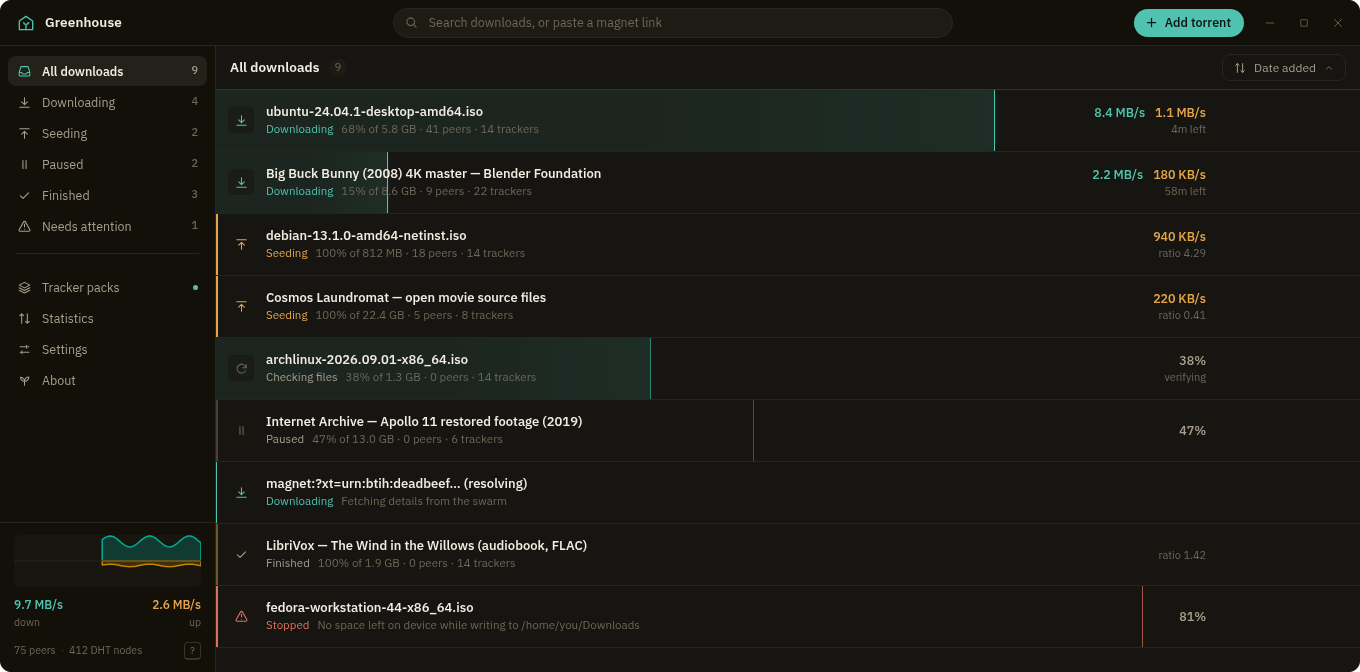
The first release of Greenhouse, a torrent client for Linux that looks good and
keeps everything a click or a keystroke away.
Which file do I want
| File | For |
|---|---|
Greenhouse_0.1.0_amd64.deb |
Debian, Ubuntu, Mint |
Greenhouse-0.1.0-1.x86_64.rpm |
Fedora, openSUSE |
Greenhouse_0.1.0_amd64.AppImage |
Anything else |
All x86_64. The .deb and .rpm are about 9 MB because they link against your
system's GTK and WebKit. The AppImage carries its own copies, so it is larger
but runs anywhere.
The packages register Greenhouse as a handler for magnet links and .torrent
files. To make it the default:
xdg-mime default Greenhouse.desktop x-scheme-handler/magnet
xdg-mime default Greenhouse.desktop application/x-bittorrent
What it does
Tracker packs. Save a list of trackers under a name, switch it on, and every
torrent and magnet you open from then on gets those trackers attached. Edit them
per torrent as a staged delta, or push a pack onto everything already in the
session. Packs can refresh themselves from a source URL.
Adding. Paste a magnet into the search bar and it is recognised as you type.
Drop .torrent files anywhere in the window. Pick your files, destination and
trackers before anything starts. File types you list, such as .exe, arrive
unticked.
Running. Queue limits for how many download and seed at once. Unfinished
downloads can live in a separate folder and move to their destination when they
complete. Speed limits apply the moment you set them. A notification when a
download finishes.
Using it. The whole list is one tab stop with arrow key navigation,
multi-select, a right click menu, and undo after removing a torrent. Press ?
for the shortcuts.
Looking at it. Progress is drawn as the row itself. Night and Day themes or
follow the desktop, six accents, compact rows, reduced motion. A statistics page
with live throughput.
Worth knowing
Protocol encryption (MSE/PE) is not supported, because the underlying engine
does not implement it. You can choose between TCP and uTP, but that is not
encryption. If your ISP or tracker requires encrypted peer connections, this is
not the client for you yet.
Network settings (port, UPnP, transport, peer limit) apply the next time
Greenhouse starts. Everything else applies immediately.