Repository navigation
Lyrics
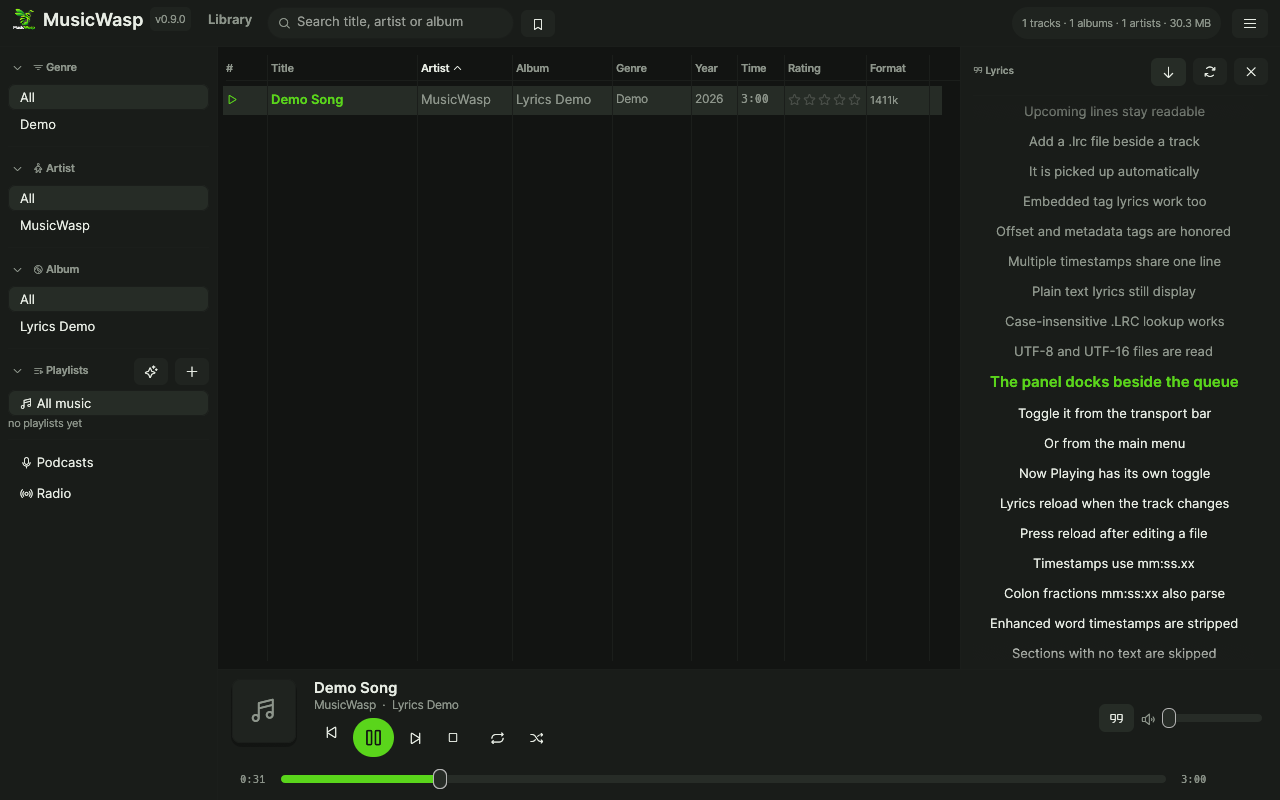
MusicWasp shows lyrics for local tracks in a dockable panel on the right. The active line follows playback when the file has timestamps.
Put an .lrc file beside the audio file with the same base name:
Music/Artist/Album/01 - Song.flac
Music/Artist/Album/01 - Song.lrc
Uppercase .LRC files are found too. If no sidecar exists, MusicWasp uses lyrics stored in the
file's tag (USLT, LYRICS, ©lyr and similar). Tag lyrics without timestamps are shown as plain
text.
Lyrics are read from disk only. MusicWasp does not query online lyric services or download files.
The parser accepts:
-
[mm:ss.xx],[mm:ss.xxx]and the older[mm:ss:xx]timestamp forms - several timestamps on one line, for repeated lyrics
-
[ti:],[ar:],[al:]and[offset:]metadata - enhanced LRC word timestamps such as
<00:12.34>, which are stripped from the displayed text - UTF-8, UTF-8 with BOM and UTF-16 LE/BE files
Empty timestamped lines used as instrumental gaps are skipped. Lines are sorted by time, so files with out-of-order timestamps still work.
Open the panel with the quotes button in the transport bar, Lyrics in the main menu, or the
quotes toggle on the Now Playing screen. The close button hides it again; the choice is stored in
settings.json.
In synchronized lyrics:
- the current line uses the accent colour and a heavier weight
- past lines are dimmed, upcoming lines stay readable
- the panel auto-scrolls to the current line; toggle auto-scroll in the panel header
- click any line to seek to that timestamp
- the reload button rereads the sidecar after you edit it
The panel also works in the full-window Now Playing view. Radio and podcast streams show a placeholder because their lyrics cannot be discovered from the stream URL.
- no online lyric lookup
- no per-word karaoke highlight (word timestamps are parsed and discarded)
- no translation or offset editor in the UI; use the
[offset:]tag in the file - unsynchronized text has no active-line highlighting or auto-scroll