If Crashing/Metadata/Scrapping/Features is not working, do these fixes.
Open the addon and head to the tools menu on the very bottom.
- Clear Cache
- Clear Local Torrent Cache
- Rebuild Database
- Wipe Addon Data (This is Optional)
- Reinstall The Addon (This Fixes Most Issues)
- Reinstall InputStream Adaptive (This Fixes Most Crashing Issues)

If you are filtering specific Anime, do these fixes
Open the addon settings and go to the general category.
- Set Anime Filter: Filters the Anime Categories if you prefer Sub, Dub, or Both
- Set Content Format: Sets the Format of the Anime. (Example: Movies, TV Shows, Ova, Ona, Etc.)
- Set Country Of Origin: Set the Country of what anime you would like to see. (Example: Japan, China, Taiwan, Etc.)
- Theme: Changes the menu icons to either Coloured or White
- Disabled Scraping Screen Fanart/Clearlogo: Gives you the ability to disable them when scrapping.

If you are looking for the best way to watch Sub or Dubs, do these fixes.
Open the addon settings and go to the Playback category.
- Preferred Audio Playback: Lets you change the audio language to either English or Japanese.
- Preferred Subtitle Language: Lets you change the Subtitle Language for the Playback.
- Preferred Source Type: Lets you change the stream sources to either Sub, Dub, or Both. (Example: If i select Subs, I only get list of Sub)
- Teritary Sort Preferences: Gives you the option of how you would like your sources sorted. (Example: Subs on the top, Dubs on bottom)
- Enable Automatic Subtitles for Dub Streams: Lets you decide if you would like Subtitles for Dub streams.

If You Do Not See Pemiumize, Real-Debrid, AllDebrid,Debrid-Link Sources, do these fixes.
Reconfigure your accounts again in addon settings.

- Make sure they are authorized by looking at the Username
If you are a Verizon user, scrapping sources will not work for you unless you enable Nyaa Alt in the Provider Settings.

Verizon blocks torrent sites like Nyaa.si and Mangadex
Luckily we have Gogo embeds and a Nyaa Alt Provider to satisfy your anime needs.
If you have a bad ISP that is blocking Nyaa then disable Nyaa and enable Nyaa Alt in the Provider Settings.

If Your Playing Next Dialog isn't showing, do these fixes.
Make sure you have your Kodi video settings set the default setting like i have otherwise, playnext will not work all the time.

If Your Subtitles or Audio Playback are receiving errors, do these fixes.
Sometimes Language settings can affect Otaku sometimes so make sure to have these settings like how i have mine.

If Watchlist Is Not Updating, do these fixes.
Incase you guys are having issues with the Watchlist, authorize them again by logging in again.

- If your still getting errors, change Watchlist to Update to something else.
If you have a bad ISP or region problem, enable this.
Enable any provider proxies that shows like below
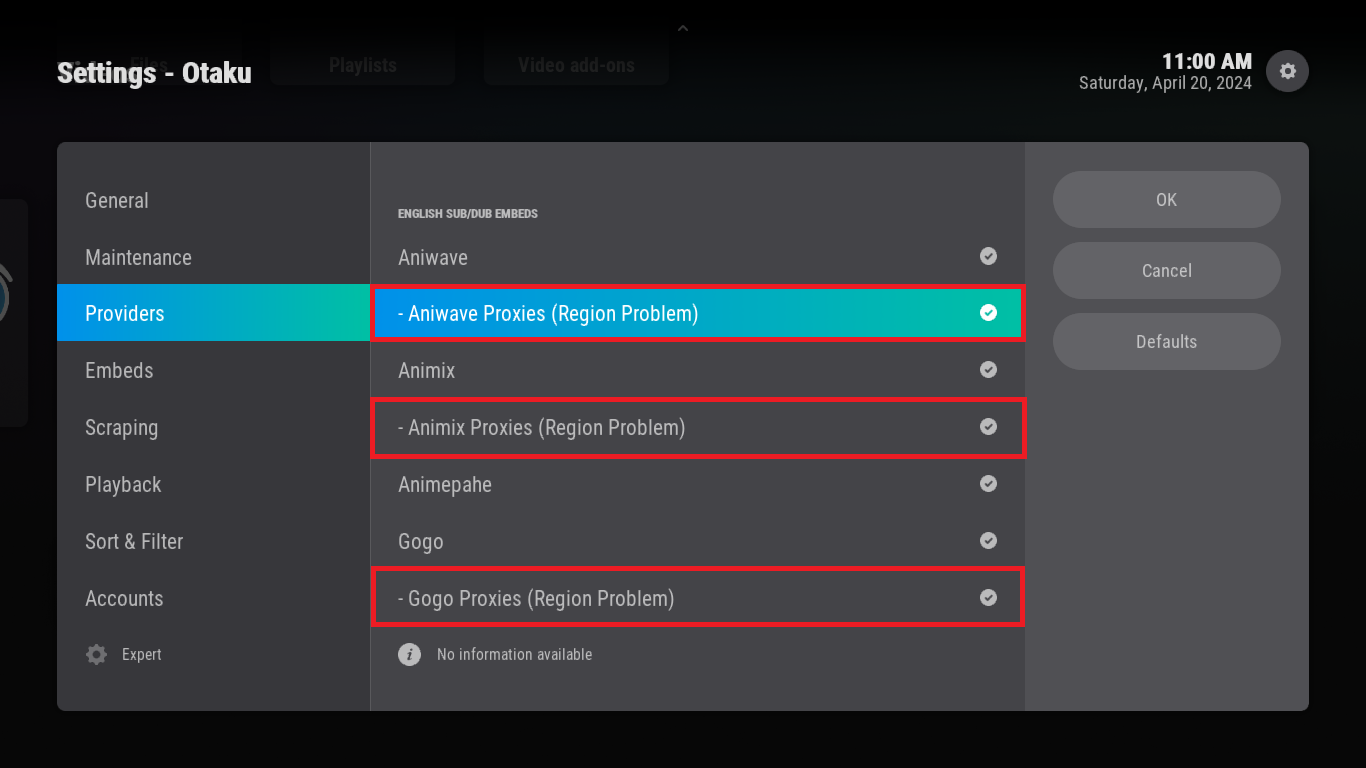
- If this problem doesn't solve, you should change your DNS for sure.
- This method for lazy people to change DNS or troubling solver in Android TV.
If Crashing/Metadata/Scrapping/Features is not working, do these fixes.
Open the addon and head to the tools menu on the very bottom.
If you are filtering specific Anime, do these fixes
Open the addon settings and go to the general category.
If you are looking for the best way to watch Sub or Dubs, do these fixes.
Open the addon settings and go to the Playback category.
If You Do Not See Pemiumize, Real-Debrid, AllDebrid,Debrid-Link Sources, do these fixes.
Reconfigure your accounts again in addon settings.

If you are a Verizon user, scrapping sources will not work for you unless you enable Nyaa Alt in the Provider Settings.
Verizon blocks torrent sites like Nyaa.si and Mangadex
Luckily we have Gogo embeds and a Nyaa Alt Provider to satisfy your anime needs.
If you have a bad ISP that is blocking Nyaa then disable Nyaa and enable Nyaa Alt in the Provider Settings.
If Your Playing Next Dialog isn't showing, do these fixes.
Make sure you have your Kodi video settings set the default setting like i have otherwise, playnext will not work all the time.

If Your Subtitles or Audio Playback are receiving errors, do these fixes.
Sometimes Language settings can affect Otaku sometimes so make sure to have these settings like how i have mine.

If Watchlist Is Not Updating, do these fixes.
Incase you guys are having issues with the Watchlist, authorize them again by logging in again.

If you have a bad ISP or region problem, enable this.
Enable any provider proxies that shows like below
