I have bubblewrap/cli latest installed on my Linux machine. I have just installed Bubblewrap on it and now it's asking me to give the location of the JDK and Android SDK. Alright then, I put in the location of both of them. That worked, but only for the JDK. When I tried putting in the location for the Android SDK it did not work, instead it spitted out the error that is entitled:
The given androidSdk isn't correct.
What does this error mean? I distinctly remember downloading the SDK that you had linked in the *README.MD* file and now it's not working. I even tried redownloading the file over five consecutive times. Please reply.
To Reproduce
Steps to reproduce the behavior:
- Install bubblewrap using
npm install -g @bubblewrap/cli
- Download the SDK using the link in the ReadMe.md file
- Type in the commandline: bubblewrap init -manifest=pwa_goes_here
- Give the location of the JDK 8 installation you have
- Give the link of the Android SDK
- See error
Expected behavior
Bubblewrap should now output the error:
>> The given androidSdk isn't correct.
Screenshots
If applicable, add screenshots to help explain your problem.
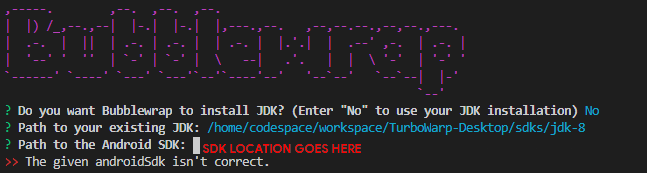
Desktop (please complete the following information):
- OS: Debian 9
- Browser: Google Chrome
- Version 86
Smartphone (please complete the following information):
N/A

I have bubblewrap/cli latest installed on my Linux machine. I have just installed Bubblewrap on it and now it's asking me to give the location of the JDK and Android SDK. Alright then, I put in the location of both of them. That worked, but only for the JDK. When I tried putting in the location for the Android SDK it did not work, instead it spitted out the error that is entitled:
What does this error mean? I distinctly remember downloading the SDK that you had linked in the
*README.MD*file and now it's not working. I even tried redownloading the file over five consecutive times. Please reply.To Reproduce
Steps to reproduce the behavior:
npm install -g @bubblewrap/cliExpected behavior
Bubblewrap should now output the error:
Screenshots

If applicable, add screenshots to help explain your problem.
Desktop (please complete the following information):
Smartphone (please complete the following information):
N/A