Repository navigation
Symmetric terrain
Use World & Terrain → Generate Terrain. This generates new terrain; it does not mirror an existing BZN or import an existing heightmap.
- Set Terrain Style to Compartmented Plateau.
- Set Zones X: 2 and Zones Z: 2. This makes a 2560 × 2560 m terrain.
- Turn off Fresh random seed each Generate.
- Enter Seed: 111. Keep the other settings at their defaults.
- Open Advanced ▸.
- Under Synthetic Symmetry, choose Mirror X.
- Click GENERATE (New Terrain). Wait for the preview to finish.
- Close Advanced ▾ if you need more room. Inspect HG2 Height, LGT Lighting and Shaded.
- Click Export HG2.... Save it using your world's terrain name, such as
symdemo.hg2.
If the bottom controls are out of view, make the window taller or collapse Advanced after setting symmetry.
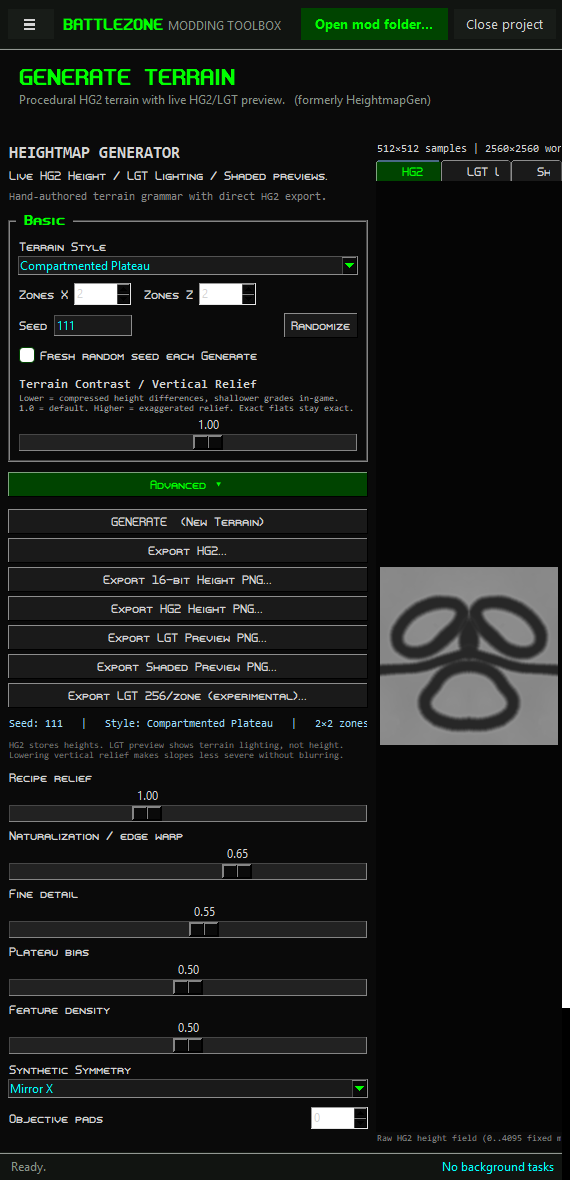
The screenshot shows the controls with the sidebar collapsed.
These descriptions refer to heightmap rows and columns, so they also apply to rectangular maps.
| Setting | Result |
|---|---|
| None | No symmetry operation. |
| Mirror X | Copies the low-column half to the other half, reversing columns. |
| Mirror Z | Copies the low-row half to the other half, reversing rows. |
| 2-way rotational | Copies one half to the opposite half with a 180° turn. |
| 4-way | Mirrors across both axes, producing four matching quarters. This is not a 90° rotational mode. |
All four symmetry modes were checked on Compartmented Plateau, 2 × 2 zones, seed 111. The exported HG2 heights matched exactly under the selected reflection or rotation. Repeating the same settings produced the same heights.
In v0.1.29, some terrain styles add asymmetric detail after the symmetry step. The default Terraced Labyrinth, plus Natural Badlands and Cratered Divide, failed exact sample comparisons in our checks. Selecting symmetry alone is not a guarantee for every style.
Use the tested settings above, or enforce symmetry on the final heightmap in an external editor using the PNG workflow. Inspect the centre seam and routes after mirroring.
Record the style, seed, zone counts and all slider values. Leave Fresh random seed each Generate off. The seed alone is not enough if you change the other settings.
Use Export 16-bit Height PNG... for editable height data. Export HG2 Height PNG..., Export LGT Preview PNG... and Export Shaded Preview PNG... are display images; do not use them as a lossless terrain source.
Symmetric heights do not mirror mission objects or terrain texture variants. Place and check bases, resources, spawns and paths separately.