
BETA release - read the Status section below and the README before using.
Major feature update since the v708 initial public release.
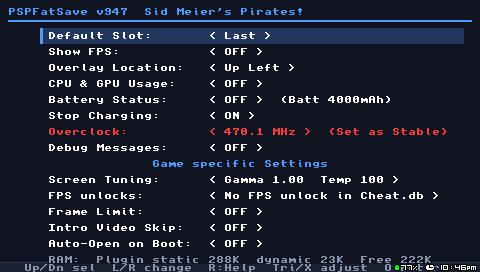
What's new since v708:
- Screen Tuning - mainly aimed at aftermarket screen mods (e.g. IPS) whose brightness/color response differs from the original PSP LCD. Live gamma adjustment and color temperature control, per game, with a full-screen test pattern and an on-screen HUD to dial it in while playing. Corrects a too-dark screen or a color cast.
- FPS Unlocks - applies FPS-unlock codes from a
cheat.db/CWCheat database to raise a game's frame-rate cap above its normal limit, for games that support it. - Stop Charging - cap battery charging at 95/90/85/80/75/70%, or disable it entirely, to help long-term battery health.
- Battery Capacity Override - enter a replacement/aftermarket battery's real mAh so the percentage and time estimates are accurate.
- Overlay Location - choose which screen corner the FPS/battery/CPU overlay appears in.
- Battery charge arrow now reflects the battery's real measured current instead of an estimate.
- One-time welcome screen on first use, plus a full explanation screen for every setting (press R on any Settings row).
- Numerous stability and compatibility fixes across many games.
Full feature list:
- Savestates with multiple slots, compression, MB/s benchmark display
- Live FPS overlay (FPS, 1% Low, frametime chart) + CPU/GPU usage monitoring
- Battery status overlay, capacity override, and charge control
- Screen Tuning (gamma/color temp, mainly for aftermarket/IPS screens) and FPS Unlocks (per-game)
- Per-game settings (video skip, auto-open, frame limit) and Overclock
Download & Installation:
Download pspfatsave-v947.zip and extract it. Choose one:
debug/pspfatsave.prx- Debug build with UART loggingrelease/pspfatsave.prx- Release build without debug code (saves RAM)
Copy your chosen pspfatsave.prx to ms0:/seplugins/ on your PSP and enable it in your plugins config (GAME and POPS: "game pops, pspfatsave.prx, on"). For FPS Unlocks, also copy the included cheat.db to ms0:/seplugins/ (sourced from CWCheat-Database-Plus-).
Does not work well with other plugins. Please deactivate other plugin while testing the features.
How to use:
Press the "Note" key while in-game.
Requisites:
- PSP-1000 only
- ARK-4 6.61 CFW
Status: BETA. Please read before using:
- Currently does not work on POPS (PS1) games - untested.
- UMD games untested.
- Do not expect it to work alongside other plugins that also hook the same systems.
- Screen Tuning and FPS Unlocks are experimental and can cause instability or crashes in some games.
- Some games may fail to start at all with the plugin enabled, or crash in general, independent of any specific feature.
- Can corrupt the Memory Stick (has not happened in testing so far).
- No guarantee that a save or load succeeds - there is a real chance of a crash.
See the README for the full safety guidelines and known issues before use.