Repository navigation
HashCortx 3.0.0 — The harness release


HashCortx 3.0.0 · The harness release
HashCoder now proves and checks its own work, fitted to every model, from a 3B on your laptop to the cloud.
The Agent Swarm designs the team your task needs. October 2026.
HashCoder harness · Agent Swarm · Permission modes · Local models · Connections
The largest HashCortx release yet.
469 commits since v2.6.0. A coding agent that proves its own work on any model,
a swarm that designs its team from your task, and an agent that asks exactly as much as you choose.
Free · MIT · No backend · No telemetry · No account

 The HashCoder harness
The harness is everything HashCortx does around the model. It decides what the model is shown, what it may do without asking, and what it has to prove before a run may end. The model's word alone is not enough.
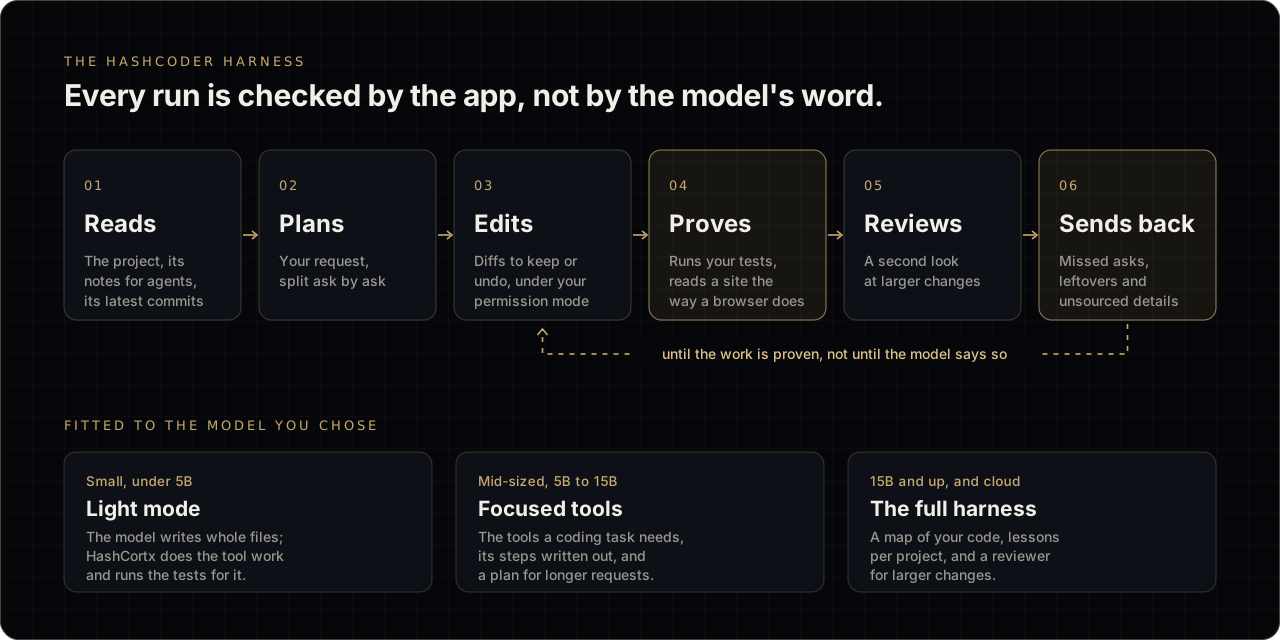
Every run is checked by the app, not by the model's word.
| Step | What HashCortx does |
|---|---|
| 01 Reads | The project, its notes for agents, its latest commits |
| 02 Plans | Your request, split ask by ask |
| 03 Edits | Diffs to keep or undo, under your permission mode |
| 04 Proves | Runs your tests, reads a site the way a browser does |
| 05 Reviews | A second look at larger changes |
| 06 Sends back | Missed asks, leftovers and unsourced details, until the work is proven, not until the model says so |
Fitted to the model you chose
| Model | Mode | What it gets |
|---|---|---|
| Small, under 5B | Light mode | The model writes whole files; HashCortx does the tool work and runs the tests for it |
| Mid-sized, 5B to 15B | Focused tools | The tools a coding task needs, its steps written out, and a plan for longer requests |
| 15B and up, and cloud | The full harness | A map of your code, lessons per project, and a reviewer for larger changes |
It proves its work
- Runs your project's own tests before it may finish, and says what was proven.
- Reads a changed website the way a browser would before calling it done.
- Runs the example command your request shows, to see what it really prints.
- Finds every place a renamed name is still written.
- Catches files that call what they never load.
- Sends back details on a page that nothing it read supports: addresses, phone numbers, hours, links.
- Holds a finished site to a standard: hidden content, endless animation, missing image sizes.
It plans, and knows your project
- Splits a request with three or more asks, and reports each one as done or not.
- Keeps a step plan for work in several parts.
- Starts with your project's notes for agents (
AGENTS.mdorCLAUDE.md) and its latest commits. - Gives larger models a map of your code.
- Can keep short lessons about each project. Off until you switch it on.
- Has a reviewer model take a second look at larger changes.
It guards the change
- Says at once when an edit leaves brackets or quotes open.
- Notices when an edit removes a function, section or heading you never mentioned.
- Leaves alone what you say to leave alone, tests included.
- Stops circling when it keeps changing the same file.
- Renames everywhere in one edit.
It fits the model you chose
- Light mode for models under 5B: the model writes whole files, and HashCortx does the tool work and runs the tests.
- Mid-sized local models get the tools a task needs, with their steps written out.
- A small project is shown whole to a local model under 15B.
- A greeting is answered without loading tools.
- On Anthropic models, requests are read from the provider's cache.
It works the way you do
- Permission modes: Manual, Accept edits and Auto. Manual is where it starts.
- Auto runs only a fixed list of read, search, git and project check commands. On macOS, checks run with the network closed.
- Attach screenshots, PDFs and files with the paperclip, by pasting, or by dropping.
- Finds openly licensed photos for a site and credits them on the page.
- Exports a conversation with its trace for debugging, with anything shaped like a key removed.
- Redesigned as HashCoder: one bar, Sessions, and a live sign that says what it is doing.
npm run bench:coder: twenty tasks, each judged by a hidden check.
 Agent Swarm
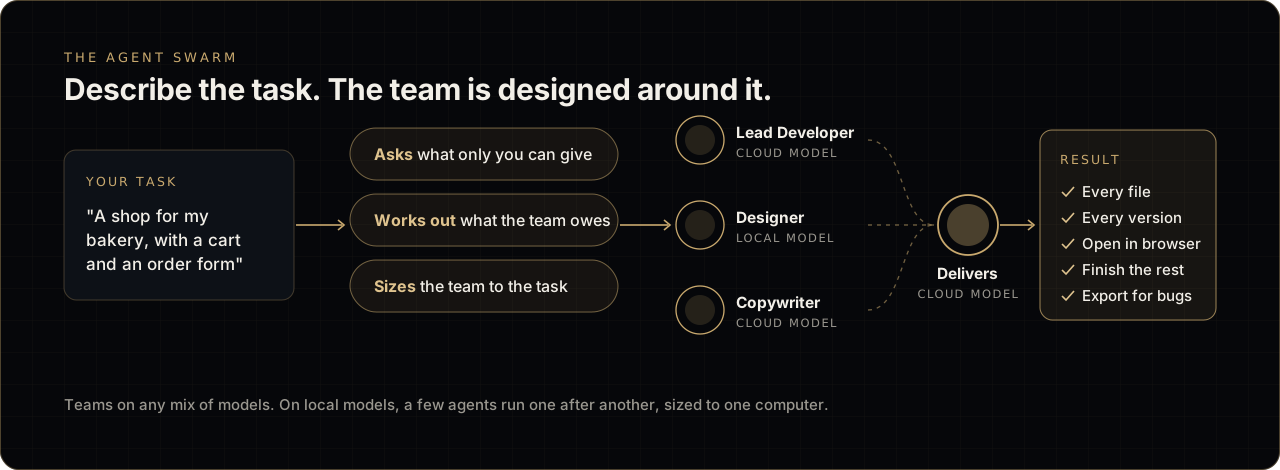
Describe the task. The team is designed around it. Your task, for example "a shop for my bakery, with a cart and an order form", goes through three steps: HashCortx asks what only you can give, works out what the team owes, and sizes the team to the task. The agents, such as a Lead Developer, a Designer and a Copywriter, run on any mix of local and cloud models and hand their work to the agent that delivers. The result holds every file and every version, opens in your browser, can finish the rest, and exports a report for bugs. On local models, a few agents run one after another, sized to one computer.
- Describe the task, get a team sized to the work and to your computer.
- What the team owes is worked out from your request, not from a fixed category.
- A task about you asks first for the details only you can give. It never invents a real person or business.
- A short piece of writing goes to one writer, with no team needed.
- On local models, a few agents run one after another.
- The agent that delivers writes the result.
- Agents can read a connected system. They never change one.
- A redesigned Result: every file, every version, and Open in browser.
- Finish the rest: run again only the agents that did not finish.
- Export for bugs: one report of the whole run, with keys removed.
- Delete a run. Every agent is marked by a drawn icon.
- A program is held to a program's rules, and a site to a site's.
 Connections, new
- Connect a business system over MCP from Settings → Connections.
- Ready-made for Odoo, GitHub, Stripe and Supabase, and "Other system" for anything else.
- Sign in through your browser, with PKCE.
- Reading asks once. Every change asks every time and shows exactly what will be sent.
- Its key never reaches a page or a model. Its records go only to local models unless you allow cloud ones.
- Used by chat agents, HashCoder, the Agent Swarm (read only), Finance and the ERP agent.
 Local models
- Models from other local model apps appear beside Ollama's.
- Every local model works as an agent, including ones that cannot call tools.
- Says when a model does not fit in graphics memory.
- Choose how long a local model stays loaded.
- A slow model is not asked the extra question.
- One local model no longer waits behind another, and thinking models answer.
- A task given to a local model stays local.
 Privacy and security
- Long-term memory has a switch. HashCoder uses it only when you turn it on.
- The app's own instructions stay between the app and the model. They are never shown or exported.
- Chat agents and HashCoder ask before they search the web or look for photos.
- A key travels in a request header, never in the address.
- A task stays on the side you chose: this computer or the cloud.
- Python written by a model runs in a sealed worker.
- On macOS, agent commands run inside the system sandbox and start without your secrets.
- A stricter file and command blocklist. Places that start programs on their own are refused.
- A narrower content security policy, and plugins the app never used are gone.
- Cloud requests are capped at 30 a minute and 6 at once.
- The app's own folder is private to your account on macOS and Linux.
- Agents are told that what a tool returns is not an instruction.
- Bundled libraries updated: DOMPurify 3.4.15, jsPDF 4.2.1 and Mermaid 11.17.2, with every version and licence recorded.
 Across the workspaces
- ERP: a design change is a short list of edits, not the whole system written again. Backups can be restored. It can bring in records from a connected system.
- Finance: the app adds up every figure, reports from a connected system, and every export saves a file.
- Chats: SambaNova, NVIDIA and Kimi Code keys work. Diagrams load only when drawn. Measured token counts appear in the footer.
- Failover stays on the side you chose, and a refused key is called one.
- 3D Forge: every length in millimetres, a design that holds across units, and an honest report of what it changed.
- Windows:
mkdir,dir,copy,npmand their kind work in HashCoder, and the wording fits any computer. - macOS: a menu bar of the app's own.
- A smaller, fully optimised release build.
- A build on a processor without AVX2 is refused at its start, with the command that works.
- Nothing in the app is an emoji. Every mark is drawn.
 Notable fixes
- A file the agent saves is replaced whole or not at all.
- Undo asks before it overwrites edits made since.
- Stop ends the commands a HashCoder run started.
- Line endings are kept when a Windows file is rewritten.
- The window stays responsive while a slow task runs.
- A link in a reply opens in your browser.
- Provider error messages no longer show your account's identifiers.
- A list a tool returns no longer breaks a Gemini conversation.
- An ERP counts in the currency of its place, unless you name another.
- Hundreds more, each in the changelog.
 Install
Upgrading from 2.6? Your keys, chats and settings carry over. HashCoder now starts in Manual and asks before every change. Choose Accept edits from the menu beside its box to work the way 2.6 did.
macOS, Apple Silicon
- Download HashCortx_3.0.0_aarch64.dmg below, open it, and drag HashCortx to Applications.
- HashCortx is not signed or notarised by Apple, so macOS refuses it the first time. The app is not damaged. Open Terminal and run this once:
xattr -cr /Applications/HashCortx.app- Open HashCortx normally. After an upgrade, run the command once more.
Windows
- Download HashCortx_3.0.0_x64_no-embeddings-setup.exe below and run it.
- Windows shows a blue Windows protected your PC box, because the installer carries no paid signing certificate. Click More info, then Run anyway, and follow the installer. HashCortx is then in your Start menu.
This build is made without local embeddings, so it starts on any 64-bit PC, including one with a processor from before 2013. The knowledge base searches by keyword instead of by meaning, and the app says so. Everything else is the same app. For search by meaning on a newer PC, build from source; the steps are in the README.
Coming from the 2.6.0 program file? Your keys, chats and settings carry over, and the old file can be deleted. If the window opens white and empty, install the WebView2 runtime.
Linux and Intel Macs
Build from source. The steps are in the README.
 Check your download
Run this in the folder you downloaded to. If the result matches, your copy is byte for byte the file published here.
macOS:
shasum -a 256 HashCortx_3.0.0_aarch64.dmg8d35c2d6e006f603306920419eb855d80239e07e2a57d9fb35a0d3e470b80b2b
Windows (PowerShell):
Get-FileHash HashCortx_3.0.0_x64_no-embeddings-setup.exe -Algorithm SHA256AA2FB249B627A956255A8F1817E2160595108CC30C3CEB66767C938FB9241A2F
Built and checked in the open. CI runs 10,178 source checks on every change, and 223 Rust tests on Linux, macOS and Windows.
The build is not code-signed, and keys are stored unencrypted, protected by your user account. SECURITY.md says everything it does, and does not.
Website · Full changelog · All changes since 2.6.0 · Discussions