A professional 3D level editor that runs entirely in your browser. Built with Three.js and TypeScript, designed for fast iteration on game worlds with CSG solid modeling, texture painting, and precision tools.
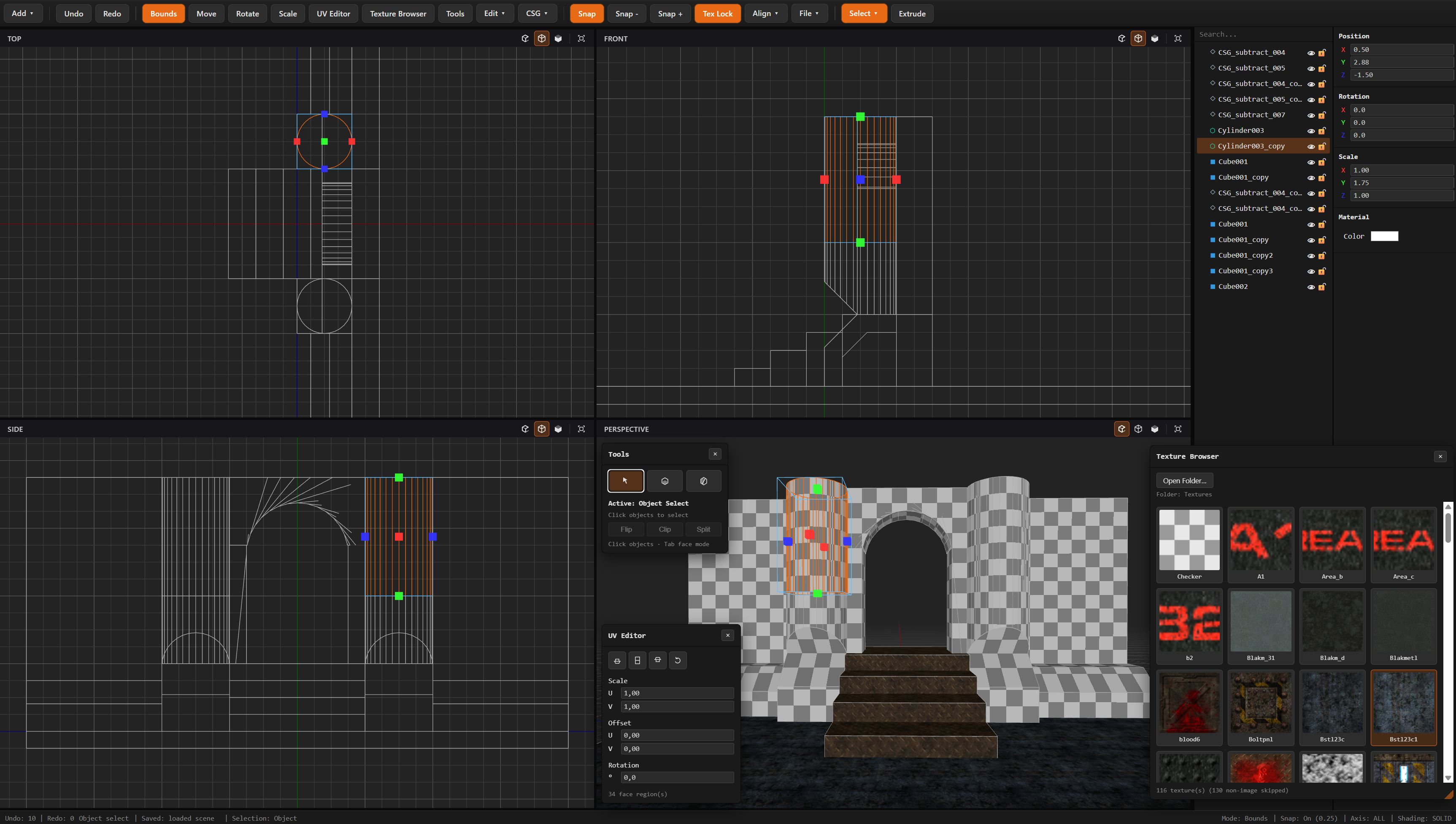
AiWorldEd is created and maintained entirely by AI (Grok 4.5 and Qwen 3.6) under human guidance. No human has manually edited the source code.
Build levels from brushes using constructive solid geometry. Add, subtract, and intersect brush volumes to carve out rooms, corridors, and architecture — then compile them into a single textured mesh.
- Additive / Subtractive / Clip brushes — each brush has a boolean operation
- Live rebuild — geometry updates in real-time as you move and resize brushes
- Per-face textures — assign different textures to each face of a brush, carried through CSG compilation
- Brush reordering — drag brushes in the outliner to change boolean evaluation order
Create basic geometry to start building your scene:
- Cubes, Spheres, Cylinders, and Planes
- All primitives support textures, colors, and CSG operations
Combine any two meshes using BSP-based boolean operations:
- Union — merge two meshes into one
- Subtract — cut one mesh from another
- Intersect — keep only the overlapping volume
Slice meshes with an interactive clipping plane. Place three points in the viewport to define a plane, then flip, clip, or split your geometry:
- Clip — cut away one side of the mesh
- Split — split the mesh into two separate pieces
- Flip — swap which side is kept
Switch to face mode to select individual faces on any mesh, then extrude them into new convex prism geometry:
- Click or drag to select faces
- Coplanar face region grouping for multi-face extrusion
- Extruded geometry is created as a new mesh (source stays intact)
Full texture workflow with per-face control:
- Texture browser — load textures from a local folder using the File System Access API
- Per-face texture assignment — assign different textures to each face of a solid
- UV editor — floating panel with scale (U/V), offset (U/V), and rotation controls
- Texture alignment — one-click align to floor, wall, or ceiling orientation
- Planar UV projection — automatic world-aligned UV baking per face
- Cylinder side unwrap — special-case UV unwrapping for cylinder geometry
- UV smear — drag to adjust UV coordinates directly on the mesh
- Texture lock — keep UVs locked to world space during transform operations
Procedural heightmap terrain for blocking-out landscapes and level layouts:
- Configurable width, depth, segmentation, and height scale
- Deterministic seed-based generation
- Automatic world-aligned texture projection
Precision object manipulation with Unity-style gizmos:
- Bounds resize — OBB-based bounding box gizmo for intuitive scaling
- Translate — move along X, Y, Z axes or free in 3D
- Rotate — rotate around individual axes
- Scale — uniform or per-axis scaling
- Grid snap — configurable snap intervals (cycle with
,/.keys) - Texture lock — UVs stay world-aligned when objects are transformed
Snap selected objects to the world origin with per-axis control. Cycle through ALL / X / Y / Z axis restrictions with the A key.
Organize your scene with a full object hierarchy:
- Group / Ungroup objects into containers
- Drag-and-drop reparenting in the outliner
- Visibility toggles per object
- Lock toggles to protect objects from edits
- Inline renaming with double-click
- Context menus with duplicate, delete, group, ungroup, visibility
Four-viewport workspace like Blender and Maya:
- Perspective — 3D fly camera with orbit and pan controls
- Top — orthographic XZ view
- Front — orthographic XY view
- Side — orthographic YZ view
- Viewport sync — 2D viewport selection syncs with the 3D viewport
- Camera widget — navigation indicator in the 3D viewport
- Infinite grid — grid that scales with camera distance
Toggle viewport rendering modes for any viewport:
- Solid — standard shaded rendering
- Wireframe — wireframe-only display
- Flat — flat-shaded rendering
- Wireframe Overlay — solid with wireframe edges on top
Robust selection system with full multi-select support:
- Click to select, Shift+click to add, Ctrl+click to toggle
- Drag selection in 2D and 3D viewports
- Tab to switch between object and face selection modes
- Mixed-value display in inspector for multi-select
Unity-style properties panel with live editing:
- Position / Rotation / Scale — numeric inputs with axis color coding
- Material color — color picker for mesh tint
- Mixed values — shows dashes for non-uniform multi-selection
- Solid brush properties — operation type, per-face texture assignment
- Save scene — proprietary JSON format with full geometry, transforms, textures, and solid model data
- Load scene — restore saved projects with all data
- Export GLB — binary glTF export for use in game engines (Unity, Godot, Unreal), Blender, and more
- File dialogs — native save/open dialogs via the File System Access API
WorldEd authors all scene data in a right-handed, Y-up, -Z-forward space,
where one editor unit is one meter. A game profile converts that authored data
at export time; it does not change the editor scene.
The GLB exporter clones the scene and places the profile conversion on an
ExportRoot node. Position, normal, UV, and index buffers are not baked or
rewritten. The conversion includes the selected unit scale and axis basis.
Right-handed profiles produce a positive-determinant root transform.
Left-handed profiles (Unity, Unreal, and custom left-handed bases) produce a
negative-determinant root transform.
| Target profile | Export basis | Units | Import requirement |
|---|---|---|---|
| Godot | Right-handed, Y-up, -Z forward |
Select the project unit | Preserve the GLB node hierarchy and root transform. |
| Blender | Right-handed, Z-up, +Y forward |
Select the desired Blender unit scale | Preserve the GLB node hierarchy and root transform. |
| Unity | Left-handed, Y-up, +Z forward |
Meter profile | Preserve the mirrored root transform; do not bake it without reversing triangle winding. |
| Unreal Engine | Left-handed, Z-up, +X forward |
Centimeter profile | Preserve the mirrored root transform; do not bake it without reversing triangle winding. |
| Custom | The three selected axes define the basis and handedness | Selected profile unit | Apply the same determinant and bake rules as the derived basis. |
For every target, validate a test asset containing an asymmetric triangle, outward normals, a textured face, and collision geometry. Its position and orientation must match the profile axes; front faces must remain visible, normals must point outward, textures must not be mirrored unexpectedly, and collision must match the rendered mesh. Importers may retain the reflected root transform directly. If an importer or an optimization step bakes a negative-determinant transform into geometry, it must reverse each triangle's index winding and transform normals with the inverse-transpose matrix. The current GLB export intentionally does not bake that transform.
Full undo/redo for all operations:
- 35+ tracked command types covering every editor action
- Coalesced commands for smooth property panel editing
Ctrl+Z/Ctrl+Yshortcuts
W       Move tool
E       Rotate tool
R       Scale tool
T       Bounds resize
A       Cycle alignment axis
F       Fit to selection
Shift+F Fit all viewports
Delete  Delete selected
Ctrl+D  Duplicate selected
Ctrl+Z  Undo
Ctrl+Y  Redo
Ctrl+S  Save scene
Ctrl+O  Load scene
Ctrl+Shift+E  Export GLB
Shift+G Group selected
Shift+U Ungroup selected
Alt+G   Align to origin
Shift+E Extrude faces
1-4     Shading mode (Solid, Wireframe, Flat, Wireframe+Overlay)
Tab     Toggle object / face selection
.       Snap interval forward
,       Snap interval backward
Escape  Deselect / exit tool
- Blender-inspired dark theme — dark backgrounds with orange selection highlights
- Toolbar — menu bar with file operations, primitive creation, CSG operations, and shading modes
- Floating panels — draggable, resizable Tools palette, UV editor, and Texture browser
- Outliner — collapsible tree view of the scene hierarchy
- Properties panel — transform, material, and brush property editors
- Status bar — real-time feedback on tool state, snap settings, and shading mode
- Context menus — right-click actions on objects in the outliner and viewports
The Settings > Update tab checks the latest published release from the AiWorldEd GitHub Releases page when the editor is hosted inside a standalone executable. The browser build shows the release page instead because a browser cannot replace its own executable.
Electrobun desktop builds use Electrobun's native updater over typed Bun/webview
RPC. The Update tab's Automatic update checks toggle controls whether the
standalone app checks its configured release channel when the tab opens. Native
Electrobun builds use the release artifacts generated by electrobun build and
the latest/download release base URL configured in electrobun.config.ts.
Standalone shells other than Electrobun can enable automatic installation by defining
window.aiworldedStandaloneUpdater before loading the editor:
window.aiworldedStandaloneUpdater = {
  platform: 'windows',
  installUpdate: async ({ version, downloadUrl, fileName, releasePageUrl }) => {
    // The shell downloads, verifies, replaces, and restarts the executable.
  },
};
The updater only passes HTTPS GitHub asset URLs selected for the host platform and only installs a release after the user presses “Install update and restart”.
- 241 TypeScript source files across 18 subdirectories
- 179 unit tests covering viewport rendering, CSG, selection, transforms, textures, serialization, and UI
- Zero external dependencies beyond Three.js — all UI, CSG, and editor logic is custom-written
- Convex-only geometry policy for level design simplicity
- BSP-based CSG with polygon clipping, mesh rebuilding, and texture propagation
- Deep-cloned 2D viewport geometry for correct orthographic display
- Schema v3 serialization format with face texture maps and buffer UV channels
bun install
bun run dev          # Start development server
bun run testrun      # Run all tests
bun run format       # Format authored source, tests, and configuration
bun run format:check # Verify formatting without changing files
bun run ci           # Run formatting, tests, and the web build
bun run build        # Production build
bun run typecheck    # Baseline TypeScript check
bun run typecheck:strict # Strongest TypeScript check (informational in CI)
bun run desktop:dev  # Watch and launch the Electrobun desktop app
bun run desktop:build # Build the native desktop app into desktop_artifacts/
bun run desktop:run  # Relaunch the last Electrobun build
The desktop build uses Electrobun with Bun and the native renderer configured for
Windows, Linux, and macOS. The desktop view bundles the same src/app.ts editor
entrypoint as the browser build, so editor behavior remains shared between both
targets.
GitHub Actions runs formatting, unit tests, and the Vite production build for
pull requests and pushes to main. The strict TypeScript check from
tsconfig.strict.json also runs as an informational step while the existing
type errors remain unresolved.
Every successful push to main starts native Electrobun builds on Windows,
Linux, and macOS. The resulting desktop_artifacts/ files are uploaded as
platform-specific GitHub Actions artifacts named with the platform and commit
SHA and retained for 30 days.
MIT — see LICENSE.md
Join the Discord server for discussion and support.
If you found this tool useful, consider supporting its development: