ThinkPad keyboards are great. Except for one thing, that the layout of page up/page down keys is, for some reason, unbelievably impractical.
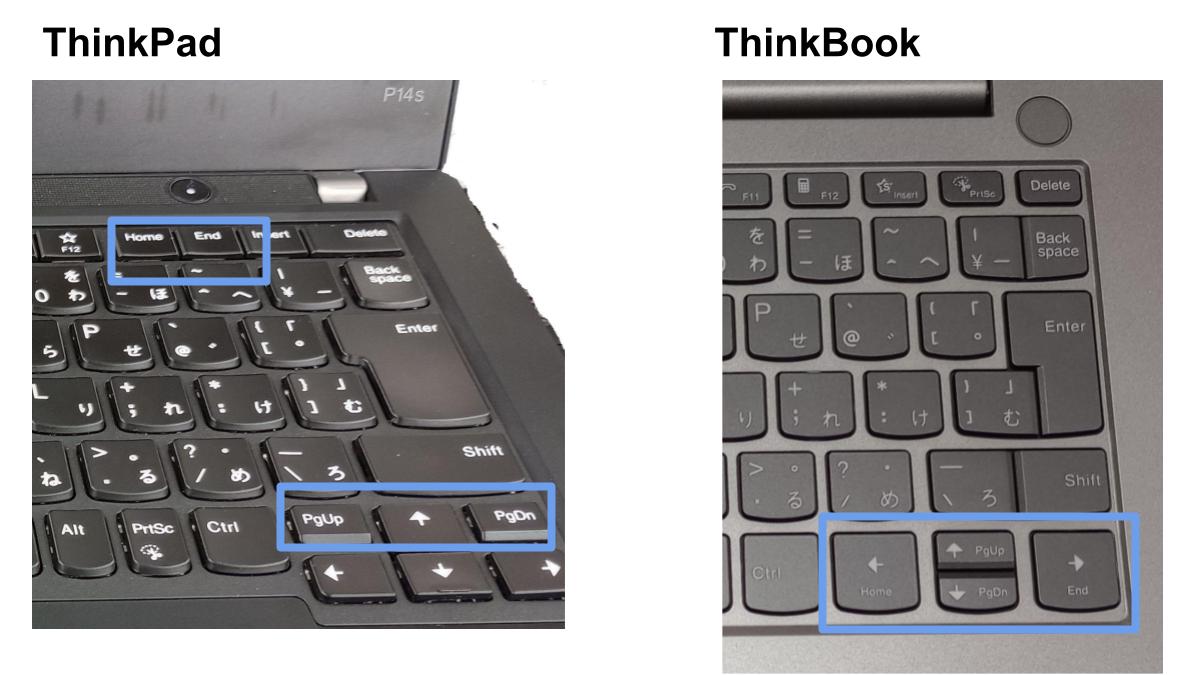
Historically, there have been numerous solutions to this problem, such as covering the keys with plastic, disabling them via SharpKeys or just straight up ripping them out, as they are more likely to be hit accidentally than on purpose. But once in a while, there may come a time when not having a page up/page down key becomes troublesome.
ThinkKeyFilter is a very simple user-mode hook that disables page up/page down keys in software, unless they are pressed together with the Windows key. To my knowledge, this acts the same as a regular press of the page up/page down key in all normal scenarios. This effectively prevents accidental key presses, while still allowing you to retain the functionality, should you ever need it!
- Build the program with Visual Studio 2026 in the Release configuration.
- Run
RunOnStartup.batto register the resulting executable to run on Windows logon. - Log out/log in or restart.
- You should now be able to use Win+PgUp/PgDn to scroll pages with plain PgUp/PgDn doing nothing.
Since most of this program is AI slop, it is not protected by copyright. However, for any purposes necessary, it is released into the public domain as CC0.