Repository navigation
Releases: Hitheshkaranth/EmbeddedDisplayStudio
Release list
EmbeddedDisplay Studio 0.1.4

Full Changelog: v0.1.3...v0.1.4
EmbeddedDisplay Studio 0.1.3
Studio 2: four modes instead of seven tabs
- One header row: the project menu (New app..., Open bundle...), a mode
switch -- Design, Simulate, Code, Deploy -- with a view
switch where a mode has more than one view (Design: Designer and AI
Design), and a device chip whose popover holds the panel address,
port, Connect and Disconnect. A status bar under the window reads the
link, the open app and the display. - Design: one toolbar with a File menu; Layers / Widgets / Pages on the
left; Design / Data / Actions on the right, with Size on screen
(Compact / Normal / Large) for the selected widget; an AI composer
over the canvas replaces Design Chat -- add / set / bind / remove still
run offline, anything else goes to AI Design with the current design as
context and lands back on the canvas. - Simulate: Tag Lab beside the panel, with a drawer for its command
log and the panel's journal (formerly Panel Logs). - Deploy: Display Console and System Profile in one view -- the release
card (Deploy, Live preview, Mirror, Restart GUI, Rollback), the four
deploy steps (Validate, Package, Transfer, Activate) moving with the
progress bar, a readiness checklist, installed releases, the device and
its health. Health is only measured while a panel is connected. - Code: restyled to match; Outline and Backend unchanged.
AI Design: the model plans, a compiler lays out
- The model no longer writes geometry. It returns a title, header items and
titled sections with roles;designer/layout/compiler.pylays them out
deterministically (header, region search with a cost model, per-kind
bands, theme tokens) and shrinks widgets below their design size when a
screen is crowded. Runner-up layouts wait in the variant strip.
ai/layoutEngine=polishrestores the old path. See
docs/AI_LAYOUT_COMPILER.md. designer/layout/intake.pyrepairs the JSON a model actually emits
(duplicate keys, trailing text) and maps property names, icons and
invented widget types onto the kit.- Per-widget size wishes -- from the plan or from Size on screen -- and
Tidy up on a compiled page compiles it again. - A finished turn is no longer shown as "Cancelled" when the panel
preview's nested event loop delivers the worker's finished signal.
Designer
- Object snap: dragging snaps to sibling and parent edges (toggle in the
canvas bar, Ctrl bypasses). - Align, match size and distribute act only on selected free siblings,
never across parents or inside a positioner.
Kit (hmi-ui and the QML kit alike)
- ShClusterGauge fits its caption between the scale numbers and keeps the
step's decimals; ShGearIndicator scales a row wider than its box;
ShAutoReadout gives a wide value the icon's slot before shrinking;
ShEngineBar holds its label to the bar; ShTrendChart draws its warning
band and axis labels; ShValueTile readstitleon the panel.
CI
- The Qt SVG image plugin comes from
libqt6svg6on Ubuntu 24.04, where
qt6-svg-pluginsno longer exists.
The panel, for an operator (CONTRACT section 13; everything is additive --
designs and bundles that use none of it are unchanged)
- Actions: a signal can run a list of actions; new kinds
toggle,
increment/decrement(step, min, max),back(page history),ack
(one alarm or*) andshelve; any list can ask Cancel / OK first. - Bindings: an expression instead of a tag (
eng1.egt > eng2.egt ? "ENG 1" : "ENG 2",round(fuel.l + fuel.r, 1), ...), fixed decimals, and rules that
set another property from the reading (a title turns "HOT" above 80). The
Designer checks expressions as you type. - Alarms: priorities 1-4, latching until acknowledged, on-delay, deadband,
custom message, shelving; a journal on the panel
(/var/lib/hmi/alarm-journal.jsonl) and an alarm tablehistorymode. - History:
hmi-hwdkeeps a SQLite history of the tagshwd.jsonlists;
trend charts fill from it when a page opens; per-tag quality (bad) in every
frame;python -m tools.hmi_deployer.history_exportpulls a CSV over SSH. - Operator input: a numeric keypad (range-checked) for numeric inputs, an
on-screen keyboard for text inputs, a "No connection to controller" banner,
and screen dim / off after inactivity (Designer: Screen idle).
Fixes
- The panel never showed a bound Value Tile / Status Dot / Data Field /
Annunciator value -- only a state colour, even without thresholds. - Numeric inputs on the panel showed "Text" where their unit belongs.
- The offline tag simulator no longer fights a local daemon or tagsim for the
Live Preview's values.
Full Changelog: v0.1.2...v0.1.3
EmbeddedDisplay Studio 0.1.2

Code: the design's widgets and its backend, side by side
- Outline -- every widget of every page as one tree, with its tags and
binding issues; filter to bound widgets, to issues or to one tag; a click
selects the widget (switching page), a double-click opens its line in
project.edsui. - Backend -- one row per tag: read/write access, the widgets that use it,
its live value and status (ok,unused,not declared). Values come
from the Studio's tag engine while a panel is connected, else from a
simulator scaled to each widget's range; double-click a writable tag to
write it. - Generate backend... writes
backend/into the project: a runnable
CONTRACT 2 UDP backend with one read/write stub per tag,tags.jsonand
tags.h. - The coding agent is told about the design -- pages, the selected widget,
its bindable properties, tags and issues -- with one-click quick actions.
Panel runtime (hmi-ui)
- A trend chart bound to an ordinary numeric tag draws that tag's recent
samples; it used to stay empty unless the tag itself carried a list. - ShToggle flips on a tap and draws
checkedon the right side; alarm tags
of 64 bytes or more fire; ShTrendChart draws the reference gradient in
O(width); ShClusterGauge no longer freezes on a tinymajorStep.
Designer
- Adding, duplicating and deleting pages, and arrow-key nudges, are undo
steps (a run of nudges is one); a multi-widget paste is one step. Before,
a later undo could replay geometry the design no longer had. - Arrange is 9x faster on busy pages; text alignment applies to every
selected text widget; image widgets are no longer decoded on every paint.
Daemon and deployment
- Commands with
NaN/Infinityare rejected; subscribe TTL is capped at
60 s; a dead Modbus server is retried everyreconnect_s, not at the poll
rate. - An upload the panel aborted reports the panel's own error; following panel
logs no longer repaints the whole view per line. - The Yocto layer installs
hwd.json0640.
CI is green again: the Linux job builds hmi-ui and runs its C tests and
the conformance and parity suites against it; the shell and native-loader
jobs find their scripts.
EmbeddedDisplay Studio 0.1.1
The Windows executable is built, run against a fixture and attached by CI; it needs no Python installation.
Qt applications on a Qt-free panel
- Deploying a
runtime: pythonbundle (PySide2 or PySide6) to a panel that
runshmi-uinow brings the Qt runtime along, after one confirmation: the
Qt app launcher,hmi-gui.service, a Weston drop-in, and the PySide2
runtime (/opt/hmi-python-qt5) or PySide6 (into/opt/hmi-python). The
PySide2 runtime is assembled on the Studio's own PC from Debian packages --
no WSL, nodpkg-deb-- and cached. The panel needs no internet. - The application's own packages (pyserial, ...) are fetched as wheels on the
PC and installed on the panel withpip --no-index. hmi-installstarts the service that matches the bundle:hmi-uifor a
Studio design,hmi-gui(under Weston) for a Qt application. Boot default,
rollback and activate follow it, so deploying a Studio design hands the
display back tohmi-ui. Exit 5 when the bundle's service is not
installed; nothing is changed.- Weston no longer segfaults at start when
/tmp/.X11-unixhas been cleaned
away on a long-up panel.
AI Design
- Designs that do not fit the screen are split into pages: the instruments,
alerts and controls that matter most stay on an overview, the rest go to a
page per engine or system, linked both ways. A page that still overlaps
after layout moves its least important widget on. The prompt gives the
model a per-page budget for the actual screen, and a brief that names a
different resolution from the panel's is reported. - A twin composition for a pair of instruments (two engines, two
channels), chosen for a page with two dials of one kind or a brief that
says dual/twin. - Gauge scales are repaired from what a widget carries: a range too short
for its own thresholds or value is widened, a 0..1 "fraction" scale with a
real readout becomes the real scale, a fixed readout that hid the live
value is cleared, and a pair of instruments shares one scale. - Sectioned runs are laid out as one page after every section, instead of
stacking each section's hero in the same slot. - Model output is made deployable: tags lowercased, actions on signals a
widget cannot emit and links to pages that do not exist dropped, reused
widget ids renamed. The Designer applies the same repairs when it opens a
design saved before. - The vLLM preset follows the lab server to
:8080andqwen3.8-35b-a3b,
with an API key; a 401/403 reads "API key required/rejected", not
"unreachable", and a saved model the server no longer serves is replaced.
Studio
- The Code workspace is a project editor: the bundle's files and
folders, a Widgets list with live thumbnails, tabbed editors with undo /
redo / save, the design pinned first, and an opencode
coding agent that works in the project folder on the configured model. - A new look, from Libraries.dev
ported to QPainter: liquid navigation, border beams on work in progress,
thinking orbs, a bot avatar for the agent, a liquid-metal mark and a
pixel-mosaic preview loader -- with an Animations switch in the header. - Mirror the panel in the Display Console: the panel's own screen at a
frame a second. - Live Preview says why a design did not load (the QML error, in the window
and the console) instead of showing an empty window, and a binding on a
property a widget does not have no longer breaks the generated file. - The packaged Studio carries every PySide6 module except WebEngine/WebView,
and its built-in pip works -- a previewed application that loads a.ui
file, or needs a package installed, now runs. - Closing the Studio during a package install no longer crashes it.
Panel runtime
hmi-tagsim: a bench feed that reads the deployed design and fills every
tag it binds from one flight, each quantity mapped onto the scale of the
widget that draws it.hmi-uihonours the Designer'sz, builds on LVGL 9.3 with gcc 14, and
four kit widgets are back to their spec away from the defaults
(ShAttitude,ShTape,ShVSI,ShGauge);ShTurnCoordinator's
aeroplane sits on its own arc again.
Earlier in this cycle
- AI Design: the reasoning pass is off by default -- a thinking model spent
the whole output budget on it and could return no design at all. - The packaged Studio ships
designer/templates, and uncaught exceptions
reachstudio.log. - The Designer's property panel no longer deletes an editor inside its own
signal, which crashed the Studio when a font size was typed.
Full changelog: v0.1.0...v0.1.1
EmbeddedDisplay Studio 0.1.0
Full Changelog: v0.0.9...v0.1.0
EmbeddedDisplay Studio 0.0.9
Deploy keys that work on the other machine, and a cluster that drives itself
Deploy keys (the fix for "imported the .hmikey, still cannot deploy")
- Export verifies before it packs. The Key field may name one key while the link actually works through another (ssh also offers the
~/.sshdefaults). Export now tries each key on its own against the panel and packs the one the panel accepts. - The bundle carries the panel's SSH host key. Import writes it into
known_hosts, replacing any entry another board left at the same DHCP address — the cause of "Host key verification failed" on the first Connect. - Import verifies after it installs and names the problem in plain words: no OpenSSH client on this machine, panel unreachable, host-key mismatch, key not trusted by the panel, or key-file permissions.
- Connect recognises a stale host key and offers to forget it.
- CLI:
python -m tools.hmi_deployer.deploy_key verify --host <ip>;export --no-verifyfor offline packing.
Both sides must run 0.0.9 — the exporter's Studio verifies the key, the importer's Studio installs the host key. Re-export once from the machine that provisioned the panel.
A cluster that drives itself
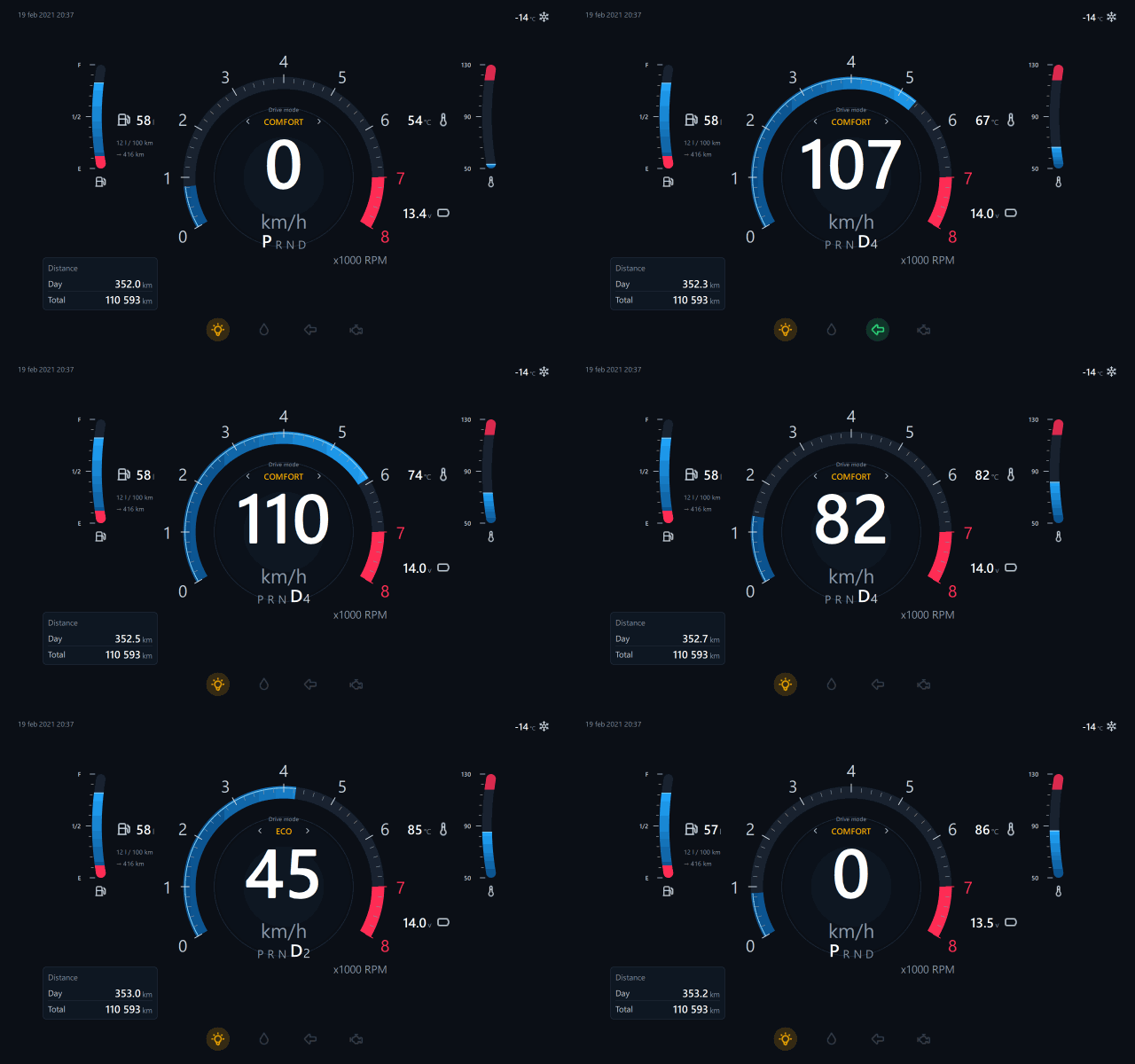
sim.car.* values are a 60 s drive cycle: idle in P, pull away through the gears, cruise, kickdown sprint to the redline, brake, ECO cruise, stop — rpm from speed and gear, coolant warming, fuel/SOC creeping down, indicators blinking. designer/templates/automotive_cluster_demo.edsui is the cluster preset on it; it runs the same on the canvas, in the Live Preview window and on the panel.
Fixes
- Size-like properties (font size, dot size, segments, decimals…) have floors; a cleared spin box used to send −100000 and a 0 px font blanked every
Text. - The gear indicator ignores a numeric gear from a simulator.
- The README tour was re-photographed from the cluster project; key-sharing diagram added.
Full Changelog: v0.0.8...v0.0.9
EmbeddedDisplay Studio 0.0.8
Automotive widgets, a canvas that shows the real thing, and deploy keys
Automotive widget set (new palette category)
ShClusterGauge, ShGearIndicator, ShAutoLevel, ShAutoReadout, ShDriveMode, ShTelltale, ShIconTile, ShTripInfo, ShSegmentBar, ShVehicleStatus — modelled on a classic instrument cluster and an EV infotainment screen. Every bindable property is proven to change the picture and every control's signal reaches the bus (tests/test_automotive_contract.py). 47 Tabler cluster icons are vendored for the QML kit.
Design presets
A brief that reads like a cluster or an EV dashboard gets a style guide and a hand-built exemplar appended to the AI prompt; automotive_cluster.edsui and ev_infotainment.edsui also open as projects. python -m tools.hmi_deployer.design_presets --list.
Studio
- Live QML canvas — the Designer draws each widget with its own QML (rendered offscreen, cached, at the canvas zoom) instead of a painted sketch. Toggle "Live QML" next to Grid / Snap.
- Live Preview window — Preview runs the design in its own window at the panel's resolution, on the Studio's tag engine, so buttons and selectors can be operated. Also "Open Live Preview" beside Deploy.
- Resize from any of the eight handles.
- Disconnect beside Connect (Cancel while connecting).
- Export key… / Import key… — a
.hmikeybundle carries the deploy key and the panel address to another user; import installs it with owner-only permissions and fills the connection fields. CLI:python -m tools.hmi_deployer.deploy_key.
Fixes
- The generator never emits a property or enum the widget does not declare; the AI importer maps enum spellings onto the real choices. (An AI-invented
activeon a status dot used to makehmi-guifail and the deploy roll back.) - A bound text property falls back to
"", not0. - Panel: the GUI loader finds the shared validator in the panel layout; the provisioner ships
modbus.py; 32-bit Modbus tags read both registers;assertin the daemon replaced by a real error. - Designer: page names may carry punctuation again; binding multiplier/offset are coerced to numbers; undo stack capped; preview child processes are reaped.
- Tests no longer overwrite the user's "last bundle" setting.
In pictures
Designer — the automotive cluster preset, every widget drawn by its own QML, the gauge selected with its eight resize handles

Live Preview window — the design at the panel's resolution on the Studio's tag engine

Display Console — connected to the panel: Disconnect, Export / Import key, readiness, Deploy, Open Live Preview

AI Design — the "Automotive cluster" example brief and the design presets behind it

How a deploy key travels

Full Changelog: v0.0.7...v0.0.8
EmbeddedDisplay Studio 0.0.7
Full Changelog: v0.0.6...v0.0.7
EmbeddedDisplay Studio 0.0.6
Full Changelog: v0.0.5...v0.0.6
EmbeddedDisplay Studio 0.0.5
Full Changelog: v0.0.4...v0.0.5