Repository navigation
Releases: HiveSolution/nivalis-tool-belt
Release list
Nivalis Tool Belt 1.1.0

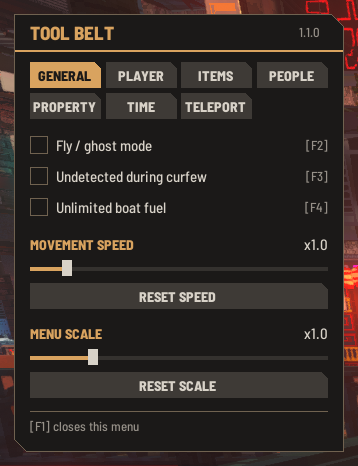
Nivalis Tool Belt 1.1.0: the menu can now be made bigger, for large TVs and 4K screens.
New
- Menu scale: a slider from x0.5 to x3 (x1 is the normal size) that makes the whole menu bigger or smaller. The new size applies when you let go of the slider and is kept between sessions. Reset scale brings it back to x1. It can also be set as
Scaleunder[Menu]inBepInEx\config\renokk.nivalis.toolbelt.cfg. - The Move tab is now called General, since it holds more than movement.
Install
- Install BepInEx 6 (IL2CPP, x64) into the game folder and start the game once.
- Extract the zip into the game folder, so that
NivalisToolBelt.dllends up inBepInEx\plugins\NivalisToolBelt\. Updating from an earlier version: just overwrite the files; saved teleport spots and settings are kept.
Built and tested against Steam build 25738165 (6 October 2026) with BepInEx 6.0.0-be.788. A game update can break the mod until it is rebuilt.
SHA-256 of NivalisToolBelt-v1.1.0.zip: B98CC307023B5F8C1E7E39A8A0AA3929A2C52669ACC9B7CAA15D431EB0C059FB
Nivalis Tool Belt 1.0.1
Nivalis Tool Belt 1.0.1: a bug fix for the latest Nivalis Nights update.
Fixed
- Fly / ghost mode no longer switches itself on. While a save or a new area loads, the game lets the player fall for a moment before placing them. On slower PCs that fall was fast enough for the mod's "falling out of the world" safety net, which switched fly mode on without any key being pressed. The safety net now waits until loading has finished.
Tested
Every tab and hotkey was checked again in the running game after the update. No other changes were needed.
Install
- Install BepInEx 6 (IL2CPP, x64) into the game folder and start the game once.
- Extract the zip into the game folder, so that
NivalisToolBelt.dllends up inBepInEx\plugins\NivalisToolBelt\. Updating from an earlier version: just overwrite the files; saved teleport spots are kept.
Built and tested against Steam build 25738165 (6 October 2026) with BepInEx 6.0.0-be.788. A game update can break the mod until it is rebuilt.
SHA-256 of NivalisToolBelt-v1.0.1.zip: 63BF15FBC66459FD8BADB5048E280BFC722397E655EEEEEA851DA8FE5EB90179
Nivalis Tool Belt 1.0.0
Nivalis Tool Belt 1.0: an in-game sandbox menu for Nivalis Nights. Press F1 to open it.
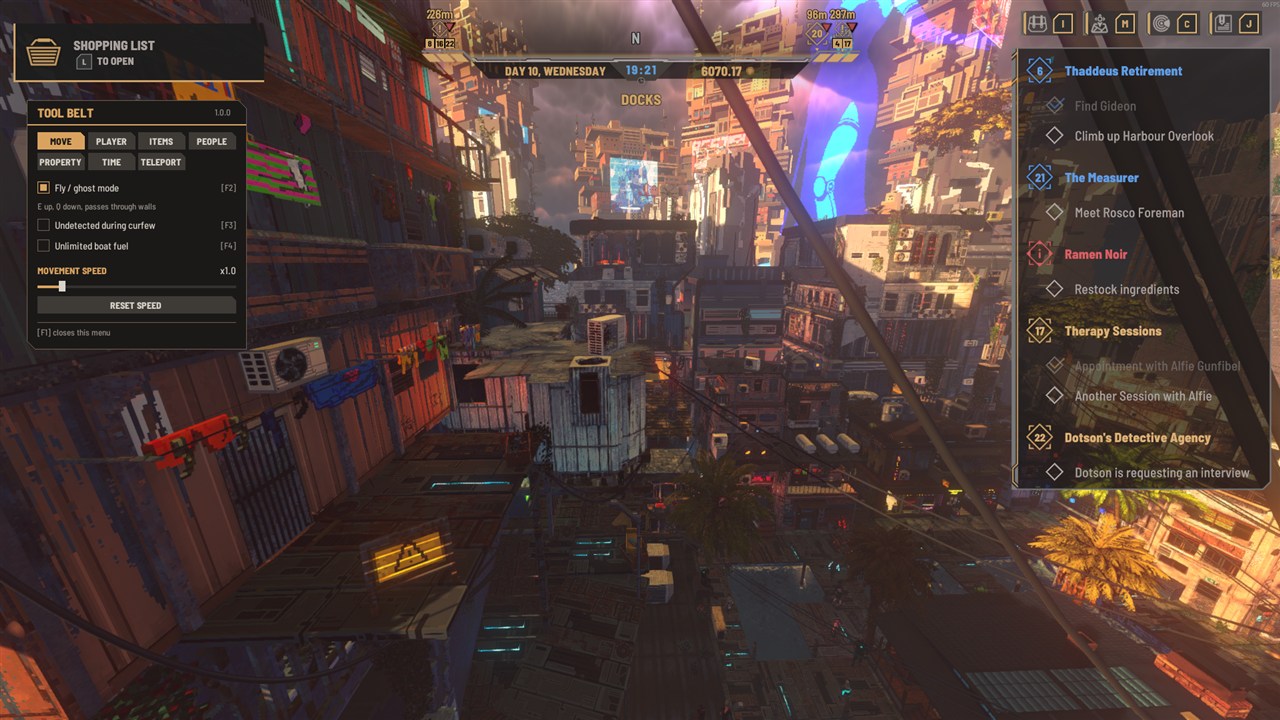
New since 0.6.0
Switches with hotkeys
- Undetected during curfew (F3): the curfew's cameras and drones do not notice you.
- Unlimited boat fuel (F4).
- Instant greenhouse growth (F6): everything planted in your greenhouses is ready to harvest at once.
- A hotkey pressed with the menu closed shows a short notice of what it switched.
Property tab (was "Venues")
- Apartments and greenhouses: rent them, take them over for free or give them up. Your money balance is left as it was.
- Storage space: multiply the storage of every venue you hold, x1 to x10. Remembered between sessions.
- Staff happiness: hold all staff of your venues at Sad, Normal or Happy.
Time tab
- Weather: switch to any of the game's ten weather types and hold it, or hand it back to the forecast.
Teleport tab
- Unlock all areas for travel.
- Rename saved spots from the menu.
Items tab
- Inventory view: see what you carry and remove one or all of an item.
- Items that share a name (about a third of the catalogue, mostly furniture) are now told apart by style or number.
Menu
- The panel is fully opaque, so the game's notifications no longer show through it.
Everything in 1.0
| Tab | Tools |
|---|---|
| Move | Fly / ghost mode (F2), undetected during curfew, unlimited boat fuel, movement speed |
| Player | Money, debt, inspiration points, skill levels, boat unlock |
| Items | Add any item, remove items you carry |
| People | Relationship levels with the 120 story characters |
| Property | Venues (level, take over, give up, storage, staff happiness), apartments, greenhouses (instant growth) |
| Time | Freeze clock, clock speed, skip ahead, weather |
| Teleport | Saved spots across areas, rename, unlock all areas |
The README has the details and screenshots of every tab.
Good to know
- Ownership changes (venues, apartments, greenhouses, boat, areas) skip the game's own purchase or story flow. Try them on a spare save first.
- The switches, held weather and held staff happiness are off again after a restart. The storage multiplier is the one setting that is kept.
- All hotkeys can be changed in
BepInEx\config\renokk.nivalis.toolbelt.cfg.
Install
- Install BepInEx 6 (IL2CPP, x64) into the game folder and start the game once.
- Extract the zip into the game folder, so that
NivalisToolBelt.dllends up inBepInEx\plugins\NivalisToolBelt\. Updating from an earlier version: just overwrite the files; saved teleport spots are kept.
Built and tested against Steam build 25680465 (2 October 2026) with BepInEx 6.0.0-be.788. A game update can break the mod until it is rebuilt.
SHA-256 of NivalisToolBelt-v1.0.0.zip: F23ED487B58B1852F9431A8150C1557206AD0DF1C1155A06DCD56E0AC0508EA1
Nivalis Tool Belt 0.6.0
A new Venues tab. The menu (F1) now has seven tabs: Move, Player, Items, People, Venues, Time, Teleport.
New: Venues tab
- List: your venues first, then the venues the game lets the player acquire. Venues run by other owners are not listed.
- Level: - and + for the level (1 to 5) of a venue you hold.
- Take over for free: makes an acquirable venue yours, as a purchase, without paying.
- Give up this venue: hands a venue back. Not offered for your starting venue.
These use the game's own ownership handling but skip its purchase flow, so anything the story ties to buying a venue does not happen. Try it on a spare save first. Apartments and greenhouses are not covered.
Install
- Install BepInEx 6 (IL2CPP, x64) into the game folder and start the game once.
- Extract the zip into the game folder, so that
NivalisToolBelt.dllends up inBepInEx\plugins\NivalisToolBelt\. Updating from an earlier version: just overwrite the files; saved teleport spots are kept.
Built and tested against Steam build 25653325 (2 October 2026) with BepInEx 6.0.0-be.788. A game update can break the mod until it is rebuilt.
SHA-256 of NivalisToolBelt-v0.6.0.zip: 992CF539DB41272AE17B37C5FF520DA8E1ECD2F07A4DB34820846C8D6C875E51
Nivalis Tool Belt 0.5.0
Three things from the save editor are now available live in the game. The menu (F1) has six tabs in two rows: Move, Player, Items, People, Time, Teleport.
New
Items tab
- Search about 1,080 items by name and add 1 or 10 to your inventory. A line under the list says what was added, or that it did not fit.
- Some furniture exists in several variants with the same name, so those appear more than once.
People tab
- Pick any of the 120 story characters (the ones you have met are listed first) and set the four relationship levels: Friend, Business, Romance, Enemy, each 0 to 5.
- Relationship levels feed into the story, so changing them can open or close dialogue options.
Player tab
- Debt: lower or raise the noodle bar debt and the other debt in steps of 1,000.
- Inspiration points: - and +.
Search boxes
- While a search box is active the game's own hotkeys are switched off, so typing does not open the map or inventory. Enter, Escape or a click elsewhere leaves it. Typing and backspace only: no cursor movement or paste.
Install
- Install BepInEx 6 (IL2CPP, x64) into the game folder and start the game once.
- Extract the zip into the game folder, so that
NivalisToolBelt.dllends up inBepInEx\plugins\NivalisToolBelt\. Updating from an earlier version: just overwrite the files; saved teleport spots are kept.
Built and tested against Steam build 25653325 (2 October 2026) with BepInEx 6.0.0-be.788. A game update can break the mod until it is rebuilt.
SHA-256 of NivalisToolBelt-v0.5.0.zip: EFFB9E5A9D7F64ECACD1A5D996F8146F9B7E706025085ED1F5C4AB931477D538
Nivalis Tool Belt 0.4.0
The menu (F1) has a new look that matches the game's own UI. The tools themselves are unchanged from 0.3.0.
Changed
- Game font: the menu uses the game's typeface (Barlow Semi Condensed).
- Panel: dark plate with cut corners, gold title and a gold rule under it.
- Buttons and tabs: grey cut-corner plates with capital lettering; the selected tab and the active clock speed are filled gold.
- Headings: gold section headings with the current value on the same line (money, clock, movement speed).
- Controls: restyled checkboxes, sliders and scrollbar.
The menu is slightly larger than before. The mod still ships no image or font files; if a game update renames the fonts, the menu falls back to Unity's default font and keeps working.
Install
- Install BepInEx 6 (IL2CPP, x64) into the game folder and start the game once.
- Extract the zip into the game folder, so that
NivalisToolBelt.dllends up inBepInEx\plugins\NivalisToolBelt\. Updating from an earlier version: just overwrite the files; saved teleport spots are kept.
Built and tested against Steam build 25653325 (2 October 2026) with BepInEx 6.0.0-be.788. A game update can break the mod until it is rebuilt.
SHA-256 of NivalisToolBelt-v0.4.0.zip: D71141E7202D7A05BB5996AB2FB2AEDB2B63789929F425BB6CAC79CBDEA8D942
Nivalis Tool Belt 0.3.0
The menu (F1) now has four tabs: Move, Player, Time and Teleport. Fly / ghost mode and movement speed moved from "Player" to Move.
New: Player tab
- Money: add 100, 1,000 or 10,000, or remove 100 or 1,000. Added without a receipt and never goes below zero.
- Skill levels: - and + for each of the nine skills (Trading, Boat, Cleaning, Cooking, Farming, Fishing, Business, Serving, Manager). Each click moves the skill to the start of the previous or next level, so progress within the current level is lost.
- Unlock the boat: sets the boat to unlocked if it is not yet. This skips whatever the story does to unlock it and cannot be undone from the menu, so try it on a spare save first.
Install
- Install BepInEx 6 (IL2CPP, x64) into the game folder and start the game once.
- Extract the zip into the game folder, so that
NivalisToolBelt.dllends up inBepInEx\plugins\NivalisToolBelt\. Updating from an earlier version: just overwrite the files; saved teleport spots are kept.
Built and tested against Steam build 25653325 (2 October 2026) with BepInEx 6.0.0-be.788. A game update can break the mod until it is rebuilt.
SHA-256 of NivalisToolBelt-v0.3.0.zip: F71DE722CB436DF17B7FD8E9A7BAF5A5D81AF85832499541EB192D89B081ABF2
Nivalis Tool Belt 0.2.0
The menu (F1) now has three tabs: Player, Time and Teleport.
New
Time
- Clock speed: run the in-game clock at x0.25 to x10. Only the clock changes, not the game speed. It resets to x1 when the game restarts.
- Skip ahead to HH:00: pick an hour with the slider. The clock only moves forward, and a skip stops at the curfew (02:00) so the game ends the day as usual. During the curfew you have to sleep to move on.
Teleport
- Save current position adds a spot; click a spot to go there, X deletes it. Spots are kept between sessions.
- Spots in other areas are marked (travel): the game's own area travel takes you there, then you are moved to the spot. No cost in money or time, and it also works during the curfew.
- A spot saved in mid-air switches fly mode on when you arrive.
- Spots get automatic names ("Docks 1"). To rename one, edit the second column in
BepInEx\config\renokk.nivalis.toolbelt.spots.txtwhile the game is closed.
Changed
- Fly / ghost mode's fall protection now remembers its safe spot per area.
Install
- Install BepInEx 6 (IL2CPP, x64) into the game folder and start the game once.
- Extract the zip into the game folder, so that
NivalisToolBelt.dllends up inBepInEx\plugins\NivalisToolBelt\. Updating from 0.1.0: just overwrite the files.
Built and tested against Steam build 25653325 (2 October 2026) with BepInEx 6.0.0-be.788. A game update can break the mod until it is rebuilt.
SHA-256 of NivalisToolBelt-v0.2.0.zip: B4392ECA00A791AD683A64F83EB3906E9E63AF9275AFED95D44FA341D6AAFD20
Nivalis Tool Belt 0.1.0
First release of Nivalis Tool Belt, a multi-tool sandbox mod for Nivalis Nights.
Press F1 in-game to open the menu.
- Fly / ghost mode (also F2): the game's own no-clip. Fly along the view direction, E up, Q down, pass through walls. If you leave it with no ground underneath, you are put back on the last spot you stood on.
- Movement speed: x0.5 to x5 for walking, sprinting and flying.
- Freeze clock and Skip 1 hour for the in-game time.
Install
- Install BepInEx 6 (IL2CPP, x64) into the game folder and start the game once.
- Extract the zip into the game folder, so that
NivalisToolBelt.dllends up inBepInEx\plugins\NivalisToolBelt\.
Hotkeys can be changed in BepInEx\config\renokk.nivalis.toolbelt.cfg after the first start.
Built and tested against the game version of 2 October 2026 with BepInEx 6.0.0-be.788. A game update can break the mod until it is rebuilt.
SHA-256 of NivalisToolBelt-v0.1.0.zip: 7059E1FEDF4A36FE5BBA0AB550C9A9F894F466D46BAD485FF3C85816FBB13F45