TerraGuard v5 Complete Handbook
Terraform Guardrail Multi-Cloud Policy (MCP), also called TerraGuard, is an enterprise Terraform governance platform for teams that need consistent infrastructure standards across AWS, Azure, GCP, Kubernetes, Helm, OCI, Vault, Alicloud, VMware, vSphere, and hybrid estates. Version 5.0 moves the product from scanning and explaining Terraform risk into an autonomous governance loop: evaluate, explain, remediate, export evidence, schedule recurrence, and report trends.
This handbook is written as a zero-to-hero guide. A beginner can use it to understand why TerraGuard exists and run a first scan. A platform engineer can use it to design policy baselines, CI gates, and evidence workflows. A governance lead can use it to explain where TerraGuard fits beside Terraform Cloud, Sentinel, Checkov, TFLint, tfsec, Terrascan, OPA, and cloud-native controls.
The TerraGuard brand uses a shielded TG monogram for Terraform guardrails, multi-cloud policy, and autonomous governance. The shield represents the governance boundary, the T represents Terraform infrastructure blocks, the G arc represents the guardrail decision loop, the nodes represent multi-cloud policy surfaces, and the bottom rails represent pass, warn, and block decisions.

- Introduction: What TerraGuard Is
- Why Terraform Needs Guardrails
- Product Evolution: v1 to v5
- Architecture and Control Plane
- Installation and First Run
- CLI Guide
- Web UI, Streamlit Apps, REST API, and MCP Server
- Rule Catalog and Policy Model
- Policy Registry, Bundles, Packs, and Layering
- Enterprise Governance Workflows
- CI/CD, Service Gates, and DevSecOps Adoption
- Cloud, Provider, and On-Premise Coverage
- Evidence, Drift, Explainability, and Remediation
- How TerraGuard Compares to Other Tools
- Industry Rollout Playbooks
- Zero-to-Hero Learning Path
- Appendix A: Command Reference
- Appendix B: API Route Reference
- Appendix C: Rule Reference
TerraGuard is a pre-apply governance layer for Terraform. It runs outside Terraform, reads Terraform configuration and optional state, applies built-in rules and enterprise policy layers, and returns a pass, warn, or block decision before infrastructure changes reach cloud control planes.
The core idea is simple: platform standards should be executable, versioned, repeatable, and auditable. TerraGuard turns policies that would normally live in architecture documents into a control plane that developers, CI systems, APIs, and governance dashboards can all call.
flowchart LR
    DEV["Developer or platform engineer"] --> TF["Terraform code"]
    TF --> TG["TerraGuard v5.0"]
    TG --> RULES["Rules, policy packs, baselines, waivers"]
    TG --> DECISION{"Decision"}
    DECISION --> PASS["Pass"]
    DECISION --> WARN["Warn with guidance"]
    DECISION --> BLOCK["Block before apply"]
    TG --> EVIDENCE["Audit evidence"]
    TG --> REMEDIATE["Remediation plan"]
TerraGuard is not only a scanner. It is a governance distribution mechanism. It gives platform teams a way to define the non-negotiable safety floor, while product teams keep freedom above that floor.
| Surface | What users do with it |
|---|---|
| CLI | Scan Terraform, evaluate enterprise context, manage policy lifecycle, export evidence, run drift gates, and operate v5 automation. |
| REST API | Expose governance checks as a service for platforms, portals, CI/CD, and internal developer platforms. |
| MCP server | Let MCP-capable clients call Terraform scanning, provider metadata, and snippet generation tools. |
| Web UI | Use a browser-based interface for scan and governance workflows. |
| Streamlit apps | Demonstrate v1 foundation, v2 enterprise, v3-v5 governance, and full v1-v5 platform journeys. |
| CI/CD templates | Enforce pull request, merge request, and pipeline guardrails in GitHub, GitLab, Azure DevOps, and AWS CodePipeline. |
| Policy registry | Publish and consume OPA-ready policy bundles and built-in enterprise policy packs. |
| Evidence engine | Export JSON, CSV, and PDF-style evidence records for audits and control reviews. |
Non-negotiable safety floor, composable freedom above it.
That means a central platform team can prevent public data exposure, secret leakage, non-encrypted storage, missing ownership metadata, and unapproved deployment locations, while application teams still choose modules, services, and architecture patterns inside the approved boundary.
Terraform improves infrastructure delivery, but Terraform alone does not decide whether an infrastructure change is safe, compliant, cost-aware, region-approved, tagged correctly, or aligned with a company baseline. Without guardrails, organizations usually depend on manual review, inconsistent repository templates, and scattered policy knowledge.
sequenceDiagram
    participant Dev as Developer
    participant PR as Pull Request
    participant Review as Manual Review
    participant Cloud as Cloud Account
    participant Audit as Audit Team
    Dev->>PR: Submit Terraform change
    PR->>Review: Reviewer checks standards manually
    Review-->>PR: Some risks missed
    PR->>Cloud: Terraform apply
    Cloud-->>Audit: Drift or exposure found later
    Audit-->>Dev: Remediation ticket
TerraGuard moves this control earlier. It creates a repeatable gate where every Terraform change is evaluated the same way before it is merged or applied.
sequenceDiagram
    participant Dev as Developer
    participant CI as CI Pipeline
    participant TG as TerraGuard
    participant Evidence as Evidence Store
    participant Cloud as Cloud
    Dev->>CI: Push Terraform change
    CI->>TG: Scan and evaluate
    TG->>TG: Apply rules, context, waivers, baselines
    TG-->>CI: pass / warn / block
    TG-->>Evidence: Store report and evidence
    CI->>Cloud: Apply only when policy allows
| Problem | TerraGuard response |
|---|---|
| Policies are interpreted differently by each team | Central policy packs, baselines, bindings, and rule metadata create one source of truth. |
| Controls run too late | CLI and CI integrations run before Terraform apply. |
| Cloud teams operate in silos | Cross-provider invariants express common expectations across AWS, Azure, GCP, and other providers. |
| Audit evidence is manually assembled | Evidence exports and schedules produce repeatable records. |
| Developers get blocked without guidance | Suggested fixes, explainability reports, and remediation plans describe what to change and why. |
| Drift gets noticed after incidents | Drift checks and drift gates compare current posture against stored snapshots. |
Use TerraGuard at the same places where unsafe Terraform changes can be stopped cheaply:
| Control point | Recommended mode |
|---|---|
| Developer laptop | Advisory scans and local learning. |
| Pull request | Warn or block based on severity and environment. |
| Protected branch | Strict policy gate for production or regulated systems. |
| Release pipeline | Evidence export and drift gate before apply. |
| Platform automation | Scheduled scans, scheduled evidence, governance trend reports. |
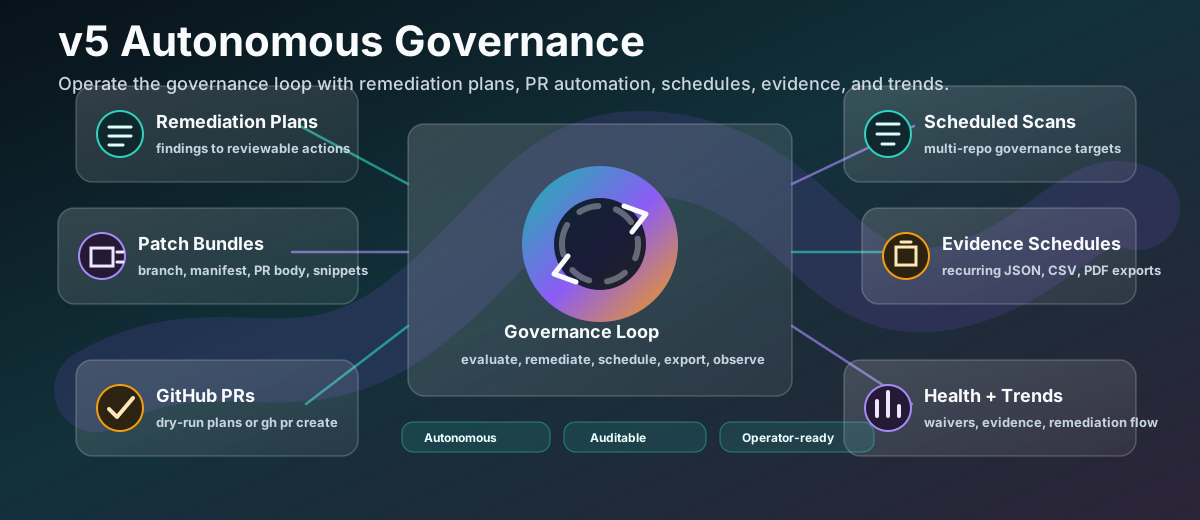
TerraGuard has evolved from a Terraform scanning assistant into a governance platform. Version 5.0 keeps earlier capabilities and adds autonomous governance.
flowchart LR
    V1["v1.0 Foundation\nCLI, rules, Streamlit,\nconfig and state checks"]
    V2["v2.0 Enterprise\nPolicy lifecycle,\nbaselines, waivers, evidence"]
    V3["v3.0 Ecosystem\nGitHub, GitLab, Azure DevOps,\nAWS CodePipeline, service API"]
    V4["v4.0 Intelligent\nContext-aware evaluation,\nexplainability, suggestions"]
    V5["v5.0 Autonomous\nRemediation, schedules,\nhealth, trends, PR automation"]
    V1 --> V2 --> V3 --> V4 --> V5
| v5 capability | Practical value |
|---|---|
| Remediation plans | Converts findings into reviewable actions. |
| Patch bundles | Produces PR-ready remediation artifacts and Terraform snippet previews. |
| GitHub PR automation | Records dry-run PR plans by default and can create PRs when explicitly enabled. |
| Scheduled scans | Runs governance checks repeatedly for chosen repositories or paths. |
| Evidence schedules | Automates audit evidence exports by standard, control, context, or result. |
| Automation runner | Executes enabled scan and evidence schedules from cron, CI, CodeBuild, or a platform orchestrator. |
| Governance health | Summarizes decisions, waivers, evidence coverage, remediation, and risk signals. |
| Trend dashboard | Shows governance activity, recurring rules, waiver aging, PR activity, and remediation flow. |
The v1-v4 surfaces remain available: scan, evaluate, REST API, policy registry, policy bundles, web UI, Streamlit apps, MCP server, GitHub Actions, GitLab CI, Azure DevOps, and AWS CodePipeline examples.
TerraGuard has a layered architecture. At the bottom are Terraform files, optional Terraform state, and provider metadata. The scanner and enterprise evaluator turn those inputs into findings and decisions. The control plane adds policies, baselines, bindings, waivers, evidence, reports, schedules, and remediation workflows.
flowchart TB
    subgraph Inputs
        HCL["Terraform .tf / .tfvars"]
        STATE["Optional .tfstate"]
        CONTEXT["Provider, env, risk tier, org, group, repo"]
    end

    subgraph Core
        SCAN["Scanner"]
        RULES["TG001-TG023 rule catalog"]
        SCHEMA["Terraform provider schema checks"]
        OPA["OPA bundle evaluation"]
    end

    subgraph Enterprise
        POLICIES["Enterprise policies"]
        BASELINES["Baselines"]
        BINDINGS["Org / group / repo bindings"]
        WAIVERS["Waivers"]
        RISK["Risk profiles"]
    end

    subgraph Outputs
        DECISION["pass / warn / block"]
        REPORTS["Reports and explanations"]
        EVIDENCE["Evidence exports"]
        REMEDIATION["Remediation plans and patch bundles"]
        TRENDS["Health and trend dashboards"]
    end

    HCL --> SCAN
    STATE --> SCAN
    CONTEXT --> SCAN
    SCAN --> RULES
    SCAN --> SCHEMA
    SCAN --> OPA
    RULES --> DECISION
    POLICIES --> DECISION
    BASELINES --> DECISION
    BINDINGS --> DECISION
    WAIVERS --> DECISION
    RISK --> DECISION
    DECISION --> REPORTS
    DECISION --> EVIDENCE
    DECISION --> REMEDIATION
    DECISION --> TRENDS
| Component | Repository implementation |
|---|---|
| CLI | terraform_guardrail.cli.app |
| Scanner |
terraform_guardrail.scanner.scan and rule catalog |
| Enterprise model | terraform_guardrail.enterprise |
| REST API | terraform_guardrail.api.app |
| Web UI | terraform_guardrail.web.app |
| MCP server | terraform_guardrail.mcp.server |
| Policy registry client | terraform_guardrail.policy_registry |
| Registry API | terraform_guardrail.registry_api |
| Provider metadata | terraform_guardrail.registry_client |
| Snippet generator | terraform_guardrail.generator |
| AWS CodePipeline scaffold | terraform_guardrail.aws_codepipeline |
stateDiagram-v2
    [*] --> Scan
    Scan --> Findings
    Findings --> ResolvePolicies
    ResolvePolicies --> ApplyRiskProfile
    ApplyRiskProfile --> ApplyWaivers
    ApplyWaivers --> Decide
    Decide --> Pass
    Decide --> Warn
    Decide --> Block
    Pass --> Evidence
    Warn --> Evidence
    Block --> Evidence
    Evidence --> Remediation
    Remediation --> [*]
TerraGuard is a Python package with a console script named terraform-guardrail. It can be installed with PyPI, Homebrew, Docker, or run through CI/CD images and examples.
flowchart LR
    INSTALL["Install TerraGuard"] --> SAMPLE["Choose Terraform folder"]
    SAMPLE --> SCAN["Run first scan"]
    SCAN --> READ["Read findings"]
    READ --> FIX["Fix Terraform or add policy context"]
    FIX --> RESCAN["Scan again"]
python -m pip install terraform-guardrail
terraform-guardrail --versionbrew install Huzefaaa2/tap/terraform-guardrail
terraform-guardrail --versiongit clone https://github.com/Huzefaaa2/terraform-guardrail.git
cd terraform-guardrail
python -m venv .venv
source .venv/bin/activate
python -m pip install -e ".[dev]"
terraform-guardrail --helpterraform-guardrail scan ./infraAdd JSON output when CI or another system needs structured results:
terraform-guardrail scan ./infra --format jsonInclude Terraform state when checking for sensitive-looking values that may already exist in state:
terraform-guardrail scan ./infra --state ./terraform.tfstateEnable schema-aware validation when Terraform CLI/provider schema support is available:
terraform-guardrail scan ./infra --schematerraform-guardrail scan ./infra --fail-on high--fail-on high exits non-zero when high-severity findings are present. Move to medium or low as teams mature.
The CLI is the most important operational interface. It supports local scans, policy registry operations, enterprise policy lifecycle, evaluation, remediation, schedules, evidence, drift gates, web servers, APIs, registry APIs, and MCP server mode.
flowchart TB
    ROOT["terraform-guardrail"]
    ROOT --> SCAN["scan\nconfig, state, schema, OPA bundles"]
    ROOT --> EVAL["evaluate\ncontext, baselines, fail thresholds"]
    ROOT --> POLICY["policy\nlist, fetch, init, validate"]
    ROOT --> ENTERPRISE["enterprise\npolicy, baseline, binding, pack, waiver,\nremediation, schedule, automation,\nhealth, trends, drift"]
    ROOT --> EVIDENCE["evidence\nexport, schedule"]
    ROOT --> SERVICES["api, web, mcp, registry-api"]
terraform-guardrail --help
terraform-guardrail --versionterraform-guardrail scan PATH [OPTIONS]Common options:
| Option | Purpose |
|---|---|
--state PATH |
Include Terraform state checks. |
| `--format pretty | json` |
--schema |
Enable provider schema-aware validation. |
--policy-bundle ID |
Evaluate one registry policy bundle. |
--policy-bundle-path PATH |
Evaluate a local bundle directory or .tar.gz. |
--policy-layers ID |
Add ordered policy layers. Repeatable. |
--policy-base ID |
Convenience base layer. |
--policy-env ID |
Convenience environment layer. |
--policy-app ID |
Convenience application layer. |
--policy-registry URL |
Use a custom policy registry. |
--policy-query QUERY |
Override OPA query. |
| `--fail-on low | medium |
Examples:
terraform-guardrail scan ./infra --schema
terraform-guardrail scan ./infra --state ./terraform.tfstate --format json
terraform-guardrail scan ./infra --policy-bundle baseline
terraform-guardrail scan ./infra --policy-base baseline --policy-env prod --policy-app payments
terraform-guardrail scan ./infra --fail-on highevaluate wraps scanning with enterprise policy resolution, context, baselines, and decisions.
terraform-guardrail evaluate ./infra \
  --provider aws \
  --baseline aws-control-tower-baseline \
  --context environment=prod \
  --context risk_tier=high \
  --fail-on high \
--format jsonThe generator currently supports AWS and Azure snippets:
terraform-guardrail generate aws aws_s3_bucket --name app_bucket
terraform-guardrail generate azure azurerm_storage_account --name appstorageterraform-guardrail api --host 127.0.0.1 --port 8080
terraform-guardrail web --host 127.0.0.1 --port 8000
terraform-guardrail registry-api --host 127.0.0.1 --port 8090
terraform-guardrail mcpterraform-guardrail policy list
terraform-guardrail policy fetch baseline --destination ./policies
terraform-guardrail policy init --destination ./policy-bundle --bundle-name guardrail
terraform-guardrail policy validate ./policy-bundleterraform-guardrail rules listTerraGuard is designed for more than local CLI usage. The same governance capability can be surfaced through a web UI, Streamlit apps, REST endpoints, MCP tools, and internal platforms.
flowchart TB
USER["User or automation"] --> CLI["CLI"]
USER --> WEB["Web UI"]
USER --> STREAMLIT["Streamlit apps"]
USER --> API["REST API"]
USER --> MCP["MCP server"]
CLI --> CORE["TerraGuard core"]
WEB --> CORE
STREAMLIT --> CORE
API --> CORE
MCP --> CORE
CORE --> DECISION["Decision, evidence, remediation"]
Run the built-in web app locally:
terraform-guardrail web --host 127.0.0.1 --port 8000Use it when you want a lightweight browser workflow for scanning and reviewing results.
The repository includes multiple Streamlit entry points:
| App | Purpose |
|---|---|
streamlit_app.py |
v1 foundation experience. |
streamlit_app_v2.py |
v2 enterprise experience. |
streamlit_app_v3_v5.py |
v3-v5 governance journey. |
streamlit_app_full.py |
Full v1-v5 product story and platform demo. |
Live app references:
| Live app | URL |
|---|---|
| v1 Foundation | https://terraform-guardrail.streamlit.app/ |
| v2 Enterprise | https://terraform-guardrail-enterprise.streamlit.app/ |
| v3-v5 Governance | https://terraform-guardrail-governance.streamlit.app/ |
| v1-v5 Full Platform | https://terraform-guardrail-platform.streamlit.app/ |
Start the API:
terraform-guardrail api --host 127.0.0.1 --port 8080Example scan request:
curl -s http://127.0.0.1:8080/scan \
-H 'content-type: application/json' \
-d '{"path":"./infra","use_schema":true}'Example enterprise evaluation:
curl -s http://127.0.0.1:8080/evaluate \
-H 'content-type: application/json' \
-d '{
"path":"./infra",
"provider":"aws",
"baseline":"aws-control-tower-baseline",
"context":{"environment":"prod","risk_tier":"high"},
"fail_on":"high"
}'The MCP server runs over stdio:
terraform-guardrail mcpIt exposes three tools:
| MCP tool | Purpose |
|---|---|
scan_terraform |
Run compliance checks over Terraform configs and optional state. |
get_provider_metadata |
Fetch provider metadata from Terraform Registry. |
generate_snippet |
Generate Terraform snippets for supported resources. |
sequenceDiagram
participant Client as MCP client
participant Server as TerraGuard MCP server
participant Core as Scanner / provider metadata / generator
Client->>Server: initialize
Server-->>Client: serverInfo and capabilities
Client->>Server: list_tools
Server-->>Client: scan_terraform, get_provider_metadata, generate_snippet
Client->>Server: call_tool(scan_terraform)
Server->>Core: execute tool
Core-->>Server: structured result
Server-->>Client: JSON-RPC response
TerraGuard v5.0 includes built-in rule IDs TG001 through TG023. These rules cover secret hygiene, parser errors, provider schema validation, AWS exposure and encryption risks, Azure storage exposure, mandatory metadata, location and SKU controls, and cross-provider invariants.
flowchart TB
RULES["TG001-TG023 built-in rules"] --> SECRETS["Secrets and state hygiene"]
RULES --> SCHEMA["HCL and provider schema"]
RULES --> AWS["AWS public access, IAM, RDS, EBS, ALB"]
RULES --> AZURE["Azure public network exposure"]
RULES --> META["Tags, region, SKU"]
RULES --> XPROVIDER["Cross-provider invariants"]
| Category | Rules |
|---|---|
| Secret and state hygiene | TG001, TG002, TG003 |
| Syntax and schema | TG004, TG005 |
| Public exposure | TG006, TG007, TG008, TG010, TG015, TG019, TG021 |
| Encryption | TG011, TG012, TG020, TG022 |
| Identity and privilege | TG009 |
| Network and boundaries | TG013, TG014 |
| Metadata and placement | TG016, TG017, TG018, TG023 |
Enterprise policies wrap rules with lifecycle and governance metadata:
| Field | Meaning |
|---|---|
id |
Policy identifier. |
name |
Human-readable policy name. |
description |
Why the policy exists. |
category |
security, cost, resiliency, or compliance. |
severity |
Enterprise decision level: info, warn, or block. |
scope |
org, group, or repo. |
providers |
Provider applicability. |
rule_type |
rego, native, or invariant. |
rule_id |
Built-in rule reference, where applicable. |
metadata |
Standard, control ID, owner, expiry, risk, remediation, extra details. |
status |
draft, review, approved, active, or deprecated. |
version |
Policy version. |
baseline_policy |
Whether it belongs to a baseline. |
classDiagram
class EnterprisePolicy {
id
name
category
severity
scope
providers
rule_type
rule_id
status
version
}
class PolicyMetadata {
standard
control_id
owner
expiry
risk
remediation
}
class Baseline {
id
name
policy_ids
scope
version
approved
}
class GroupPolicyBinding {
target_type
target
policy_ids
baseline_ids
parent
}
EnterprisePolicy --> PolicyMetadata
Baseline --> EnterprisePolicy
GroupPolicyBinding --> Baseline
TerraGuard supports policy bundles, built-in enterprise packs, and layered policy resolution. This matters because real organizations rarely have one policy set. They have a global baseline, environment-specific controls, application exceptions, and industry-specific compliance overlays.
flowchart TB
BASE["Base baseline"] --> MERGE["Ordered policy evaluation"]
ENV["Environment layer"] --> MERGE
APP["Application layer"] --> MERGE
PACK["Built-in policy pack"] --> MERGE
WAIVER["Approved waiver"] --> MERGE
MERGE --> DECISION["Effective decision"]
Start the registry API:
terraform-guardrail registry-api --host 127.0.0.1 --port 8090Use registry commands:
terraform-guardrail policy list
terraform-guardrail policy fetch baseline --destination ./policies
terraform-guardrail policy init --destination ./policy-bundle --bundle-name guardrail
terraform-guardrail policy validate ./policy-bundleUse ordered layers when you want deterministic composition:
terraform-guardrail scan ./infra \
  --policy-layers baseline \
  --policy-layers prod \
  --policy-layers payments
Use convenience flags when your organization thinks in base, environment, and app layers:
terraform-guardrail scan ./infra \
  --policy-base baseline \
  --policy-env prod \
--policy-app paymentsTerraGuard includes built-in packs such as:
| Pack | Coverage |
|---|---|
pci-dss |
Payment workload controls across AWS, Azure, and GCP. |
aws-control-tower |
AWS landing zone guardrails aligned to Control Tower and Well-Architected concerns. |
azure-landing-zone |
Azure landing-zone controls for storage, network exposure, and compliance metadata. |
banking-resiliency |
Financial-services controls for encryption, internet exposure, ownership, and evidence. |
Install and optionally create a baseline:
terraform-guardrail enterprise pack list
terraform-guardrail enterprise pack show aws-control-tower
terraform-guardrail enterprise pack install aws-control-tower --approve --create-baselineEnterprise workflows are built around policy lifecycle, baselines, bindings, risk profiles, waivers, evaluation, explainability, remediation, evidence, schedules, and health reports.
flowchart LR
    AUTHOR["Author policy"] --> REVIEW["Review"]
    REVIEW --> APPROVE["Approve"]
    APPROVE --> BASELINE["Attach to baseline"]
    BASELINE --> BIND["Bind org/group/repo"]
    BIND --> EVALUATE["Evaluate Terraform"]
    EVALUATE --> EXPLAIN["Explain decision"]
    EXPLAIN --> REMEDIATE["Remediate or waive"]
    REMEDIATE --> REPORT["Evidence and health"]
terraform-guardrail enterprise policy create \
  --name "S3 encryption required" \
  --description "Block unencrypted S3 buckets" \
  --category security \
  --severity block \
  --scope org \
  --provider aws \
  --rule-id TG011 \
  --standard "AWS Well-Architected" \
  --control-id "SEC08-BP02" \
  --owner aws-platform \
  --risk high \
  --remediation "Enable default bucket encryption"

terraform-guardrail enterprise policy list
terraform-guardrail enterprise policy approve <policy-id> --actor platform-leadterraform-guardrail enterprise baseline create \
--name production-baseline \
--policy-id <policy-id> \
--scope org
terraform-guardrail enterprise baseline approve <baseline-id> --actor cloud-governanceterraform-guardrail enterprise binding create \
--target-type repo \
--target payments-infra \
--baseline-id <baseline-id>
terraform-guardrail enterprise binding resolve \
--org acme \
--group payments \
--repo payments-infraRisk profiles let the same rule behave differently in different contexts.
terraform-guardrail enterprise risk-profile create \
  --name regulated-prod \
  --environment prod \
  --risk-tier high \
  --severity-override TG016=medium \
  --default-fail-on high
Waivers should be explicit, owned, expiring, and auditable:
terraform-guardrail enterprise waiver create \
  --rule-id TG016 \
  --reason "Legacy module migration in progress" \
  --owner platform-team \
  --expires-at 2026-12-31 \
  --target-type repo \
  --target legacy-infra

terraform-guardrail enterprise waiver approve <waiver-id> --actor security-lead
terraform-guardrail enterprise waiver revoke <waiver-id> --actor security-leadTerraGuard is most valuable when it runs automatically in delivery systems. The repository includes examples for GitHub Actions, GitLab CI, Azure DevOps, and AWS CodePipeline/CodeBuild.
flowchart TB
    PR["Pull or merge request"] --> CI["CI/CD job"]
    CI --> TG["terraform-guardrail evaluate"]
    TG --> OUT{"Decision"}
    OUT -->|pass| MERGE["Allow merge/apply"]
    OUT -->|warn| COMMENT["Comment, report, evidence"]
    OUT -->|block| STOP["Fail job"]
    TG --> SARIF["SARIF"]
    TG --> JUNIT["JUnit"]
    TG --> CSV["CSV/JSON evidence"]
Use TerraGuard in a pull request workflow:
name: Terraform Guardrail
on:
  pull_request:
    paths:
      - "**/*.tf"
      - "**/*.tfvars"

jobs:
  guardrail:
    runs-on: ubuntu-latest
    steps:
      - uses: actions/checkout@v4
      - uses: actions/setup-python@v5
        with:
          python-version: "3.11"
      - run: pip install terraform-guardrail
- run: terraform-guardrail evaluate ./infra --provider aws --context environment=prod --fail-on high --format jsonterraform_guardrail:
image: python:3.11
stage: test
script:
- pip install terraform-guardrail
- terraform-guardrail scan ./infra --fail-on high --format json
artifacts:
when: always
paths:
- guardrail-report.jsonUse the provided Azure DevOps extension and pipeline examples when you want TerraGuard as a reusable organizational task. It fits naturally before Terraform plan/apply stages.
Use the AWS CodePipeline scaffold:
terraform-guardrail enterprise aws codepipeline init \
  --destination ./aws-codepipeline \
  --terraform-dir . \
  --provider aws \
  --baseline org-baseline \
  --evidence-format json
Recommended AWS flow:
sequenceDiagram
    participant Dev as Developer
    participant CodeCommit as Source
    participant CodeBuild as CodeBuild
    participant TG as TerraGuard
    participant S3 as Evidence S3
    participant Deploy as Deploy Stage
    Dev->>CodeCommit: Push Terraform change
    CodeCommit->>CodeBuild: Start pipeline
    CodeBuild->>TG: Evaluate and drift gate
    TG-->>CodeBuild: pass / warn / block
    TG-->>S3: Export evidence artifact
    CodeBuild->>Deploy: Continue only when allowed
| Phase | Enforcement | Outcome |
|---|---|---|
| Advisory | Run scans, do not block. | Teams see findings without disruption. |
| Warn | Comment, annotate, export evidence. | Teams become accountable. |
| Strict | Fail pipelines by severity threshold. | Production changes meet the baseline. |
TerraGuard is built for multi-cloud and hybrid governance. The scanner and metadata layers understand provider context and built-in rules include both provider-specific controls and cross-provider invariants.
flowchart LR
    TG["TerraGuard"] --> AWS["AWS"]
    TG --> AZ["Azure / azurerm"]
    TG --> GCP["GCP / google"]
    TG --> K8S["Kubernetes"]
    TG --> HELM["Helm"]
    TG --> OCI["Oracle Cloud"]
    TG --> VAULT["Vault"]
    TG --> ALICLOUD["Alicloud"]
    TG --> VMWARE["VMware / vSphere"]
    TG --> HYBRID["On-premise and hybrid Terraform estates"]
| Provider family | Names accepted by MCP/provider metadata flow |
|---|---|
| AWS | aws |
| Azure |
azure, azurerm
|
| Google Cloud |
gcp, google
|
| Kubernetes | kubernetes |
| Helm | helm |
| Oracle Cloud | oci |
| Vault | vault |
| Alicloud | alicloud |
| VMware |
vmware, vsphere
|
| Platform | Example controls |
|---|---|
| AWS | Public S3 ACLs, S3 public access block, IAM wildcard permissions, public IP association, S3 encryption, RDS encryption, HTTP load balancers, public RDS, EBS encryption. |
| Azure | Storage public network access, location controls, SKU controls, encryption policy overlays through packs. |
| GCP | Included in multi-cloud policy packs and cross-provider invariants for storage, exposure, tags/labels, and regulated workloads. |
| Kubernetes and Helm | Useful for platform teams that govern Terraform-managed Kubernetes objects, Helm releases, and hybrid platform modules. |
| Vault | Supports Terraform workflows that include secrets infrastructure and policy-controlled provider metadata. |
| VMware/vSphere | Useful for private cloud and data center Terraform adoption where central guardrails are still required. |
Cross-provider invariants are rules that express one business standard across many providers. For example:
| Invariant | Example rule |
|---|---|
| Public exposure is controlled | TG021 |
| Storage must be encrypted | TG022 |
| Ownership metadata must be present | TG023 |
These rules are important in large enterprises because "no public storage" should mean the same thing across AWS buckets, Azure storage accounts, GCP buckets, and future storage abstractions.
Version 5.0 makes the governance loop operational. A team can evaluate Terraform, explain the result, export evidence, create a remediation plan, create a patch bundle, record or create a GitHub PR, schedule future scans, schedule evidence exports, and review health/trends.
flowchart TB
    EVAL["Evaluation result"] --> EXPLAIN["Explainability report"]
    EVAL --> EVIDENCE["Evidence export"]
    EVAL --> REM["Remediation plan"]
    REM --> PATCH["Patch bundle"]
    PATCH --> PR["GitHub PR plan or PR"]
    EVAL --> DRIFT["Drift check / gate"]
    EVIDENCE --> SCHEDULE["Evidence schedule"]
    DRIFT --> HEALTH["Governance health"]
    PR --> TRENDS["Governance trends"]
terraform-guardrail enterprise explain <result-id> --format markdown
terraform-guardrail enterprise report <result-id> --format markdown
Explainability reports describe:
| Area | What it tells users |
|---|---|
| Decision | Why the result is pass, warn, or block. |
| Applied policies | Which policies and baselines were used. |
| Context | Provider, environment, risk tier, org, group, repo, and extra context. |
| Waivers | Which waiver affected which finding, if any. |
| Suggested fixes | What the developer should change next. |
terraform-guardrail evidence export <result-id> --format json
terraform-guardrail evidence export <result-id> --format csv
terraform-guardrail evidence export <result-id> --format pdf
Schedule recurring evidence:
terraform-guardrail evidence schedule create \
  --name monthly-soc2 \
  --standard SOC2 \
  --format json \
  --repo payments-infra

terraform-guardrail evidence schedule run <schedule-id>terraform-guardrail enterprise drift-check ./infra \
--state ./terraform.tfstate \
--snapshot-id prod-payments \
--update-snapshot
terraform-guardrail enterprise drift-gate ./infra \
--state ./terraform.tfstate \
--snapshot-id prod-payments \
--provider aws \
--context environment=prod \
--fail-on highterraform-guardrail enterprise remediation create <result-id> \
--format markdown \
--output guardrail-remediation.md
terraform-guardrail enterprise remediation patch-bundle <plan-id>
terraform-guardrail enterprise remediation github-pr <bundle-id> \
--repository Huzefaaa2/terraform-guardrailBy default, GitHub PR automation is designed for safe dry-run recording unless explicit creation is requested. This lets platform teams inspect patch bundles and branch metadata before changing repositories.
terraform-guardrail enterprise schedule create \
  --name daily-prod \
  --path ./infra \
  --cadence daily \
  --provider aws \
  --context environment=prod

terraform-guardrail enterprise automation run
terraform-guardrail enterprise health
terraform-guardrail enterprise trendsTerraGuard is best understood as a governance control plane, not a replacement for every Terraform tool. It can sit alongside linters, security scanners, policy engines, cloud-native controls, and Terraform platforms.
flowchart TB
    subgraph Local["Local and static checks"]
        TFLINT["TFLint"]
        TFSEC["tfsec"]
        CHECKOV["Checkov"]
        TERRASCAN["Terrascan"]
    end
    subgraph Engines["Policy engines"]
        OPA["OPA / Conftest"]
        SENTINEL["Sentinel"]
    end
    subgraph Control["Enterprise governance loop"]
        TG["TerraGuard\nCLI + API + MCP + evidence + remediation + schedules"]
    end
    TFLINT --> TG
    TFSEC --> TG
    CHECKOV --> TG
    TERRASCAN --> TG
    OPA --> TG
    SENTINEL --> TG
| Tool | Primary role | TerraGuard relationship |
|---|---|---|
| Terraform CLI | Provisioning engine | TerraGuard runs before apply and does not replace Terraform. |
| Terraform Cloud/Enterprise | Remote runs, state, workspace governance, Sentinel integration | TerraGuard can complement it as a pre-apply multi-cloud guardrail and evidence layer. |
| Sentinel | Policy as code in HashiCorp environments | TerraGuard is broader as a standalone CLI/API/MCP governance service with rule catalog, evidence, remediation, and CI examples. |
| OPA/Conftest | General Rego policy engine | TerraGuard can consume OPA bundles and adds lifecycle, reports, schedules, and Terraform-specific UX. |
| Checkov | Broad IaC security scanning | TerraGuard complements it with enterprise baselines, policy packs, contextual decisions, drift/evidence/remediation workflows. |
| TFLint | Terraform linting and provider best-practice checks | TerraGuard complements it with organizational governance and policy decisions. |
| tfsec | Terraform security scanning | TerraGuard can run as the governance gate around security and compliance standards. |
| Terrascan | IaC security and compliance scanning | TerraGuard adds enterprise policy lifecycle and autonomous governance workflows. |
| Cloud-native controls | Runtime/account/platform policy | TerraGuard catches issues before Terraform creates or changes resources. |
Use TerraGuard when your goal is not merely "find bad Terraform," but "make infrastructure governance executable across teams."
Strong use cases:
| Use case | Why TerraGuard fits |
|---|---|
| Multi-cloud platform standards | Provider-specific and cross-provider controls. |
| Regulated infrastructure delivery | Evidence exports, control metadata, policy approvals, and baselines. |
| Central platform enablement | One policy distribution mechanism for many repositories. |
| Developer self-service | CLI, UI, API, explanations, and suggested fixes. |
| Autonomous governance | Schedules, remediation, patch bundles, PR records, health, and trends. |
Different industries should adopt TerraGuard with different starting policies, evidence expectations, and enforcement thresholds.
flowchart LR
    START["Advisory pilot"] --> BASE["Define baseline"]
    BASE --> CI["Add CI gate"]
    CI --> EVIDENCE["Automate evidence"]
    EVIDENCE --> STRICT["Move production to strict"]
    STRICT --> AUTO["Enable v5 schedules and remediation"]
| Focus | Recommended TerraGuard setup |
|---|---|
| Regulated data | Install pci-dss and banking-resiliency packs. |
| Change evidence | Export JSON/CSV evidence for every protected-branch evaluation. |
| Production gate | Use --fail-on high first, then expand to medium. |
| Drift | Run drift gates before production apply. |
| Remediation | Use remediation plans and patch bundles for controlled fixes. |
| Focus | Recommended TerraGuard setup |
|---|---|
| Developer speed | Start with advisory PR comments and pretty CLI output. |
| Guardrail consistency | Bind repository groups to shared baselines. |
| Ownership | Enforce TG016/TG023 tagging and ownership metadata. |
| Platform self-service | Expose REST API or MCP tools to internal developer platforms. |
| Focus | Recommended TerraGuard setup |
|---|---|
| Audit readiness | Use evidence schedules by control and standard. |
| Data protection | Block public exposure and unencrypted storage. |
| Exceptions | Require expiring waivers with owner and reason. |
| Reports | Use explainability reports for control review. |
| Focus | Recommended TerraGuard setup |
|---|---|
| Shared landing zones | Use org and group baselines. |
| Cost and ownership | Enforce mandatory tags and approved regions/SKUs. |
| Hybrid estate | Include VMware/vSphere and cloud providers in policy context. |
| Gradual rollout | Advisory to warn to strict by environment. |
sequenceDiagram
    participant Platform as Platform Team
    participant Security as Security
    participant App as Application Team
    participant CI as CI/CD
    participant Audit as Audit
    Platform->>Security: Propose baseline and policy metadata
    Security-->>Platform: Approve controls
    Platform->>CI: Publish guardrail workflow
    App->>CI: Submit Terraform change
    CI->>App: Findings and suggested fixes
    CI->>Audit: Evidence export
    Platform->>Platform: Review health and trends
This path turns a new user into an expert operator in a practical sequence.
flowchart LR
    BEGINNER["Beginner\ninstall, scan, read findings"]
    PRACTITIONER["Practitioner\nfail thresholds, bundles, CI gates"]
    PLATFORM["Platform engineer\npolicies, baselines, bindings, waivers"]
    EXPERT["Expert\nevidence, drift gates, remediation, trends"]
    BEGINNER --> PRACTITIONER --> PLATFORM --> EXPERT
Goals:
| Skill | Practice |
|---|---|
| Install TerraGuard | pip install terraform-guardrail |
| Scan Terraform | terraform-guardrail scan ./infra |
| Read findings | Match finding IDs to rule reference. |
| Fix simple issues | Remove secrets, add encryption, restrict public access. |
Goals:
| Skill | Practice |
|---|---|
| JSON output | Use --format json in automation. |
| Fail thresholds | Use --fail-on high. |
| State checks | Add --state ./terraform.tfstate. |
| Schema validation | Use --schema when provider schemas are available. |
| Policy bundles | Use --policy-bundle or layers. |
Goals:
| Skill | Practice |
|---|---|
| Enterprise policies | Create, list, show, approve policies. |
| Baselines | Build a safety floor. |
| Bindings | Attach controls to orgs, groups, and repos. |
| Risk profiles | Adjust enforcement by environment and risk tier. |
| Waivers | Create expiring, approved exceptions. |
Goals:
| Skill | Practice |
|---|---|
| Service API | Use /evaluate and /service/evaluate. |
| Evidence | Export and schedule audit evidence. |
| Drift | Run drift-check and drift-gate. |
| Remediation | Create plans, patch bundles, and GitHub PR records. |
| Autonomous loop | Run schedules, automation, health, and trends. |
- Install TerraGuard in a platform repository.
- Add a GitHub Actions or GitLab CI workflow.
- Start in advisory mode with JSON reports.
- Install
aws-control-tower,azure-landing-zone,pci-dss, orbanking-resiliencypack as appropriate. - Create a production baseline and bind it to a protected repo.
- Add context:
environment=prod,risk_tier=high,app=<name>. - Export evidence on every protected branch run.
- Add drift gates before apply.
- Enable scheduled scans and evidence schedules.
- Review health and trends weekly.
flowchart TB
    ROOT["terraform-guardrail"] --> SCAN["scan"]
    ROOT --> EVAL["evaluate"]
    ROOT --> GENERATE["generate"]
    ROOT --> MCP["mcp"]
    ROOT --> WEB["web"]
    ROOT --> API["api"]
    ROOT --> REGAPI["registry-api"]
    ROOT --> POLICY["policy"]
    ROOT --> RULES["rules"]
    ROOT --> ENT["enterprise"]
    ROOT --> EVID["evidence"]
| Command | Purpose |
|---|---|
terraform-guardrail scan PATH |
Scan Terraform config, optional state, schema, and policy bundles. |
terraform-guardrail evaluate PATH |
Run enterprise evaluation with context, baselines, and fail threshold. |
terraform-guardrail generate PROVIDER RESOURCE |
Generate supported Terraform resource snippets. |
terraform-guardrail mcp |
Start MCP server over stdio. |
terraform-guardrail web |
Start web UI. |
terraform-guardrail api |
Start REST API. |
terraform-guardrail registry-api |
Start policy registry API. |
| Command | Purpose |
|---|---|
terraform-guardrail policy list |
List policy bundles. |
terraform-guardrail policy fetch BUNDLE_ID |
Download a registry bundle. |
terraform-guardrail policy init |
Create a new policy bundle skeleton. |
terraform-guardrail policy validate BUNDLE_PATH |
Validate local policy bundle structure. |
terraform-guardrail rules list |
List built-in rule IDs and descriptions. |
| Command family | Examples |
|---|---|
| Policy lifecycle |
enterprise policy create, list, show, approve
|
| Baselines |
enterprise baseline create, list, show, version, approve, history
|
| Bindings |
enterprise binding create, list, resolve
|
| Built-in packs |
enterprise pack list, show, install
|
| Risk profiles |
enterprise risk-profile list, show, create
|
| Recommendations | enterprise recommendations |
| Explainability |
enterprise explain, enterprise report
|
| Remediation |
enterprise remediation create, list, show, patch-bundle, patch-bundles, github-pr, github-prs
|
| Schedules |
enterprise schedule create, list, run, runs
|
| Automation |
enterprise automation run, runs
|
| Waivers |
enterprise waiver create, list, approve, revoke
|
| AWS | enterprise aws codepipeline init |
| Governance |
enterprise health, enterprise trends
|
| Drift |
enterprise drift-check, enterprise drift-gate
|
| Command | Purpose |
|---|---|
terraform-guardrail evidence export RESULT_ID |
Export evaluation evidence. |
terraform-guardrail evidence schedule create |
Create recurring evidence export schedule. |
terraform-guardrail evidence schedule list |
List evidence schedules. |
terraform-guardrail evidence schedule run SCHEDULE_ID |
Run a schedule immediately. |
terraform-guardrail evidence schedule runs SCHEDULE_ID |
List schedule runs. |
flowchart LR
    API["TerraGuard API"] --> SCAN["/scan"]
    API --> EVAL["/evaluate"]
    API --> SERVICE["/service/evaluate"]
    API --> POLICY["/policies / baselines / bindings"]
    API --> PACKS["/packs"]
    API --> REM["/remediation/*"]
    API --> GOV["/governance/health and /governance/trends"]
    API --> SCHEDULES["/scheduled-scans and /evidence/schedules"]
    API --> DRIFT["/drift/check and /drift/gate"]
    API --> EXPORTS["/exports"]
| Route | Purpose |
|---|---|
GET /health |
Health check. |
GET /metrics |
Prometheus metrics. |
POST /scan |
Run scanner. |
POST /provider-metadata |
Fetch Terraform Registry provider metadata. |
POST /generate-snippet |
Generate Terraform snippet. |
GET /policy-bundles |
List policy bundles. |
GET /policy-bundles/{bundle_id} |
Get one policy bundle. |
GET /packs |
List built-in policy packs. |
GET /packs/{pack_id} |
Get one built-in pack. |
POST /packs/{pack_id}/install |
Install a built-in pack. |
| Route family | Purpose |
|---|---|
/policies |
Create, list, show, update policies. |
/policies/{policy_id}/versions |
Manage policy versions. |
/policies/{policy_id}/approve |
Approve policies. |
/baselines |
Create and list baselines. |
/baselines/{baseline_id}/versions |
Manage baseline versions. |
/baselines/{baseline_id}/approve |
Approve baselines. |
/bindings and /bindings/resolve
|
Manage and resolve org/group/repo bindings. |
/risk-profiles |
Manage risk profiles. |
/waivers |
Create, list, approve, revoke waivers. |
/recommendations |
Retrieve rule recommendations. |
/evaluate |
Enterprise evaluation. |
/service/evaluate |
Service-oriented evaluation with request metadata and evidence options. |
/results/{result_id} |
Retrieve evaluation result. |
/results/{result_id}/explain |
Explain an evaluation. |
/results/{result_id}/comment |
Render a text comment. |
/results/{result_id}/reports/{format} |
Render native report formats. |
| Route | Purpose |
|---|---|
POST /remediation/plans |
Create remediation plan from an evaluation result. |
GET /remediation/plans |
List remediation plans. |
GET /remediation/plans/{plan_id} |
Show a remediation plan. |
GET /remediation/plans/{plan_id}/markdown |
Render remediation plan as Markdown. |
POST /remediation/patch-bundles |
Create PR-ready patch bundle. |
GET /remediation/patch-bundles |
List patch bundles. |
POST /remediation/patch-bundles/{bundle_id}/github-pr |
Record or create GitHub PR flow. |
GET /governance/health |
Governance health report. |
GET /governance/trends |
Governance trend report. |
POST /scheduled-scans |
Create scheduled scan. |
POST /scheduled-scans/{target_id}/run |
Run scheduled scan. |
POST /evidence/schedules |
Create evidence schedule. |
POST /evidence/schedules/{schedule_id}/run |
Run evidence schedule. |
POST /automation/run |
Run scheduled governance automation cycle. |
POST /drift/check |
Check drift against a snapshot. |
POST /drift/gate |
Run drift plus evaluation gate. |
POST /exports |
Export evidence. |
flowchart TB
    HIGH["High-risk examples"] --> TG002["TG002 hardcoded secret"]
    HIGH --> TG003["TG003 state secret"]
    HIGH --> TG006["TG006 public S3 ACL"]
    HIGH --> TG007["TG007 S3 public block disabled"]
    HIGH --> TG008["TG008 world-open ingress"]
    HIGH --> TG009["TG009 IAM wildcard"]
    HIGH --> TG015["TG015 public RDS"]
    HIGH --> TG021["TG021 cross-provider exposure"]
    HIGH --> TG022["TG022 cross-provider storage encryption"]
| Rule | Description | Default risk | Remediation theme |
|---|---|---|---|
| TG001 | Sensitive variable without ephemeral=true
|
Medium | Add ephemeral handling for sensitive variables. |
| TG002 | Hardcoded secret in Terraform config | High | Move secrets to secret managers, variables, or CI secrets. |
| TG003 | Sensitive-looking value stored in Terraform state | High | Use ephemeral or write-only values to keep secrets out of state. |
| TG004 | HCL parse error | Low | Fix invalid HCL syntax. |
| TG005 | Attribute not found in provider schema | Medium | Verify attribute names against provider schema. |
| TG006 | Public S3 bucket ACL detected | High | Remove public ACLs and use private policies. |
| TG007 | Public S3 access block disabled | High | Enable S3 public access block settings. |
| TG008 | Security group ingress open to the world | High | Restrict ingress CIDRs. |
| TG009 | IAM policy wildcard permissions | High | Scope IAM actions and resources explicitly. |
| TG010 | Public IP association enabled on compute | Medium | Remove public IP association for private compute. |
| TG011 | S3 bucket missing default encryption | Medium | Enable S3 default encryption. |
| TG012 | RDS storage not encrypted | Medium | Enable encrypted RDS storage. |
| TG013 | Load balancer listener uses HTTP | Medium | Use HTTPS listeners. |
| TG014 | Instance missing subnet/VPC boundary | Low | Attach instances to explicit network boundaries. |
| TG015 | RDS instance publicly accessible | High | Disable public database exposure. |
| TG016 | Missing mandatory resource tags | Low | Add required tags. |
| TG017 | Resource region/location not in allowed list | Medium | Deploy only in approved regions or locations. |
| TG018 | Instance type or SKU not in allowed list | Medium | Use approved compute types or SKUs. |
| TG019 | Azure storage account public network access enabled | Medium | Disable public network access or use private endpoints. |
| TG020 | EBS volume not encrypted | Medium | Enable EBS encryption. |
| TG021 | Cross-provider public exposure invariant violation | High | Disable public access and use private networking. |
| TG022 | Cross-provider storage encryption invariant violation | High | Enable provider-native storage encryption. |
| TG023 | Cross-provider ownership tag invariant violation | Low | Add consistent ownership tags or labels. |
Start small, make the rules visible, and increase enforcement only when teams understand the signal. TerraGuard is strongest when platform, security, audit, and product engineering teams agree on a shared safety floor and let the tool enforce it automatically.
For deeper reference pages, continue with: