Module dependencies
It's very likely that your modules will require other modules to function.
In Modules, this can be solved using the ModuleDependencies annotation.
Let's say you have ModuleA, which requires ModuleB to function. To tell the module manager to load ModuleB first,
we need to annotate ModuleA with ModuleDependencies, just like in the following example.
import net.hypejet.annotation.ModuleDependencies;
import net.hypejet.modules.Module;

@ModuleDependencies(required = ModuleB.class)
public final class ModuleA extends Module<ExampleEnvironment> {
    @Override
    protected void load() {
        ModuleB moduleB = this.getModuleManager().getModuleOrThrow(ModuleB.class);
        // You can interact with module B here
        moduleB.doSomething();
    }

    @Override
    protected void unload() {
        ModuleB moduleB = this.getModuleManager().getModuleOrThrow(ModuleB.class);
        // It is safe to use module B here as well
        moduleB.doSomethingOnModuleAUnload();
    }
}
ModuleManager#getModuleOrThrow throws an exception if ModuleB is not loaded.
However, it's guaranteed that ModuleA will never load until ModuleB is loaded.
In our case, we use that method to get rid of the nullable value, which is returned by ModuleManager#getModule.
All modules are unloaded with the reverse order of loading, so it's safe to use ModuleB while ModuleA is being unloaded as well.
You can also specify optional dependencies. Modules specified as optional dependencies aren't strictly required to load your module, but if they're present, it's guaranteed that they will load before your module loads.
In the code snippet below we specify ModuleB as an optional dependency of ModuleA.
import net.hypejet.annotation.ModuleDependencies;
import net.hypejet.modules.Module;

@ModuleDependencies(optional = ModuleB.class)
public final class ModuleA extends Module<ExampleEnvironment> {
    @Override
    protected void load() {
        ModuleB moduleB = this.getModuleManager().getModule(ModuleB.class);

        // Null if ModuleB was not registered or failed to load
        if (moduleB != null) {
            // You can interact with module B here
            moduleB.doSomething();
        }
    }

    @Override
    protected void unload() {
        ModuleB moduleB = this.getModuleManager().getModule(ModuleB.class);

        // Same as in the load method
        if (moduleB != null) {
            // It is safe to use module B here as well
            moduleB.doSomethingOnModuleAUnload();
        }
    }
}
ModuleManager#getModule on the other hand does not throw an exception. If the specified module is not loaded, it returns null.
It's worth noting that one module can have multiple dependencies, and you can mix required dependencies with optional ones, but you cannot specify a module as both required and optional. If you do so, module manager will treat it as required, but it's not supported and there will be a warning in the console.
To specify multiple dependencies, use arrays:
import net.hypejet.annotation.ModuleDependencies;
import net.hypejet.modules.Module;

@ModuleDependencies(required = { ModuleB.class, ModuleD.class }, optional = { ModuleC.class, ModuleE.class })
public final class ModuleA extends Module<ExampleEnvironment> {
    // Your module code
}
The example above shows ModuleA, which requires both ModuleB and ModuleD to load,
and specifies ModuleC, as well as ModuleE as optional dependencies.
Remember that you need to be careful when specifying dependencies as you may fall into circular module loading.
Circular module loading happens when a module depends on - directly or indirectly - itself.
See the following example:
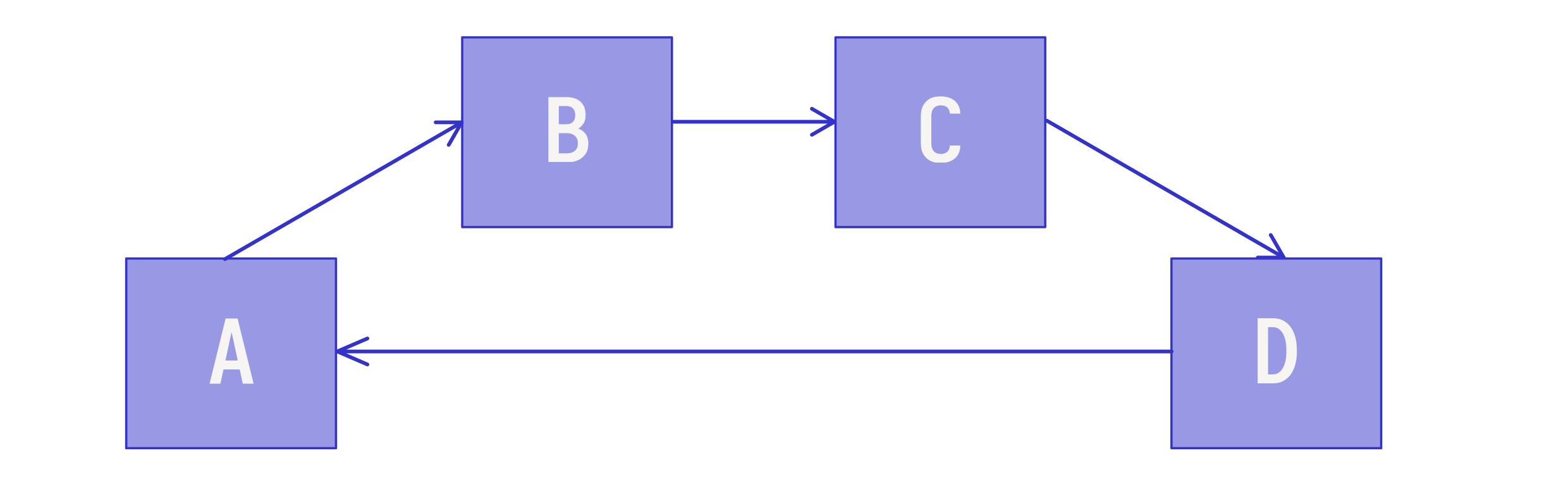
Module A requires Module B, which requires module C, which requires module D, which requires module A, so module A requires itself to load.
As previously said, circular module loading can also be direct. It happens when a module specified itself as a dependency.
In both cases, Modules won't try to solve circular module loading and creation of the module manager will fail with an exception. Note that it fails even if dependencies that caused this problem are optional.