how_to_deploy_winslow
- Network File System
- Multiple Hosts to run Winslow
- Docker
Winslow is a distributed system, which can be deployed on multiple hosts, for more information click here.
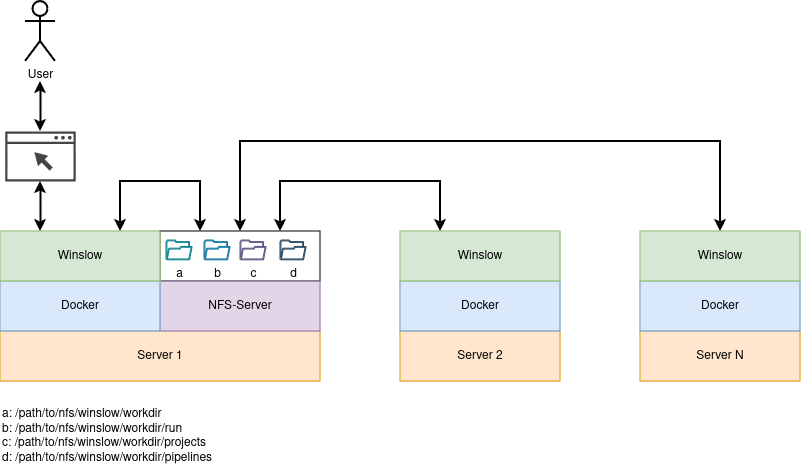
For multi host usage, a NFS-Server is required to share the workdir between all Winslow instances.
This guide assumes, that the server which provides the NFS-Server is also running Winslow.
See the following image for a better understanding of the system overview:
- Select a server to run the NFS-Server and do Install NFS-Server
- Do Start Winslow on every host, which will run Winslow
Important
This step is only required on the host, which will provide the NFS-Server.
- Install nfs
sudo apt update && sudo apt install nfs-kernel-server
- Create the following directories for winslow
sudo mkdir -p /path/to/nfs/winslow/workdirsudo mkdir -p /path/to/nfs/winslow/workdir/runsudo mkdir -p /path/to/nfs/winslow/workdir/projectssudo mkdir -p /path/to/nfs/winslow/workdir/pipelines
- Export the directories
-
sudo vim /etc/exportsand add the absolut path of the folders created aboveIt is recommended to limit access for the NFS share by setting a specific ip-range/path/to/nfs/winslow/workdir *(rw,no_root_squash,all_squash,anonuid=0,anongid=0) /path/to/nfs/winslow/workdir/run *(rw,no_root_squash,all_squash,anonuid=0,anongid=0) /path/to/nfs/winslow/workdir/projects *(rw,no_root_squash,all_squash,anonuid=0,anongid=0) /path/to/nfs/winslow/workdir/pipelines *(rw,no_root_squash,all_squash,anonuid=0,anongid=0)127.0.0.1(rw,...)or10.150.20.0/24(rw,...)instead of*(rw,...).
-
- At last restart nfs
sudo systemctl restart nfs-server.service
- Done

This guide provides a step-by-step approach how to set up winslow. It is assumed that the NFS-Server is already running and the workdir is shared.
Tip
This step is required on every host, which will run Winslow (see server 1...N from the image above).
- Install Docker
- see Docker Offical Documentation to install it for your linux distribution
- Checkout Winslow
git clone https://github.com/IT-Designers/winslow.gitcd winslow/node
- Set Winslow Env-Variables in
start-winslow.sh-
sudo vim start-winslow.shand set STORAGE_TYPE="nfs"STORAGE_PATH="nfs-server:/path/to/nfs/winslow/workdir"- To use the web frontend uncomment
HTTP="80". It is sufficient to do this only on one host.
-
- Enhanced Configuration (Optional) ℹ️
- See environment variables for a complete overview.
- See use docker with nvidia gpu to enable GPU support.
- Finally, start Winslow
sudo ./start-winslow.sh
- Done

Open a browser and navigate to the IP of the host, which runs the Winslow WebUi.


- TO BE DONE