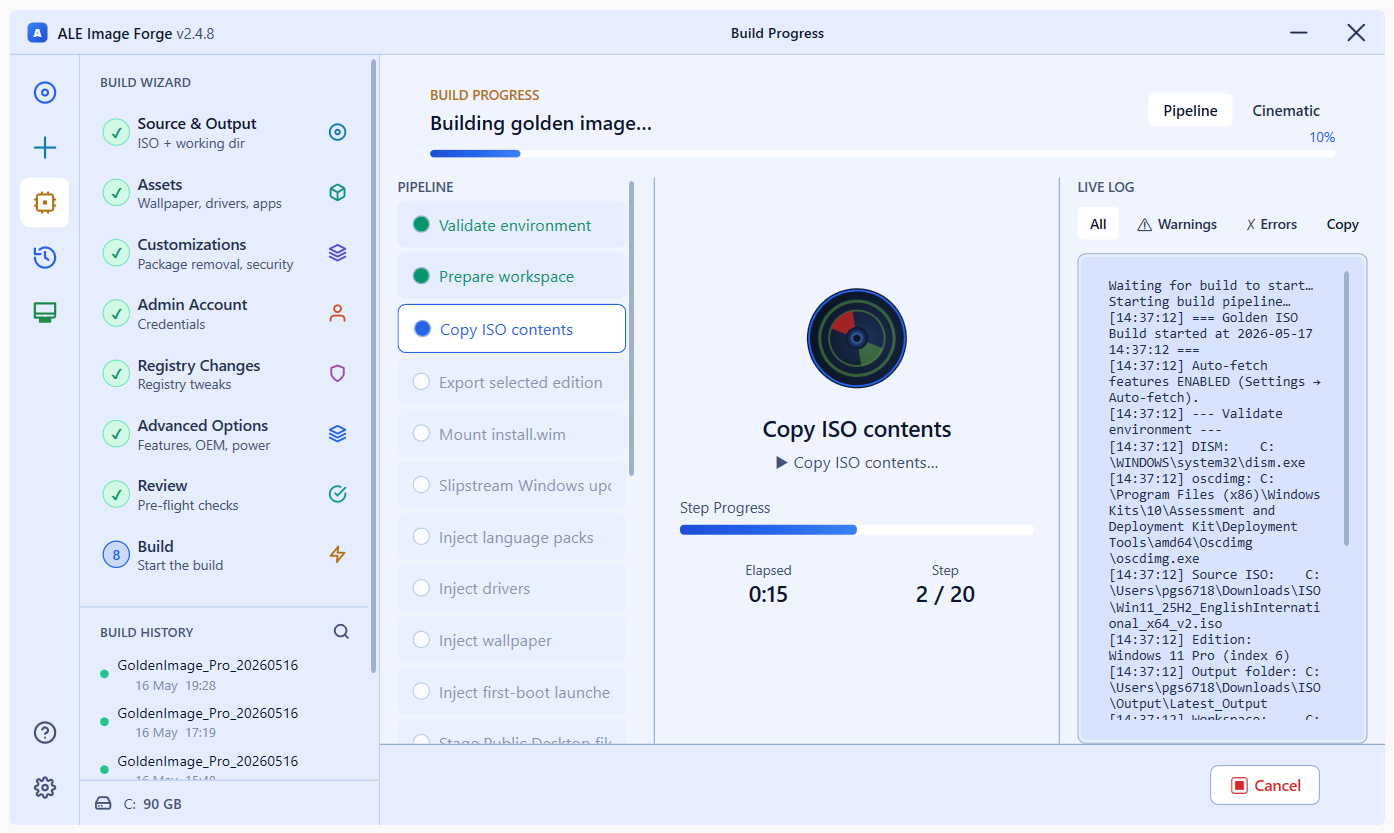
No golden VM. No Sysprep. No manual steps after imaging.





3–4 weeks of manual golden-image work → 3–4 days with WinForge. Every config, driver, policy, app, and registry tweak — baked directly into the ISO.
⬇️ Download Latest · 📸 Screenshots · 🚀 How It Works · ✨ Features · 🛠 Build from Source
Every Windows deployment cycle looks like this:
Week 1  →  Install base Windows on VM
Week 2  →  Apply policies, inject drivers, configure security baseline
Week 3  →  Install applications, test auto-logon, validate Sysprep
Week 3+ →  New requirement arrives — start over from scratch
Week 4  →  Boot on real hardware — issue found — start over again
           ^^^^^^^^^^^^^^^^^^^^^^^^^^^^^^^^^^^^^^^^^^^^^^^^^^^^
                         3 to 4 WEEKS total
A single missed driver, a broken MSI argument, or a last-minute policy change means you rebuild from zero. There is no partial recovery. There is no "just fix the one thing." The entire cycle restarts.
And after all that work, the result is a snapshot in time — a fragile VM that drifts, requires maintenance, and cannot be reproduced identically on another machine.
Day 1  →  Open WinForge, load vanilla Windows 11 ISO
Day 1  →  8-step wizard: drivers, apps, policies, registry, branding — all in one pass
Day 2  →  New requirement arrives — change one setting, rebuild
Day 3  →  ISO ready — boot on real hardware — done
          ^^^^^^^^^^^^^^^^^^^^^^^^^^^^^^^^^^^^^^^
                       3 to 4 DAYS total
WinForge works directly against the mounted WIM using DISM and reg.exe. No VM. No Sysprep. No state to maintain. A .gibprofile saves your entire config — rebuild an identical ISO a year later on any machine with one click.
|
|
|
|
|
|
|
|
|
|
|
|


WinForge runs a 19-stage offline pipeline against the mounted WIM. Nothing touches a running OS. Nothing requires a VM or Sysprep.
┌─────────────────────────────────────────────────────────────────┐
│                        WinForge Pipeline                        │
├──────┬──────────────────────────────────────────────────────────┤
│   1  │  Validate  — admin check, tool presence (dism, oscdimg)  │
│   2  │  Prepare   — clean workspace, purge orphaned WIM mounts  │
│   3  │  Copy ISO  — mount source ISO, robocopy to workspace     │
│   4  │  Export    — DISM /Export-Image to single-edition WIM    │
│   5  │  Mount WIM — DISM /Mount-Image /Index:1                  │
│   6  │  Lang Packs — DISM /Add-Package per selected CAB         │
│   7  │  Drivers   — DISM /Add-Driver /Recurse (local or OEM)    │
│   8  │  Wallpaper — takeown + overwrite all system wallpapers    │
│   9  │  FirstBoot — stage GIBFirstBoot.exe + apps.json into WIM │
│  10  │  Desktop   — files staged to Users\Public\Desktop        │
│  11  │  Scripts   — deployment scripts + Startup trigger        │
│  12  │  Bloatware — DISM /Remove-ProvisionedAppxPackage         │
│  13  │  Features  — Enable / Disable optional Windows features  │
│  14  │  Registry  — offline hive load → reg.exe → unload        │
│  15  │  Unattend  — generate Autounattend.xml + SetupComplete    │
│  16  │  Validate  — ⚠️ FULL pre-commit inspection of WIM        │
│  17  │  Unmount   — DISM /Unmount-Image /Commit                 │
│  18  │  Build ISO — oscdimg UEFI + BIOS dual-boot               │
│  19  │  Verify    — SHA-256 checksum of final ISO               │
└──────┴──────────────────────────────────────────────────────────┘
Stage 16 is your safety net. The pre-commit validator inspects the mounted image before DISM /Commit. If anything is wrong — missing installer, broken auto-logon, misconfigured BitLocker — the build halts with a full HTML report while the WIM is still recoverable. You never lose a 2-hour build to a silent misconfiguration.
| Category | What WinForge injects |
|---|---|
| 🔄 Windows Updates | Cumulative update + checkpoint chain — machines boot fully patched |
| 🚗 OEM Drivers | Auto-fetch Dell / HP / Lenovo driver packs, or inject from local folders |
| 📦 Applications | Any MSI / EXE / MST — silently installed at first user login via the bundled first-boot launcher |
| 🔒 Security | Remove bloatware, disable Copilot / Recall / Widgets, SMBv1 off, Defender ATP, BitLocker with optional key export |
| 📋 Group Policy | Machine + user policies applied offline — no domain controller required at build time |
| 🎨 Branding | Wallpaper, lock screen, OEM support info, org logo, trusted certs, custom fonts, registry tweaks |
| 🤫 Unattended Setup | Full Autounattend.xml — zero clicks from boot to desktop, no OOBE interaction |
| 🏷️ Auto-Rename | First-boot hostname from template: {PREFIX}{SERIAL}, {PREFIX}{LAST6_MAC}, {PREFIX}{ASSETTAG} |
| 🧪 Test in Hyper-V | Boot the produced ISO in a Gen 2 / Secure Boot / TPM 2.0 VM directly from the app |
| Step | Page | What you configure |
|---|---|---|
| 1 | Source & Output | Vanilla Win 11 ISO, target edition, boot language, output folder |
| 2 | Assets | Wallpaper, staged apps, language packs, OEM drivers, deployment scripts, fonts |
| 3 | Customizations | Bloatware removal, Win 11 UX defaults, security toggles, certs, Group Policies |
| 4 | Admin Account | Username, password, auto-logon, password-never-expires |
| 5 | Registry | Custom keys into HKLM\SOFTWARE, HKLM\SYSTEM, or Default User hive |
| 6 | Advanced | Optional features, OEM branding, product key, OOBE skip, power plan, timezone, scheduled tasks |
| 7 | Review | Full summary of every choice — save or load a .gibprofile config file |
| 8 | Build | Live 19-stage pipeline with cinematic view + detailed log |
- IT Administrators deploying Windows 11 at scale — 10 machines or 10,000
- Sysadmins tired of maintaining a golden VM that drifts and breaks
- Enterprise teams that need reproducible, auditable, policy-compliant images
- MSPs that need to rapidly produce per-client customised builds
| Requirement | Details |
|---|---|
| OS | Windows 11 on the build machine (build 17763+) |
| Privileges | Run as Administrator (DISM requires elevation) |
| Windows ADK | Deployment Tools component (oscdimg.exe) — WinForge can install this automatically |
| Disk space | ~30 GB free on workspace drive |
| Hyper-V | Optional — only needed for "Test in VM" |
Download the latest installer from Releases:
WinForge-Setup-2.4.8.exe
Installs to %ProgramFiles%\WinForge\. Requires administrator privileges. Settings survive uninstall and reinstall.
🔧 Building from source
# 1. Build GoldenISOBuilder (automatically builds GIBFirstBoot too)
cd GoldenISOBuilder
dotnet build -c Release -p:Platform=x64 --nologo

# 2. Publish as a single self-contained executable
dotnet publish -c Release -p:Platform=x64 -r win-x64 --self-contained true `
    -p:PublishSingleFile=true `
    -p:IncludeNativeLibrariesForSelfExtract=true `
    -p:EnableCompressionInSingleFile=true --nologo

# 3. Compile Inno Setup installer (requires Inno Setup 6)
& "$env:LOCALAPPDATA\Programs\Inno Setup 6\ISCC.exe" Installer\WinForge.iss
Output: GoldenISOBuilder\bin\x64\Release\net8.0-windows10.0.17763.0\win-x64\publish\
🏗️ Architecture overview
Two projects in one solution:
| Project | Role | Size |
|---|---|---|
| GoldenISOBuilder | WPF wizard running on the admin's build machine | ~75 MB self-contained |
| GIBFirstBoot | Bundled into the ISO at C:\GIB\ — reads apps.json, installs every staged app silently on first user login |
~70 MB |
Key design decisions:
BuildSession.Currentis the single source of truth — every page reads/writes it directly- All engine work is
async/await— UI never blocks - Passwords are always base64-encoded via
ToPsEncodedCommand()— never plain text on disk - Registry writes use
reg.exe, not PowerShell, for offline-hive compatibility Step()= fatal (halts pipeline);StepSoft()= logs and continues — critical steps are fatal, best-effort steps (drivers, wallpaper, fonts) are soft so one hiccup doesn't waste a 90-min build- Pre-commit validator runs before
DISM /Unmount-Image /Commit— WIM is still recoverable on failure
| Version | Highlights |
|---|---|
| 2.4.8 | UI polish, Event Log fix, validator AutoLogon + BitLocker regression fixes |
| 2.4.7 | Light-theme fixes, driver-extract freeze fixed, validator extended (drivers, lang packs, wallpaper, bloatware, features, font registry) |
| 2.4.6 | AutoLogon regression fix (removed legacy setup.exe path breaking Win 11 OOBE auto-logon) |
| 2.4.5 | Auto-fetch on by default; OS-version-aware Windows Update filter (24H2/25H2 WIM metadata detection) |
| 2.4.1 | OEM driver auto-fetch (Dell/HP/Lenovo catalogs); Windows Update slipstream; WinPE driver filter |
| 2.4.0 | Pre-commit validator + HTML validation report |
Issues and PRs welcome. Please open an issue first for anything beyond a small bug fix so we can discuss scope before you invest the time.
MIT — see LICENSE.
Built by Pavan G S · BTQ Infra, Alcatel-Lucent Enterprise
If WinForge saved you time, a ⭐ on GitHub goes a long way.