This is not a issue but a feature request about quantities calculations.
The Goal
The goal is to connect the already implemented calculating quantities functions with the quantity property.
If there isn't the calculating function or the existing function is not suited, it's necessary to write a new calculating function.
All the Qto Psets and the Quantity Properties have been extracted from IFC4x3 schema and reported into the following .xlsx attached files:
How to help
Only two files are involved, both stored in "/src/blendebim/blenderbim/bim/module/pset"
- "qto_calculator.py" that has all calculating functions (for example get_height that returns the height of an object)
- "calc_quantity_function_mapper" that has a dictionary called mapper that connect the "qto_name.quantity_name" with the function (for example, "Qto_WallBaseQuantities.Height" with get_height)
So, to help, it's enough to work on the mapper to connect the quantity with the proper calculating function.
There are 346 quantities, so help is welcome :-)
Of course, many quantities are repeated so, presumably, it will be used the same function (for example, there are 36 "Lenght" and presumably "get_legth" is a suitable calculating function).
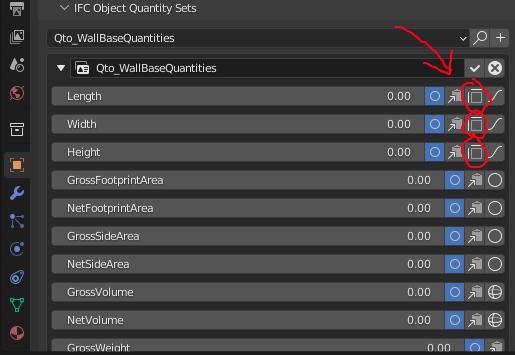
After the mapper dictionary has been modified, to check if the function works correctly, open blendebim->object property panel->IFC object quantity set -> edit the qto and there will be a new icon next to the quantity
Cheers, Massimo


This is not a issue but a feature request about quantities calculations.
The Goal
The goal is to connect the already implemented calculating quantities functions with the quantity property.
If there isn't the calculating function or the existing function is not suited, it's necessary to write a new calculating function.
All the Qto Psets and the Quantity Properties have been extracted from IFC4x3 schema and reported into the following .xlsx attached files:
How to help
Only two files are involved, both stored in "/src/blendebim/blenderbim/bim/module/pset"
So, to help, it's enough to work on the mapper to connect the quantity with the proper calculating function.
There are 346 quantities, so help is welcome :-)
Of course, many quantities are repeated so, presumably, it will be used the same function (for example, there are 36 "Lenght" and presumably "get_legth" is a suitable calculating function).
After the mapper dictionary has been modified, to check if the function works correctly, open blendebim->object property panel->IFC object quantity set -> edit the qto and there will be a new icon next to the quantity

Cheers, Massimo