-
Notifications
You must be signed in to change notification settings - Fork 17
Register Mode Map Nodes
Impetus edited this page Apr 16, 2015
·
1 revision
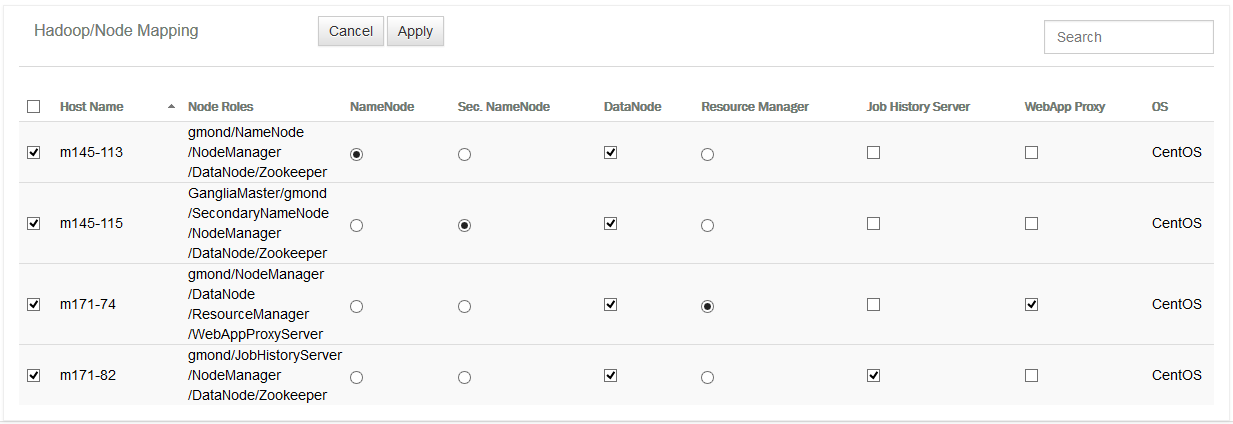
In the retrieved nodes, the mapping of nodes needs to be done which can be easily done by clicking Map Nodes while deploying a component. When you click on Map Nodes, a form opens for assigning roles to the components of the cluster under creation.
Just configure the role(s) through simple selection and click Apply. Refer to the screenshot below for configuring component specific details in the deploy mode.
![] (https://raw.githubusercontent.com/wiki/impetus-opensource/ankush/images/Image160.png) Figure: Node Mapping of Component - Deploy mode
-
Ankush at a Glance
-
Installing Ankush
- Start Using Ankush
-
First Time Interaction
-
Regular Interaction
- Understanding Ankush Navigation
-
Cluster Creation
- General Details
- Java
- Working With Nodes
- Agent Directory
- Configuring Vendor & Version
- Configuring Technology Specific Details
- Deploy Mode - Configuration
- Deploy Mode - Map Nodes
- Register Mode - Configuration
- Saving Details as a Cluster Creation Template
- Deploying Cluster
- Tracking Cluster Deployment Progress
-
Redeploying Cluster with Deployment Error
- Cluster Management
- Cluster Monitoring
-
Tiles Summary
-
Glossary