Repository navigation
v1.0.13

STR v1.0.13
Built from commit: fb5a08a3fb0afe4e21989de40ccb67e97eec218d
Workflow run: https://github.com/JRpersonal/streborn/actions/runs/38687939695
What's changed in v1.0.13
New features
- Remove old Wi-Fi networks from a speaker so it stops falling back to a hotspot
- Tell you when a speaker cannot reach the internet
- Update speakers from the phone, no computer needed (agent)
- A desktop app for Linux on ARM64, for example a Raspberry Pi 4 or 5 (app)
- Browse and play your Pandora stations in the Find tab and on the phone (app)
- Find a speaker by showing a hello on its display (app)
- Installing STR switches the speaker's clock display on (app)
- Link Pandora and iHeartRadio to a speaker in its settings (app)
- Linux users on Debian, Ubuntu, Mint and Raspberry Pi OS can install ST Reborn as a .deb package that updates through the system's package installer (app)
- The Wishes tab shows recently built wishes for three months (app)
- Long titles scroll on the speaker display instead of shrinking (display)
- STR owns the speaker display during playback: track, time and a playing symbol (display)
- The speaker display confirms saved keys and shows other STR notices (display)
- New guide to control your speakers from Apple Shortcuts and the Apple Watch (docs)
- The app updates an outdated speaker to Bose's last firmware with one click (firmware)
- ST Reborn is now licensed under Apache-2.0, and the app's credits and the Linux download carry the license and NOTICE files (license)
- Update all speakers at once from the phone (phone)
On the speaker display
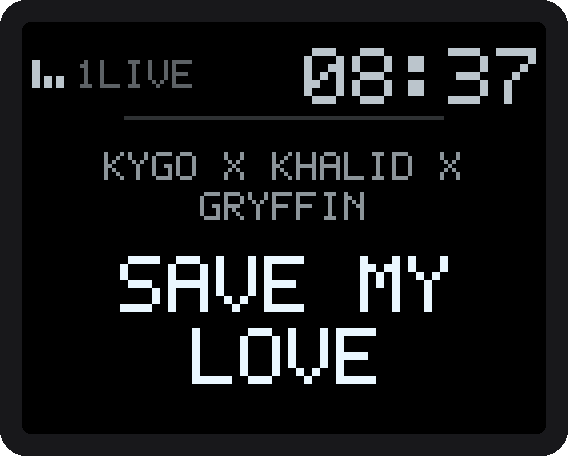
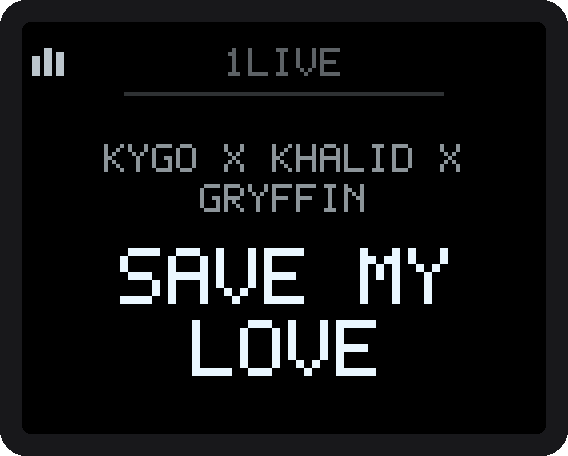
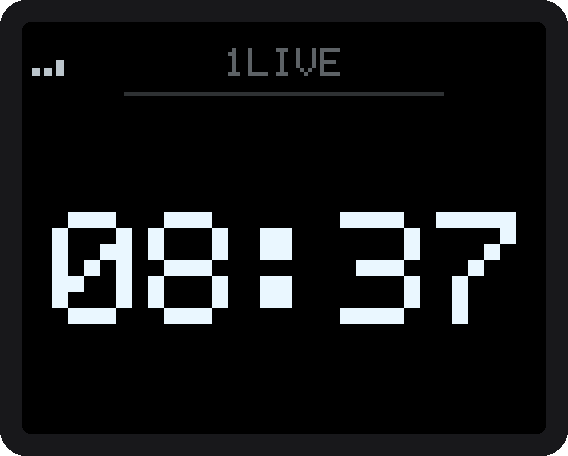
On every SoundTouch with a display (20, 30, Portable and Wave), STR now draws what is playing on the speaker's own display, with no audio gap at song changes. Switch it on in the speaker's settings in the app ("Show the current track on the speaker display" and "Time during playback"). Real screenshots from a Portable:
| Track and time | Track only | Time only |
|---|---|---|
 |
 |
 |
Ideas for a better layout are welcome in #1305.
Fixes
- Diagnostic reports no longer include a Wi-Fi password the speaker wrote to its log
- Music library keys show the album cover from your media server, and a Spotify cover no longer lands on a library key
- Show the station name again when the speaker display shows the current track
- A SoundTouch Portable no longer warns that STR has not saved its Wi-Fi when the speaker keeps it itself (agent)
- A Spotify key that a stereo pair fails to start is retried once instead of hanging on "stream starting" (agent)
- A music-library song saved on a key before v1.0.11 learns its length after one play and then ends on time (agent)
- A speaker following a stereo pair or group no longer gets preset writes its firmware refuses, and the log no longer claims those keys were repaired (agent)
- A speaker that stops taking audio no longer makes Spotify race through tracks until Spotify blocks the account for a while (agent)
- Holding a preset key on the speaker now leaves a trace in the diagnostic when the save does not happen (agent)
- Starting Spotify on a speaker in standby no longer plays its last radio station for a few seconds first (agent)
- A preset key whose stream never starts shows an error after 30 seconds instead of "stream starting ..." forever (app)
- A speaker that needs unplugging no longer also gets the restart notice (app)
- A track replayed from Recently played shows its progress bar (app)
- Installing STR finishes the speaker's setup by setting its language, so it stops asking for the SoundTouch app (app)
- Saving a song from the speaker's own Spotify entry to a key stores that song, not the last one STR's Spotify played (app)
- The Linux ARM64 app updates itself from its own archive, never the x86_64 one (app)
- The Windows firewall notice no longer flashes up for a few seconds at every start while the app is still looking for speakers (app)
- When the station directory is down, the search says so instead of showing a raw error (app)
- The speaker shows "keys restored" only the first time, not after every restart (display)
- Stop Spotify from taking the speaker back after a library or station key (spotify)
- The Spotify app's volume slider shows and follows the speaker's real volume (spotify)
Downloads
| Platform | File |
|---|---|
| Windows desktop app | STR-Windows.exe |
| macOS desktop app | STR-macOS.dmg |
| Linux desktop app (x86_64) | STR-Linux-x64.tar.gz |
| Linux desktop app (ARM64) | STR-Linux-arm64.tar.gz |
| Linux .deb (Debian, Ubuntu, x86_64) | STR-Linux-x64.deb |
| Linux .deb (Raspberry Pi OS, ARM64) | STR-Linux-arm64.deb |
| Stick agent (ARMv7l, real target) | streborn-armv7l |
| Stick agent (ARM64, reserve) | streborn-arm64 |
| Stick agent (amd64, test rig) | streborn-amd64 |
| Spotify sidecar (go-librespot, ARMv7l) | go-librespot-armv7l |
| Checksums | SHA256SUMS |
| Machine-readable | manifest.json |
The website at st-reborn.de fetches manifest.json to render the current download links. All file names are stable (no version in the name), so every file, the desktop apps included, has a permanent /releases/latest/download/<file> URL.
System requirements
| Windows | Windows 10 or 11, 64-bit. The app uses Microsoft Edge WebView2; Windows 7 and 8 are not supported. |
| macOS | macOS 12 Monterey or newer. |
| Linux | 64-bit (x86_64) with WebKitGTK (webkit2gtk 4.x) on a current glibc-based distribution. |
| Speaker | Bose SoundTouch 10, 20, 30 or Portable on the final Bose firmware (27.0.6). |
Verify your download
Every binary in this release is attested by GitHub's build provenance system.
# SHA256 checksum
sha256sum -c SHA256SUMS

# Sigstore attestation (requires GitHub CLI)
gh attestation verify STR-Windows.exe --owner JRpersonal
Code signing
Windows: signed with a Certum Open Source code signing certificate. SmartScreen may still warn while the signature builds download reputation.
macOS: signed with a Developer ID certificate and notarized by Apple. The app and the disk image each carry a stapled ticket, so Gatekeeper opens them without a warning, offline included.
Any warning you do see, and the exact click path past it, is documented on the website Verify page.
VirusTotal scan
Each binary in this release is uploaded to VirusTotal on build, so the unsigned apps' heuristic false-positives are checkable. Live reports for this exact build:
| Platform | Report |
|---|---|
| Windows | VirusTotal |
| macOS | VirusTotal |
| Linux x64 | VirusTotal |
| Linux ARM64 | VirusTotal |