plugin shows 'IDTY' on sqrl: click but does not show login button #15

Description

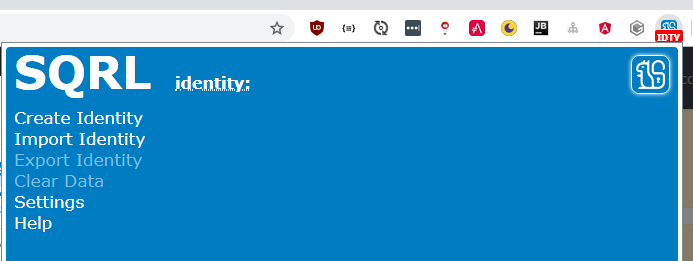
This is what the screen looks like after:
- clicking on the SQRL button in my app
- clicking on the plugin sqrl icon, labeled with the IDTY as you can see in the screenshot.
However, what happens next is confusing. I was expecting to see a login button, but I did not.
At first I was thinking it was not installed completely, or it had some kind of error. After messing with this for a while, I realized that there is no identity installed. One more thing I should mention is that this occurred on a chrome browser where I had just enabled sync with google. That process pulled in my other extensions, including this one. The others seem to be working fine - they don't require configuration - but it was not clear that this one needed some extra work on my part. Namely, I needed to either create an identity or import one.
So what I'm thinking is that maybe this plugin should step a new user through the process of installing their identity when it realizes it does not know who this user is, instead of showing a default home page like this with buttons to click on. I suspect that new users that aren't security professionals won't really know what an identity is or that they need to click on some of these buttons.