Repository navigation
Releases: Jacckisback/arachnide-seo-spider
Release list
Arachnide SEO Spider 3.21.0 — scale to 200 000 pages

Six versions in one release, from a technical review of a 200 000-page crawl. No database, no native dependency.
- 3.16 — no more crash at 125 000 URLs (no spread on site-sized arrays), quadratic loops removed, table sort 20× faster, atomic writes.
- 3.17 — compact link graph: URLs and anchors interned, 14 bytes per link, CSR graph for inlinks, depth, PageRank and link checks. 50 000 pages: analysis 29 s / 2.5 GB → 5.5 s / 647 MB.
- 3.18 — crawls written as they go: gzipped NDJSON streams, history reads one line, resume journal after a crash or Ctrl+C (--resume, POST /api/crawl { resume }), old .json files still open.
- 3.19 — every page compared for near duplicates (banded search, no 5 000 cap), linear cannibalization, segment counters in one pass.
- 3.20 — the browser receives a light result as a stream, never the whole crawl: paginated links, page record on click, site-map edges on demand, server-side compare, import/export through the server.
- 3.21 — crawl guard-rails (budget on downloaded pages, tracking parameters removed, facet traps, RFC 9309 robots.txt, robots per host, deferred retries, bounded bodies, Chrome restart, regex in a worker), XPath extraction, --sitemap list mode, CLI extraction columns, list mode for AI agents, npm run bench.
Full suite: 167 tests. See CHANGELOG.md for every measurement.
v3.15.0 — Google Analytics 4: orphan pages that get traffic
📊 Google Analytics 4 — orphan pages that get traffic
Search Console only sees the pages that show up in Google. Google Analytics 4 sees every visit: direct, email, social, ads and search. Arachnide 3.15 crosses that traffic with the crawl.
Connect GA4 your way
- API: use the same Google Cloud service account as Search Console and add it as a Viewer of the GA4 property. The property is detected from your domain, or you can enter its ID.
- CSV: export Pages and screens (or Landing page) from GA4 and import it in Settings → Google.
What you get
- Sessions, views, users and engagement for every page, in a new Google Analytics tab.
- Orphan pages that get traffic: pages that get visits but have no internal link leading to them, such as campaign landing pages, old URLs, or pages found only through the sitemap.
- Pages in error that still get traffic: 404 / 500 URLs that visitors keep landing on.
- Non-indexable pages that get traffic and indexable pages with no sessions.
- GA4 sessions in segments, so you can see the traffic per site section.
CLI and AI agents
--ga4-key,--ga4-property,--ga4-days,--ga4-csv; sessions and views columns inpages.csv.ga4_key_file,ga4_propertyandga4_csvoptions on the crawl tools; page search can sort by sessions.
Available in all 6 languages. Full details in the changelog.
v3.14.0 — Segments: audit a big site section by section
🧩 Segments — audit a big site section by section
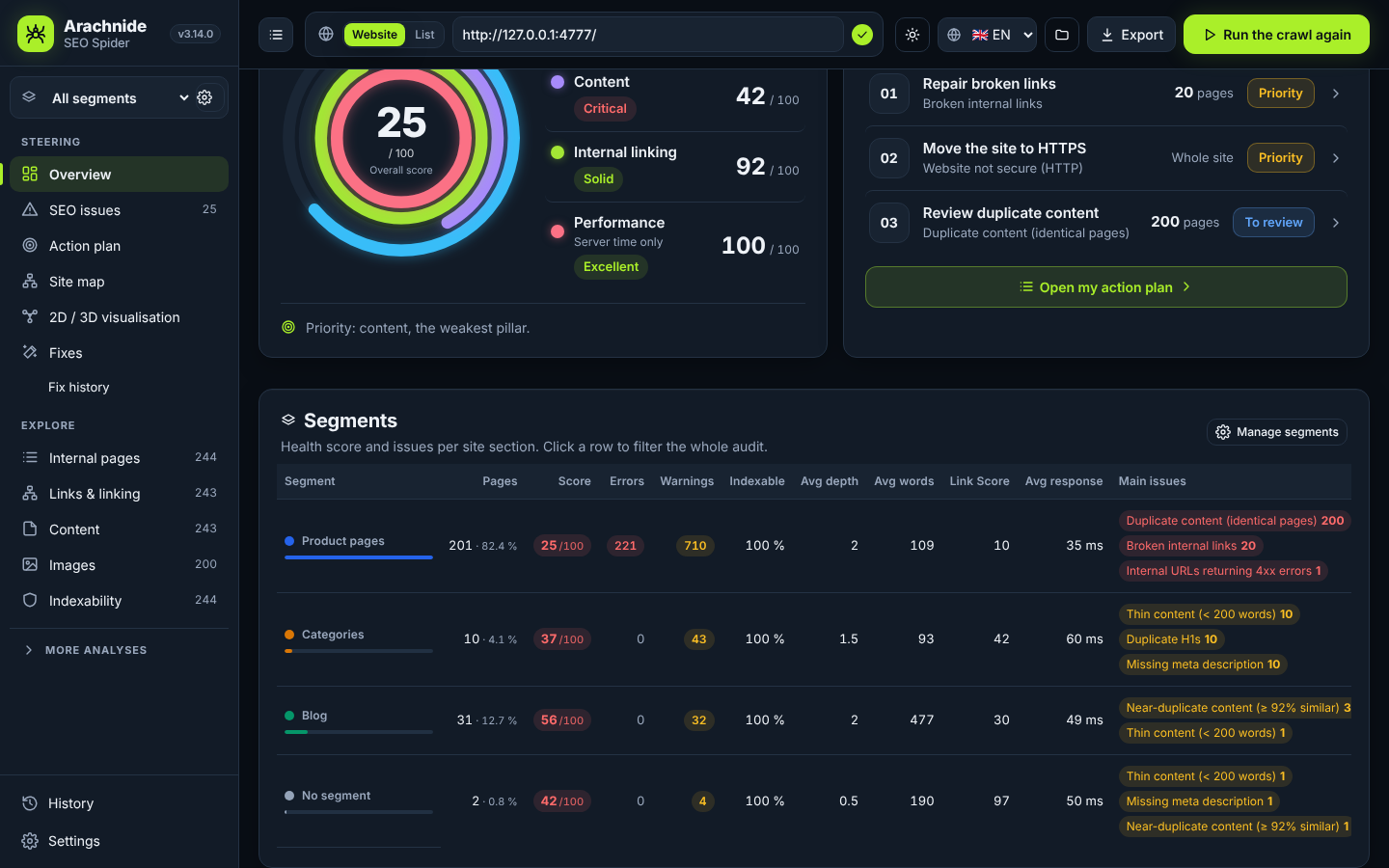
On a large site, one global score hides where the problems really are. Segments split the audit into named sections (product pages, categories, blog, a language…), like Screaming Frog segments.
Rules on any field
- Path, URL, title, H1, meta description, status, indexability, click depth, word count, inlinks, Link Score, response time, sitemap, structured data type, language, Search Console clicks — and your custom extractions.
- Text (contains, starts with, regex…), number (>, ≤…) and true / false operators, combined with AND / OR.
- First match wins: order your segments, the rest goes to No segment. Live page counts while you edit.
- One click to start: Create from directories builds one segment per folder.
The whole app follows the segment
- Applied after the crawl, without recrawling, saved with the crawl and reused for the next crawls of the site. JSON import / export.
- A global filter in the sidebar: dashboard, health score and pillars, SEO issues, action plan, every table, CSV exports and the PDF report are recomputed for that section, with the engine's exact scoring method.
- A Segments table on the dashboard: pages, score, errors, warnings, indexability, depth, words, Link Score, response time and main issues per section.
- Each issue split by segment, a Segment column in tables and CSV, colour by segment on the site map.
CLI and AI agents
--segments segments.json,--segment-folders,--segment blog(example:docs/segments.example.json).- New MCP / REST tool
arachnide_segments(get / suggest / set) and asegmentparameter on summary, issues, action plan, page search and GEO readiness — 25 tools.
Available in all 6 languages. Full details in the changelog.
v3.13.0: Merge pull request #19 from Jacckisback/v3.13-agent-bridge
🤝 Plug your own AI agent (Claude, ChatGPT…) into Arachnide
Arachnide becomes the eyes and hands of your SEO / GEO agent: it reads the audit you have open, starts crawls that appear live in the app, explores pages, gets the prioritised action plan and the new GEO readiness report, and fixes the site with your approval.
Three doors, 24 tools
- MCP over stdio — Claude Code, Claude Desktop (unchanged).
- MCP over HTTP —
/mcp, for claude.ai custom connectors and hosted agents. - REST + OpenAPI 3.1 —
/api/agent/*,/openapi.json: import it as a ChatGPT Action in one click.
Same tools everywhere, defined once. crawl_id: "current" always means the audit open in the app.
New tools
arachnide_action_plan— the app's ordered plan, quick wins flagged.arachnide_search_pages— filter and sort pages by Link Score, depth, status, folder, issue.arachnide_geo_readiness— AI crawler access, llms.txt, structured data, content depth → 0-100 score and recommendations.arachnide_start_crawl+arachnide_crawl_status— background crawl, visible live in the app.
Settings → AI agents
Access token (show / copy / renew), MCP and OpenAPI URLs, public URL for tunnels (cloudflared, ngrok, Tailscale), ready-to-paste snippets for Claude Desktop and ChatGPT Actions, and the log of the latest agent calls.
Guide and suggested system prompt for an SEO / GEO agent: docs/AGENTS.md (FR: docs/AGENTS.fr.md). Available in all 6 languages.
v3.12.0 — Design audit
🎨 A design pass across the whole app
Every page was audited in both themes, on desktop and mobile, with real WCAG contrast measurements — then fixed.
Typography
- Inter Variable is now bundled (offline, SIL OFL licence): every weight renders the same on every machine. The stylesheet named Inter but never loaded it.
- One 8-step type scale replaces 23 scattered sizes, with consistent headings, radii and spacing.
Readable light theme
- Every coloured text — warnings, OK states, links, muted labels, effort badges — now meets WCAG AA contrast (4.5:1) on the backgrounds it sits on: 103 measured failures brought to 0.
- Dark theme: white-on-yellow and white-on-green badges fixed.
Smoother details
- The Fixes page now works on a crawl opened from a file.
- The page detail panel no longer lingers on pages without a table.
- Selected table rows are marked cleanly; the theme button shows what it will do; the simulation switch is visible again; dashboard cards wrap properly on mobile.
Available in all 6 languages.
v3.11.0 — Site map and 2D / 3D visualisation, side by side
🧭 Two views of your site, side by side
- Site map: the classic, Screaming Frog-style map — white background, horizontal tree, made for screenshots and client reports.
- 2D / 3D visualisation (new tab, right below Site map): the exploration view is back — dark style, radial layout, 2D or 3D, coloured by SEO issues by default.
- Both views share the same data, filters, search and page inspector; each remembers its own settings.
Available in all 6 languages.
v3.10.0 — Classic site map
🌳 A classic, screenshot-ready site map
Built from user feedback: the 3.9 map was accurate but felt too futuristic. 3.10 makes it clear enough to show a client or a manager as is.
Site map
- Classic style (new default): white background, thin links, dark labels — in the spirit of Screaming Frog's crawl tree. The Dark style is still one click away, in 2D and 3D.
- Horizontal tree: home on the left, one column per level, one label per page. Long lists are summarised ("+ 28 more pages", with the problems of hidden pages still flagged); Show the full list expands them. The selected page always stays visible.
- Directories like a file explorer: each folder shows its path relative to its parent.
- Client-ready exports: PNG / PDF with a header (site, view, crawl date, pages shown), legend and context.
- No invented URLs: a page such as
/ennow carries its/en/folder instead of a fake/en/URL appearing next to it.
Filters & crawl scope
- URLs to include / exclude in the map: one pattern per line — text (
/en/), wildcard (/en/*) or regex (/en/(.*)). - Folder filter at any level (
/en/blog/). - Crawler: include / exclude accept one regex per line; new Stay in the start folder option (
--stay-in-folderin the CLI).
Sturdier
- Invalid start URLs (
htp:/x,javascript:…, a bare number) are refused with a clear message. - Absurd values are brought back to safe limits, and you're warned if a crawl can't be saved.
- New end-to-end and "monkey" tests drive the real interface in a browser on every test run.
Available in all 6 languages.
v3.9.0 — Site map redesign
🕸️ Site map, redesigned
The site map is now a real analysis tool: accurate, fast and readable, in 2D or 3D.
Three distinct views
- Crawl tree — the real shortest click path from the home page to every page (redirects don't count as clicks). Pages not reached through a followed link are grouped separately.
- Directories — your URL structure, with virtual folders that don't count as pages.
- Internal linking — the directed graph of followed internal links, with the real link count.
Find and act faster
- Colour by depth, issues, HTTP status, indexability or directory; size by Link Score or inlinks.
- Search and filters that work across the whole crawl, with highlight or isolate.
- Inspector with Page, Links and Issues tabs, click path, and a direct link to the Action plan.
- List view, full screen, PNG export with labels and legend, PDF and CSV.
Much faster
| View | Before → After (5,000 pages) |
|---|---|
| 3D crawl tree, ready in | 11.7 s → 0.9 s |
| 3D crawl tree, smoothness | 1 → 47 fps |
| 3D internal linking, smoothness | 1–2 → 60 fps |
| 2D crawl tree, ready in | 5.9 s → 1.05 s |
Selecting a page opens its details in under 15 ms.
Notes
- Crawls made before 3.9 show an inferred click path; re-crawl to get the exact one.
- Available in all 6 languages.
v3.8.0 — Action plan redesign
Arachnide SEO Spider 3.8.0 — Action plan redesign
The action plan now takes you from “I see the issues” to “I know what to handle and how to move forward”: what to start with, why, how many URLs it affects, how serious it is, what it takes to fix — and where you are.
Highlights
- Summary cards — actions left to handle (by severity), quick wins (low effort, medium or high impact), fixing effort, and Start here: the first action in the recommended order, which moves on as you work.
- Roadmap — every issue becomes an action with a clear verb (“Shorten titles”, “Check nofollow links”, “Consider adding llms.txt”), with its rank, severity, SEO impact, unique URLs, effort and status. Filters, search, and a manual sort that clearly replaces the recommended order until you switch back.
- Action panel — why start here (facts from the crawl only), numbered method, a concrete “Done when…” criterion, see / export the URLs, notes, and the status flow To do → In progress → To validate. Only a new crawl that no longer detects the issue marks it as resolved.
- Tracking saved in your browser for each site; multi-select to export the URLs of several actions or change their status at once.
- Responsive — two-thirds / one-third layout with a sticky panel, a side drawer on tablets, compact cards on mobile. Translated into 6 languages.
Notes
- Tracking is stored locally in the browser: it is not synchronised between computers or people.
Update
cd ~/arachnide-seo-spider && git pull && npm install && npm start
See the CHANGELOG for details.
v3.7.0 — SEO issues page redesign
Arachnide SEO Spider 3.7.0 — SEO issues page redesign
The issues page now goes straight from diagnosis to fixes: what was found, what to fix first, how serious it is, how many URLs it affects, how much effort it takes and exactly what to do. Every value comes from the current crawl.
Highlights
- Summary cards — issue types overall, errors, warnings and notices (never a sum of URLs), with a severity bar. Click a card to filter the list.
- Prioritised list — severity tabs, search on name, category and action, and a sort selector (recommended priority by default, with the rule spelled out). Unique URLs per issue (or “Whole site”), effort shown on its own colour scale, pagination and keyboard navigation.
- Fix panel — why it matters, numbered steps, a real before / after example (with an automatic, clearly labelled shortening suggestion for titles and descriptions that are too long), useful nuances, a preview of affected URLs, See the N URLs and Export the list for the selected issue, and a shortcut to the Fixes tab when the issue can be fixed there.
- Responsive — two columns with a sticky panel on large screens, stacked on tablets, a dedicated detail view on mobile.
- New night palette, translated into 6 languages.
Fixed
- Recommended priority: a widespread warning could rank above an error. Errors now always come first — in the issues page, the action plan and the overview priorities, including crawls saved before 3.7.
Update
cd ~/arachnide-seo-spider && git pull && npm install && npm start
See the CHANGELOG for details.