Disable all the other extensions except for LaTeX Workshop, and check that you still see this issue. [Required]
Done.
Make sure to visit the wiki FAQ before filling an issue.
Done.
Describe the bug [Required]
I was (and am) literally very surprised to see the "View TikzPicture" a few days ago – never thought that such a feature will ever be implemented. After some days of using and checking, I think there are still some problems to be considered:
- LaTeX Workshop doesn't recognize 90% of the TikZ pictures in my document, although they are all bounded by
\begin{tikzpicture}[something] and \end{tikzpicture}.
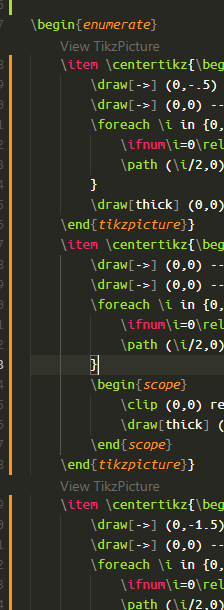
- Surprisingly, all recognized TikZ pictures are surrounded by one custom-defined command (in my case it is
\centertikz) (see screenshot below). Even more, two adjacent TikZ pictures are recognized as one.
- And, none of these buttons work :( There are some cases it opens a PDF file which has literally nothing but some text (maybe because the feature does not take the preamble into account which leads to some kinds of compilation errors). In some rare cases (which I can not reproduce right now, but I have encountered before), no PDF file is opened at all and error "PDF file not found" is reported by the PDF viewer.
Last, but not least, could you please change "TikzPicture" to "TikZ picture", or even better "TikZ picture"? The official "logo" of the package is "TikZ".
Expected behavior
Exactly what we all expect.
Logs [Required]
LaTeX Workshop Output [Required]
I paste the related part (everything that is shown after I pressing the button). The other lines are not related IMHO.
[15:26:24] Serving PDF file at http://localhost:51814/viewer.html?file=pdf..QyUzQSU1Q1VzZXJzJTVDQU5IVEFOfjElNUNBcHBEYXRhJTVDTG9jYWwlNUNUZW1wJTVDdnNjb2RlLWxhdGV4d29ya3Nob3AlNUN0aWt6cHJldmlldy1wcm9ibGVtLXR2d3RsNSU1Q3Rpa3pwaWN0dXJlLTcwMzgwODQwLnBkZg
[15:26:24] The encoded path is C:\Users\ANHTAN~1\AppData\Local\Temp\vscode-latexworkshop\tikzpreview-problem-tvwtl5\tikzpicture-70380840.pdf
[15:26:25] Open PDF tab for C:\Users\ANHTAN~1\AppData\Local\Temp\vscode-latexworkshop\tikzpreview-problem-tvwtl5\tikzpicture-70380840.pdf
[15:26:26] No PDF viewer connected for C:\Users\ANHTAN~1\AppData\Local\Temp\vscode-latexworkshop\tikzpreview-problem-tvwtl5\tikzpicture-70380840.pdf
[15:26:26] Serving PDF file at http://localhost:51814/viewer.html?file=pdf..QyUzQSU1Q1VzZXJzJTVDQU5IVEFOfjElNUNBcHBEYXRhJTVDTG9jYWwlNUNUZW1wJTVDdnNjb2RlLWxhdGV4d29ya3Nob3AlNUN0aWt6cHJldmlldy1wcm9ibGVtLXR2d3RsNSU1Q3Rpa3pwaWN0dXJlLTcwMzgwODQwLnBkZg
[15:26:26] The encoded path is C:\Users\ANHTAN~1\AppData\Local\Temp\vscode-latexworkshop\tikzpreview-problem-tvwtl5\tikzpicture-70380840.pdf
[15:26:26] Open PDF tab for C:\Users\ANHTAN~1\AppData\Local\Temp\vscode-latexworkshop\tikzpreview-problem-tvwtl5\tikzpicture-70380840.pdf
[15:26:28] Handle data type: open
[15:26:28] Handle data type: open
[15:26:28] Preview PDF file: c:\Users\ANHTAN~1\AppData\Local\Temp\vscode-latexworkshop\tikzpreview-problem-tvwtl5\tikzpicture-70380840.pdf
[15:26:28] Preview PDF file: c:\Users\ANHTAN~1\AppData\Local\Temp\vscode-latexworkshop\tikzpreview-problem-tvwtl5\tikzpicture-70380840.pdf
[15:26:28] Handle data type: loaded
[15:26:28] Handle data type: loaded
Developer Tools Console [Required]
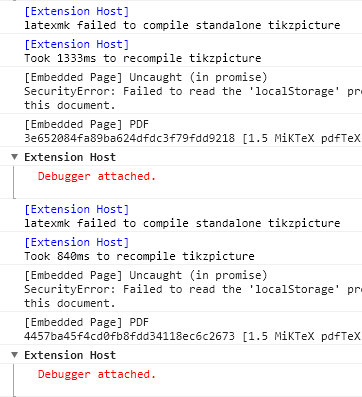
latexmkrc seems to have trouble compiling the TikZ pictures.
Screenshots
In the following screenshot, there are no buttons.
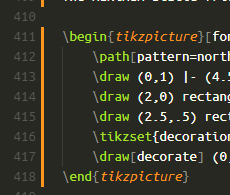
In the following screenshot, the middle TikZ picture is not recognized.
In the following screenshot, it is expected to be a graph.
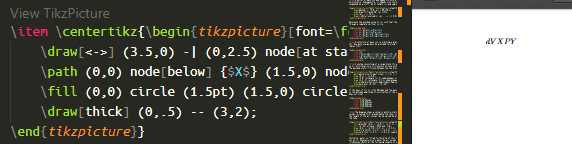
\begin{tikzpicture}[font=\footnotesize,>=stealth]
    \draw[<->] (3.5,0) -| (0,2.5) node[at start,below] {$d$} node[at end,left] {$V$};
    \path (0,0) node[below] {$X$} (1.5,0) node[below] {$P$} (3,0) node[below] {$Y$};
    \fill (0,0) circle (1.5pt) (1.5,0) circle (1.5pt) (3,0) circle (1.5pt);
    \draw[thick] (0,.5) -- (3,2);
\end{tikzpicture}
Desktop [Required]:
- OS: Windows 10
- VS Code version: 1.36.1
- Extension version: 7.2.0
Additional context
If necessary, this is my mysterious \centertikz command. It is a workaround for centering elements in the middle of the baseline. I can't figure out how it affects the feature, but as I can see, it does affect the feature.
\newbox\mybox
\def\centertikz#1{%
    \setbox\mybox\hbox{#1}%
    \raisebox{-0.5\dimexpr\ht\mybox+\dp\mybox}{\copy\mybox}%
} 
Disable all the other extensions except for LaTeX Workshop, and check that you still see this issue. [Required]
Done.
Make sure to visit the wiki FAQ before filling an issue.
Done.
Describe the bug [Required]
I was (and am) literally very surprised to see the "View TikzPicture" a few days ago – never thought that such a feature will ever be implemented. After some days of using and checking, I think there are still some problems to be considered:
\begin{tikzpicture}[something]and\end{tikzpicture}.\centertikz) (see screenshot below). Even more, two adjacent TikZ pictures are recognized as one.Last, but not least, could you please change "TikzPicture" to "TikZ picture", or even better "TikZ picture"? The official "logo" of the package is "TikZ".
Expected behavior
Exactly what we all expect.
Logs [Required]
LaTeX Workshop Output [Required]
I paste the related part (everything that is shown after I pressing the button). The other lines are not related IMHO.Developer Tools Console [Required]
latexmkrcseems to have trouble compiling the TikZ pictures.Screenshots

In the following screenshot, there are no buttons.
In the following screenshot, the middle TikZ picture is not recognized.

In the following screenshot, it is expected to be a graph.

Desktop [Required]:
Additional context
If necessary, this is my mysterious
\centertikzcommand. It is a workaround for centering elements in the middle of the baseline. I can't figure out how it affects the feature, but as I can see, it does affect the feature.