
A Chrome extension that seamlessly integrates Google NotebookLM into your browsing workflow. Instantly summarize webpages, specific links, or selected text with a single click.

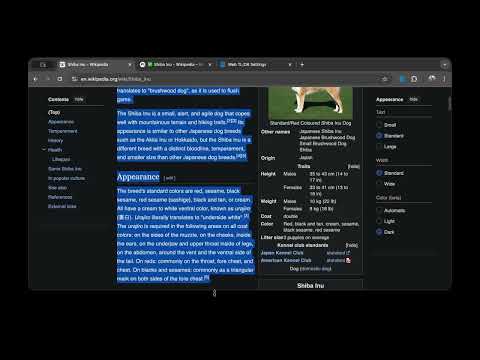
- One-Click Summarization: Click the extension icon to summarize the current page.
- Context Menu Integration:
- Right-click any page to "Summarize this page".
- Right-click any link to "Summarize link" (bypassing the need to open it first).
- Select text, right-click, and choose "Summarize selection" to focus on specific content.
- Smart Automation:
- Automatically opens NotebookLM in a new tab.
- Imports the target content (URL or selected text).
- Automatically enters and submits your prompt (default: "TL;DR").
- Visual Feedback:
- Toast Notifications: Real-time status updates (Importing, Generating, Success) via a non-intrusive toast.
- Tab Title Status: The NotebookLM tab title updates with emojis (⏳, ✨, ✅) so you can monitor progress from the tab bar.
- Configurable Options: Customize your default prompt and behavior.
- Download or clone this repository to your local machine.
- Open Chrome and navigate to
chrome://extensions/. - Enable "Developer mode" by toggling the switch in the top-right corner.
- Click "Load unpacked" and select the directory containing the extension files.
- The extension should now appear in your Chrome toolbar.
- Navigate to any webpage.
- Click the Web TL;DR extension icon in the toolbar, OR right-click the page and select Summarize this page with NotebookLM.
- A new tab will open, importing the page and generating the summary.
- Right-click on any link.
- Select Summarize with NotebookLM.
- The extension will pass the link to NotebookLM without you needing to visit it first.
- Highlight any text on a webpage.
- Right-click the selection.
- Select Summarize with NotebookLM.
- The selected text will be imported as a "Text" source in NotebookLM.
Right-click the extension icon and select Options (or click "Extension Options" in chrome://extensions) to configure:
- Custom Prompt: Change the default "TL;DR" prompt to anything you like (e.g., "Summarize in 3 bullet points").
- Open in Background: Toggle whether the NotebookLM tab opens in the background or immediately grabs focus.
This extension:
- Only accesses the specific URL or text you explicitly choose to summarize.
- Does not collect, store, or transmit any personal data or browsing history to third parties (other than sending the user-initiated URL/Text to Google NotebookLM for processing).
- Runs locally in your browser.
- Google Chrome browser.
- A Google account with access to NotebookLM.
- Login: Ensure you are logged into Google and can access NotebookLM.
- Prompt Issues: If the automatic prompt fails, you can manually type in the NotebookLM chat.
- Permissions: Verify the extension has the necessary permissions in
chrome://extensions.
MIT License. See the LICENSE file for details.