Repository navigation
Releases: Johnserf-Seed/logitech-scroll-rescue
Release list
Scroll Rescue v0.3.0

Scroll Rescue 是一款轻量、便携的 Windows 罗技鼠标滚轮恢复工具,用于尝试恢复退出瓦洛兰特(VALORANT / 无畏契约)后滚轮持续滚动或无限滚动的问题。
功能
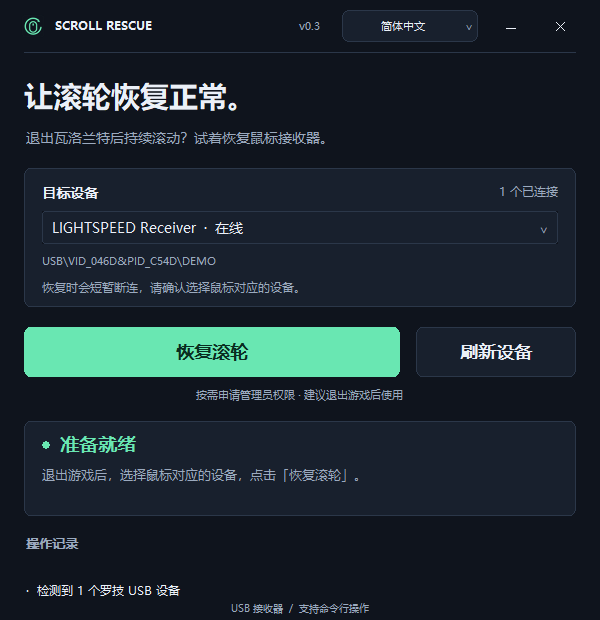
- 自绘窗口标题栏,内置应用图标。
- 简体中文与 English 界面,可跟随系统或手动切换并记住选择。
- 图形界面与命令行均可使用,支持设备列表、JSON 输出和操作预览。
- 便携运行,无需安装额外运行环境。
下载与使用
- 下载下方的 scroll-rescue-cpp-windows-x64.zip 并解压。
- 打开 scroll-rescue.exe,选择鼠标对应的罗技 USB 设备。
- 退出游戏后点击 恢复滚轮,允许管理员授权。
恢复过程中鼠标会短暂断连。完成后请实际测试滚轮。命令行用法见压缩包中的 README;同名 .sha256 文件用于校验下载的 ZIP。
支持 Windows 10 2004 及以上 / Windows 11,x64,适用于罗技 USB 鼠标及 LIGHTSPEED 接收器。蓝牙设备、macOS 和 Linux 暂不支持。
English
Scroll Rescue is a lightweight, portable Windows utility for Logitech mouse continuous or infinite scrolling after VALORANT. This release includes a custom title bar, an app icon, English/Simplified Chinese localization, and both GUI and command-line use.
Download scroll-rescue-cpp-windows-x64.zip, extract it, open scroll-rescue.exe, select the matching Logitech USB device and choose Restore scrolling after closing the game. Allow administrator approval and check the wheel afterward; the mouse briefly disconnects during recovery.
Requires Windows 10 version 2004 or later / Windows 11, x64. Supports Logitech USB mice and LIGHTSPEED receivers. Bluetooth devices, macOS and Linux are not supported. See the bundled English README for command-line usage; the .sha256 file provides the ZIP checksum.