Baritone Panel is a Baritone-based fork for Minecraft 1.19.4 that keeps normal Baritone command behavior and adds a vanilla Minecraft-style GUI opened with the B key. The GUI exposes the current fork's active commands and every setting from Settings.java while delegating pathing, mining, building, farming, following, exploring, Elytra, waypoints, schematics, litematica, cache, and chat command behavior to Baritone's existing systems.
Original Baritone credit and license notices remain intact. Baritone was created by leijurv and Brady; this fork adds the Baritone Vanilla GUI / Baritone Panel layer.
- Adds a normal Minecraft keybind named
Open Baritone Panel. - Opens a vanilla-style Baritone Panel with Movement, Mining, Building, Selection, Farming, Follow / Pickup, Waypoints, Explore, Elytra, Render / HUD, Settings, Advanced, and Debug / About categories.
- Provides GUI command forms for every active command registered by this fork.
- Provides a complete Settings GUI for all 248 current
Settings.javasettings. - Keeps chat commands such as
#goto,#mine,#build,#farm,#follow,#elytra,#set, and#stopworking as before.
Use the JAR matching your loader and Minecraft version. This release targets Minecraft 1.19.4.
Recommended installable JARs are copied to:
build/baritone-gui-release/
After .\gradlew.bat clean build, install one of:
- Fabric:
build/baritone-gui-release/baritone-panel-standalone-fabric-1.9.5-panel.1.jar - Forge:
build/baritone-gui-release/baritone-panel-standalone-forge-1.9.5-panel.1.jar - Standalone/tweaker:
build/baritone-gui-release/baritone-panel-standalone-1.9.5-panel.1.jar
Do not use dev or unoptimized jars for normal installs. API jars in dist/ are for library consumers, not the recommended player download.
This fork is built from the current Gradle configuration:
- Minecraft:
1.19.4 - Java:
17 - Fabric loader metadata:
0.14.11 - Forge:
45.0.43 - Standalone/tweaker artifact: enabled
The Gradle build currently includes Fabric, Forge, and standalone/tweaker artifacts.
Press B in-game to open Baritone Panel.
To change it, open Minecraft Options -> Controls -> Baritone Panel and remap Open Baritone Panel.
The GUI executes commands through Baritone's existing command manager. The command prefix, chat parsing, settings shortcut behavior, settings files, schematics/litematica, waypoints, cache, mining/building/farming/follow/explore/Elytra processes, and cancel/pause/resume behavior are preserved.
You can keep using chat commands exactly as normal. The panel is an additional interface, not a replacement command implementation.
- The GUI uses text-based file paths and item/block ids rather than a full file picker or registry picker.
- Some advanced/internal settings are intentionally shown behind Advanced mode or as read-only Java/API-only entries.
- Dangerous actions use confirmation screens, but users should still review commands before running build, selection, cache, reset, or force-cancel actions.
- Interactive in-game visual QA should be repeated on each packaged loader before publishing beyond this local release.
Use Java 17 and run:
.\gradlew.bat clean buildThe build runs unit tests and GUI coverage checks, then copies optimized release jars to build/baritone-gui-release/.
Useful checks:
.\gradlew.bat test
.\gradlew.bat verifyGuiCoverageDocs
.\gradlew.bat verifyGuiReleaseArtifactsGUI coverage is documented in:
docs/gui-coverage-report.md
That report compares DefaultCommands.java and Settings.java against the GUI registries and records that all active commands and all settings are covered.
The source code for this fork is this repository root. The original upstream Baritone project is:
https://github.com/cabaletta/baritone
The packaged mod metadata preserves original Baritone credit and license notices.

























A Minecraft pathfinder bot.
Baritone is the pathfinding system used in Impact since 4.4. Here's a (very old!) video I made showing off what it can do.
Quick download links:
How to immediately get started: Type #goto 1000 500 in chat to go to x=1000 z=500. Type #mine diamond_ore to mine diamond ore. Type #stop to stop. For more, read the usage page and/or watch this tutorial playlist. Also try #elytra for Elytra flying in the Nether using fireworks (trailer, usage). For help, join the Baritone Discord Server.
For other versions of Minecraft or more complicated situations or for development, see Installation & setup. For 1.16.5, click here and see description. Once Baritone is installed, look here for instructions on how to use it. There's a showcase video made by @Adovin#6313 on Baritone which I recommend. For help, join the Baritone Discord Server.
This project is an updated version of MineBot, the original version of the bot for Minecraft 1.8.9, rebuilt for 1.12.2 onwards. Baritone focuses on reliability and particularly performance (it's over 30x faster than MineBot at calculating paths).
Have committed at least once a day from Aug 1, 2018, to Aug 1, 2019.
1Leijurv3DWTrGAfmmiTphjhXLvQiHg7K2
Here are some links to help to get started:
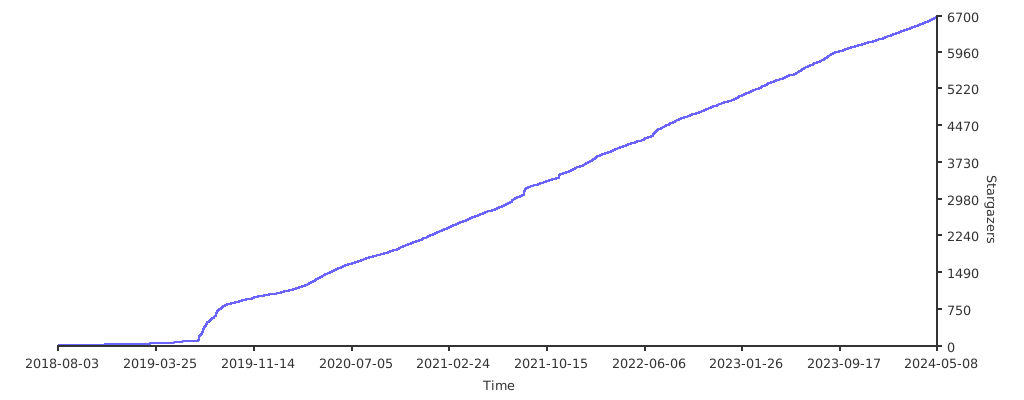
The API is heavily documented, you can find the Javadocs for the latest release here.
Please note that usage of anything located outside of the baritone.api package is not supported by the API release
jar.
Below is an example of basic usage for changing some settings, and then pathing to an X/Z goal.
BaritoneAPI.getSettings().allowSprint.value = true;
BaritoneAPI.getSettings().primaryTimeoutMS.value = 2000L;
BaritoneAPI.getProvider().getPrimaryBaritone().getCustomGoalProcess().setGoalAndPath(new GoalXZ(10000, 20000));That's what it's for, sure! (As long as usage complies with the LGPL 3.0 License)
Magic. (Hours of leijurv enduring excruciating pain)


YourKit supports open source projects with innovative and intelligent tools for monitoring and profiling Java and .NET applications.
YourKit is the creator of the YourKit Java Profiler, YourKit .NET Profiler, and YourKit YouMonitor.
We thank them for granting Baritone an OSS license so that we can make our software the best it can be.
It's named for FitMC's deep sultry voice.