Repository navigation
Releases: JorreFog/ROCKNIXDS
Release list
ROCKNIXDS 1.6.1

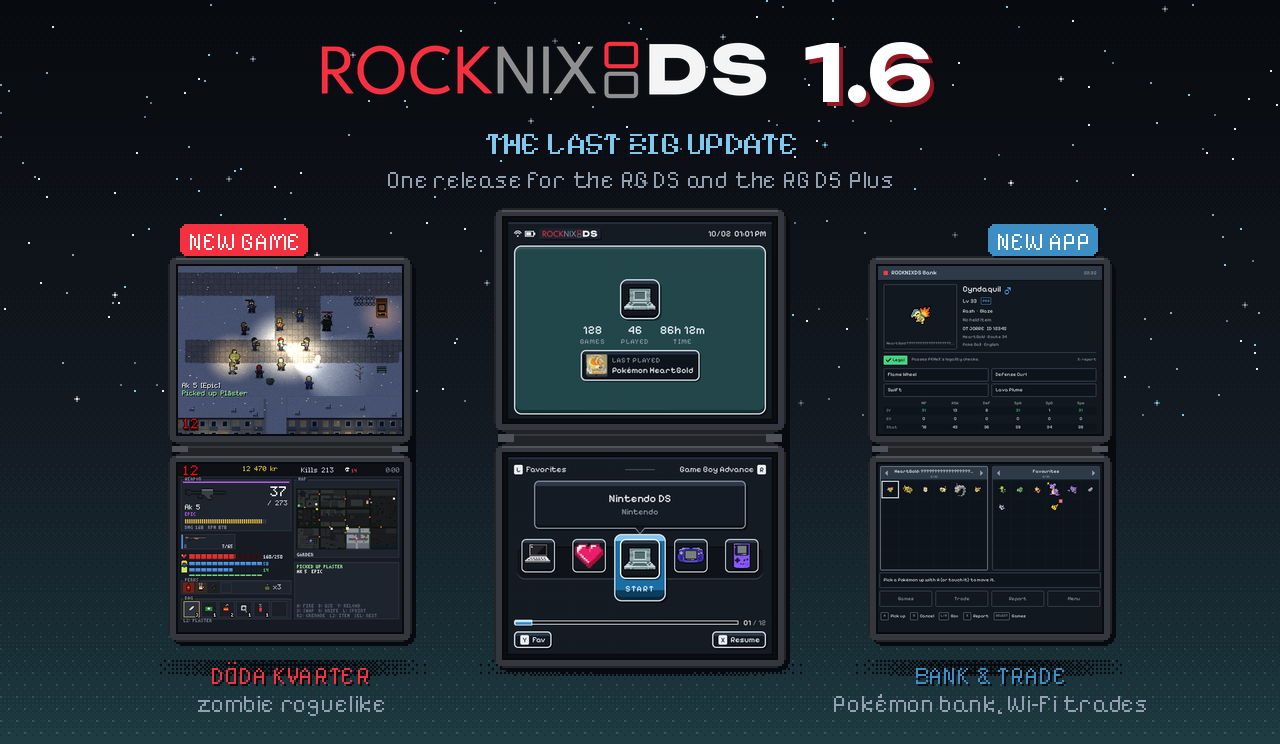
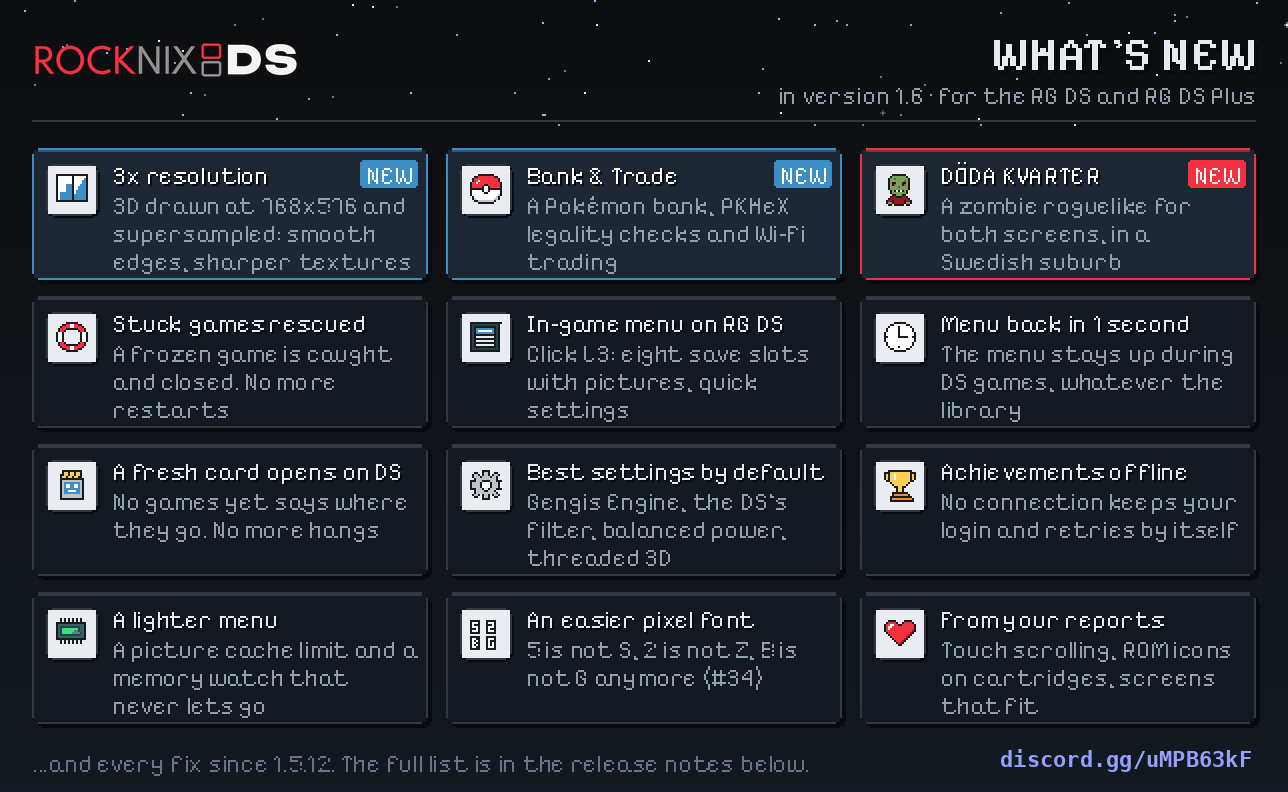
A game that gets stuck no longer needs a restart, the menu is back about a second after you quit, and three new
things: 3× internal resolution, ROCKNIXDS Bank & Trade, and a game of our own, Döda Kvarter. 1.6 is the last big
update of ROCKNIXDS. This is the RG DS release, and it is 1.6 and 1.6.1 in one: 1.6.1 is Döda Kvarter 0.2, with a
difficulty setting, a lock-on button and updates of its own. The RG DS Plus has its own releases,
v1.6-plus and
v1.6.1-plus.
Install or upgrade
From 1.5: Updates & downloads > ROCKNIXDS in the menu. New SD card: the image attached below, see the
README's Get started. From anything else, ssh into the handheld
as root (password rocknix) and run:
curl -fsSL https://raw.githubusercontent.com/JorreFog/ROCKNIXDS/main/install.sh | shROCKNIXDS Bank & Trade is a separate install (below). Döda Kvarter comes with the update.
🔺 3× internal resolution
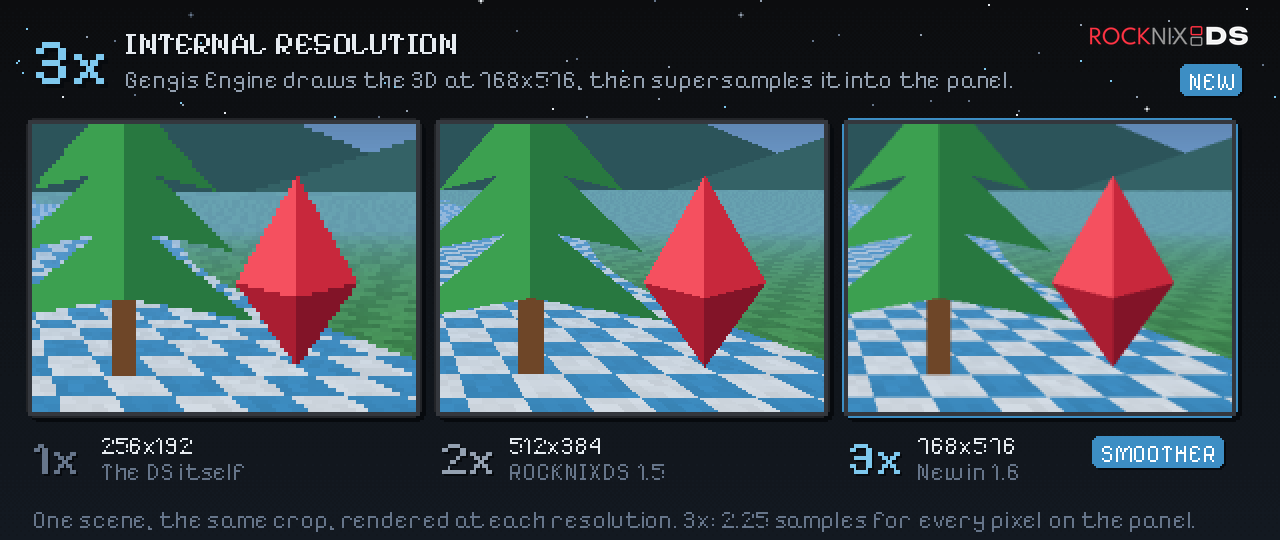
Gengis Engine can draw a game's 3D at three times the DS's size and bring it down to the 2× picture: smoother polygon
edges, the same layout. Nintendo DS settings (or a game's) > 3D resolution: 3x. It costs CPU, so 3x runs on the
performance power profile unless the game has its own profile set. On this RG DS, ROCKNIXDS's 3D stress test held
60 fps at 3x at its lighter level and fell to about 47 at a heavy one (59.5 at 2x), so 3x is for games with light 3D
(Pokémon HeartGold walking held 60 fps at 3x on a Plus, the same chip). DraStic's own renderer ignores the setting.
🏦 ROCKNIXDS Bank & Trade
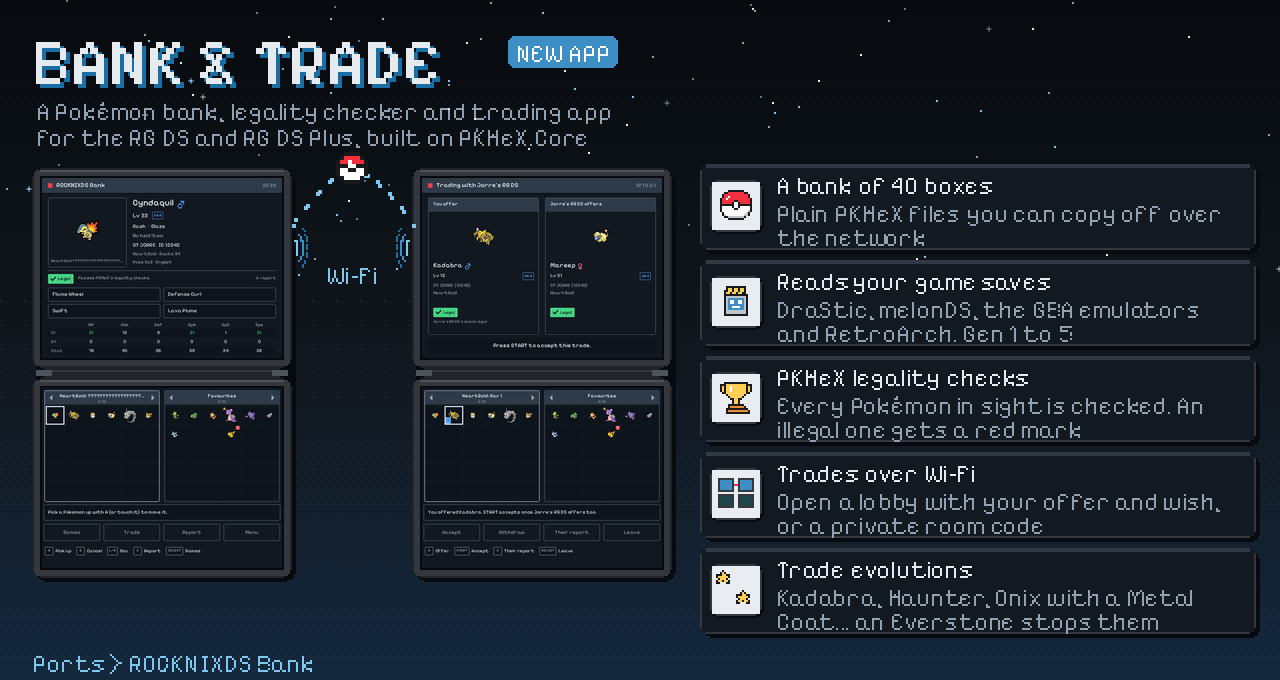
A Pokémon bank, legality checker and trading app on both screens, built on PKHeX.Core: it reads your game saves
(DraStic's, melonDS's, RetroArch's), stores Pokémon in 40 boxes of its own, moves them between games through the bank
(up a generation as Pal Park and Poké Transfer did, never back down), checks every one with PKHeX's legality
analysis, and trades between two handhelds over Wi-Fi: open lobbies that every handheld on the network sees, or a
private room joined with a code. Trade evolutions happen on arrival. Over ssh:
curl -fsSL https://raw.githubusercontent.com/JorreFog/ROCKNIXDS/main/bank/device/install-bank.sh | shIt gets a tile of its own on the home page (Bank & Trade). Close the game whose save you open: emulators write
their own copy of the save when they quit. The bank's README
has the rest. Tested on an RG DS Plus with Black 2, HeartGold and generated saves of every generation, and with two
instances trading over Wi-Fi.
🧟 Döda Kvarter
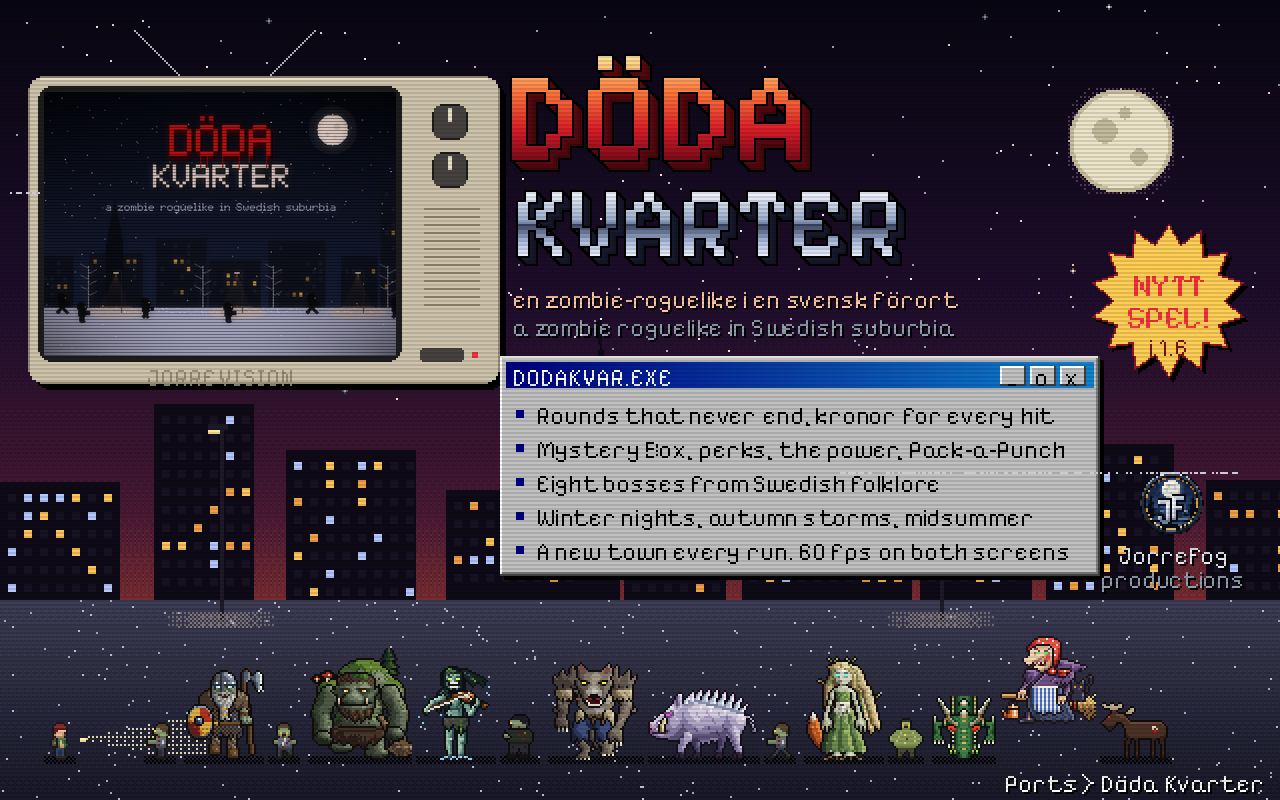
A zombie roguelike made for both screens, set in a Swedish suburb at night: rounds that never end, kronor for every
hit, barricades into new districts, the Mystery Box (Lådan), perks as Swedish food, Pack-a-Punch (Smedjan), eight
bosses from Swedish folklore, and a new town every run; Today's town is the same for everyone on the same day. It
draws every pixel itself on the bare panels at 60 frames a second, and it has a tile of its own on the home page.
Settings > Buttons sets the layout and a button for every action. On the RG DS it draws 2× pixels, on the Plus 3×.
New in 1.6.1, Döda Kvarter 0.2:
- Difficulty: Easy, Medium, Hard (Settings > Difficulty; a run takes it when it starts). The default is
Medium: the dead (and the bosses) hit 30% softer, have 20% less health, come 15% fewer to a round, and turn into
runners and sprinters more slowly. Easy goes further (55%, 40%, 30% off). Hard is 0.1's game. The high
score list marks each run E, M or H. - Lock on: hold R2. While you hold it, your aim stays locked on the nearest zombie in sight, with a red marker
round it; let go and the aim is free again. Let go and hold it again at once to lock on the next nearest. When the
one you're locked on falls, the aim moves to the nearest by itself. The right stick or a touch on the top screen
still aims where you point. - The buttons that moved, to free R2: the grenade is on L2, and the bag is all on SELECT: a tap picks the
next item, holding it uses it (or tap the bag on the bottom screen). Settings > Buttons changes any of it. - The game updates itself. A new Döda Kvarter doesn't need a ROCKNIXDS update: the title says when there is one
(with Wi-Fi on), and Settings > Game updates downloads it, checks it, puts it in place and starts it. High
scores and settings stay. A ROCKNIXDS update never puts an older game back over a newer one.
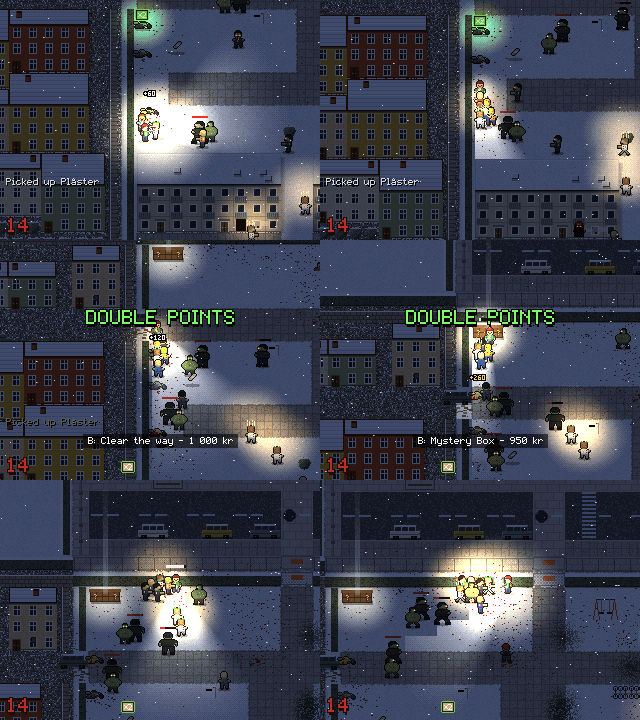
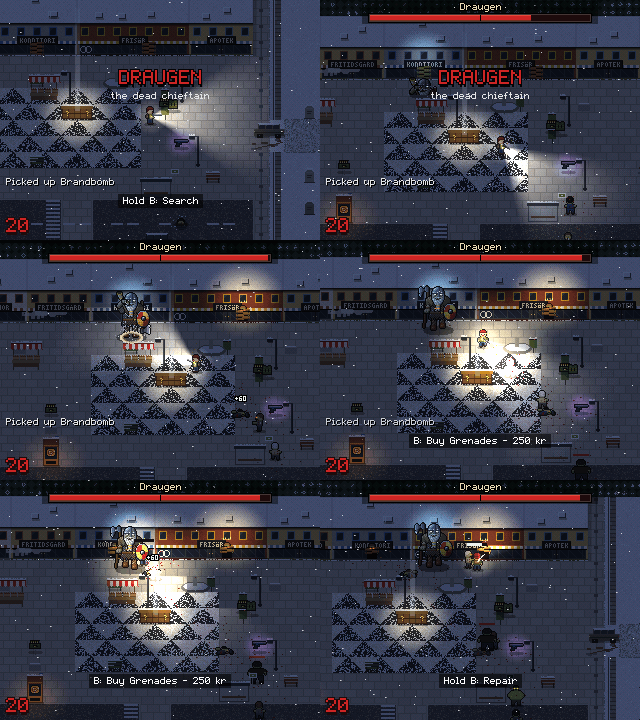
Real play, at the game's own resolution: a horde on round 14, and the boss Draugen on round 20.
🛟 A stuck game never needs a restart again
On 2026-10-05 a Plus froze right after Pokémon Black 2 loaded its resume state: the game stopped drawing and nothing
ended it; the handheld had to be restarted. Now:
- The cause is found and fixed. DraStic starts four of its helper threads before it sets up the locks they wait
on; a helper that was quick waited on a lock DraStic then wiped, and nothing ever woke it: a game that showed no
frame, or stopped at its first 3D frame. It struck 4 of 25 HeartGold starts on a Plus. SuperDrastic now holds
those threads at the door until their locks exist: 0 of 40 starts since, and 0 of 6 with the race forced (4 of 4
froze without the fix). - 5 s without a picture (outside DraStic's own menu and the in-game menu): a red card says The game stopped
responding. The exit hotkey then takes you to the menu at once, and the log records what every part of the game
was doing. - 20 s without a picture: the game is closed, and the menu says why.
- The exit hotkey always ends the game. A second press, or a game that doesn't take the save within 3 seconds,
quits at once (without a resume state). - A game frozen solid (even its display engine stuck) is ended from outside after 15 s, with the same message.
All of it checked on an RG DS and an RG DS Plus (docs/1.6-prep/stall-checks.sh: 7 of 7 on each), and 30 fresh
starts in a row on the RG DS with 1.6.1's library: none froze.
🎮 The in-game menu, on the RG DS too
Clicking the left stick (L3) during a game opens a menu in ROCKNIXDS Pixel's look instead of DraStic's old one:
Resume; Save and Load, with eight slots, a picture in each, and Undo last load; Quick settings (volume, brightness,
a live microphone meter and Blow); DraStic's own menu; Quit. The top screen shows the paused game, this session's
play time, the last save and your latest achievements. It was designed at the RG DS's 640×480 and is drawn at that
size here, its pixel text on the font's grid. RG DS Plus beta testers have had it since 1.5.13 beta 1; since then a
selected empty slot on the Load page is readable and dates have ...


ROCKNIXDS 1.6.1 for the RG DS Plus
Döda Kvarter 0.2: a difficulty setting, a lock-on button, and a game that updates itself. Nothing else in
ROCKNIXDS changes from 1.6.
RG DS (non-Plus) owners: your 1.6 is coming separately. Until then v1.5.12 is your release.
Install or upgrade
From 1.6 or 1.5: Updates & downloads > ROCKNIXDS in the menu. From anything else, ssh into the handheld as root
(password rocknix) and run:
curl -fsSL https://raw.githubusercontent.com/JorreFog/ROCKNIXDS/main/install.sh | shNew SD card: the 1.6 image on the v1.6-plus release,
then update from the menu.
🧟 Döda Kvarter 0.2
- Difficulty: Easy, Medium, Hard (Settings > Difficulty; a run takes it when it starts). 0.1 was too hard, so the
new default is Medium: the dead (and the bosses) hit 30% softer, have 20% less health, come 15% fewer to a
round, and turn into runners and sprinters more slowly. Easy goes further (55%, 40%, 30% off). Hard is 0.1's
game. The high score list marks each run E, M or H; the scores from 0.1 count as Hard. - Lock on: hold R2 (the right trigger). While you hold it, your aim stays locked on the nearest zombie in sight,
with a red marker round it; let go and the aim is free again. Let go and hold it again at once to lock on the next
nearest instead (and round again). When the one you're locked on falls, the aim moves to the nearest by itself.
Walk anywhere and keep shooting it. The right stick or a touch on the top screen still aims where you point. - The buttons that moved, to free R2: the grenade is on L2, and the bag is all on SELECT: a tap picks the
next item, holding it uses it (or tap the bag on the bottom screen). Settings > Buttons changes any of it. Custom
layouts from 0.1 go back to the new defaults once. - The game updates itself. From now on a new Döda Kvarter doesn't need a ROCKNIXDS update: the title says when
there is one (with Wi-Fi on), and Settings > Game updates downloads it, checks it, puts it in place and starts
it. High scores and settings stay; a run saved in the old version doesn't carry over, and the row asks first. A
ROCKNIXDS update never puts an older game back over a newer one.
For developers
A game release is a dodakvarter-v<version> tag (the game's VERSION), published as a pre-release by
.github/workflows/dodakvarter-release.yml with dodakvarter-<version>-aarch64.tar.gz and its .sha256; the game's
device/update.sh takes the newest. Like the bank's, these never show up as ROCKNIXDS releases.
Tested on a PC: the game's tests (the rules, the bot playing whole runs and every boss under the sanitizers, a run saved
and loaded, the monkey), the updater end to end against a local release (a damaged download changes nothing), and the
RG DS build under qemu. Not yet tested on a handheld.
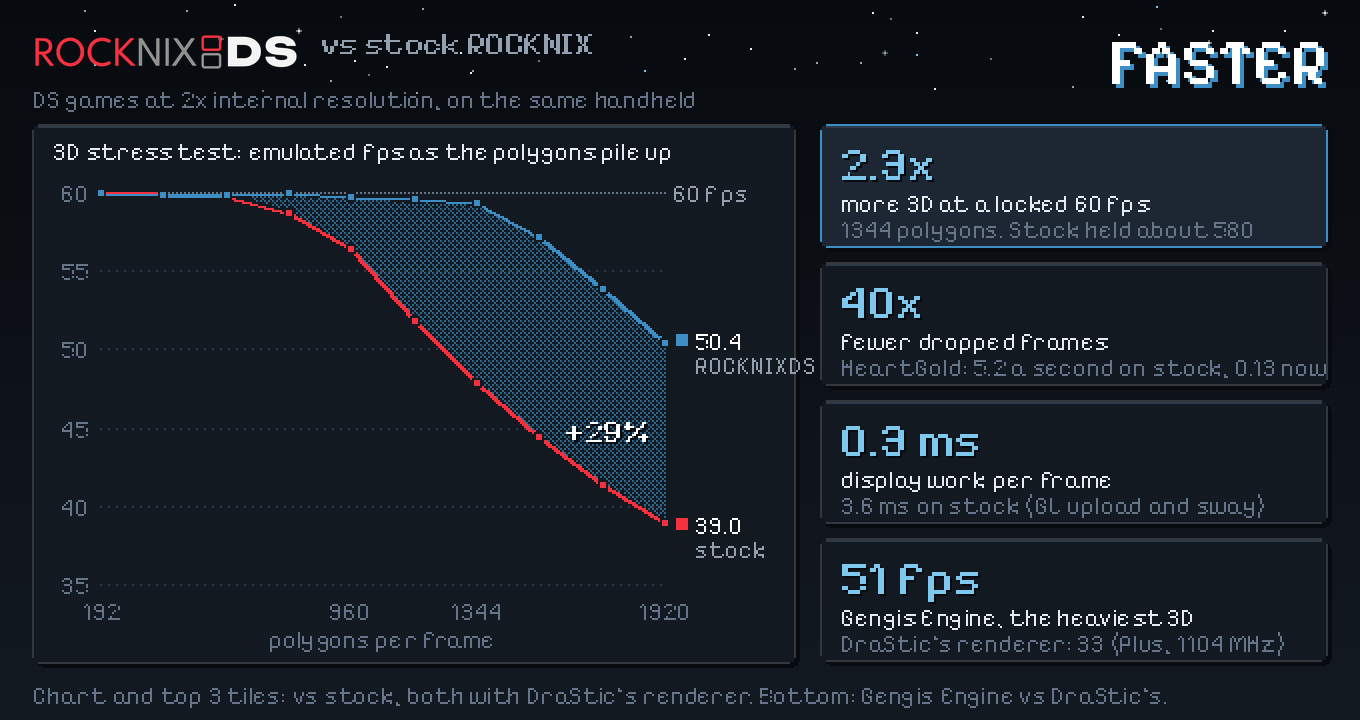
ROCKNIXDS 1.6 for the RG DS Plus
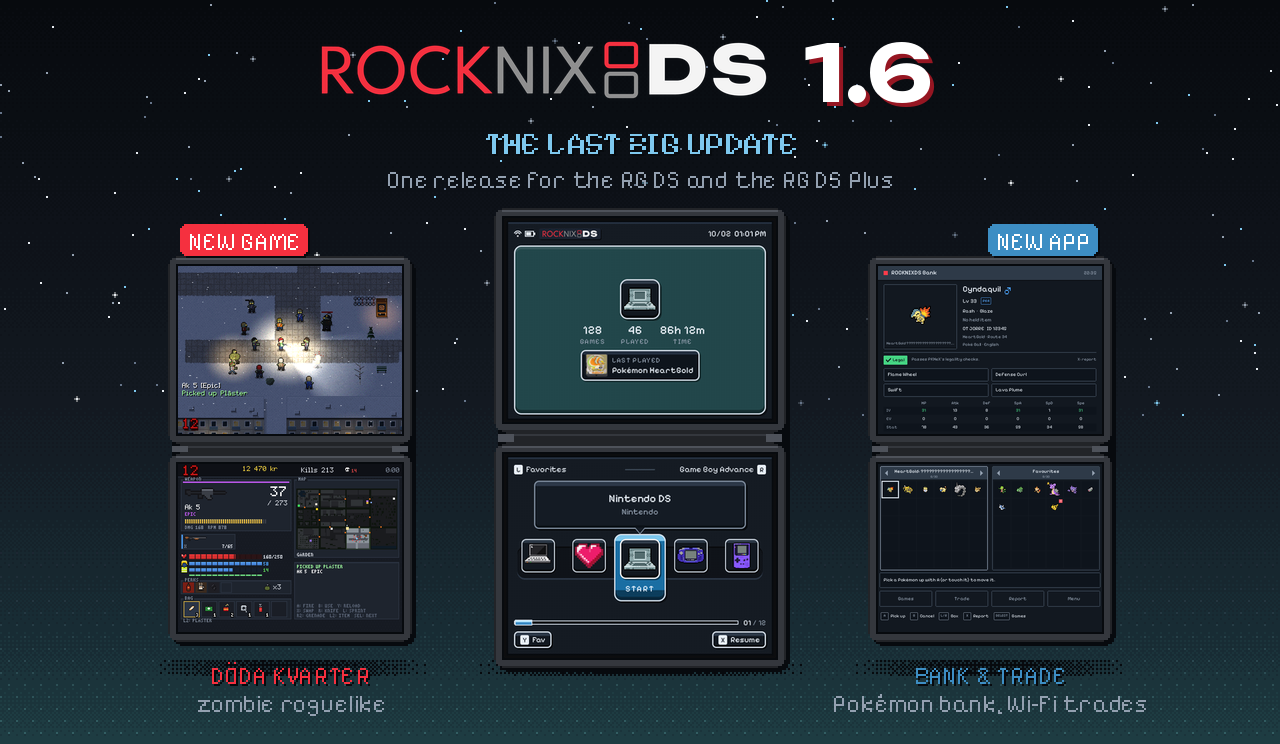
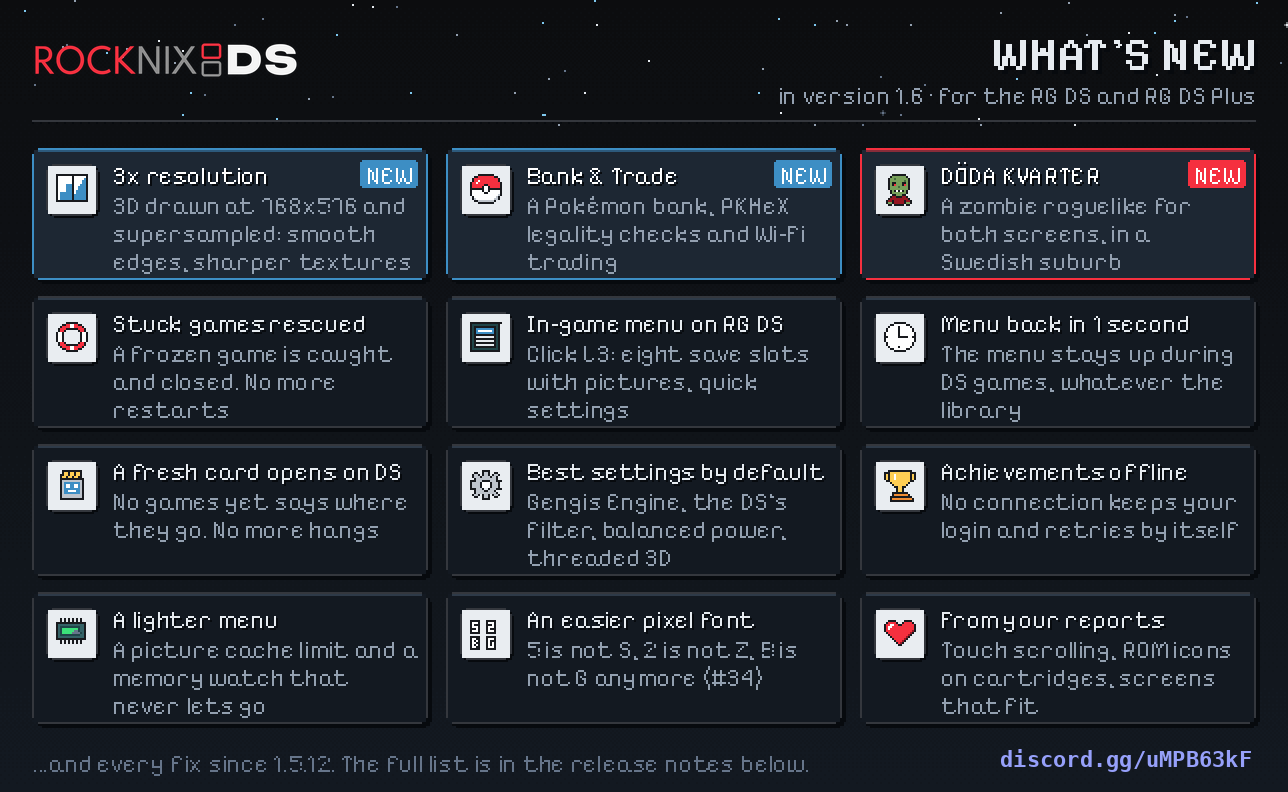
A game that gets stuck no longer needs a restart, the menu is back about a second after you quit, and three new
things: 3× internal resolution, ROCKNIXDS Bank & Trade, and a game of our own, Döda Kvarter. 1.6 is the last big
update of ROCKNIXDS. This is the RG DS Plus release; the RG DS (non-Plus) release follows.
RG DS (non-Plus) owners: your 1.6 is coming separately. Until then v1.5.12 is your release.
Install or upgrade
From 1.5: Updates & downloads > ROCKNIXDS in the menu. New SD card: the image attached below, see the
README's Get started. From anything else, ssh into the handheld
as root (password rocknix) and run:
curl -fsSL https://raw.githubusercontent.com/JorreFog/ROCKNIXDS/main/install.sh | shROCKNIXDS Bank & Trade is a separate install (below). Döda Kvarter comes with the update.
🔺 3× internal resolution
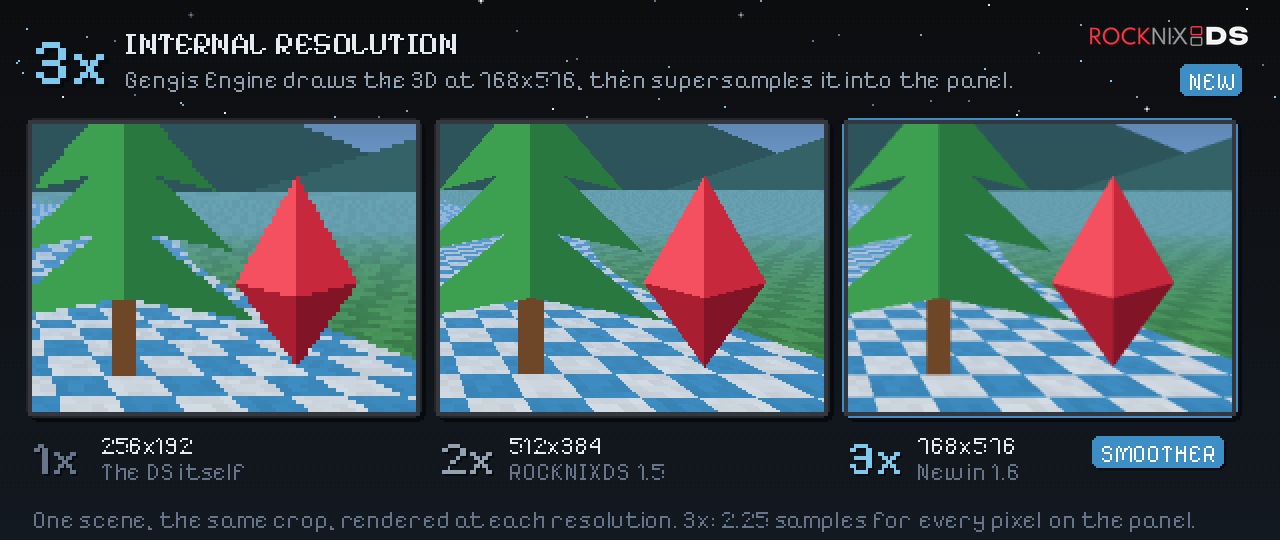
Gengis Engine can draw a game's 3D at three times the DS's size and bring it down to the 2× picture: smoother polygon
edges, the same layout. Nintendo DS settings (or a game's) > 3D resolution: 3x. It costs CPU, so 3x runs on the
performance power profile unless the game has its own profile set (Pokémon HeartGold walking held 60 fps at 3x on
a Plus in the 3x test build). DraStic's own renderer ignores the setting.
🏦 ROCKNIXDS Bank & Trade
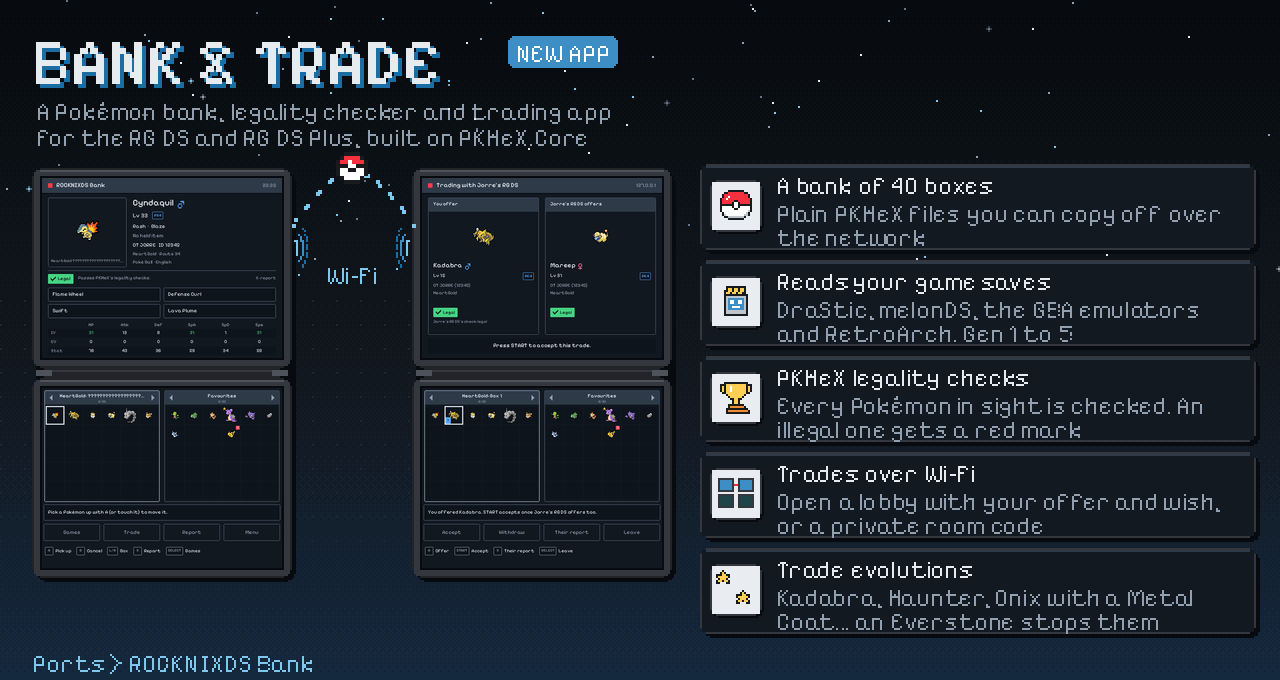
A Pokémon bank, legality checker and trading app on both screens, built on PKHeX.Core: it reads your game saves
(DraStic's, melonDS's, RetroArch's), stores Pokémon in 40 boxes of its own, moves them between games through the bank
(up a generation as Pal Park and Poké Transfer did, never back down), checks every one with PKHeX's legality
analysis, and trades between two handhelds over Wi-Fi: open lobbies that every handheld on the network sees, or a
private room joined with a code. Trade evolutions happen on arrival. Over ssh:
curl -fsSL https://raw.githubusercontent.com/JorreFog/ROCKNIXDS/plus-beta/bank/device/install-bank.sh | shIt gets a tile of its own on the home page (Bank & Trade). Close the game whose save you open: emulators write
their own copy of the save when they quit. The bank's README
has the rest. Tested on an RG DS Plus with Black 2, HeartGold and generated saves of every generation, and with two
instances trading over Wi-Fi.
🧟 Döda Kvarter
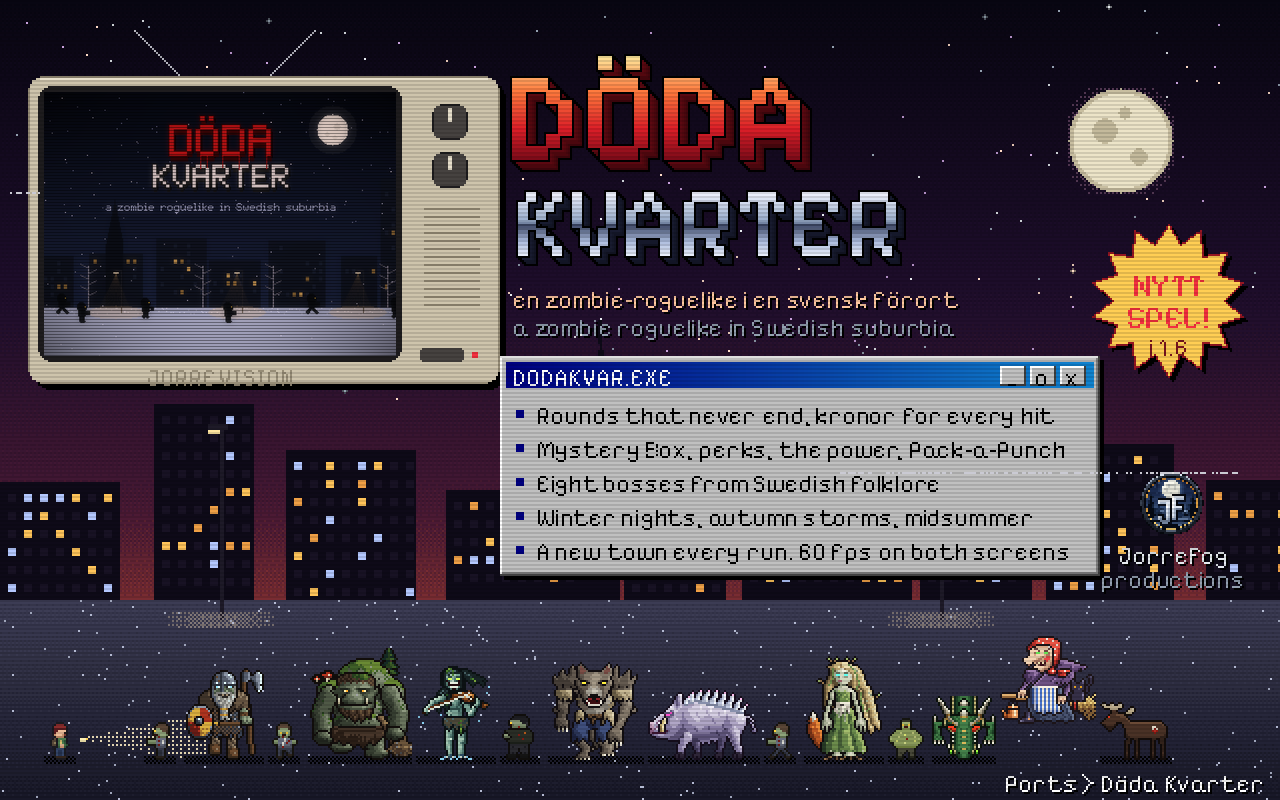
A zombie roguelike made for both screens, set in a Swedish suburb at night: rounds that never end, kronor for every
hit, barricades into new districts, the Mystery Box (Lådan), perks as Swedish food, Pack-a-Punch (Smedjan), eight
bosses from Nordic folklore, and a new town every run; Today's town is the same for everyone on the same day. It
draws every pixel itself on the bare panels at 60 frames a second, and it has a tile of its own on the home page.
Settings > Buttons sets the layout and a button for every action. (It stuttered on the Plus the day before this
release: a 50-100 ms freeze every 3 seconds, from re-checking the input devices; fixed, and measured at a steady 60
frames a second with 0 late frames.)
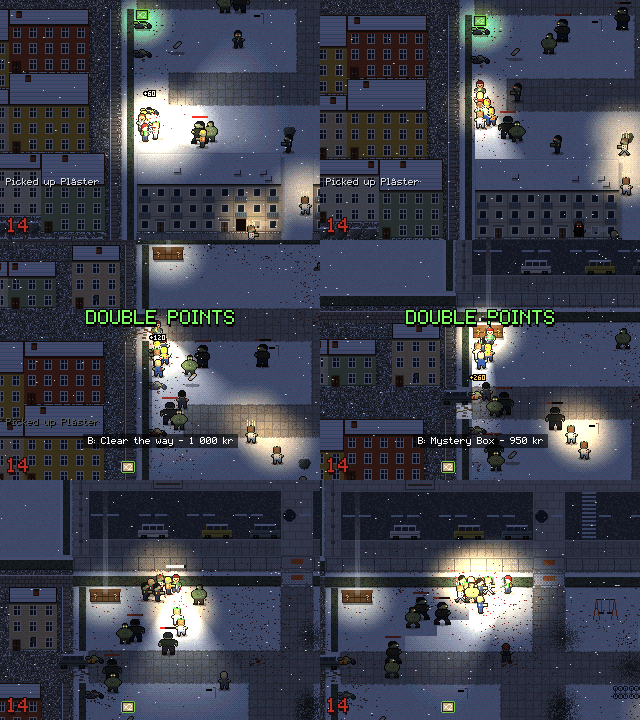
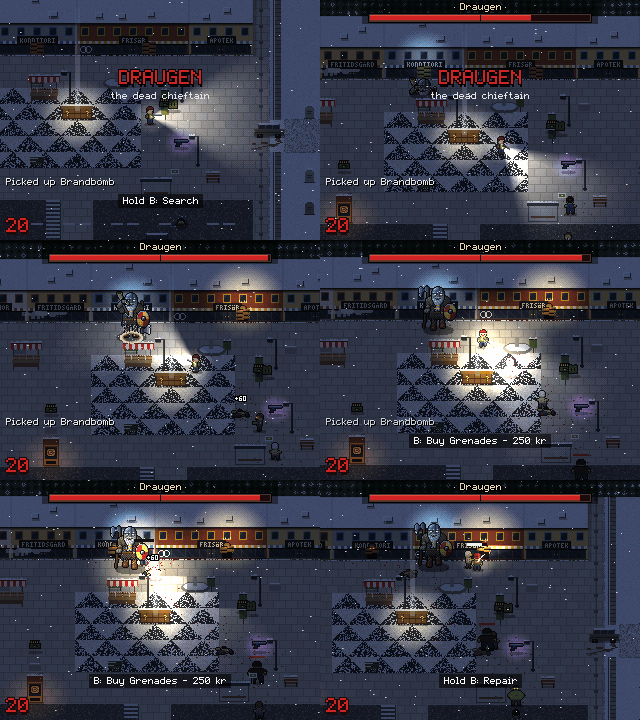
Real play, at the game's own resolution: a horde on round 14, and the boss Draugen on round 20.
🛟 A stuck game never needs a restart again
On 2026-10-05 a Plus froze right after Pokémon Black 2 loaded its resume state: the game stopped drawing and nothing
ended it; the handheld had to be restarted. Now:
- The cause is found and fixed. DraStic starts four of its helper threads before it sets up the locks they wait
on; a helper that was quick waited on a lock DraStic then wiped, and nothing ever woke it: a game that showed no
frame, or stopped at its first 3D frame. It struck 4 of 25 HeartGold starts on a Plus. SuperDrastic now holds
those threads at the door until their locks exist: 0 of 40 starts since, and 0 of 6 with the race forced (4 of 4
froze without the fix). - 5 s without a picture (outside DraStic's own menu and the in-game menu): a red card says The game stopped
responding. The exit hotkey then takes you to the menu at once, and the log records what every part of the game
was doing. - 20 s without a picture: the game is closed, and the menu says why.
- The exit hotkey always ends the game. A second press, or a game that doesn't take the save within 3 seconds,
quits at once (without a resume state). - A game frozen solid (even its display engine stuck) is ended from outside after 15 s, with the same message.
All of it checked on a Plus (docs/1.6-prep/stall-checks.sh: 7 of 7).
🎮 The in-game menu
Clicking the left stick (L3) during a game opens a menu in ROCKNIXDS Pixel's look instead of DraStic's old one:
Resume; Save and Load, with eight slots, a picture in each, and Undo last load; Quick settings (volume, brightness,
a live microphone meter and Blow); DraStic's own menu; Quit. The top screen shows the paused game, this session's
play time, the last save and your latest achievements. Beta testers have had it since 1.5.13 beta 1; since then a
selected empty slot on the Load page is readable and dates have no double space.
⏱️ Back to the menu in about a second, and it looks clean
Quitting a DS game no longer restarts EmulationStation. The menu stays up during the game and is back about a second
after you quit, whatever the size of your library (measured on a Plus: about 1.7 s). Between the menu and the game
the screens are plain black: no terminal cursor, and no leftover frame of the start animation. The first button
press after a game is no longer lost (sway had its display back but no input devices until something made it look;
6 of 9 first presses were ignored, now 7 of 7 registered). /storage/.config/drastic/dsflip/fast-switch off (over
ssh) goes back to the old way.
🖼️ The menu: tiles, cartridges, pictures
- Döda Kvarter and Bank & Trade have tiles of their own on ROCKNIXDS Pixel's home page, with pixel icons of
their own: A on the tile starts the app. - No cartridge is ever empty. ROCKNIX's pictures for its Tools (File Manager, the emulators' own menus...) are
SVG files the menu couldn't read, so every cartridge in Tools was blank: they show now. An entry with no picture at
all (the Music Player, a game nobody scraped) shows its system's icon on a plain label. - The game stopped responding notice fits its box; Tools and Music Player no longer carry an empty-box glyph
before "System"; a game never started says Not played yet on the home card; a list of one shows no neighbours.
🗂️ A fresh card opens on the DS
With no DS games yet, EmulationStation used to drop the DS. The menu then opened on Music Player and two empty
collection...
ROCKNIXDS Bank & Trade bank-v0.1.0
ROCKNIXDS Bank & Trade: a Pokémon bank, PKHeX legality checks and Wi-Fi trading for the RG DS and RG DS Plus.
Install on the handheld (ssh, as root):
curl -fsSL https://raw.githubusercontent.com/JorreFog/ROCKNIXDS/main/bank/device/install-bank.sh | sh
See bank/README.md.
ROCKNIXDS 1.5.13 beta 1 for the RG DS Plus: a new in-game menu
A new in-game menu. Clicking the left stick (L3) during a game now opens a menu in ROCKNIXDS Pixel's look
instead of DraStic's old one: big tiles, touch everywhere, save slots with pictures, and your latest achievements on
the top screen. The pixel font is easier to read too: 5 no longer looks like S.
Beta, RG DS Plus only. Tested on an RG DS Plus. There is no RG DS (non-Plus) build of this yet: RG DS owners
stay on v1.5.12. Stable Plus users are not
offered this beta; it comes through the beta channel only (see below).
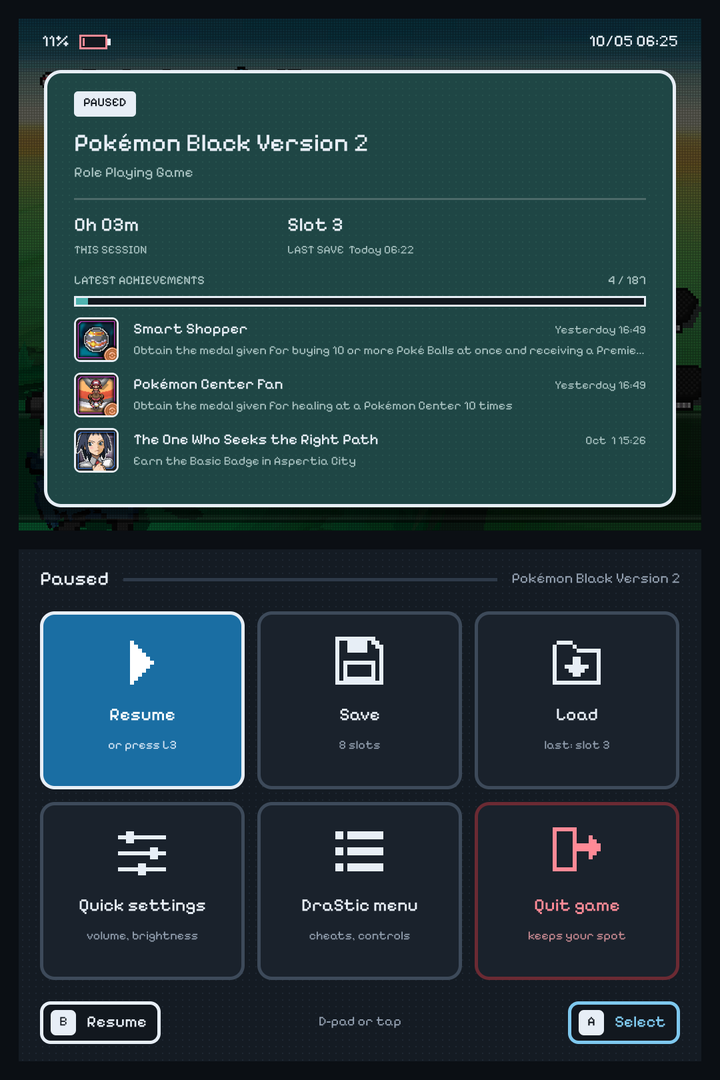 L3 in a game: paused, with your latest achievements |
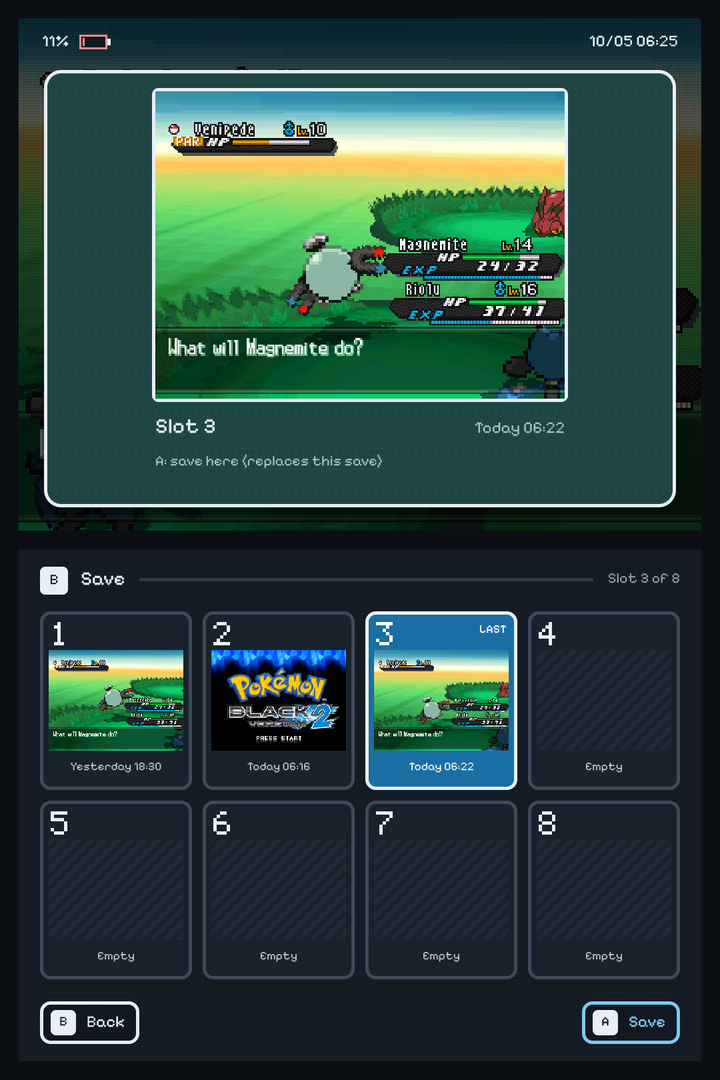 Save: 8 slots, each with a picture |
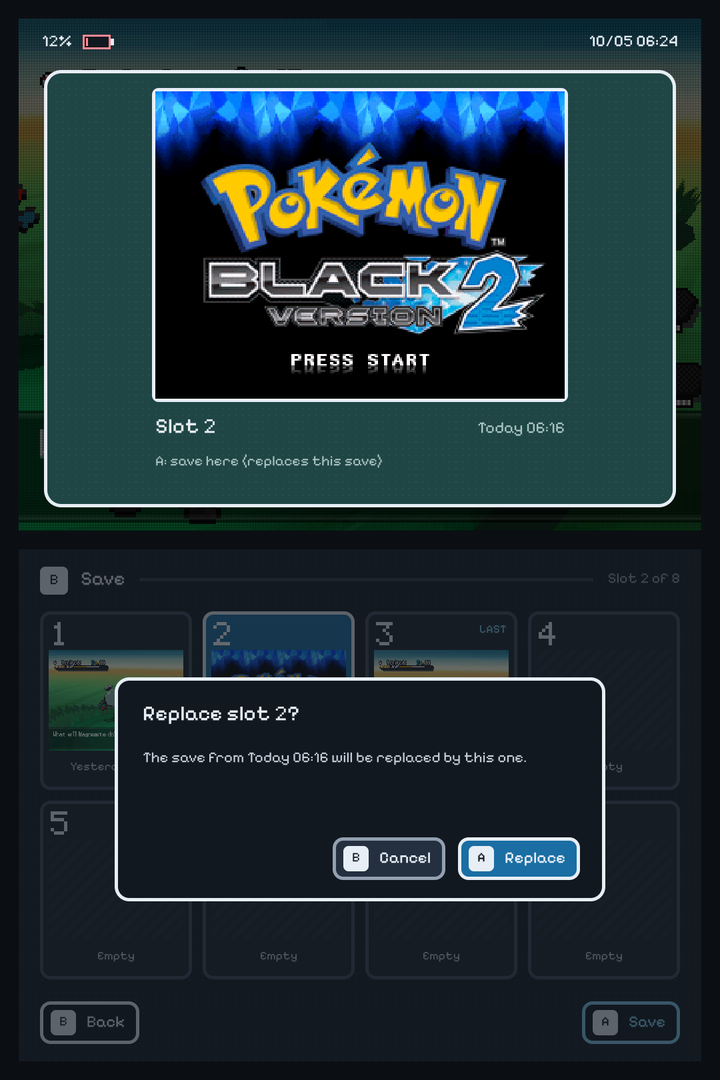 Replacing a save asks first |
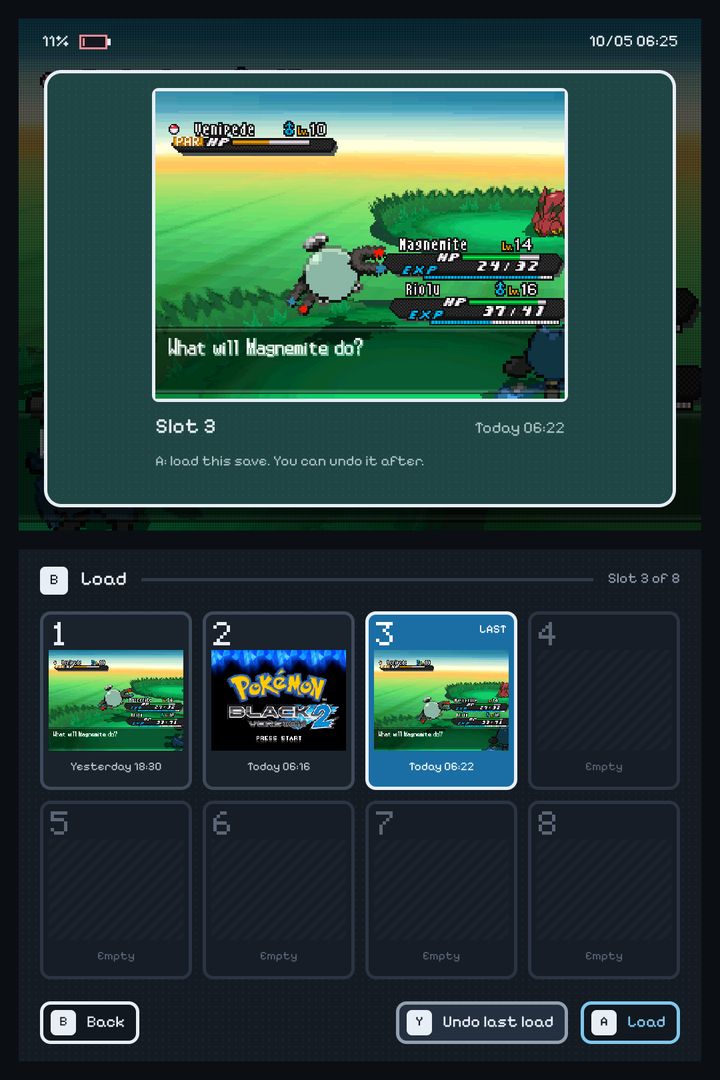 Load, with Undo last load |
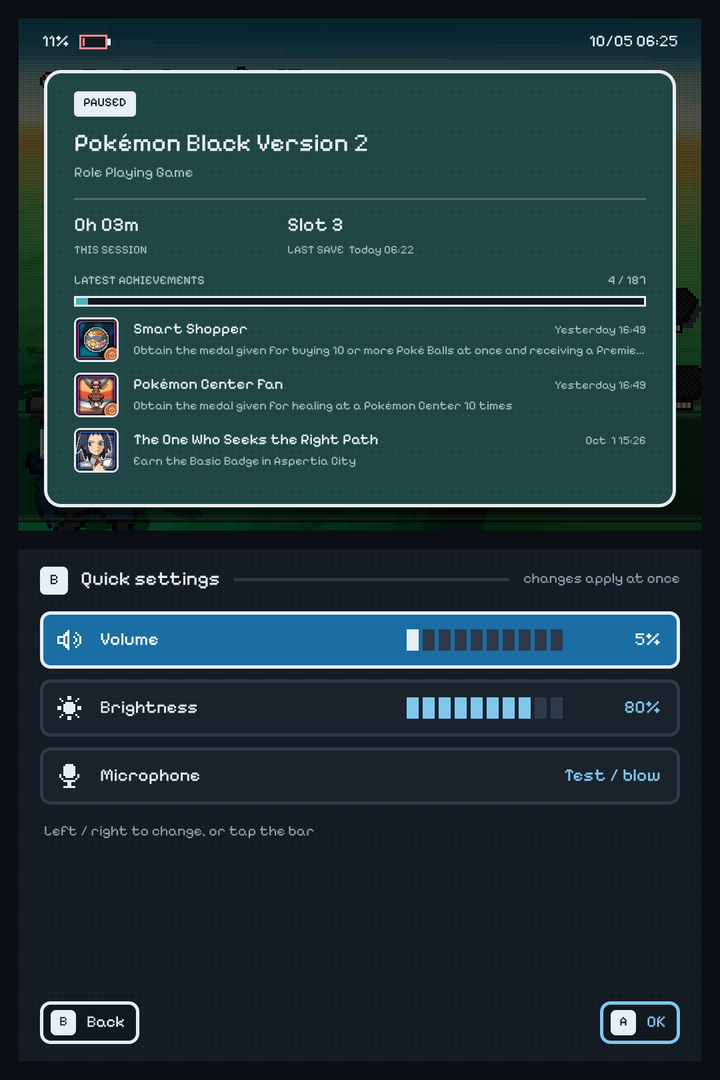 Quick settings |
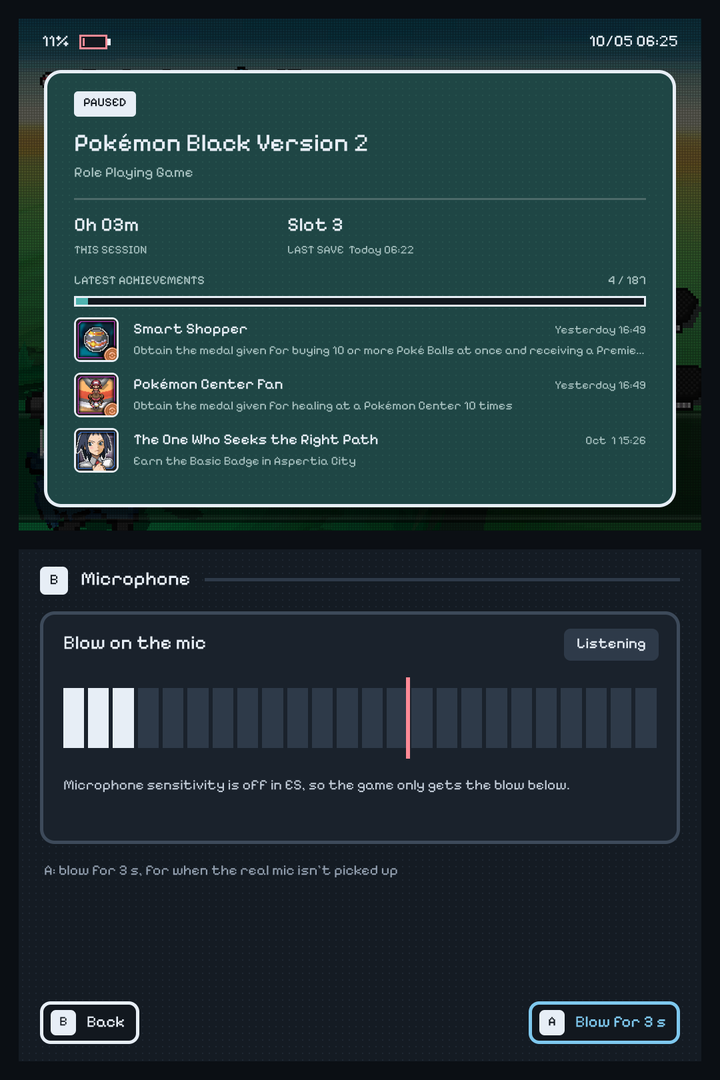 Microphone: a live meter |
 Pop-ups (achievements, volume, saves) in the same style |
||
Install
On an RG DS Plus with ROCKNIXDS 1.5 or newer: Updates & downloads > ROCKNIXDS, set the channel to beta,
then update. Over ssh (root, password rocknix):
curl -fsSL https://raw.githubusercontent.com/JorreFog/ROCKNIXDS/main/install.sh | RGDS_BRANCH=beta shBack to stable: set the channel to stable in the same menu and update; that installs 1.5.12 again.
🎮 The in-game menu
Press L3 (or the mode key) while a game runs. The game, its sound and its clock stop until you close the menu.
Use the D-pad, the left stick or touch (DraStic's menu ignored the touchscreen). A picks, B goes back,
L3 or Start closes it.
- Resume.
- Save and Load: 8 slots, each with a picture of the game as it was saved and when. The top screen shows the
slot you're on, large. Replacing a save asks first. Saves made in DraStic's old menu show up too (slots 1–8 are
DraStic's slots 0–7). - Undo last load (Y on the Load page): every load first keeps the game as it was, so loading the wrong
slot never costs you progress. - Quick settings: volume and brightness (both screens), which change right away, and Microphone.
- DraStic menu: DraStic's original menu, for cheats, controls and the firmware settings.
- Quit game: asks first, then keeps your spot like the exit hotkey (with resume on quit on).
Top screen: the game, this session's play time, your last save and your latest RetroAchievements with their
badges and the progress bar. The server's "Warning: Unknown Emulator" entry (it only means hardcore isn't available
with DraStic) is no longer listed or shown as an unlock.
🎤 Microphone
Quick settings > Microphone shows a live meter of the handheld's mic: blow on it and the bar climbs; past the red
line, the game counts it as a blow ("Heard!"). The line follows the microphone sensitivity setting in ES's DS
options. With it off (the default), the game doesn't hear the real mic at all, and the page says so. A there blows
for you: the menu closes and the game hears 3 seconds of blowing, for games that ask you to blow (candles, pinwheels)
when the real mic doesn't do it.
🔤 An easier pixel font
Pixelify Sans drew its 5 like an S, so "10/05" read as "10/0S" (#34).
Its 2 and Z were near twins, and B looked like G ("Pokémon Glack"). Those four are redrawn on the
font's own pixel grid with the same widths, so nothing moves; everything else in the font is unchanged. It applies to
the whole ROCKNIXDS Pixel menu and to the in-game menu.
🔔 Pop-ups in the same style
Achievement unlocks, the game's achievement summary, the volume indicator and the menu's messages ("Saved to slot
3") now use ROCKNIXDS Pixel's look: the dark dotted card with a light border, framed badges, the pixel font, and the
theme's gold, cyan and red.
Other fixes
- The exit hotkey works while the in-game menu is open: it closes the menu, saves your spot and quits.
- DraStic's save/load buttons, pressed for you (resume on quit, the menu): a second press while the first was still
held could leave the first button held down.
Known limits
- Fast forward isn't in the menu: DraStic's fast forward has no button by default, and it couldn't be checked
under SuperDrastic's frame pacing. - The Microphone page's "Blow" was checked to reach DraStic, not yet in a game's blowing scene: reports welcome.
- Want DraStic's old menu back? Ask in an issue; SuperDrastic can switch the new one off (
DSFLIP_MENU=0).
SuperDrastic 0.5.0-beta.1 (release).
ROCKNIXDS 1.5.12 for the RG DS Plus
Cartridge labels show the whole label. With ScreenScraper's cartridge art (a photo of the whole card), ROCKNIXDS
Pixel zoomed in on the middle of the label: Mario Kart DS read "MARIOKAR", and the logos lost their sides. The
cartridges now show the label's full width: the whole logo, the age rating and the Nintendo seal. Tested on an RG DS
Plus with six DS games scraped from ScreenScraper.
RG DS (non-Plus) owners: your release and image are on v1.5.12.
Install or upgrade
From 1.5: Updates & downloads > ROCKNIXDS in the menu. New SD card: the image attached below, see the
README's Get started.
ROCKNIXDS 1.5.12
Cartridge labels show the whole label. With ScreenScraper's cartridge art (a photo of the whole card), ROCKNIXDS
Pixel zoomed in on the middle of the label: Mario Kart DS read "MARIOKAR", and the logos lost their sides. The
cartridges now show the label's full width: the whole logo, the age rating and the Nintendo seal. Tested on an RG DS
Plus with six DS games scraped from ScreenScraper.
RG DS Plus owners: your release and image are on v1.5.12-plus.
Install or upgrade
From 1.5: Updates & downloads > ROCKNIXDS in the menu. New SD card: the image attached below, see the
README's Get started.
ROCKNIXDS 1.5.11 for the RG DS Plus
The SD card image now installs everything on its first start. In 1.5.10's image the first start stopped after
the menu theme: the menu looked right, but DS games ran on stock DraStic and Updates & downloads > ROCKNIXDS didn't
work. This release's image (rocknixds-v1.5.11-plus-rocknix-20261001.img.gz, attached below) installs all of ROCKNIXDS. Tested on an RG DS Plus: flashed,
first start, full install, updater working.
RG DS (non-Plus) owners: your release and image are on v1.5.11.
Flashed 1.5.10's image? Connect to Wi-Fi and run the installer once over ssh (as root, password rocknix):
curl -fsSL https://raw.githubusercontent.com/JorreFog/ROCKNIXDS/main/install.sh | shAfter that, updates work from the menu again. Installs over ssh were never affected.
See the README's Get started for flashing the image.
Known issue: until there is at least one DS game in roms > nds, the menu has a UI bug. It goes away once
you add a DS game and restart.
ROCKNIXDS 1.5.11
The SD card image now installs everything on its first start. In 1.5.10's image the first start stopped after
the menu theme: the menu looked right, but DS games ran on stock DraStic and Updates & downloads > ROCKNIXDS didn't
work. This release's image (rocknixds-v1.5.11-rocknix-20261001.img.gz, attached below) installs all of ROCKNIXDS. Tested on an RG DS Plus: flashed,
first start, full install, updater working.
RG DS Plus owners: your release and image are on v1.5.11-plus. The RG DS image has the same fix but was only tested on the Plus.
Flashed 1.5.10's image? Connect to Wi-Fi and run the installer once over ssh (as root, password rocknix):
curl -fsSL https://raw.githubusercontent.com/JorreFog/ROCKNIXDS/main/install.sh | shAfter that, updates work from the menu again. Installs over ssh were never affected.
See the README's Get started for flashing the image.
Known issue: until there is at least one DS game in roms > nds, the menu has a UI bug. It goes away once
you add a DS game and restart.
ROCKNIXDS 1.5.9 for the RG DS Plus
A faster Gengis Engine. SuperDrastic 0.4.0-beta.2: about 5% less CPU than 1.5.5's Gengis Engine and 12% less than
DraStic's renderer in Pokémon HeartGold, with the same picture. Tested on an RG DS Plus.
RG DS (non-Plus) owners: your release is v1.5.9.
The install command and the menu's updater pick the right one for you.
Install or upgrade
From 1.5: Updates & downloads > ROCKNIXDS in the menu. From anything older, ssh into the handheld as root
(password rocknix) and run:
curl -fsSL https://raw.githubusercontent.com/JorreFog/ROCKNIXDS/main/install.sh | sh🐎 A faster Gengis Engine
SuperDrastic 0.4.0-beta.2 brings a newer Gengis Engine: leaner rasterizer kernels, and a compositor that puts the
3D layer onto the screen with NEON instead of DraStic's per-pixel loop. Measured on an RG DS Plus, Pokémon HeartGold
walking from the same savestate (CPU time per frame, whole emulator):
| 1104 MHz | 816 MHz | fps at 816 MHz | |
|---|---|---|---|
| DraStic's renderer | 30.7 ms | 45.3 ms | 50.6 |
| Gengis Engine in 1.5.5 – 1.5.8 | 28.3 ms | 41.4 ms | 51.6 |
| Gengis Engine in 1.5.9 | 27.1 ms | 39.2 ms | 53.1 |
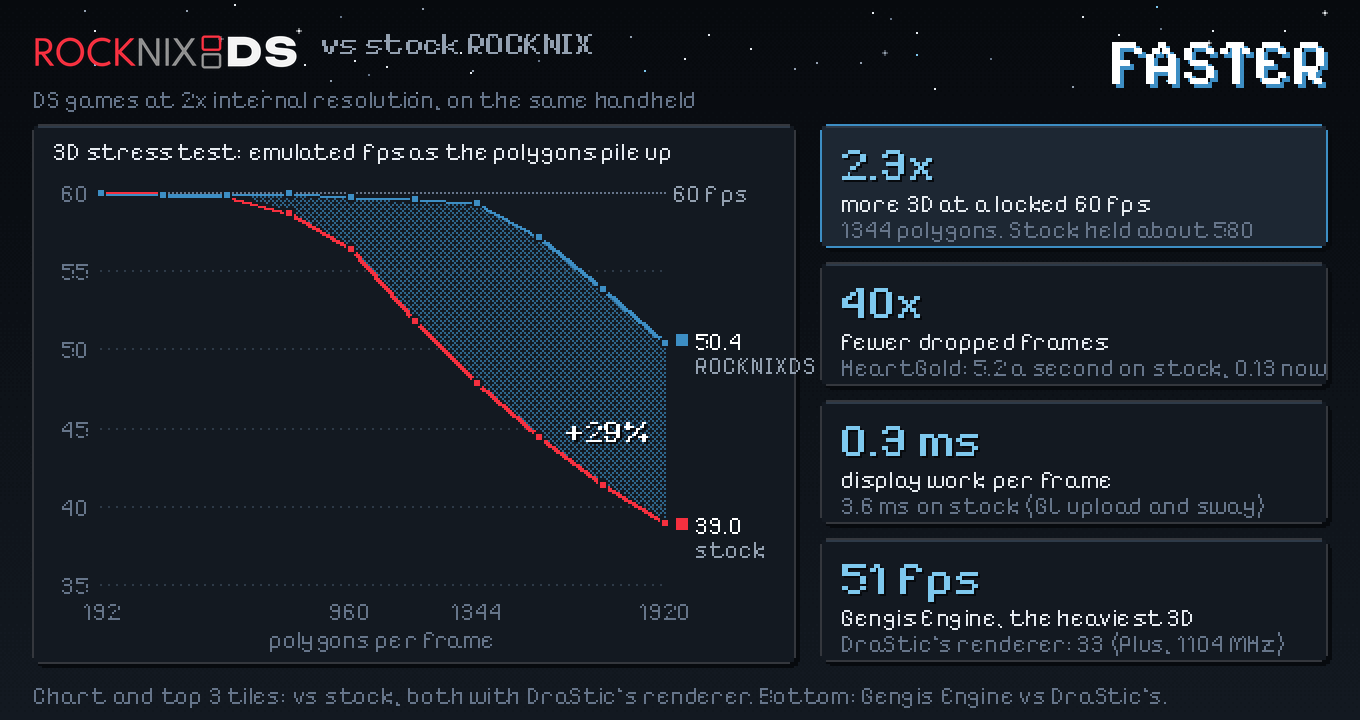
On the 3D stress test's heaviest scene at 1104 MHz it runs at 51 fps, where DraStic's renderer manages 33.
The picture is still DraStic's, pixel for pixel: checked in HeartGold (26,400 rendered bins compared, none differ;
2.4 million composited lines compared, none differ).
Turn it on under Game settings > Per system advanced configuration > Nintendo DS > 3D renderer > Gengis Engine, or
per game. DraStic stays the default.