Releases: JoshuaMillerCode/crosspoint-reader-companion
Release list
v1.0.2 — Your character stays put

One fix, and it is worth reflashing for.
Choosing a character did not survive a sleep
Pick Vellum, Octavo, Lumen or Sprig, put the device to sleep, and it woke up as the fox again. Every time.
The choice was being written to your SD card correctly. It was being thrown away on the way back in.
Deep sleep is a full chip reset, so settings reload from the card on every wake. That load validates each dropdown against its list of options, but the character picker builds its options as plain strings rather than translation ids, and the check only looked at the translation ids. It found none, decided every possible value was out of range, and handed back the default. Which is the fox.
It never showed up in testing because settings only reload on boot. Pick a character, use the device, and it is fine right up until the moment you close the cover.
If you picked a character in 1.0.0 or 1.0.1, you have been losing it ever since. Pick again after flashing and it will stay this time.
Nothing else was touched. Of the 31 dropdown settings in the firmware, 30 take the exact code path they always did. The character picker was the only one built in a way that tripped this.
Everything from 1.0.1 is still here
Works on all four themes, companion in the column beside the menu, OPDS servers no longer push it off screen, and no more sleep image ghosting behind the home screen.
Upgrading is just reflashing. Your streak, reading history and settings live on the SD card and are not touched.
Still only tested on an Xteink X3. Should run on an X4, but it has no RTC so streaks and the sad moods will not work. Will not boot on an X4 Pro, which is a different chip. Back up your firmware first, instructions in the README.
Found something else? Open an issue.
v1.0.1 — Works on every theme
A bug-fix release. Two problems reported after v1.0.0, both fixed.
Upgrading is just reflashing. Your streak, character choice, and reading history are stored on the SD card, not in firmware, so none of it is lost.
The companion only laid out correctly on Lyra
Reported by u/ppfry. On the other themes the character was drawn over the last menu row, and its speech bubble was often empty.
Two causes. The home screen worked out where the menu ended using a formula that only matched Lyra — Classic was off by 10px, RoundedRaff by 35px, because RoundedRaff sizes its rows from the font rather than the metrics table. And the bubble was pinned to the character's height, so a small character produced a bubble too short to fit a single line of text, which then drew nothing at all.
The companion has moved off the bottom of the screen entirely. Each theme now says what space it can spare, and the companion goes there.
| Theme | Where the companion sits now |
|---|---|
| Lyra | In the column to the right of the menu buttons |
| Lyra Extended | In the column to the right of the menu buttons |
| RoundedRaff | In the column to the right of the menu buttons |
| Classic | To the right of the book cover at the top of the screen. Its menu rows are full width with nothing to sit beside, so it uses the strip under the menu only when there is genuinely room there |
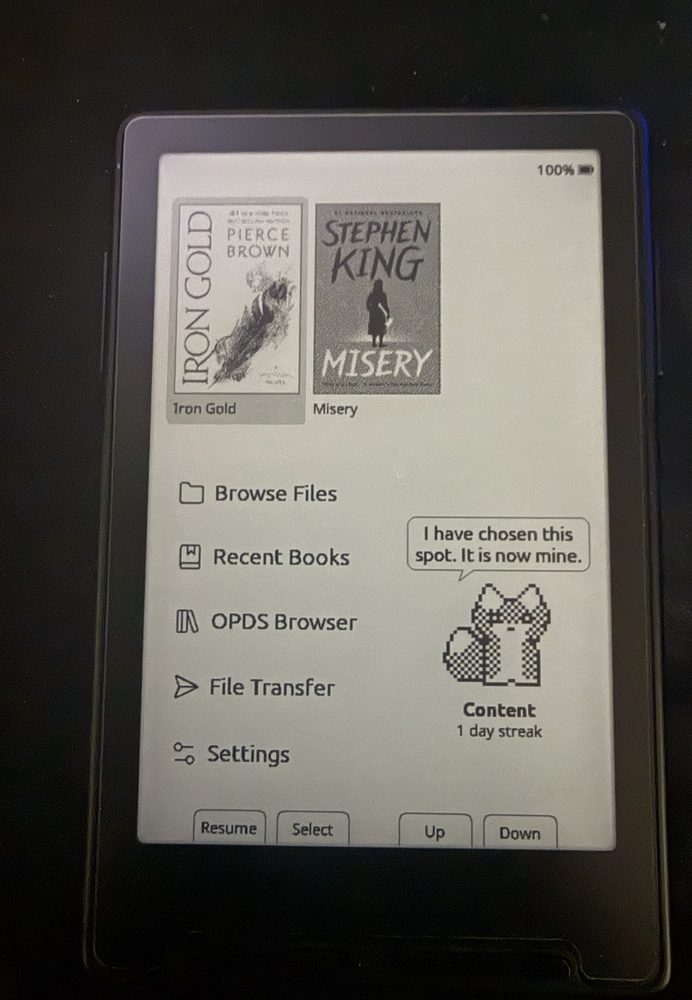
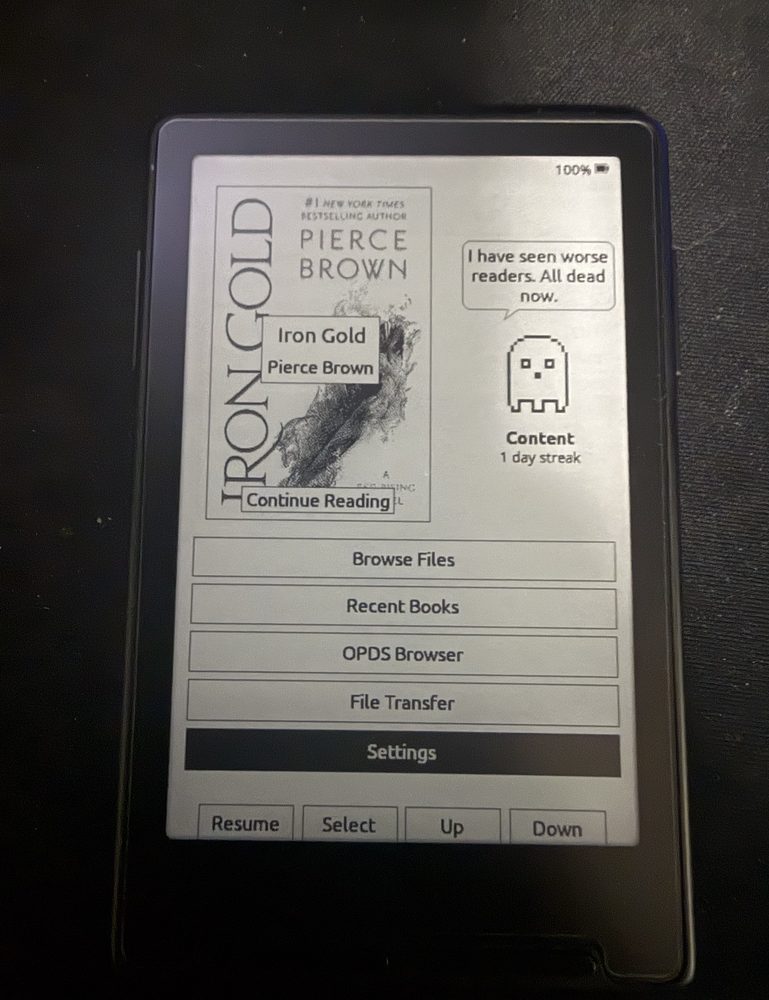
Left: Lyra Extended, beside the menu. Right: Classic, beside the cover.
Putting it beside the menu was u/joshthor's suggestion, and it turned out to be the answer for three of the four themes. The menu buttons only need to be as wide as their labels, so narrowing them opens a column that is taller and better shaped than the strip underneath ever was. Every theme now gets a full size character, where before the roomiest one managed three quarters of that and the tightest showed a 30px character with an empty bubble.
Waking from sleep left the sleep screen ghosted behind the home screen
A CrossPoint bug rather than a companion one, and it happens whether or not you enable the companion.
Waking skips the panel's clearing pass to keep resume fast, leaving the sleep image on the screen for the next paint to replace. The reader repaints properly; the home screen used the fast e-ink waveform, which draws over a retained frame without clearing it. So the sleep image sat behind the UI until enough button presses wore it away.
The first home paint after a wake now clears properly. This costs roughly a second on wake — that is the trade for a clean screen. Resuming into the reader is unaffected.
Both this and a divide-by-zero in the settings list are CrossPoint bugs found while building this, and are being offered upstream.
Still only tested on the Xteink X3
Unchanged from v1.0.0. Should run on an X4, but it has no RTC so streaks and the sad moods will not work. Will not boot on an X4 Pro, which is a different chip. Back up your firmware before flashing — instructions in the README.
Thanks to u/ppfry and u/joshthor for finding and shaping both of these.
Found something else? Open an issue.
v1.0.0 — Reading Companion
A reading companion for CrossPoint: a small pixel character that lives on your home screen and whose mood depends on how much you actually read.
Built on CrossPoint 1.5.0 (develop).
⚠️ Read this first
Developed and tested only on the Xteink X3.
| Device | Status |
|---|---|
| Xteink X3 | ✅ Tested |
| Xteink X4 | |
| Xteink X4 Pro | ❌ Do not flash this binary. X4 Pro is ESP32-S3, this is ESP32-C3. It will not boot. Build the x4pro environment from source instead |
Back up your firmware first. Two minutes, and it means you can return to exactly your current setup rather than a clean reinstall:
esptool --chip esp32c3 --port /dev/cu.usbmodemXXXX --baud 921600 read-flash 0 0x1000000 crosspoint-backup.bin
Restore with write-flash 0 crosspoint-backup.bin.
Install
- Download
firmware.binbelow - Connect by USB-C and wake the device
- Go to crosspointreader.com/#flash-tools
- Pick your device, choose Custom .bin, upload
Or: esptool --chip esp32c3 --port /dev/cu.usbmodemXXXX --baud 921600 write-flash 0x10000 firmware.bin
Books and reading progress live on the SD card and are not touched.
Turning it on
Settings → Companion, then pick a Character. Off by default; nothing about the reader changes until you enable it.
What's in it
- Five characters — a fox, a ghost, a robot, a moth, and a sprout
- Four moods driven by reading time and days skipped
- 180 written lines, a different one each time you land on Home
- A streak counter and a nudge showing how far you are from the top mood
- The character paces around as you move the menu cursor
Time is only credited while pages are actually turning, so a reader left open on one page earns nothing. Day rollover uses your local timezone so a late-evening session doesn't break a streak.
Costs about 16 KB of flash and 80 bytes of RAM when enabled.
Also fixed
A latent bug in CrossPoint's settings screen: enum settings whose options are runtime strings never opened their picker and then took a modulo by zero. This affects SD-card font selection too.
MIT licensed, same as CrossPoint. Not affiliated with Xteink, CrossPoint, or Pierce Brown.