Repository navigation
Releases: Joverit5/Frutii
Release list
Frutii 0.4.9-alpha — The room TV, watch together and a radio that plays anything

The room gets a TV. Play a game from the hang-out room and everyone inside watches — and hears — it on the TV while you all talk. Or put a YouTube video or a Twitch stream on and watch it together. The radio plays any song now, streamed from whoever puts it on, and nobody downloads anything.
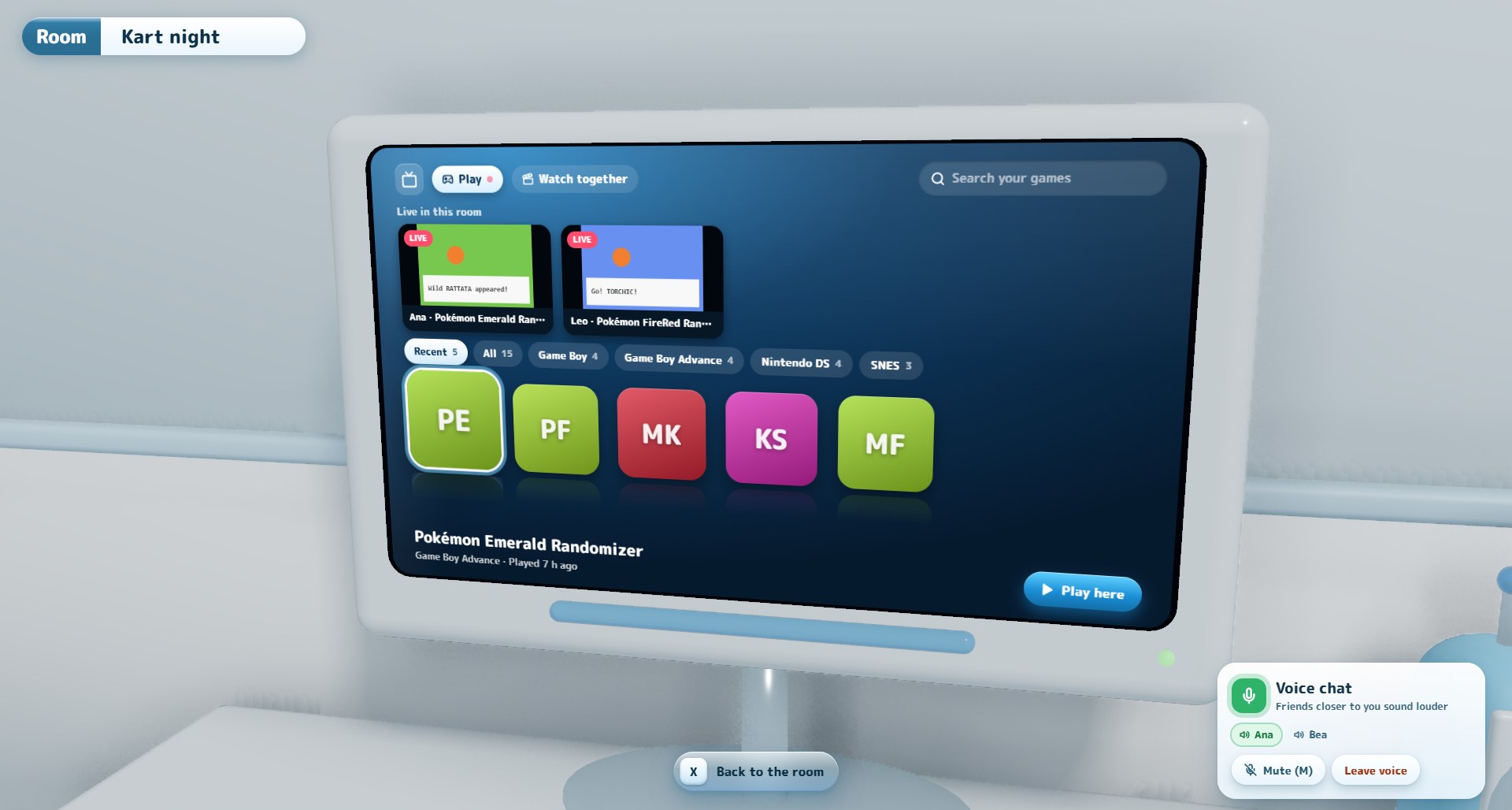
Play from the TV, and everyone watches
Walk up to the TV and it turns on its own menu: search your library, browse Recent, All or one shelf per console, and press Play here. Frutii asks each time whether your game should show on the TV. Say yes, and while you play:
- Everyone in the room sees your game on the TV — two games side by side if two of you are playing — with its sound, louder the closer they stand to the TV.
- The room stays open behind your game. Voice keeps going, so the people watching can cheer while you play.
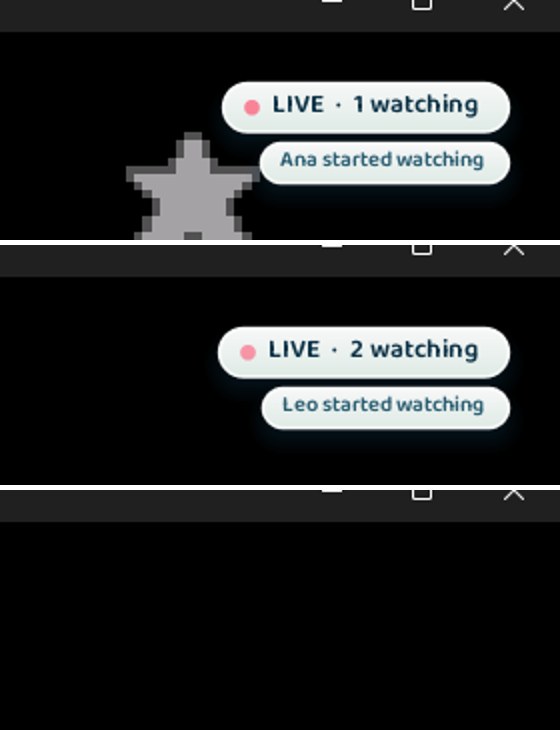
- You can see who is watching. A small LIVE · 2 watching badge sits in the corner of your game, and when someone new starts watching, their name appears for a moment.
- Close the game and you are back in the room, and the TV turns off by itself.
- Privacy first: if Show what I'm playing is off in your account, your game never goes on the TV — and turning it off mid-game takes you off the TV right away.
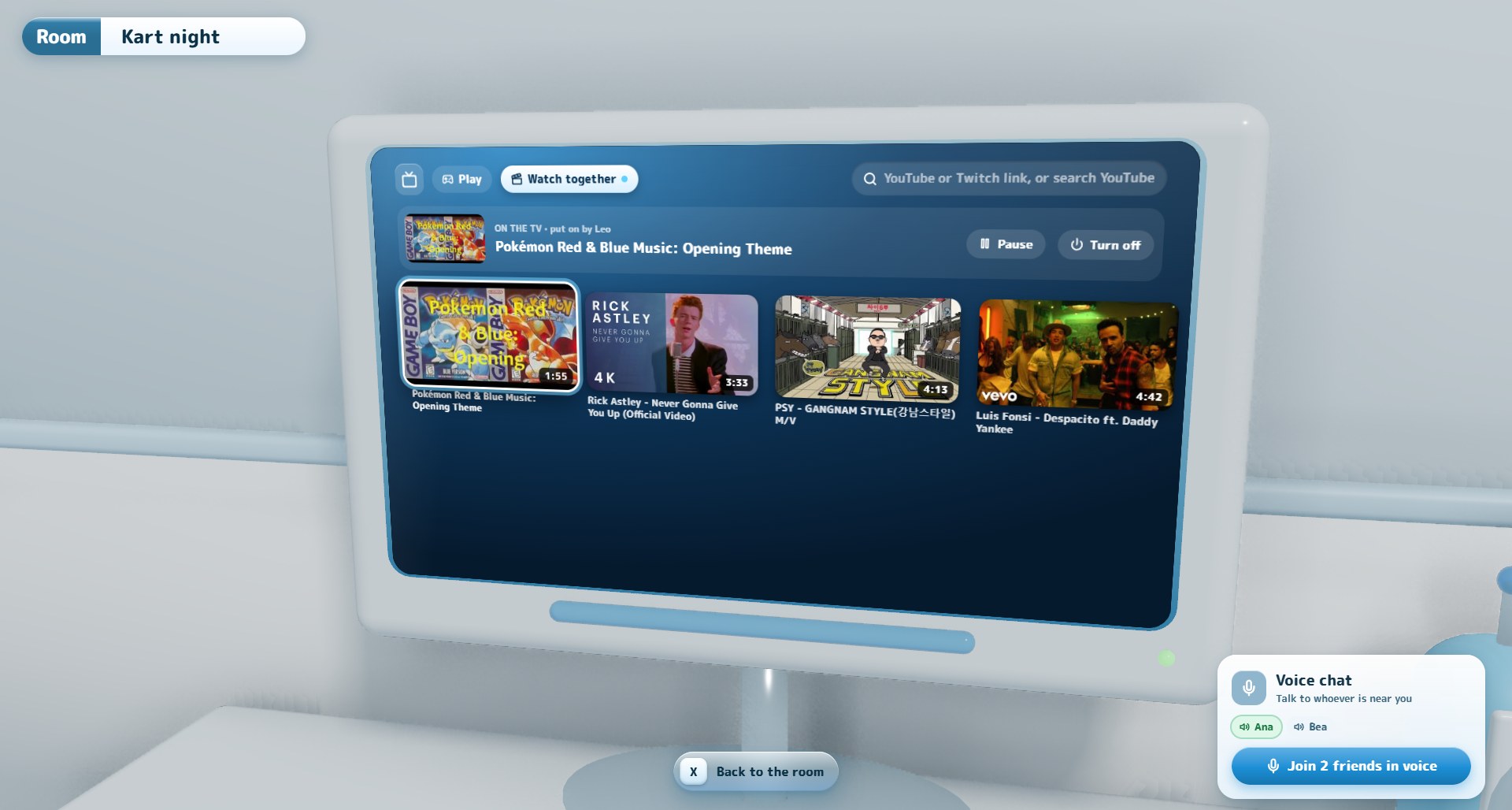
Watch together
The TV menu has a new Watch together tab. Paste a YouTube or Twitch link, or search YouTube right there, and the video plays on the room TV for everyone at the same moment. Anyone can pause it, change it or turn it off. You can see it from anywhere in the room, not just up close, and nobody sends video to anybody: each of you plays it yourself, in sync.
A radio that plays anything
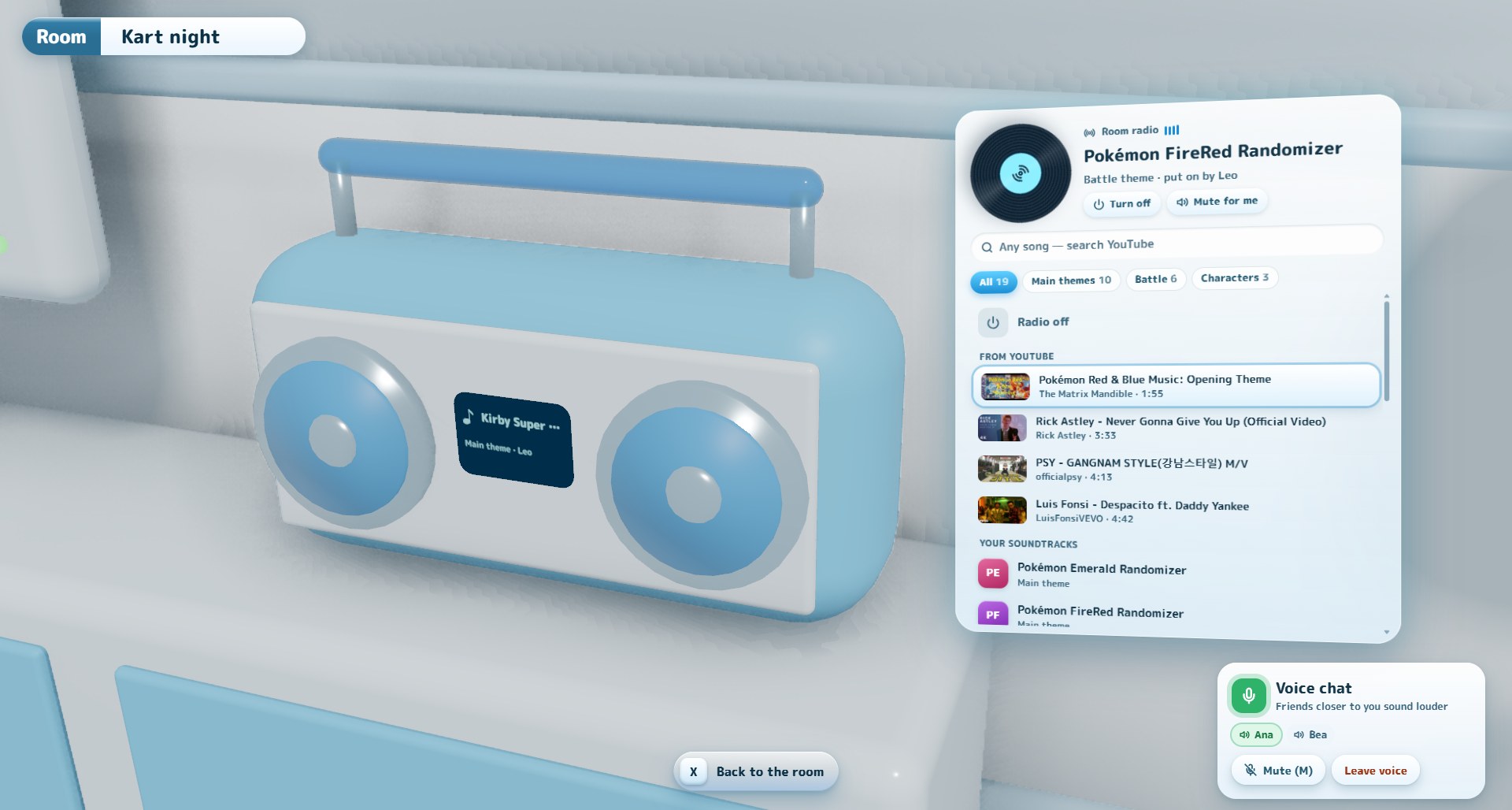
Walk up to the radio and a glass panel opens beside it, with a spinning record for whatever is on.
- Any song: type in Any song — search YouTube and pick one.
- Your soundtracks are listed right below, filtered by main themes, battle themes, characters and title screens.
- Streamed from whoever puts it on. The rest of the room hears it live and nothing is downloaded to anyone's PC. Before, a friend could fill your disk with songs just by switching tracks.
- If the person who put the radio on leaves, it turns off.
Voice you can't miss
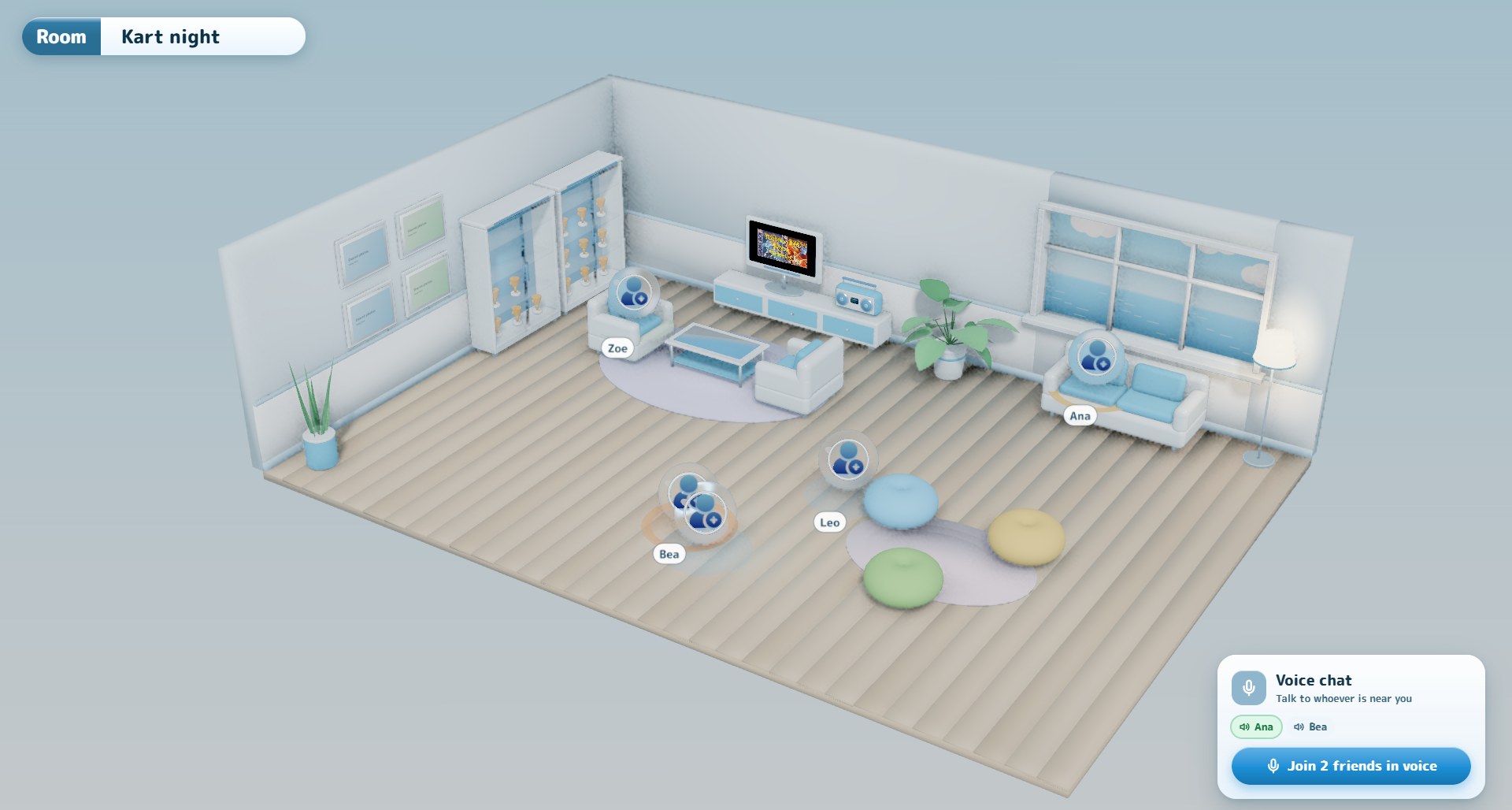
- A voice card in the corner shows who is in voice and who is talking, and has a big Join friends in voice button.
- When your friends are talking and you are not in voice, a note at the top tells you.
- When you join, a ring on the floor shows how far your voice reaches, then fades to a faint mark.
- Each friend in voice shows their connection time (and whether it goes through the relay server), so you can tell when the connection is the problem.
Also in this version
- GIFs move in the picture frames on the room's walls.
- Longer GIFs can be sent in chats. Short, light GIFs with many frames used to be rejected; now long animations are shrunk to fit instead.
- The 3D room is much lighter on your graphics card. It is capped at 60 fps (30 when nothing moves), with cheaper shadows and lighting: from about 72% of an RTX 4060 to about 28%.
- The radio and TV lists live inside the room now, instead of floating over it.
Good to know
- Everything in the room that involves other people needs your friends on 0.4.9 too.
- On very strict networks (some mobile data and university networks), voice, the TV and the radio need the new relay server. It is being set up and turns on without an app update.
Frutii 0.4.8-alpha — Frutii Plaza, hang-out rooms with voice and a new pause menu
Social gets a place of its own, and hanging out gets real. Social is now Frutii Plaza: its own intro, its own colors, six sections, and your friends front and center — with notes over their faces, posts in the games you share, and reactions to everything they do. And the room you open from a chat is finished: it grows with your group, fits ten people, has seats, a radio everyone shares and voice that fades with distance.
Frutii Plaza
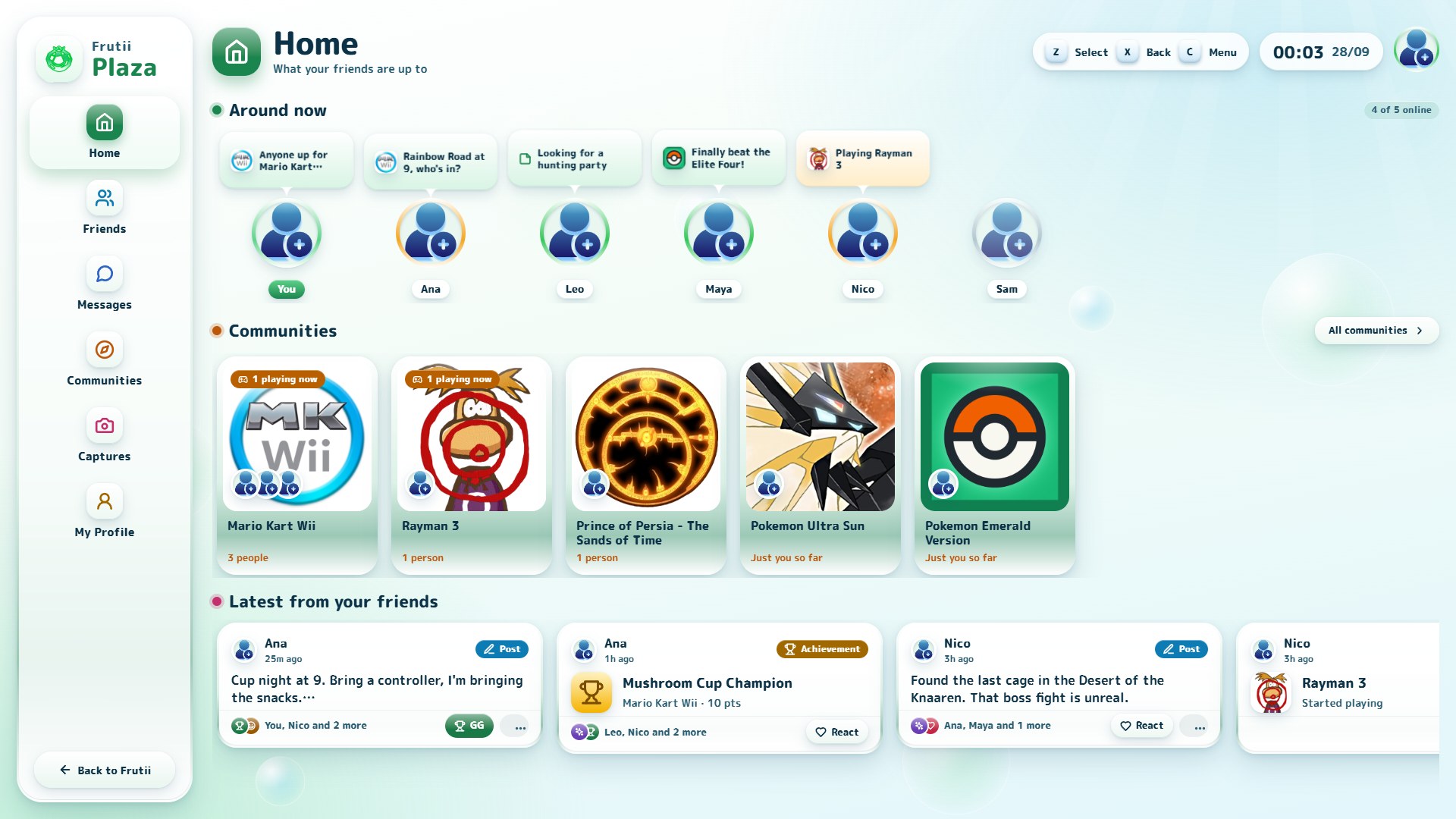
Social stops being a tab and becomes somewhere you go. Plaza opens with its own short intro and jingle, keeps its own white-and-mint look whatever theme you use, and is split into Home, Friends, Messages, Communities, Captures and My Profile. Everything works with the keyboard or a controller, and press back to return to Frutii.
- Home shows who is around and what they are saying, the games your friends gather around, and the latest from them.
- Communities are the games you and your friends play. Open one to see who plays it, what happened in it, and — if it is in your library — press Play.
- Captures collects every picture shared with you in your chats.
- A friend's page shows the games you both play and what they have been up to lately, even if they do not share a profile card.
Notes
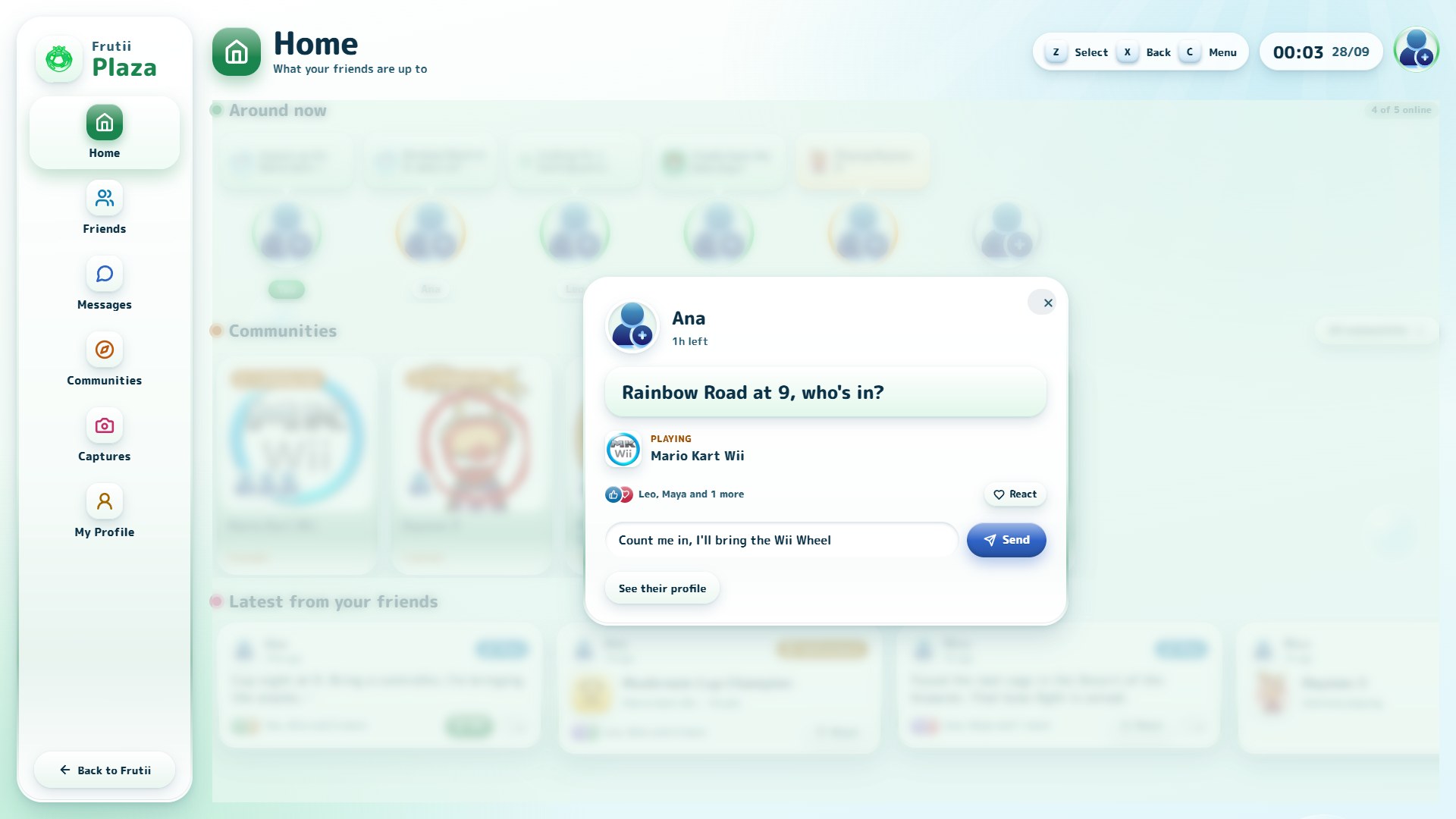
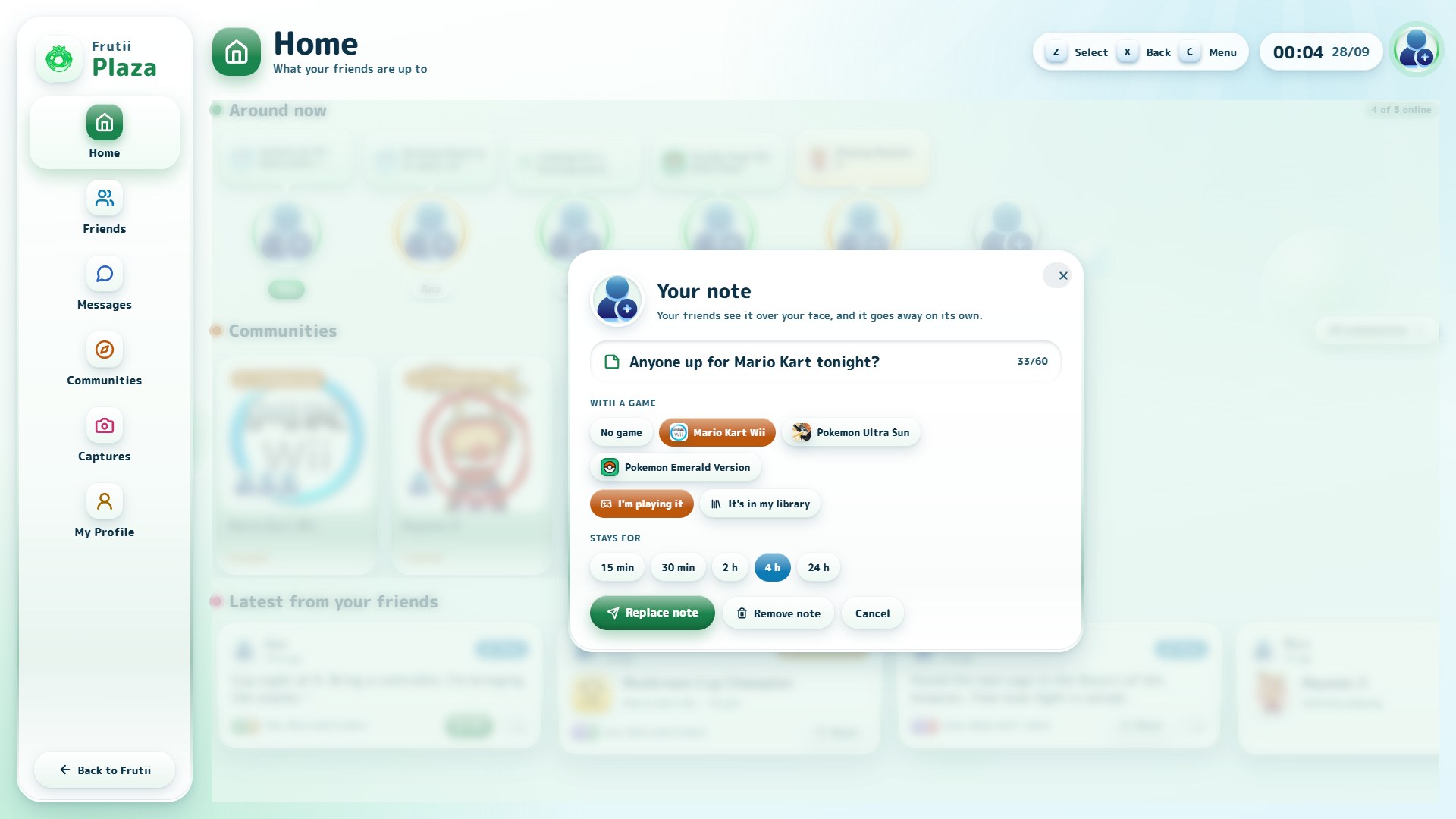
Leave a short note over your face, like on Instagram: one sentence, optionally with a game you own or are playing right now, and choose how long it stays — 15 min, 30 min, 2 h, 4 h or 24 h. Your friends see it at the front of their Plaza. They can react to it, or reply, and the reply lands in your chat with them.
Post in a community, react to anything
Every community has a box to write in. Posts are for your friends only — nobody else can see them, even if they play the same game — and they go away after 30 days. Delete yours whenever you want, or report someone else's (and stop seeing it).
React with Like, Love, Haha, Wow or GG to posts, achievements, captures and notes. You always see how many people reacted, but only the names of people you know.
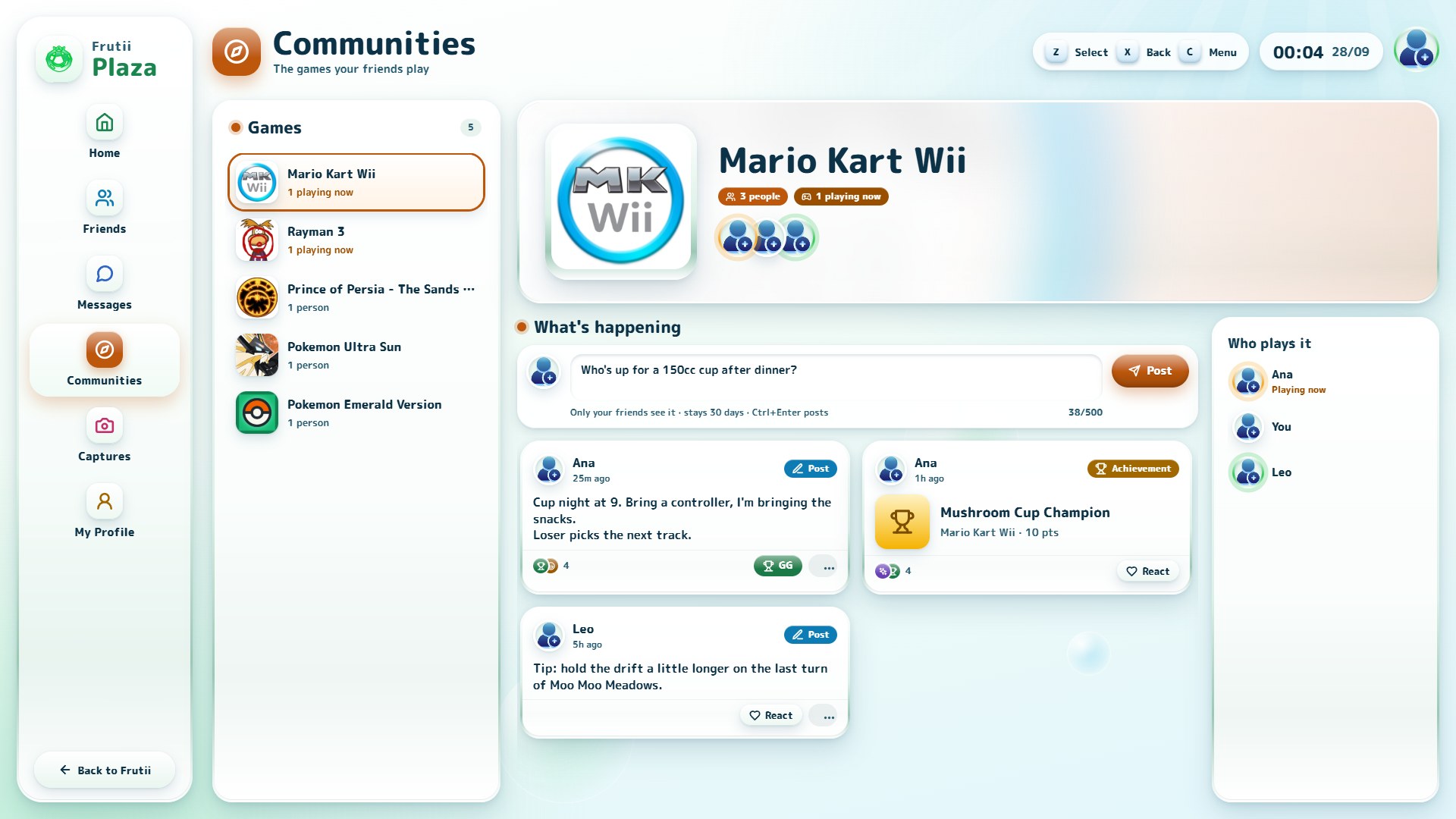
Hang out, for real
Open a chat and press Hang out: your friends get an invite with its own sound, and everyone who joins walks around the same room.
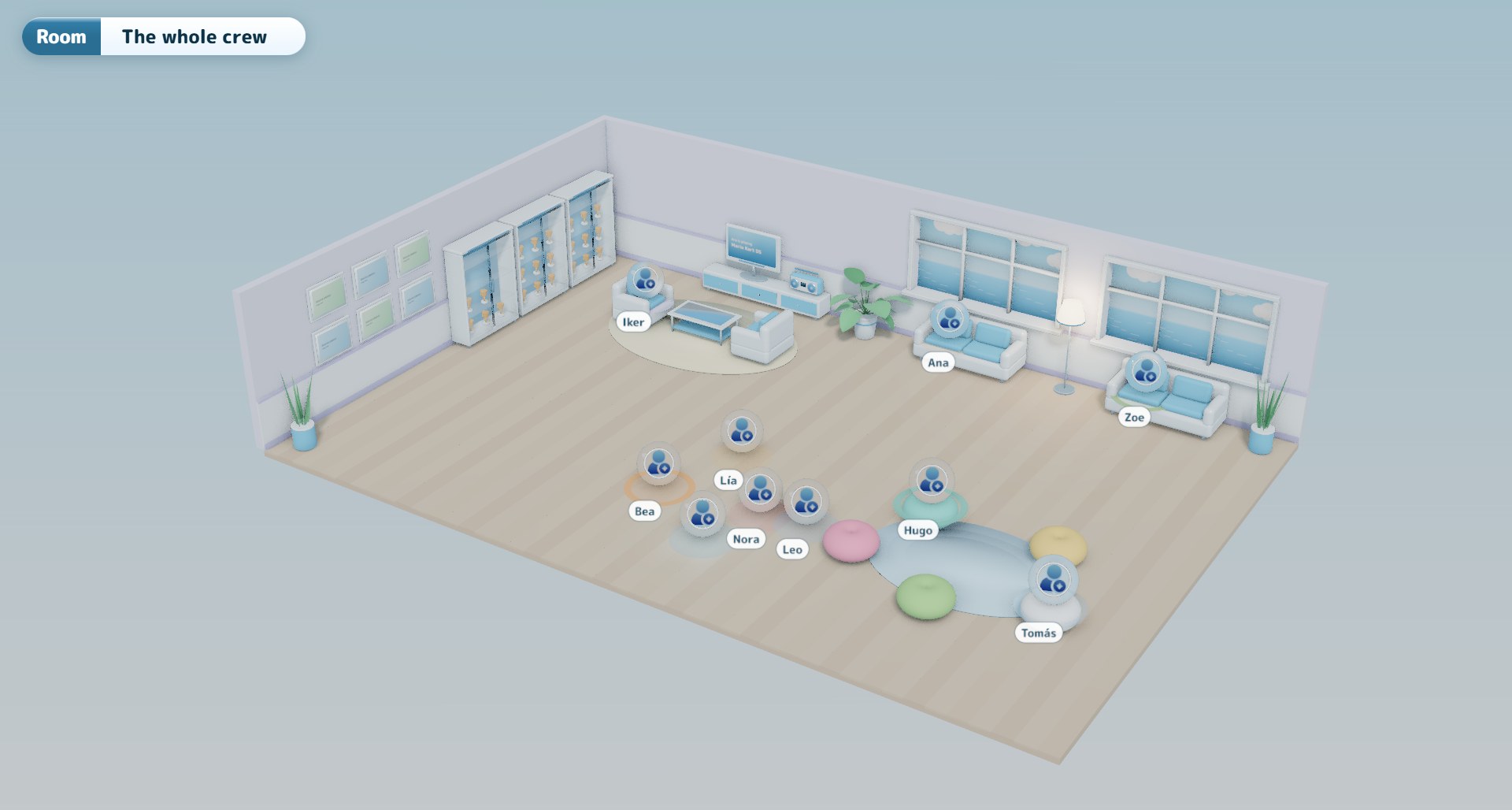
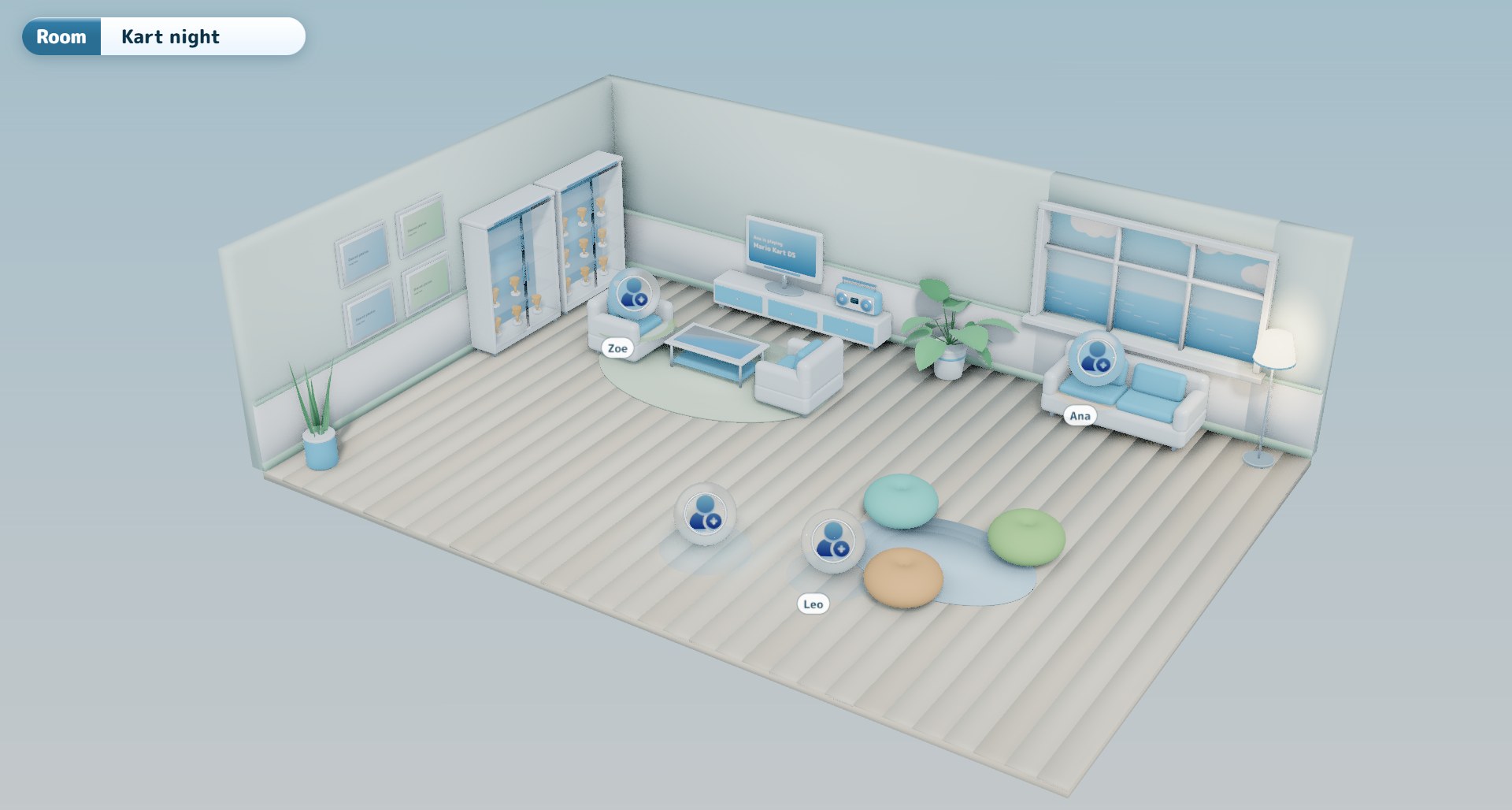
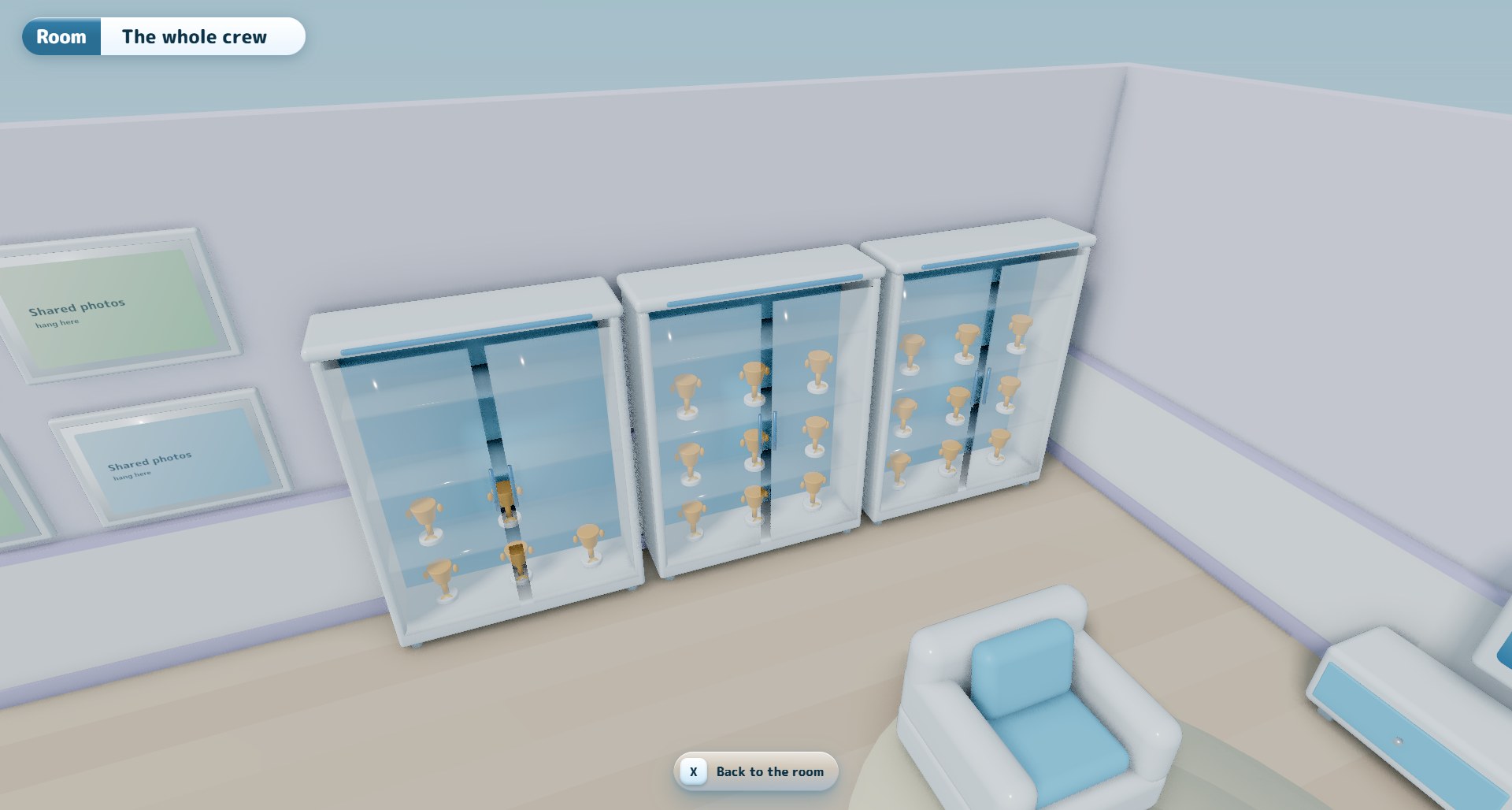
- Rooms grow with your group. Chats with up to six people get the cozy room; groups of seven or more get a bigger one with two windows, two sofas, three trophy cases and space for everyone. Up to ten people can be inside at once, and groups can have up to twenty members.
- Every group has its own room. The colors of the walls, floor, rugs and beanbags come from your chat, so the same group always walks into the same room — and a different group into a different one.
- Talk. Press Join voice and talk to whoever else has it on. Voices get quieter the further away someone stands, a ring lights up under whoever is talking, and M mutes you. Frutii only asks for your microphone when you press Join voice.
- Sit down on the sofas, armchairs and beanbags.
- One radio for everyone. Put a song on and the whole room hears it, from the same second. If someone does not have that song yet, Frutii gets it for them.
- The trophy cases show the latest achievements of the people in the room.
- Smooth, even on a busy connection. Friends no longer move in jumps when their updates arrive in bursts.
- If your PC cannot draw the 3D room, you get a flat version with the same people, radio and voice.
A new pause menu
The in-game menu now matches the rest of Frutii: a side menu with one color per action, and a card that tells you what each option does — the save slots with a large preview, how many achievements you have unlocked, which cheats are on, how your screens are set up. The game stays visible behind it.
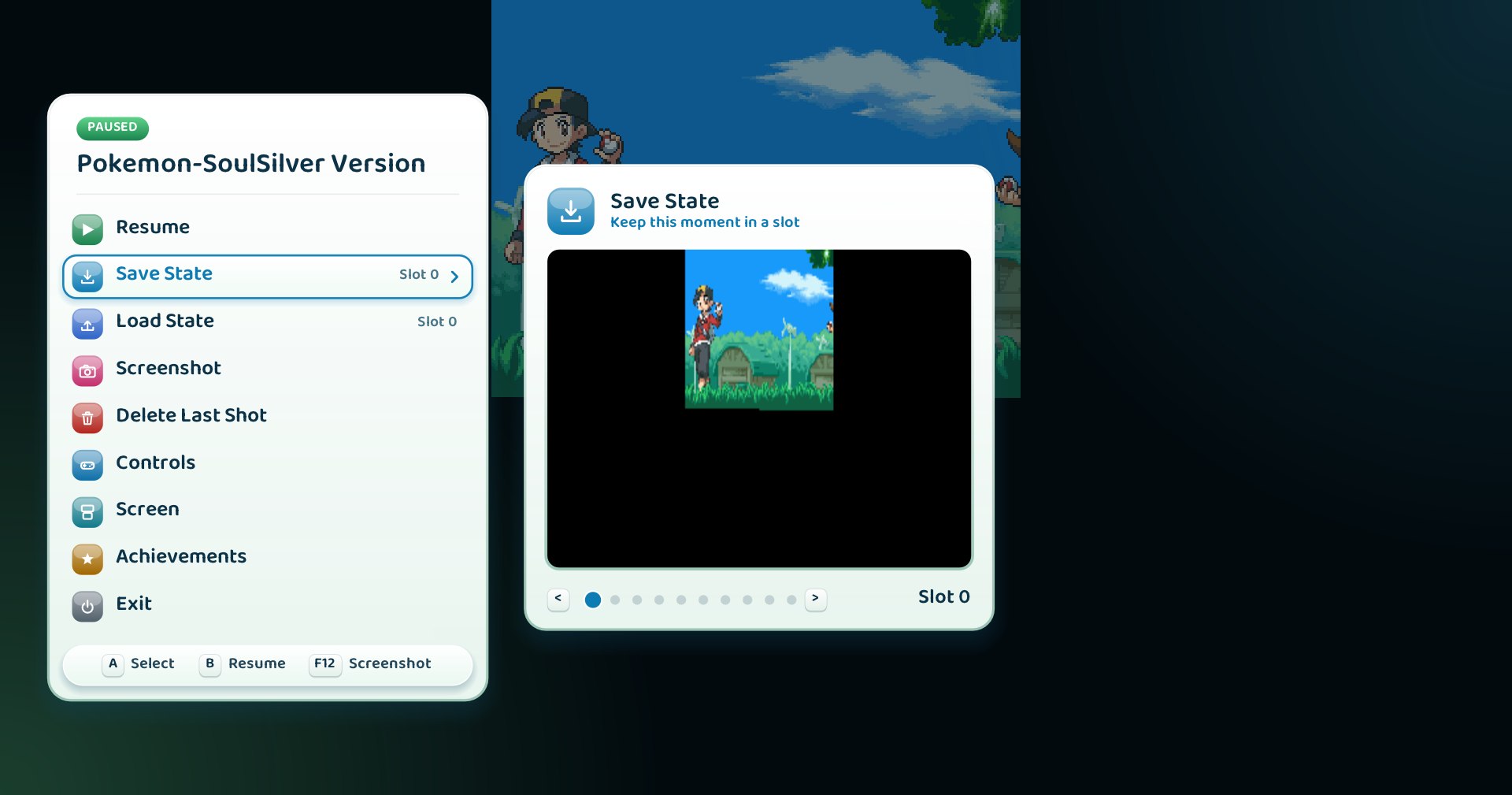
Your screens, your way
A new Screen page in the pause menu:
- Rotate any game — for DS games you hold sideways, or vertical arcade games.
- On DS and 3DS, arrange both screens: stacked, side by side, one big and one small, or a single screen. Choose which one is the main screen, how big it is and the gap between them.
- Touch input follows whatever layout you pick, and the setting is saved per game.
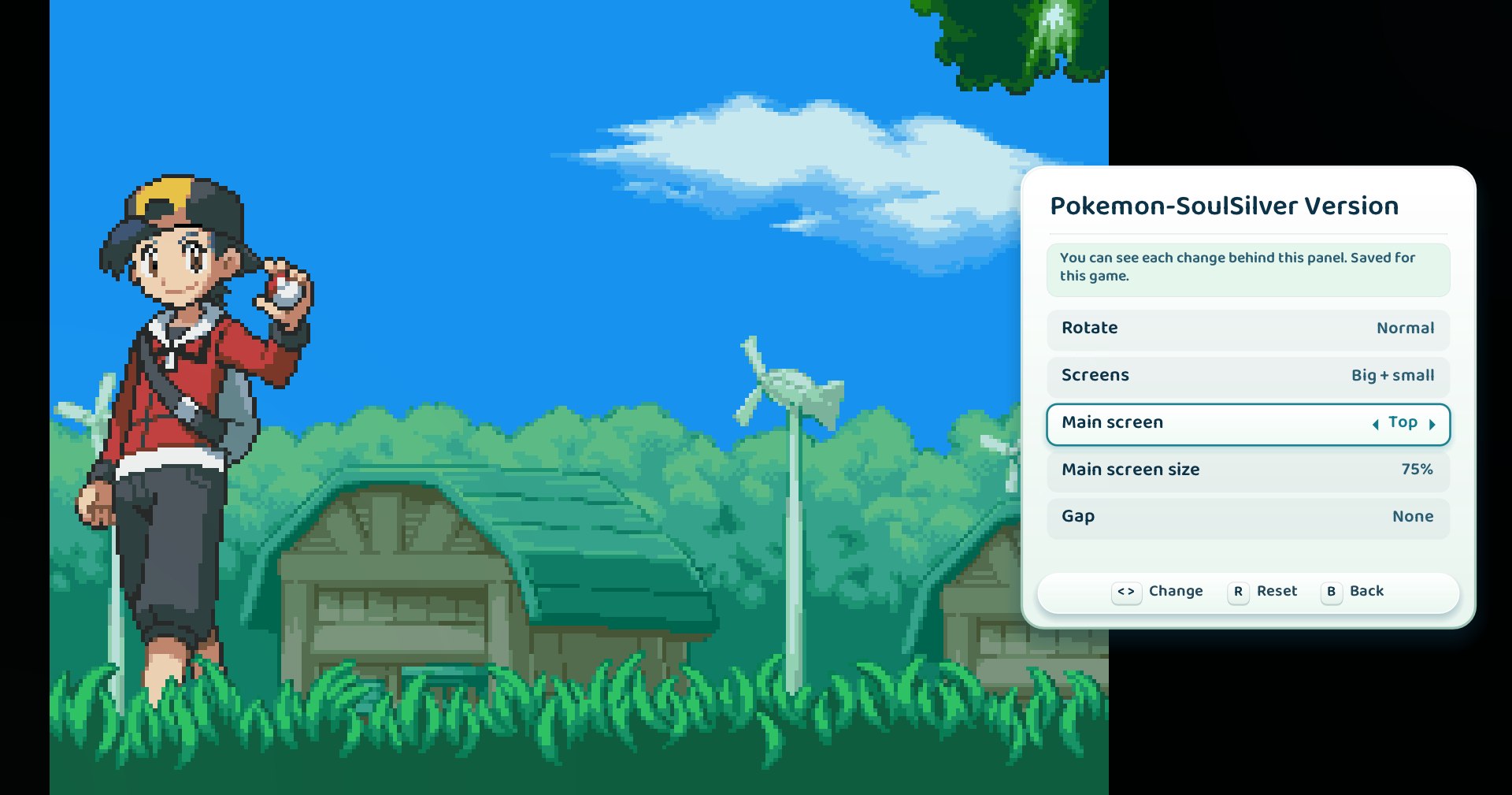
Everything else in this release
- Achievements that cannot be earned now say why. If RetroAchievements does not support your exact copy of a game, the in-game Achievements page explains it and points to the list of supported files, instead of showing two warnings as if they were achievements. With hardcore on, it also tells you that RetroAchievements has not approved Frutii's emulator yet, so hardcore unlocks cannot be earned — softcore ones still count.
- A visual pass over the whole app: shadows and glows no longer end in hard edges in scrolling lists (Collection, Plaza, chats, Settings), your profile card keeps its buttons visible, and long text in the game details fades out instead of being cut in half.
- Game details show real release dates, and the achievements widget and Trophies show the game's name instead of its file name.
- The Back button in System Settings is readable on dark themes, and a few Spanish labels were translated.
- No games yet? An empty library now opens the home with a clear way out — add a folder, change folders or look again — instead of a loading screen that never ends.
- The console rail no longer shows up on top of the loading screen.
- Fixed a crash when closing Frutii.
- Frutii and its emulator now carry proper version information and a Windows manifest, which helps with false antivirus warnings.
- Privacy fix: the activity feed no longer shares previews of your private messages with friends who are not in that conversation.
Install
Download Frutii-Setup.exe — per-user install, no admin. Or take frutii_portable.zip if you would rather not install anything.
Verify what you downloaded against the .sha256 files published beside it. The in-app updater checks these too and refuses a download whose digest does not match.
Alpha, plainly
This is an alpha. The online service runs on a single box operated by one person. Voice goes directly between the people in a room, so they can see each other's IP address, like in most voice apps. Nothing local depends on the account — your library, saves, states, captures and RetroAchievements unlocks stay on your PC whether you sign in or not, and that is a rule the project does not break.
Frutii never distributes BIOS or ROMs.
Frutii 0.4.7-alpha
Your friends stop being a page you visit. They live in the top-left corner of every screen, any chat opens a small 3D room you share with whoever is inside, and every capture you take lands in one system album.
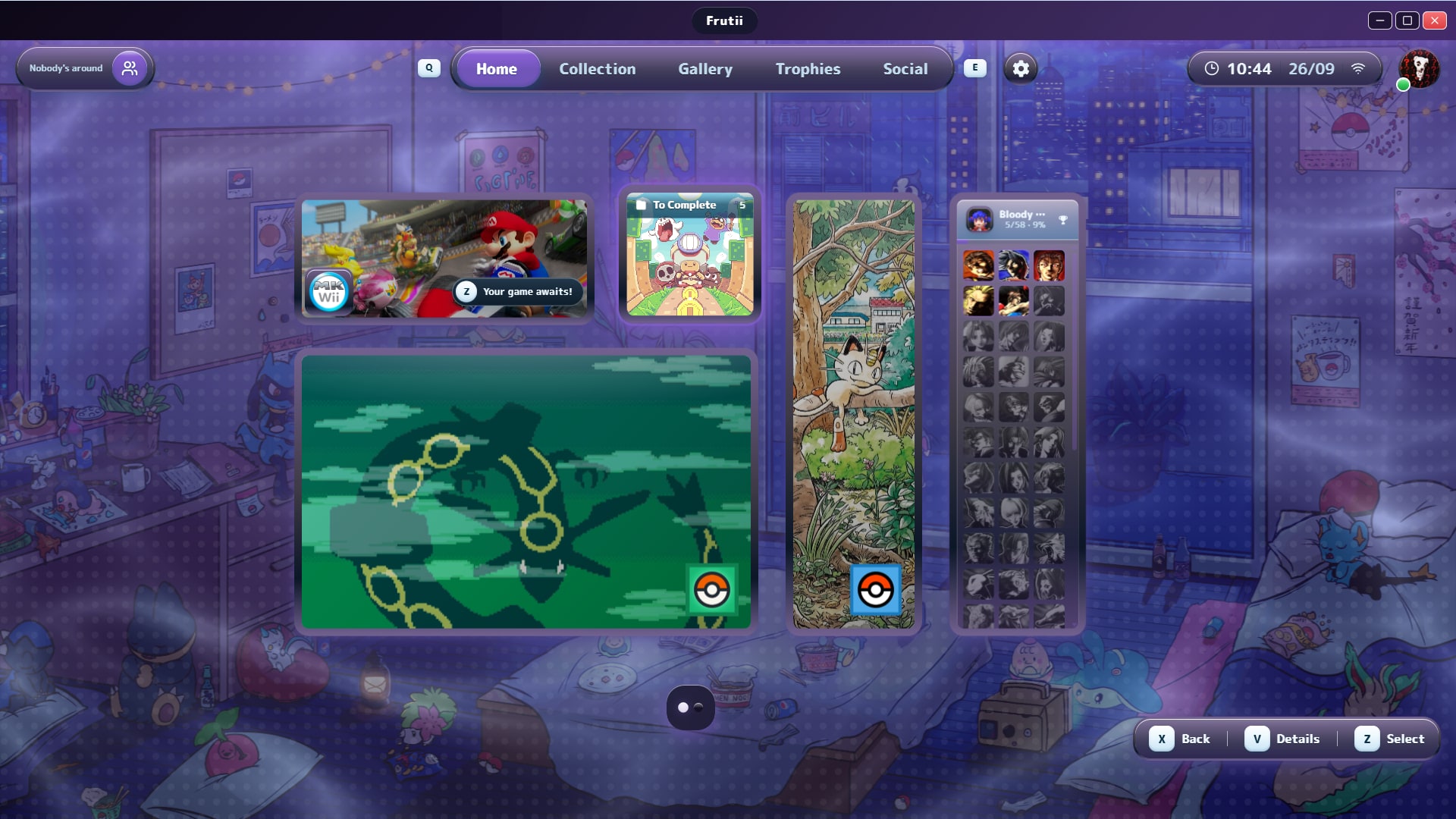
Friends, always one click away
The logo, the user capsule and the notification bell are gone. In their place, top-left, your friends: who is online, who is playing what, how many unread messages you have — and a reply box right there, without leaving what you are doing.
Top-right, your profile card: games in your library, time played, your favorite game, your latest RetroAchievements unlocks and what you have played most. Your friends can open it too, with a single switch to hide it. If you have turned off sharing what you play, the card respects that as well.
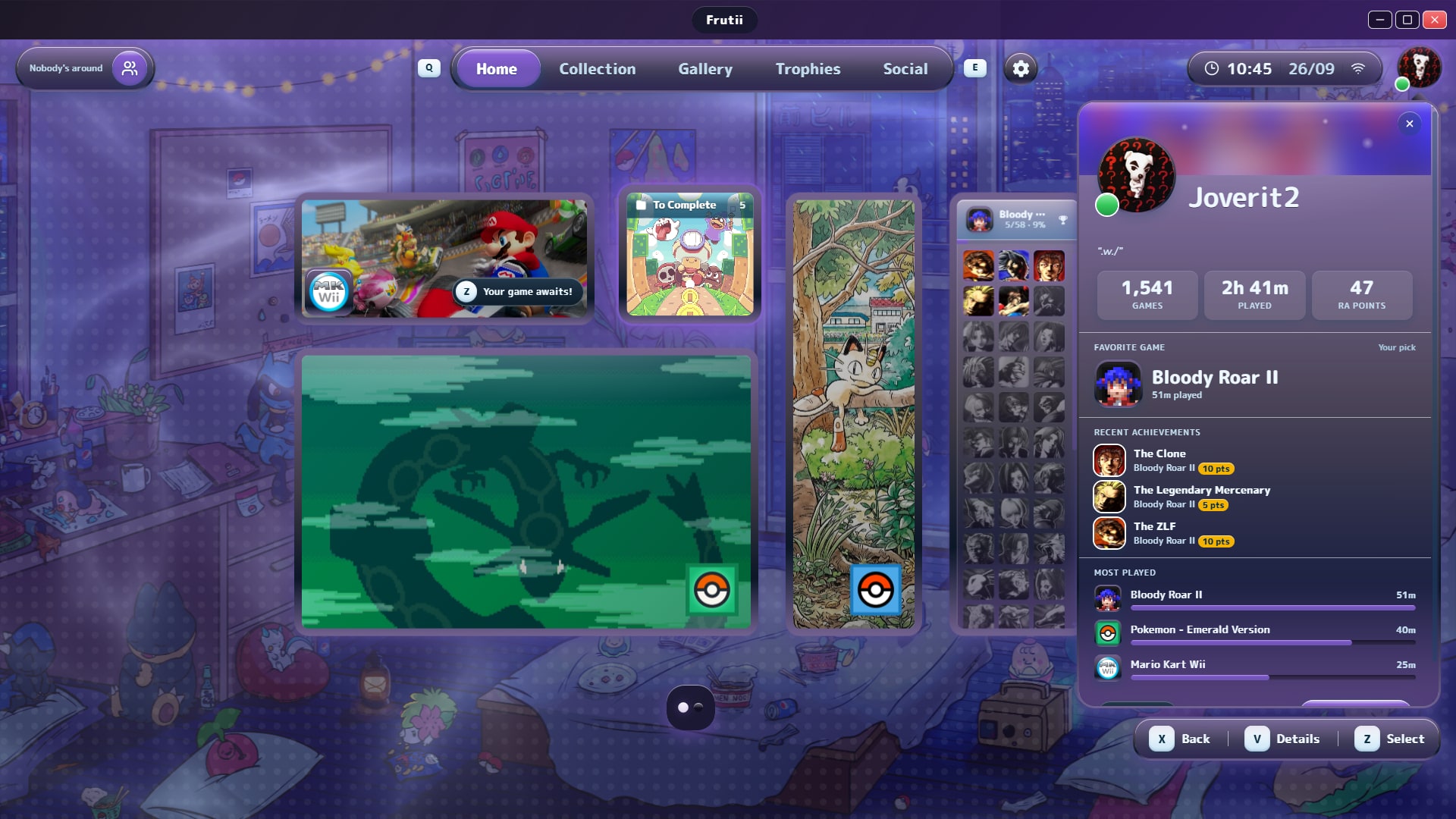
A room to hang out in
Open any chat and press Hang out. You get a small dollhouse room — sofa, TV, radio, showcases, a photo wall — and everyone else inside is an orb with their photo and their name above it, walking around with you.
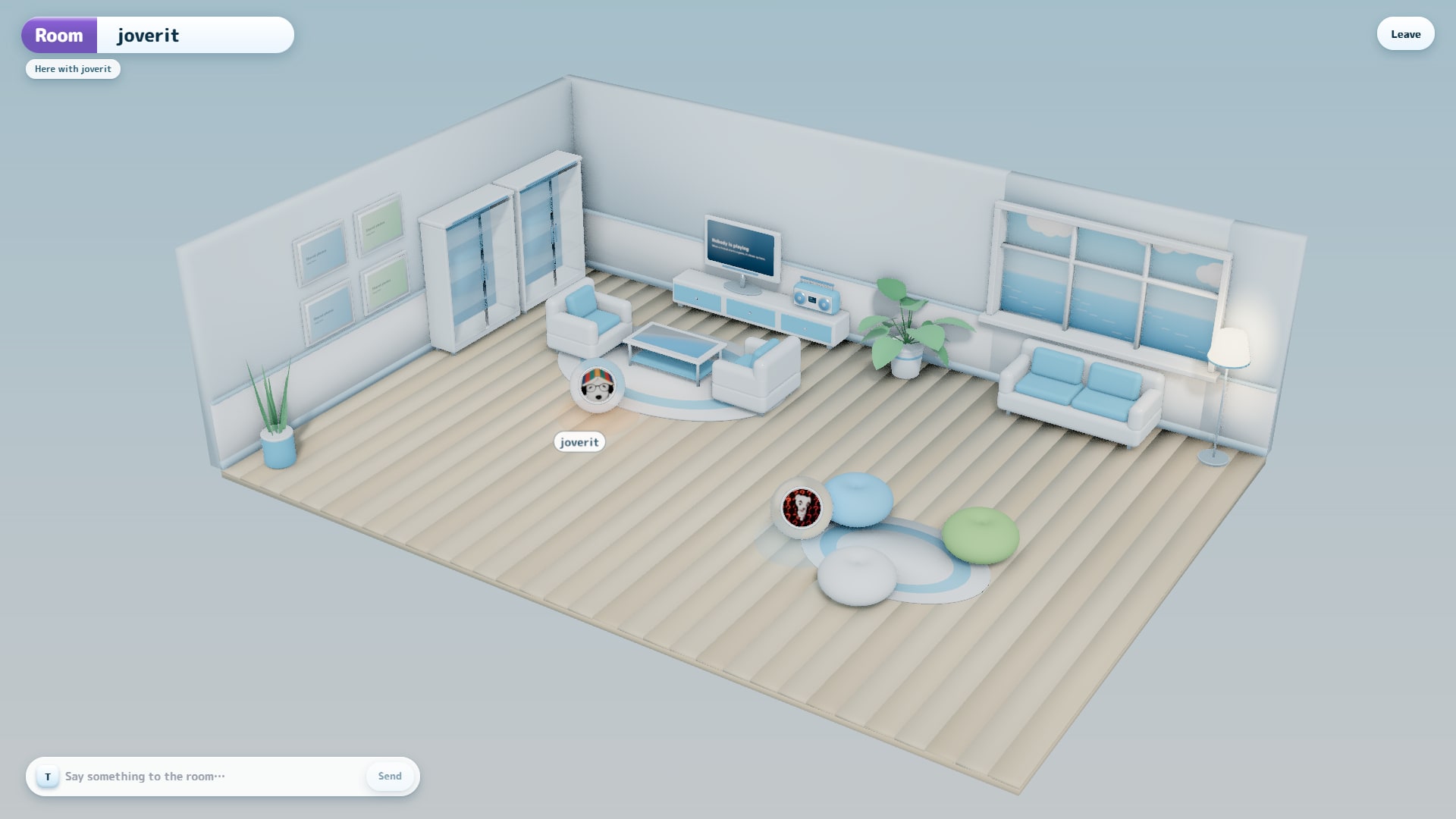
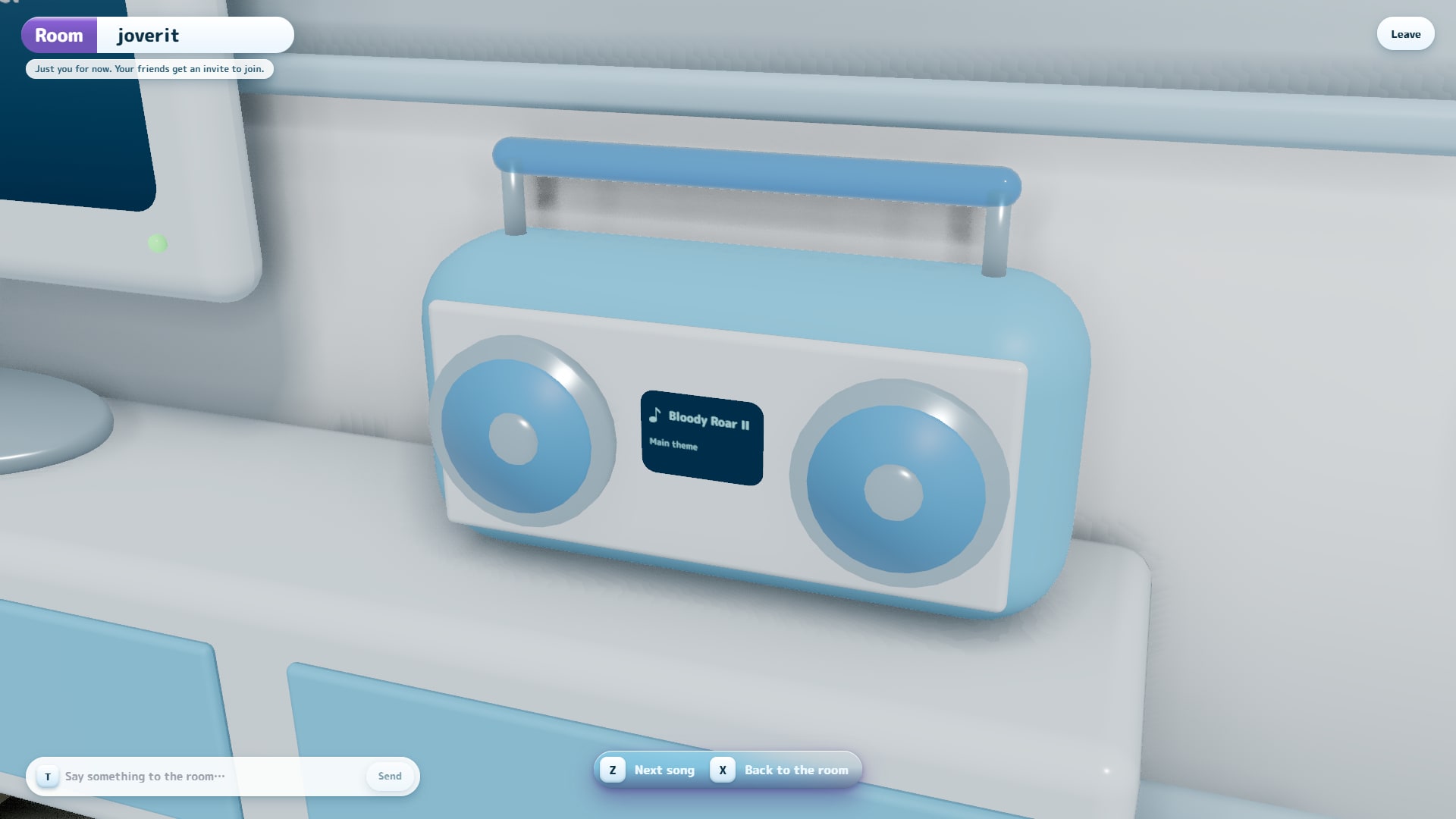
- Walk up to something and the camera flies in. The TV says who is playing what. The showcases hold the achievements of everyone in the chat. The frames hold the photos you have shared in that conversation.
- Press T to say something. It goes to the chat, like any message, and pops up as a bubble over your head.
- The radio plays the game soundtracks you have downloaded, and quiets every other music while it plays.
- When a friend opens a room, you get an invite with a Join button, and the chat shows how many people are inside.
Rooms, messages, friends and presence now arrive the moment they happen over a live connection, instead of being polled every half minute. If that connection drops, Frutii quietly goes back to checking every so often — nothing stops working.
The system album
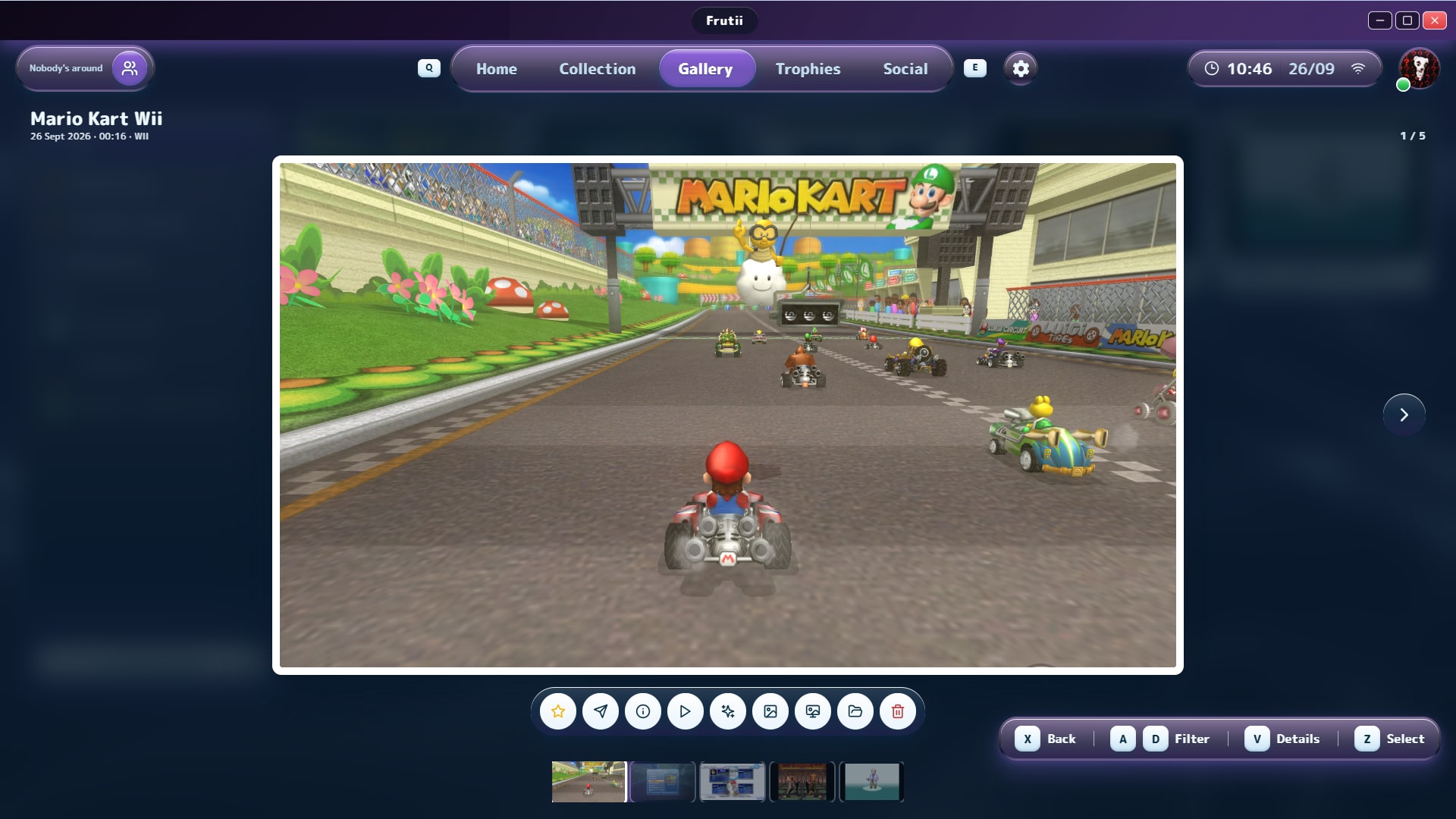
Every screenshot and every save-state moment, in one album: all of them, your favorites, trophy shots or moments, or one game at a time. Open a photo at pixel-perfect size, run a slideshow, set it as the game's art or as your wallpaper, jump straight back into the moment it was taken, select several at once — or send it to a friend.
Everything else in this release
- Game details, redesigned. An asset studio to pick icons, art and backgrounds, and a Soundtrack panel: download the main, title, character or battle theme, choose between results, preview and remove them.
- Music downloads work again. The bundled downloader now updates itself, which is what YouTube kept breaking.
- Honest errors. A server that says "no" (a mistyped friend code, a wrong password) no longer shows up as "Couldn't reach Frutii's servers".
- Photos only ever reach a chat as the image itself; Frutii never uploads a file from an arbitrary path on your PC.
Install
Download Frutii-Setup.exe — per-user install, no admin. Or take frutii_portable.zip if you would rather not install anything.
Verify what you downloaded against the .sha256 files published beside it. The in-app updater checks these too and refuses a download whose digest does not match.
Alpha, plainly
This is an alpha. The online service runs on a single box operated by one person. Nothing local depends on the account — your library, saves, states, captures and RetroAchievements unlocks stay on your PC whether you sign in or not, and that is a rule the project does not break.
Frutii never distributes BIOS or ROMs.
Frutii 0.4.6-alpha
Social stops being a board of names and becomes a place. Your house is the hub. The street outside is your friends list, and a beacon over a roof is someone who is online.

Walk down your street
The neighbourhood is a real toon-shaded 3D world now, and walking is the navigation. Your own house is always first at address 1-01, with up to nine friends after it and up to a hundred across ten streets. Walk up to a door to visit.
A cyan beacon over a roof means someone is home. An amber one, pulsing, means they are playing and sharing it.
The camera sits low — fourteen degrees, near the horizon — because that is what makes a street read as a place with distance rather than a plan seen from a helicopter.
The light is your light

The neighbourhood runs on your own clock. Open it at two in the afternoon and at eleven at night and you get two different places, and the same place. Dawn is orange and long-shadowed, midday is the Frutiger Aero blue, dusk turns the pavement warm, and at night there are stars.
The streetlamps come on by themselves as the light goes. If you are standing there when it happens, you see it happen.

Everything else in this release
- Rooms, direct messages and image attachments — shipped but never released until now.
- A loading screen that actually loads. It holds until the world is genuinely drawable: texture in, shaders compiled, one full frame painted. No minimum timer — if it is ready in two hundred milliseconds, that is how long it lasts.
- Message retention now runs. The documented 30-day purge was indexed and never executed; the table grew forever. Wired into the daily sweep.
- Avatars reach the 3D world (the avatar route was missing a CORS header, which
<img>does not need and WebGL does). - The movement loop no longer clicks on every repeat.
Install
Download Frutii-Setup.exe — per-user install, no admin. Or take frutii_portable.zip if you would rather not install anything.
Verify what you downloaded against the .sha256 files published beside it. The in-app updater checks these too and refuses a download whose digest does not match.
Alpha, plainly
This is an alpha. The online service runs on a single box operated by one person. Nothing local depends on the account — your library, saves, states, captures and RetroAchievements unlocks stay on your PC whether you sign in or not, and that is a rule the project does not break.
Frutii never distributes BIOS or ROMs.
Frutii 0.4.4-alpha
Frutii 0.4.4-alpha — What your friends are playing, legibly
A small release with one visible change and one promise behind it.
Game titles stopped shouting their filename
Your friends list used to say things like Playing Super Mario Kart (USA) [!].smc,
because that is what the file on disk is called. It says Playing Super Mario Kart now.
Region tags, revision numbers, dump flags, underscores standing in for spaces —
all of it is decoration a cataloguing convention put there, and none of it is the
name of the game. Titles that store the article at the end get it back where it
belongs, so Legend of Zelda, The - Ocarina of Time reads as
The Legend of Zelda - Ocarina of Time.
What is not touched: capitals, accents, hyphens and punctuation. R-Type stays
R-Type and Mario Kart 8: Deluxe keeps its colon — those are part of the name,
not decoration. If you ever want to know exactly which file a friend is on, hover
the line and the raw title is still there.
This happens on your machine, when the line is drawn. So it tidies up what you
see from everyone, including friends who haven't updated yet.
And the console it's running on
There's a small platform logo next to it now, so you can tell a Game Boy game
from a PlayStation one without reading.
Behind this: changes stop debuting on your account
Until now every change to the accounts service went straight to the machine your
account lives on, and the person testing Frutii made their test accounts in the
same database as everyone else's real ones.
There's a separate test environment now, with its own database, and it is wired
so it cannot reach yours — the service refuses to start if it is pointed at the
wrong one, in both directions. It also cannot send email: a test signup writes
its confirmation link to a log file instead of your inbox.
You will never see it, and that is the point. It means the next release's
database changes get tried somewhere that isn't your account.
Frutii 0.4.2-alpha
Frutii 0.4.2-alpha — Friends
The account stopped being just yours. You can add people, see who's around, and
find out someone asked to be your friend without going looking for it.
Same rule as before, and it isn't moving: nothing you have depends on any of
this. Games, saves, states, screenshots and RetroAchievements are on your disk.
Friends sit on top.

Friends, by friend code and only by friend code
Press 3 or click the friends icon, and there's your code and a box to type
someone else's. Swap codes, send the request, done.
There's no search by name and no search by email, and that isn't a feature that's
missing — it's one that won't exist. Both let anyone sweep for users, and email
also tells the person sweeping who has a Frutii account at all. A code you hand
over is what keeps adding someone a decision both people made.
Codes never contain a character you could mistake for another: no 0 next to
O, no 1 next to I or L. If you type one wrong, Frutii tells you instead
of guessing — guessing is how a friend request reaches a stranger.
If you both send a request before either of you answers, you're just friends. No
ceremony.
You can see who's around
Friends show as online, and what they're playing.
Two separate switches in Social → Account, both on by default:
- Appear online — off makes you invisible to everyone, immediately.
- Share what I'm playing — off keeps you online but drops the title.
Off is off: the server never sends what you hid, so it isn't a matter of the app
choosing not to draw it.
Being online is worked out from whether Frutii is still checking in, not from a
flag someone has to remember to clear. So a crash, a closed lid or a lost
connection makes you disappear on its own — and closing Frutii takes you off
your friends' lists straight away instead of leaving a ghost behind for a couple
of minutes.
Nothing is kept. There's no history of what you played on Tuesday, because
"who's around right now" and "a log of your habits" are different things and only
one of them was asked for.

Friend requests come to you
A request that arrives while you're in a game now shows up as a notification,
with Accept and Decline on the card itself. You don't have to go find the
screen where you say yes.
Blocking
Blocking someone removes the friendship and stops any further requests.
Whoever is blocked can't tell. Asking to be your friend gets them exactly the
same answer as anyone else would get — because a block you can detect is one
people work around. Unblocking doesn't restore the friendship either: being
friends again is something you both decide.
Signing in twice on the same PC stops piling up
The list of open sessions used to grow one row per sign-in, all identical. It's
a list of devices now, so re-signing in on the same machine replaces its entry
instead of adding another.
Fixes
- The friends list came up empty while accepting a request worked fine. The
host wasn't routing the one command that loads it. - Accepting from the notification left the Social page saying "nobody yet"
until it next refreshed, so two halves of the same screen disagreed for thirty
seconds. - A failed friends list looked exactly like having no friends — same
sentence for both. It says what went wrong now, and offers to retry. - Declining a request was an unlabelled ✕ next to Accept, which reads as
"dismiss this" just as easily as "no". It says Decline. - Notification cards hang from the bell instead of a fixed spot, so the animation
that tucks them away actually points at where they went.
Frutii 0.4.1-alpha
Frutii 0.4.1-alpha — Frutii goes online
Frutii has an account now. You can sign up, sign in from any PC, and get your
profile back if you forget your password.
Nothing you have becomes conditional on it. Your games, saves, save states,
screenshots and RetroAchievements stay exactly where they are — on your disk.
The account adds an identity on top; losing it costs you a name and a friend
code, not a library. That rule is why an alpha account is safe to try at all,
and it isn't going to change.
Signing up asks for three things
Email, a name, and a password. That's it.
The plan was to gate the alpha behind invite codes, and for a while it was: no
code, no account. That put the toll on the first screen someone sees after
installing Frutii, and made getting in depend on having a friend awake. Invites
still exist — they're just not a door any more (see below).

Setup is one question per screen, like a console: Enter moves forward,
Escape goes back. A photo is the last step and you can skip it.
Forgot your password? You can get back in
There's a Forgot your password? link on the sign-in panel now. Type your
email, open the link we send, choose a new password, done.

Previously — and this is the part worth saying plainly — that link didn't exist,
while the app told you verifying your email was "what lets you recover your
account later". It wasn't true. Anyone who forgot their password lost the
account outright. Both the app and the email now say what actually happens.
Setting a new password signs out every device that was signed in, because
someone resetting a password may be doing it precisely to kick an intruder out.
Your account lives in Social
Press 3, or click the friends icon in the sidebar. That's your profile card:
photo, name, friend code, and how many people you've brought to Frutii.
Press C there for the account menu:
- Change your photo — click it. Your image is re-encoded by the server, so
what gets stored is never the file you picked. - Change your name — once every 30 days.
- Change your password, or resend the confirmation email if the first never
arrived. - See where you're signed in. A session lasts 30 days, so if you signed in
once on a friend's laptop, this is how you find out it's still open — and
close it, from here, without touching that PC. Your current device is marked
so you don't close it by accident. - Sign out, and delete your account if you want to leave.
Deleting frees your email and your name so you could sign up again later, but
keeps your friend code reserved: somebody may have written it down, and handing
it to a stranger would send their friend requests to the wrong person.
Invites are now a thank-you, not a gate
You get codes to hand out, and you can enter someone else's code after you
sign up, whenever you like — from Social → Account. It records who brought you
in, and there's a Recruiter badge at ten friends.
Because the door is open, there are limits where the invite used to be one: a
handful of new accounts per address per day. If you're setting up two accounts
in the same house you'll never notice.
Emails that look like Frutii
The verification and password-reset emails were bare paragraphs and a naked
link. They now have a proper layout, a real button, and a plain-text version for
whatever you read mail in — built to survive Outlook and Gmail rather than to
look good only in a browser.
Also
- The notification bell sits slightly further from the clock.
- Signing out now really signs you out. The old Log Out button in
Maintenance only returned you to the start screen while the session stayed
open — and since the session lives outside the browser, Frutii walked straight
back in. There's one sign-out now, in Social → Account, and it works.
Frutii 0.3.9-alpha
Frutii 0.3.9-alpha — remap your controls without leaving the game
The last release before Frutii goes online. This one is about the things you
touch: controls you can change mid-game, sticks that work on a keyboard, and
notices you can actually read.
Change your controls from inside the game
You had to quit to fix a button. The only place to remap anything was Frutii's
Emulation panel — so the moment you discover a control is wrong, which is while
you are playing, you had to close the game to do something about it.
The in-game menu (Esc) now has a Controls entry. Same controls as the
settings panel, same names, switch between gamepad and keyboard with left/right,
press a control to rebind it, R restores defaults. What you change there is
saved for good — it's the same profile the settings panel shows, not a
session-only patch.
Playing with a keyboard? Your sticks work now
An analog stick could only be driven by another analog stick, which meant that
on a keyboard there was no way to move it at all. In a game that ignores the
D-pad — Mario Kart Wii being the obvious one — that isn't a missing convenience.
The kart simply doesn't turn.
Each stick now has four bindable directions. Map them to WASD, the arrows, or
anything else, in the Emulation panel or from the in-game menu. Holding a key
gives full deflection. Your gamepad keeps working exactly as before; if both are
in use, whichever is pushed further wins.
Notification buttons you can see
"Download and install", "Cancel", "Enable dolphin" — white text on a background
that was very nearly white too, depending on your theme. Reported as "looks
white on white, you can barely see it", and that was exactly right.
Button colours are now measured against your palette rather than assumed, so no
theme can make them unreadable again. Along the way this turned up a case the
eye would have missed: Frutii's own mid-blue can't reach a readable contrast
with any text colour, so the button background gives way instead.
Notices that don't hide
Try to play a GameCube or Wii game and Frutii offers to enable the core it
needs. In 0.3.8 that offer appeared only inside the notifications panel — closed
by default — so pressing Play still looked like nothing happened.
Important notices now appear as a card in front of you, and after a few seconds
fly into the notifications bell so you know where they went. The card carries
its own button, and it won't dismiss itself while it's still asking you
something.
If Frutii crashes, you can report it
Frutii has been writing crash dumps since 0.3.5 and nobody was collecting them.
If the app or the emulator closes unexpectedly, the next launch tells you and
offers to open a report with the version and component already filled in, with
the dump file selected in Explorer so you can drag it in.
Nothing is uploaded automatically, and that's deliberate: a crash dump contains
the program's memory — file paths, ROM names, possibly credentials in transit.
Sending that without asking is not ours to do.
Also
- The loading screen no longer announces "this is taking longer than expected"
with a row of internal flags. It often just means "large library". - The in-game menu no longer overlaps its own button hints when many entries are
present. - Removed: sharing your controls with external emulators (RetroArch,
Dolphin). Frutii is an alternative to those emulators, not a configurator for
them, and the Dolphin side was never verified against a real Dolphin — it
promised something in the interface that most likely did not work. Signing in
to RetroAchievements once in Frutii still carries over.
Install with Frutii-Setup.exe — per user, no admin rights. Windows 10/11.
The WebView2 runtime is installed for you if you don't have it. A portable zip
is available too, and from 0.3.8 onward portable copies update themselves
properly instead of being handed the installer.
If you are on 0.3.8-alpha, Frutii can update itself: the notification carries a
button that downloads the right artifact for your install, verifies its SHA-256
against the signature published here, and applies it.
Still an alpha. Most of what's above came from someone saying what broke or what
they couldn't read — that remains the most useful thing you can do.
Frutii 0.3.8-alpha
Frutii 0.3.8-alpha — your whole library, and two things that looked broken
This one is about scale: what happens when Frutii holds a real library
instead of a handful of games. Plus two fixes for problems a tester hit within
minutes of installing 0.3.7 — one of which made perfectly good games look
corrupt.
GameCube and Wii games would not start
Try to play a .rvz and Windows asked you which application to open it with.
Try a .iso and 7-Zip appeared with "Cannot open file as archive". Nothing
looked like it came from Frutii, so the natural conclusion was that the ROM was
bad. It wasn't.
GameCube and Wii run on an experimental core that is off by default. Frutii
reported that the same way it reports "I cannot emulate this console at all",
and the launcher's answer to that is to hand the file to Windows — which then
does what Windows does with an unknown ROM. Worse, Frutii counted that as a
successful launch, so it never said a word.
Now it tells you what is actually going on and offers to turn the core on, right
where you tried to play:
Wii runs on the experimental dolphin core, which is off by default. Enable it
to play Mario Kart Wii?
One click enables it, downloads it if needed, and starts the game. Launch
failures in general are no longer silent — they show up in notifications instead
of nowhere.
Portable installs were being handed the installer
If you run the portable build and used the in-app updater, it downloaded
Frutii-Setup.exe — which does not update a portable copy. It installs a
second Frutii into your user folder and leaves the portable one on the old
version, telling you about the update forever.
Frutii now knows which kind of copy it is and offers the matching download. A
portable install gets the portable ZIP, verified against its published SHA-256,
and Frutii opens the folder so you can close it and extract over your own — it
cannot replace itself while running, and it will not pretend otherwise.
One caveat, stated plainly: releases up to 0.3.7 do not publish a checksum for
the portable ZIP, and Frutii refuses to download anything it cannot verify. So
portable copies still get the notification with a link rather than a button.
From this release on, the button works.
Hiding and showing games in bulk
Curating a homepage one game at a time does not survive a real library — the
game that prompted this had about a hundred games hidden by hand, one by one.
Selecting all now works on what you searched for, not just on everything.
Search "mario", press once, and all forty are selected. And there is a new
Manage view in home edit mode showing your whole library with the games
currently on your homepage already checked: uncheck to hide, check to show, and
apply everything at once. The button tells you what it will do before it does it
— Apply (+3 / −12).
Cover art for the whole library
Cover art was already being downloaded for your entire library. Finding it was
the problem, for two separate reasons — one cache that never refreshed until you
restarted Frutii, and path comparisons that treated C:\ROMs\game.iso and
c:/roms/game.iso as different files. That is why a game could have a cover in
your collection and a blank tile in the Album.
Both are fixed, and every part of Frutii now looks art up the same way.
Scanning a large library
Adding a big folder used to be several minutes of an interface that said
nothing and could not be stopped. Now there is real progress — folders found,
then files being read, with a count — and a Cancel button.
Cancelling keeps the hashes already computed, so stopping a scan does not
punish the next one. It does discard the partial result rather than showing you
a half-scanned library, because that would make games appear to vanish.
Small background scans stay silent, as before. The progress only appears when a
scan is actually long.
Also
Games in formats RetroAchievements cannot read (.rvz, .wia, .gcz,
.wbfs, .cso) now say so in the game details, before you play, along with
the format that does work. Previously you found out from the in-game overlay,
with the session already started.
Install with Frutii-Setup.exe — per user, no admin rights. Windows 10/11.
The WebView2 runtime is installed for you if you don't have it. A portable zip
is available too.
If you are on 0.3.7-alpha and installed Frutii normally, it can update itself:
the notification carries a button that downloads the installer, verifies its
SHA-256 against the signature published here, and runs it.
Still an alpha. Both of the fixes at the top came from someone reporting what
broke, which remains the most useful thing you can do.
Frutii 0.3.7-alpha
Frutii 0.3.7-alpha — two fixes from your reports
A small, focused release. Two things that were wrong got fixed, both found by
people actually using Frutii rather than by us reading code.
Save state thumbnails were upside down on Vulkan
Save a state while running a game on the Vulkan renderer and its thumbnail
showed up flipped in the slot picker. The screenshot itself was always fine —
only the little preview was inverted.
The cause arrived with 0.3.6: when the flying-photo animation started working on
Vulkan, the game frame began coming from the swapchain (top to bottom) instead of
OpenGL's back buffer (bottom to top), and the thumbnail writer still flipped it
unconditionally. The image orientation now travels with the frame, so both
renderers write it the right way up.
ROMs added while still copying are no longer skipped
Drop a large ROM into a watched folder and Frutii notices immediately — sometimes
too immediately, while Windows still has the file locked for the copy. The scan
failed to open it, and the game ended up in your library with no hash: no
artwork, no achievements, no explanation, and no retry until the next full scan.
Frutii now waits and retries when a file is locked. It only does this for locked
files: if a ROM was renamed or deleted mid-scan, retrying would just waste time,
so it doesn't.
Under the hood
The native test harnesses can no longer run against your real data. They already
had a way to sandbox themselves, but it was optional — and forgetting it once was
enough to write test entries into a real ROM hash cache. Now a test binary that
isn't sandboxed refuses to start.
Install with Frutii-Setup.exe — per user, no admin rights. Windows 10/11.
The WebView2 runtime is installed for you if you don't have it. A portable zip is
available too.
If you are on 0.3.6-alpha, Frutii can update itself: the notification carries a
button that downloads the installer, verifies its SHA-256 against the signature
published here, and runs it.
Still an alpha, and still worth reporting what breaks — both of the fixes above
came from exactly that.