How Pianoscribe Works
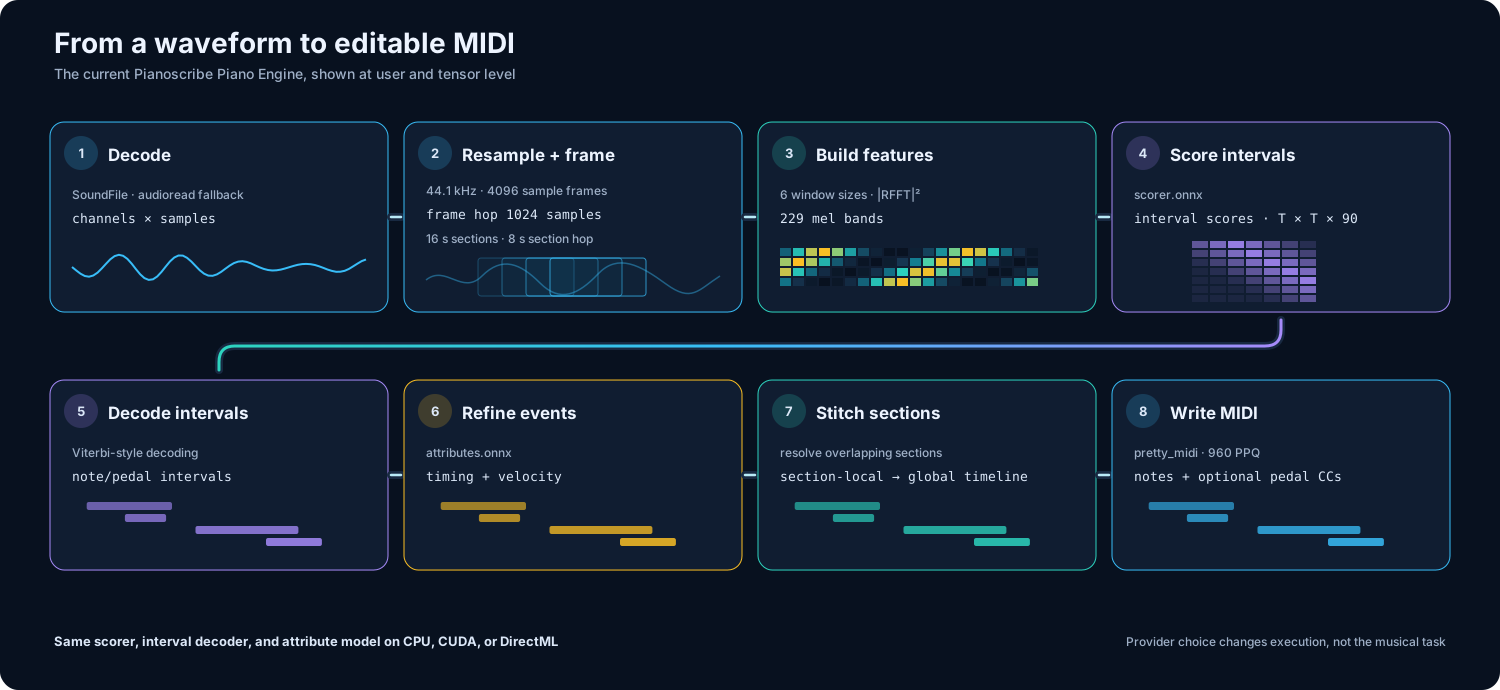
Pianoscribe does not search for a pre-existing MIDI file. It analyzes the sound itself. The application divides a recording into overlapping sections, turns each section into a frequency-based representation, estimates note and pedal intervals, refines when they begin and end, and combines everything into an editable MIDI timeline.
The overlap is important: a note near the edge of one section can be understood with sound from the neighboring section. The result is still an estimate. Reverb, pedal resonance, compression, background instruments, and closely overlapping notes can make different musical events sound similar.
- Clean solo piano normally gives the engine less ambiguity than a dense mix.
- MIDI stores notes, timing, velocity, and controller changes, not the original piano sound.
- CPU and GPU modes run the same transcription process; GPU mode changes execution, not the musical objective.
- Treat the output as an editable transcription, especially around note endings, repeated notes, quiet inner voices, dynamics, and pedals.
- Decode: SoundFile opens the recording; audioread is the fallback.
- Resample: audio is converted to the model's 44,100 Hz sample rate.
- Segment: the waveform is padded and divided into overlapping 16-second sections with an 8-second nominal hop.
- Compute: six windowed Fourier views are projected into 229 mel-frequency bands and log-normalized.
- Score intervals: the scorer model assigns evidence to possible start/end pairs for every modeled note and pedal.
- Decode a path: a Viterbi-style dynamic program selects a coherent sequence of intervals.
- Refine attributes: a second model predicts velocity and sub-frame onset/offset adjustments.
- Stitch sections: section-local events are moved onto the recording timeline and overlaps are resolved.
-
Write MIDI: note and optional pedal events are sorted and saved in a uniquely named
.midfile.
| Property | Current value |
|---|---|
| Sample rate | 44,100 Hz |
| Analysis hop | 1,024 samples, about 23.22 ms |
| Window size | 4,096 samples |
| Analysis windows | 6 |
| Mel bands | 229 |
| Section length / nominal hop | 16 s / 8 s |
| Modeled symbols | 88 piano pitches + sustain + soft pedal |
These are properties of the current bundle, not promises for every future model.
- Audio Processing Pipeline explains framing, FFT power, mel projection, and normalization.
- Pianoscribe Piano Engine explains the two ONNX components and modeled symbols.
- From Model Output to MIDI explains interval selection, exact timing, stitching, and MIDI construction.
- Worked Example and Validation connects those stages to an MP3, Pianoscribe output, waveform, spectrogram, and aligned piano roll.
| Stage | Project implementation |
|---|---|
| Decode, resample, features, inference, decoding | Pianoscribe/pianoscribe/core/piano_engine.py |
| Model bundle validation | Pianoscribe/pianoscribe/core/model_service.py |
| ONNX sessions and providers | Pianoscribe/pianoscribe/core/onnx_runtime_service.py |
| Runtime packs | Pianoscribe/pianoscribe/core/runtime_pack_service.py |
| MIDI construction and filenames | Pianoscribe/pianoscribe/core/conversion_service.py |
| Conversion workflow and cancellation | Pianoscribe/pianoscribe/workers/conversion_worker.py |